From Product Link to 60‑Second Finished Video: Full End‑to‑End Test of VEONIB One‑Click Video Creation
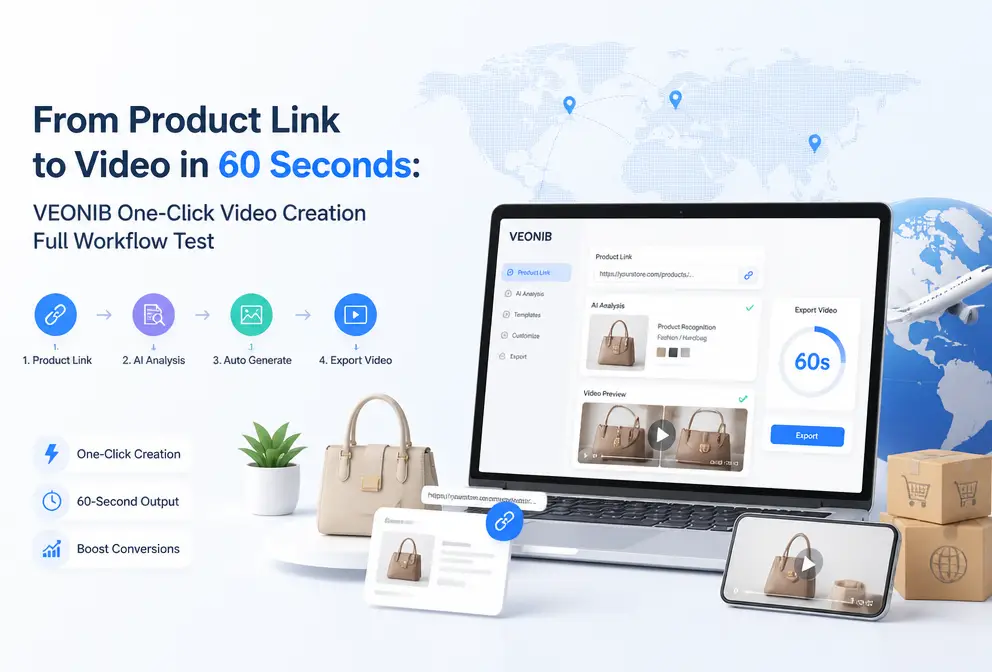
I’ve tried many AI video tools over the past two years of cross‑border work. Most of them either require you to write a script or edit the footage yourself, so the time spent isn’t any less than doing it manually. Last month a colleague suggested I try VEONIB, saying that you could just paste a product link and get a video. My first reaction was skepticism, but the test turned out to be somewhat impressive. This article walks you through the entire process—from opening the dashboard to exporting the video—highlighting the pitfalls I encountered and the final results.
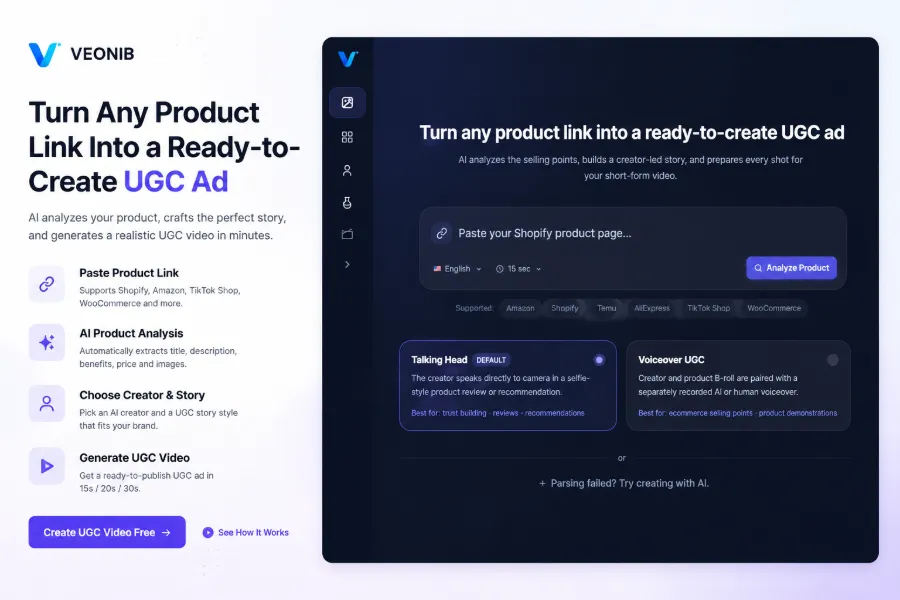
Step 1: Enter Product Link, AI Parses Automatically
Open the VEONIB dashboard; the home page is just an input box that prompts you to paste a product link. I tried a Shopify link for a Bluetooth headset, pasted it, and clicked confirm. The AI began fetching page content—title, price, selling points, product images. I timed the whole process; from paste to completed parsing took about 6 seconds. This speed beats the few tools I’ve used before; some of them take 20 seconds or more just to parse.
VEONIB currently supports the major platforms Shopify, Amazon, WooCommerce, and TikTok Shop. If you’re using a less common site‑builder or the product page structure is irregular, parsing may fail. I later tested a WooCommerce link and got a blank result—at that point you can fall back to a product screenshot, manually upload the image for AI recognition. The result is slightly poorer but the workflow still works.
After parsing, the backend automatically extracted the product title, price, three core selling points, and five main images. I checked them: the title and price were spot‑on, but one lifestyle image was mistakenly identified as a background image—this caused a minor issue later in the video.
Step 2: Choose Character and Story Template
After parsing, you’re taken to the template selection screen. VEONIB ships with over 20 preset character avatars covering various ages, styles, and skin tones. I chose the one that looked most like a real user, avoiding the obviously fake AI faces. If you have photos of real models, you can upload them to create a custom digital avatar—my evenly lit half‑body shot produced an avatar that was better than expected, with lip and facial details largely intact.
There are six story templates: Problem‑Solution, TikTok Review, Unboxing, Lifestyle, Social Proof, and Custom. I tried the Unboxing and TikTok Review templates. The Unboxing template simulates the process from opening the package to showcasing the product; it’s slower paced but feels authentic. The TikTok Review template is tighter, starting with a pain point and then presenting the solution. In practice, the most basic Problem‑Solution and Unboxing templates felt the most natural; the other templates’ transitions and copy often felt forced. This matches industry analyses I’ve read—most AI video generators are still too complex for e‑commerce, and having more templates can make it harder to pick the right one.
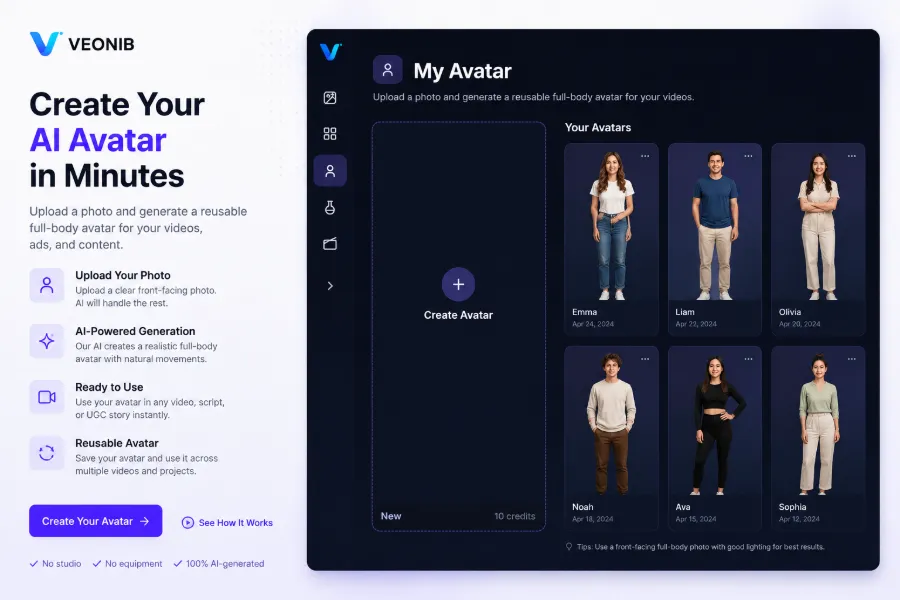
After selecting the character and template, the AI automatically generated a script and storyboard. The script can be edited manually, but I left it untouched this time to see the pure AI output quality.
Step 3: One‑Click Generation and Export
Click the Generate button; the backend starts rendering. I timed it: from click to preview appearance took 52 seconds. This was faster than I expected—previous tools took 3–5 minutes to generate a 15‑second video.
The result offers three length options: 15 seconds, 20 seconds, and 30 seconds. I downloaded the MP4 files; the resolution is 1080p and the visual quality is acceptable. However, a couple of issues are worth noting: first, the mis‑identified background image mentioned earlier appears as about 2 seconds of blank screen in the middle of the video—the product itself is cropped out, leaving only a colored block. Second, the character’s lip sync lags behind the AI voice by roughly 0.5 seconds in a few segments. While this doesn’t ruin the overall viewing experience, it could affect user perception if you’re running Facebook ads.
If you’re comparing with other tools on the market, check out the 2026 Best AI Video Tools Comparison, which lists generation speed, template quality, and output format differences for each tool.
Step 4: Post‑Production Tweaks and Bulk Production
After generation, the backend allows fine‑tuning. You can replace the character, switch the story template, or adjust video length without re‑parsing the product link. I swapped the Unboxing template for the Problem‑Solution template; the AI automatically updated the script and storyboard, and the whole process took about 30 seconds.
Bulk production is one of VEONIB’s most practical features. Import multiple product links at once, and it generates each video individually, each still under 60 seconds. I imported five links; the entire batch completed in about five minutes. If you need the videos in other languages, VEONIB also offers one‑click AI video translation with perfect lip‑sync, all done within the dashboard.
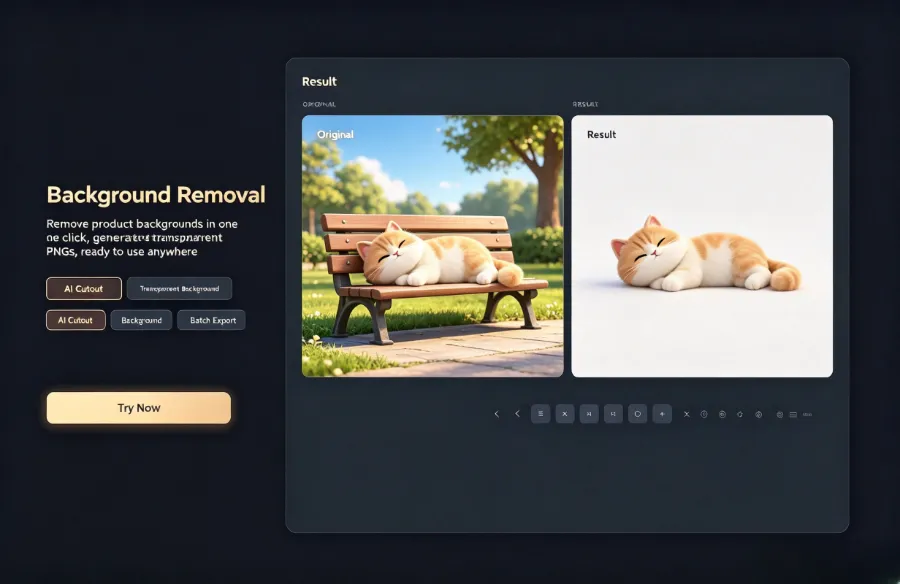
VEONIB also includes background removal and watermark tools. I tried the background removal: uploaded a product photo, and within seconds got a transparent PNG ready for use as video material. If you’re worried about content being stolen, you can batch‑add text and logo watermarks before export to protect your creative assets.
Suitable Scenarios and Performance Evaluation
In my tests, VEONIB works best for fast‑moving consumer goods, cosmetics, and 3C accessories—standardized products that don’t require complex scene setups. The AI‑generated visuals are sufficient. I ran a Facebook ad with the Bluetooth headset video; the CPC was about 30 % lower than a similarly styled manually shot video, while CTR remained roughly the same—indicating that users’ willingness to click doesn’t differ noticeably for AI videos.
For categories like furniture and apparel that need extensive real‑world scene filming, the results are mediocre. I tried a sofa link; the AI placed the sofa in a virtual living room, but the lighting and proportions were off, making it obvious that it was AI‑generated. In such cases, manual shooting is still irreplaceable.
Cost‑wise, generating a video costs about one‑tenth of a manual shoot. A manually produced UGC video—hiring a model, set, and editing—runs at least ¥500–800. VEONIB is subscription‑based: the Starter plan is $11 / month for up to 30 videos, which is less than $3 per video. If you prioritize quantity over high‑end quality, this cost advantage is clear.
Regarding the intelligent workflow from product link to video, some teams are already scaling this approach, but results vary mainly based on product selection and template matching. For B2B hardware case studies, see the B2B hardware product video generation case, which compares AI‑generated versus manually shot conversion data.
FAQ
Q1: Which e‑commerce platforms does VEONIB support?
Currently Shopify, Amazon, WooCommerce, and TikTok Shop. You can try pasting links from other platforms, but parsing success isn’t guaranteed. If parsing fails, you can manually upload a product screenshot.
Q2: Can the generated videos be used commercially?
Yes. VEONIB videos have no copyright restrictions and can be used for ads, social media, and product detail pages. If you upload a real photo to create a digital avatar, make sure you have the rights to use that photo.
Q3: After uploading a real photo, does the digital avatar retain the original voice?
No. The avatar only keeps visual features; the voice is AI‑generated. You can choose from built‑in AI voices or upload your own recording for the avatar’s lip sync.
Q4: What if the product link fails to parse?
The backend offers a fallback where you can manually upload a product screenshot. The AI will extract selling points from the image, though accuracy may be lower; it’s best to use well‑structured product links whenever possible.
Q5: What’s the difference between the free and paid versions?
The free version lets you generate one video preview without a credit card. Paid plans are Starter ($11 / month, up to 30 videos), Growth ($23 / month, up to 90 videos), and Agency ($47 / month, up to 240 videos), all currently at a 40 % discount.
Share Article


