VEONIB Review 2026: Advantages, Limitations, and Who Should (or Should Not) Subscribe
For the past two years making e‑commerce videos, I’ve switched tools several times. Sometimes the output looks like footage from a ten‑year‑old phone; other times I had to spend two hours learning how to write prompts. A colleague later recommended VEONIB, claiming you could generate a video just by pasting a link. I tried it skeptically for a while; some parts were surprisingly useful, but I also hit a few pitfalls. This review is a candid rundown of my real experience—what scenarios are worth paying for and when it’s better to skip it.
Hands‑On Experience: How Fast Is It From Product Link to Finished Video?
In a traditional workflow, creating a product showcase video requires gathering assets, writing a script, recording voice‑over, editing, and color grading. Even a simple 15‑second clip can take most of a day from concept to export. If you outsource to an editor, the back‑and‑forth revision time is even less predictable.
In this test I evaluated the actual performance of VEONIB. The operation is so simple it feels counter‑intuitive: copy a product link from Shopify or Amazon, paste it into VEONIB’s input box, and the AI automatically pulls the title, description, images, and selling points, generating a preview with a script and storyboard in seconds. You can pick one of six video styles—Lifestyle, Studio, UGC, Brand, Minimalist, Luxury—then click Generate, and in under a minute you can export an MP4. No prompt writing, no editing software needed.
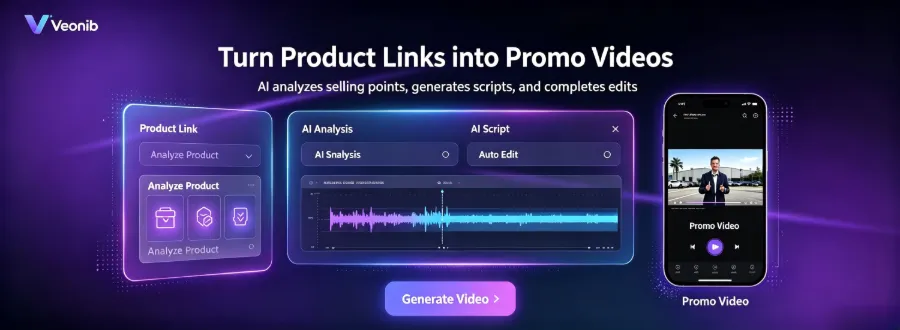
I tried it with a kitchen scale link. The traditional method would involve shooting unboxing footage, recording a voice‑over, adding subtitles—at least two hours. VEONIB completed the job in about 50 seconds, producing a UGC‑style video with background music, subtitles, and dynamic transitions. The visual quality and lighting can’t match a professional studio shoot, but it’s more than sufficient for TikTok or an Amazon listing.
A detail that’s easy to overlook: VEONIB’s performance in the UGC style is noticeably better than in high‑end brand videos. If you choose “Luxury” or “Brand,” the AI‑generated material texture and lighting sometimes look fake—over‑uniform reflections, unnatural shadows. But for UGC scenarios (phone‑shot feel, everyday usage shots), that actually becomes a “real‑life” advantage. I saw the same point mentioned repeatedly in G2 user reviews.
If you’re unsure whether this tool fits your category, check out the VEONIB reviews on G2, where many real sellers share their experiences.
Objective Breakdown: Which Scenarios Are Truly Cost‑Effective, Which Aren’t
VEONIB currently offers three subscription tiers, all at a limited‑time 40 % discount:
| Plan | Monthly Fee (discounted) | Video Limit | Suitable Scenarios | Limitations |
|---|---|---|---|---|
| Starter | $11 | 30 videos | Individual small‑seller testing | Limited bulk testing, few script fine‑tuning opportunities |
| Growth | $23 | 90 videos | Daily updates for small‑to‑medium teams | May be insufficient during peak stocking periods |
| Agency | $47 | 240 videos | Multi‑client agency | Template style repetition, requires extra post‑production polishing |
Honestly, the Starter tier’s 30 videos per month isn’t enough for most sellers—you’ll run out after testing a few products with three script variations each. Growth is the reasonable starting point for most, covering daily updates plus a modest amount of testing. Agency’s 240‑video limit should theoretically support a studio, but I noticed a problem: as the volume increases, the template repetition becomes obvious. When producing many videos in bulk, the visual structure and transitions are so similar that viewers can experience fatigue.
I once read a viewpoint: “Don’t use five different AI tools for a single product video—each tool switch is an efficiency black hole.” VEONIB packs analysis, scripting, generation, and export into one workflow, truly solving a real pain point. However, its customization space is limited. If you need a specific actor (e.g., a brand’s long‑term model) or a special shooting scenario (e.g., outdoor on‑site footage), it simply can’t do that. When I tested an industrial hardware link, the AI misidentified a screw’s metallic texture as plastic, resulting in a video with completely mismatched gloss. I had to re‑select images and run it again, costing me an extra half‑hour instead of saving time.
On the pricing side: all three tiers cap at 240 videos per month; there’s no higher tier. If you’re a high‑volume seller producing several hundred videos a month, you’ll either have to slow down or supplement VEONIB with other tools. This is where VEONIB’s scalability trade‑off shows—think of it as a fast prototype generator rather than a full‑scale production line.
Who Should Subscribe — and Who Should Skip
First, who it’s not for. If you’re a professional video editor who demands absolute control over color, composition, and depth of field for every frame, VEONIB’s templated output will likely drive you crazy. The AI‑generated script and visuals are logically sound but lack that handcrafted, human touch. Also, if your brand uses fixed actors (e.g., contracted models) or needs real‑world usage footage (e.g., a chef cooking in a kitchen), VEONIB can’t accommodate—there’s no real‑person shooting step; everything is assembled from existing product images and assets.
So who is it for?
- Shopify independent‑store sellers: especially small teams that add 3–5 new products each week. Shooting videos yourself is time‑consuming; outsourcing isn’t cost‑effective.
- Amazon listing video creators: Amazon’s video quality requirements are modest—just clear, functional demos. An AI‑generated one‑minute feature video can be uploaded directly, saving a lot of money.
- Content creators / social‑media managers: daily need for TikTok, Reels, Shorts product‑grass videos. The UGC style fits perfectly.
VEONIB includes six video templates—Lifestyle, Studio, UGC, Brand, Minimalist, Luxury. For beginners, just remember: don’t greedily pick “Luxury” expecting higher quality; the most natural results come from UGC and Minimalist styles. If you need to merge the exported video into a longer piece, use VEONIB’s official MP4 merge tool to combine clips efficiently, avoiding the hassle of re‑importing into editing software.
The real efficiency gain isn’t the single‑video generation itself, but the automated pipeline that connects generation, export, merging, and background removal. For example, generate a batch of white‑background videos with VEONIB, use an AI background‑removal tool to extract the product or person, then composite them into various scenes. When you string these steps together into a production line, handling a few hundred videos a month becomes realistic.
If you’re a small seller wanting to see how AI video can help you compete with big brands on a limited budget, check out this practical guide. It contains several peer‑shared ad performance data points that are quite valuable.
Frequently Asked Questions (FAQ)
Q1: Which e‑commerce platforms does VEONIB support?
It currently supports Shopify, Amazon, WooCommerce, TikTok Shop, and most major e‑commerce sites. After pasting a product link, the AI automatically extracts the page information.
Q2: I have no editing experience—can I use it right away?
Yes. The entire workflow requires no editing skills—paste the link, choose a style, export. The AI writes the script and storyboard for you.
Q3: Can the generated videos be used for TikTok ads and Amazon listings?
Yes. The output is a standard MP4 compatible with both landscape and portrait formats. You can upload directly to TikTok, Instagram Reels, or Amazon listing video sections. Just double‑check subtitle placement in case the platform crops it.
Q4: Does the free trial require a credit card?
No. The first generation is free and does not require any payment method. You can view the full video before deciding to subscribe.
Q5: If I’m unhappy with the generated video, can I edit it?
Editing options are limited. You can’t manually adjust individual frames or replace a specific shot; you can only re‑choose a style, swap a template, or replace product images and generate again. For precise control, it’s recommended to use another tool for post‑production tweaks after export.
Share Article


