Comparison of AI Video Generation Tools: Runway, Synthesia, and E‑Commerce‑Specific Tools – Which Is More Suitable for Sellers?

Many sellers run Runway, Synthesia, and an e‑commerce‑specific video tool simultaneously, only to realize that the three outputs are fundamentally different: one produces cinematic clips, another creates digital human narrations, and the third generates ready‑to‑run product ads. Comparing the three tools on the same criteria is the first mistake in the selection process.
Direct answer to the title: If the goal is a finished e‑commerce ad, general‑purpose generators and digital‑human tools are only intermediate steps; only a tool designed around product links can directly produce a video with selling points, storyboards, and calls‑to‑action that is ready for deployment. The evaluation metric isn’t “which looks better,” but which output is closest to the launch button.
Below we won’t discuss “who is strongest.” Instead, we place the three tools into the actual production pipeline of e‑commerce ads, examine where each gets stuck, what problems it solves, and where it wastes budget.
Positioning Differences: The Three Tools Solve Three Different Problems
| Tool | Core Positioning | Generation Starting Point | Output Form | E‑Commerce Fit | Billing Logic |
|---|---|---|---|---|---|
| Runway | General‑purpose creative video generation | Text prompt or reference image | Cinematic clips and special‑effect shots | Low (requires post‑processing) | Credits or subscription, per generation |
| Synthesia | Digital‑human presenter video | Script and avatar selection | Person‑led narration video | Medium (suitable for explanatory content) | Seat‑based annual subscription |
| VEONIB (e‑commerce‑specific) | E‑commerce product ad video | Product link or product screenshot | Ad video with selling points and storyboard | High (ready to launch) | Monthly package by number of videos |
Key distinction: Not “generation capability,” but whether the tool understands the product. General tools don’t know selling points; digital‑human tools don’t showcase product scenes; e‑commerce‑specific tools automatically parse product images, titles, and selling points.
The starting points and deliverables differ even more. Runway begins with a text prompt or reference image and yields a cinematic clip; Synthesia starts from a script and avatar and yields a narrated video; the e‑commerce tool starts from a product link or screenshot and yields a scripted, storyboarded ad video. The average generation time for a product‑link‑direct video is about 60 seconds, whereas a tools tool often requires multiple rounds of prompt tweaking and editing, taking hours.
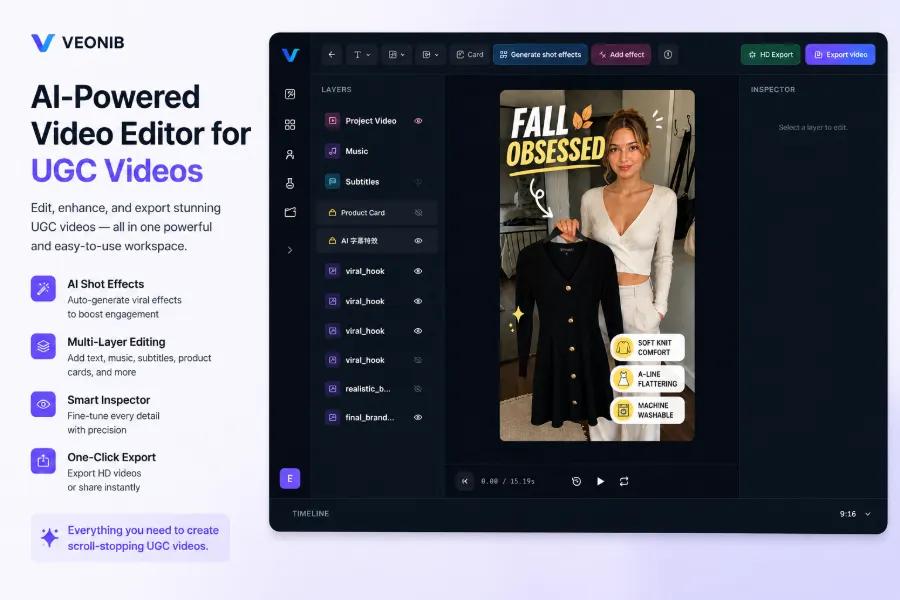
The representative of the third category is VEONIB. Its workflow is clearly different: after pasting a product link, the system automatically extracts selling points, writes the script, plans the storyboard, and generates the video—no prompts, no timeline dragging.
The concept of product‑link‑to‑video e‑commerce ads has already been documented: paste a product page URL and get a ready‑to‑run ad video with selling points and visuals already arranged. Placing the three tools side by side makes the differences stark:
| Comparison Dimension | Runway | Synthesia | VEONIB (e‑commerce‑specific) |
|---|---|---|---|
| Core Positioning | General creative video generation | Digital‑human presenter video | E‑commerce product ad video |
| Generation Starting Point | Text prompt or reference image | Script and avatar selection | Product link or screenshot |
| Output Form | Cinematic clips & special‑effect shots | Person‑led narration video | Ad video with selling points & storyboard |
| E‑Commerce Fit | Low (needs secondary processing) | Medium (good for explanatory) | High (directly launchable) |
| Billing Logic | Credits or subscription, per generation | Seat‑based annual subscription | Monthly package by video count |
Thus, the evaluation framework should start with: what do you actually need—atmospheric shots, narrated explanation, or conversion‑focused ad? Then choose the appropriate tool class. Comparing them as if they were direct competitors leads to a wrong first step.
E‑Commerce Workflow Breakdown: From Product Link to Deployable Ad
The full production chain for an e‑commerce ad video is longer than imagined: product information → selling‑point extraction → script → storyboard → generation → editing → multi‑platform adaptation. No step can be skipped. TikTok, Reels, Shorts, and product detail pages each require a specific size and duration, often consuming half the time.
Runway requires manual intervention at every stage; prompt tweaking and “card‑drawing” costs are concentrated in the generation step. The result is raw material, not a finished ad: you must overlay product info, add calls‑to‑action, subtitles, and product cards yourself. A 30‑second ad consisting only of atmospheric footage with music fails to convey any selling point.
Synthesia solves the narration part, but product showcase footage still must be prepared or filmed separately. Even if the presenter is perfect, a sudden shift to product close‑ups creates a jarring cut that hurts conversion for sales videos.
E‑commerce‑specific tools compress the chain. After pasting a product link, AI automatically parses selling points, writes the script, plans the storyboard, and generates scenes. They support 15 s, 20 s, and 30 s lengths, with styles covering brand, lifestyle, studio, luxury, minimal, and UGC. Under the UGC category, there are six story templates: problem‑solving, TikTok Review, unboxing, lifestyle, social proof, and custom. After selecting a template, the script is generated instantly.

Batch revisions are where ad testing truly gains efficiency. Before A/B testing, you usually need multiple variants: different openings, selling‑point orderings, visual styles. Bulk template generation is far faster than manual editing per item. When product assets are complete, AI can also batch‑generate marketing videos from any material, eliminating the need to reorganize links.
Cost and Efficiency: Credits, Seats, or Monthly Video Quotas
The three tools have completely different billing models, affecting budgets in distinct ways. Runway consumes credits, with uncertain output quality; repeated “card draws” continuously burn credits. Synthesia charges per seat and annual subscription, resulting in high fixed costs. E‑commerce‑specific tools charge a monthly quota of videos, tying cost directly to material volume—ideal for the fluctuating demand of ad testing.
Per‑video cost makes the gap even clearer. Using VEONIB as an example, the Starter, Growth, and Agency plans cost roughly $11, $23, and $47 per month, delivering 30, 90, and 240 videos respectively. Assuming a limited‑time 40 % discount, the Agency tier drops to about $28.2/month for 240 videos, i.e., $0.12 per video; the Growth tier yields about three videos per day. At this scale, extra variants don’t require additional budget approvals.
Outsourcing is even more expensive. A single ad video from an agency typically starts at a few hundred dollars, with communication and revision cycles measured in days. If the first version isn’t satisfactory, you wait for another round—making daily updates impossible. In ad campaigns, assets decay quickly; you need fresh material every three days, which outsourced timelines can’t match.
The real cost difference lies in the “busy work.” Prompt engineering, post‑production, subtitle and product‑card addition, multilingual versions—whether the tool’s built‑in capabilities cover these tasks determines if you need extra staff. Some independent sellers have logged every hour from generation to launch; this single‑person content team practice record reflects true cost.
Billing logic also shapes team behavior. Credit‑based tools lack a direct cost perception for each “card draw,” encouraging trial‑and‑error. Monthly‑quota tools force teams to finalize scripts before generation, making outputs more controllable. A single person can run the whole “generate → revise → export → launch” pipeline under a subscription model.
Onboarding Barrier and Ongoing Maintenance: Which Output Remains Stable?
Onboarding difficulty varies. Runway requires prompt‑engineering skills; a poor prompt yields unusable footage for the same product. Synthesia needs script writing and avatar configuration. The e‑commerce tool only needs a pasted link—no editing experience required. For sellers without a video team, learning costs become hidden budget items.
Maintenance differences are even more critical than onboarding. General tools have scattered templates and low controllability; maintaining style consistency is hard, and a single revision often means re‑running the whole generation. E‑commerce tools keep templates, styles, and bulk revisions within a single system, preventing chaos during rapid releases.
E‑commerce back‑ends amplify this gap. Shopify, Amazon, and TikTok Shop require frequent new product uploads, each needing a video. Agency teams handling multiple clients and categories can see their asset management become messy, causing delivery delays.
Post‑production “busy work” determines real maintenance cost. Background removal, transparent PNGs, multi‑layer editing, subtitles, and product cards—if the tool includes these features, cross‑tool transfers are minimized. Previously, background removal required manual Photoshop work for minutes; now it’s a one‑click operation that also outputs a reusable transparent PNG.

A recurring failure scenario: a team starts with a general creative tool for e‑commerce ads, spends weeks drawing cards, and ends up with clips lacking selling points and calls‑to‑action. The subscription budget is mostly burned, forcing a switch back to a product‑link workflow. Digital‑human tools also reveal visual discontinuities between product close‑ups and scene footage. The issue isn’t generation quality but an incomplete workflow. Whether “busy work” can be reduced depends on the completeness of the toolset; you can see the exact components of an e‑commerce AI video toolbox in the e‑commerce AI video toolbox composition.
Choosing by Scenario: New Product Launch, Ad Testing, Bulk Outsourcing
The final selection returns to the scenario. Different stages need different things: speed, explanation, atmosphere, or bulk volume—each calls for a distinct tool.
New product launch needs a product‑detail video and social‑media assets quickly. A product‑link‑direct tool is the shortest path—60 seconds to a finished video, matching the launch timeline. The method of turning a beverage product link into a product‑page video in 60 seconds demonstrates this workflow.
Content requiring a human presenter—tutorials, FAQs, product explanations—can be filled by digital‑human narration. Brand ads that need atmospheric creative shots benefit from a general generator, which supplies material to be composited into the main ad. Neither directly produces a finished ad video.
Bulk outsourcing and agency work benefit from a monthly‑quota tool with predictable costs. The Agency tier (≈240 videos/month ≈ 8 per day) supports multiple clients’ frequent updates. Traditional project‑based outsourcing struggles to achieve the same daily frequency.
The three tools are not mutually exclusive. General tools supply atmospheric shots, digital‑human tools supply narration, and e‑commerce tools deliver the main ad. Together they form a complementary pipeline. The starting point isn’t “who is stronger,” but the volume of assets, budget, and product category that dictate where to enter the chain. Treating “ad video” as “creative video” is the main source of budget waste.
FAQ
Can Runway‑generated videos be used directly for e‑commerce ads?
Generally no. Runway outputs creative material without selling‑point structure, subtitles, or calls‑to‑action; you must edit and assemble it to meet ad standards. It’s suitable for atmospheric footage, but a finished ad still requires post‑production.
Is Synthesia suitable for “live‑shopping” videos?
It works well for explanatory content but not for complete product ads. Synthesia handles narration, but product close‑ups and scene footage must be prepared separately, and stitching them together often feels disjointed. Tutorials and FAQs are better fits.
Are e‑commerce‑specific tools and general tools substitutes or complements?
They are complementary. General tools provide atmospheric creative shots; e‑commerce tools generate full ads directly from product links. Credit‑based general tools are good for asset creation; monthly‑quota tools excel at bulk ad production. They can be chained together.
What should a budget‑constrained individual seller prioritize?
A monthly‑quota e‑commerce‑specific tool. The entry‑level plan (≈30 videos/month) covers new launches and basic testing, with per‑video costs dropping to a few cents. Credit‑based general tools can deplete the budget quickly. First get launch‑ready ads, then use general tools to supplement creative shots if needed.
Share Article


