Runway, Pika, and CapCut for E‑commerce Videos: What They Can Do, What They Can’t, and How to Choose

A cross‑border e‑commerce operator has two new products at the same time: one needs a vertical TikTok traffic‑driving video, the other a showcase video for an Amazon listing. He first tried Runway—its visual quality was indeed good, but he had to decide the selling points and where to place subtitles himself; then he switched to Pika for effects—looks great, but the click‑through rate was mediocre; finally he went back to CapCut and realized he had no raw footage to edit at all. This scenario doesn’t show which tool is stronger; it shows that the three tools occupy different positions in the video production pipeline—the first step in tool selection is to identify where your bottleneck is.
Conclusion: These three tools are not on the same level, so you can’t compare them side‑by‑side on image quality. Runway generates scenes from text or images, Pika adds effects to existing footage, and CapCut assembles raw material into platform‑ready final videos. Each solves a specific segment of the pipeline, but none understands product selling points or automatically combines selling points, subtitles, and platform specifications into a publishable ad.
Below we break down the tools by their boundaries, showing which stages can save time, which cannot, and where teams with different bottlenecks should allocate budget.
First Clarify the Positioning: What Each of Runway, Pika, and CapCut Solves
The e‑commerce video production pipeline is usually divided into four stages: material acquisition → script & selling‑point structure → final editing → platform adaptation. Material acquisition determines “whether there is anything to edit”; the script decides “what to say first and what to emphasize”; editing handles pacing; platform adaptation deals with vertical aspect ratio, length, and subtitle placement.
Runway (e.g., Runway Gen‑4) is a generation tool: you input prompts or reference images and it outputs footage. Pika 2.0 is a re‑creation tool that turns images or video clips into dynamic assets with effects. CapCut is an editing tool that assembles existing assets into a final video. Their commonality is that they are all generic productivity tools without built‑in e‑commerce workflows—they don’t read product pages or automatically parse selling points.
A 20‑30‑second e‑commerce product video typically takes 2‑5 days from script to delivery; using a ready‑made template can shrink that to half a day, but the material‑acquisition stage remains the bottleneck. The first step in tool selection is not to compare image quality but to answer: What am I missing—visuals, structure, or editing capacity?
| Tool | Core Positioning | Typical Input | Understanding of Product Selling Points | Best‑Fit E‑commerce Stage |
|---|---|---|---|---|
| Runway | Text‑to‑image/video generation | Prompt + reference image | No | Creative assets |
| Pika | Effects & video re‑creation | Image or video clip | No | Effect‑rich assets |
| CapCut | Editing & template rendering | Existing assets | No | Post‑production editing & platform adaptation |
Runway: Can Produce Cinematic Footage, but Can’t Bridge to the Product
Runway’s strength lies in the footage itself. Camera movement, lighting, and cinematic texture are top‑tier among generative tools, making it suitable for hero visual assets, such as the main visual shot for headphones or a product rotation close‑up. The problem is that it only understands prompts, not the product; selling points and usage scenarios must be translated into visual language inside the prompt.
It does not parse product links, does not automatically generate a sales script, and the output lacks subtitles, selling‑point annotations, and vertical format. A 5‑second clip consumes about 5 credits; a standard subscription’s monthly quota only allows a few dozen generations, so a single test iteration can exhaust the budget.

Typical workflow: write prompt → generate → export → import into editing software. Subtitles, selling‑point annotations, and vertical adaptation are all done manually in the latter half, often taking longer than the generation itself. If you expect the tool to deliver both the selling‑point structure and final specifications in one go, there are workflows that take a product link as input—e.g., VEONIB puts scripting, storyboarding, and final rendering on a single line, eliminating the need to go back to an editor for subtitles.
Cost structure must also be considered. Billing by credits and by generated seconds, an unsatisfactory shot requires a re‑generation that costs dozens of credits. For teams lacking planning or editing skills, Runway feels more like an expensive stock‑asset library than a production tool. There is a separate solution for material volume: the method described in AI Commercial Photography Advertising Asset Generation mentions uploading once to generate multiple ad creatives, which is more stable than relying on a single prompt’s luck.
Pika: Effects Are Flashy, but Still One Step Away From “Convert‑Ready Ads”
Pika 2.0’s positioning is re‑creation. Pikaffects can turn a static product image into fluid, squeeze, or other dynamic effects; transition tricks are abundant, making it good for adding memorable touches. However, ad performance hinges on conversion, not just novelty of effects.
There are three layers of issues in e‑commerce scenarios. First, effects can dominate, causing users to remember the transformation rather than the selling point. Second, there is no e‑commerce script or selling‑point structure; whether the material conveys “solves what problem” is left to chance. Third, output randomness is high—identical prompts can produce wildly different results, making batch replication difficult.
Cost also doesn’t hold up under testing. On mainstream generative platforms, a 5‑10‑second asset typically costs $0.5–$1, which looks cheap; but splitting one ad into five test assets means a single test can cost dozens of dollars, most of which will die at the CTR stage.

A bigger conflict is realism. Shoppable content (especially UGC style) needs credibility; Pika’s strong AI feel can directly lower trust in categories like beauty, home, and food. A skincare seller who used effect‑heavy material on TikTok got comments like “Is this AI‑generated?” When effects are used as auxiliary, they’re fine; as the main video, ROI suffers.
Even when creating memorable assets, the structure of a UGC route differs greatly from an effect‑centric route. Previously we compiled a GCTikTok UGC video template for batch‑producing “grass‑planting” videos covering six story structures (problem‑solution, unboxing, social proof, etc.). In practice, these are generally more stable than pure‑effect assets.
CapCut: Editing Is Its Strength, But It Can’t Solve “No Material”
CapCut (the domestic version of Jianying) addresses the latter half of the pipeline. Bulk template application, automatic subtitles, vertical export, and multi‑platform size presets are very handy for e‑commerce operators. A skilled operator can turn 3‑5 raw assets into a 20‑second final video in about 20–30 minutes—editing itself isn’t the bottleneck.
However, it can’t generate footage from scratch, doesn’t understand product selling points, and won’t automatically produce a complete video. Templates are pre‑set timelines and transitions that require you to fill them with material; without raw or generated footage, no amount of templates can get you started.
This contradiction is common in practice. A seller I know spent an entire month’s credits and about a week on Runway to generate product shots, only to return to CapCut to add selling‑point subtitles, price tags, and vertical adaptation—adding another two days before launch. “Can generate footage” and “can directly output a finished video” are two different things; most time and budget are spent on material trial‑and‑error.
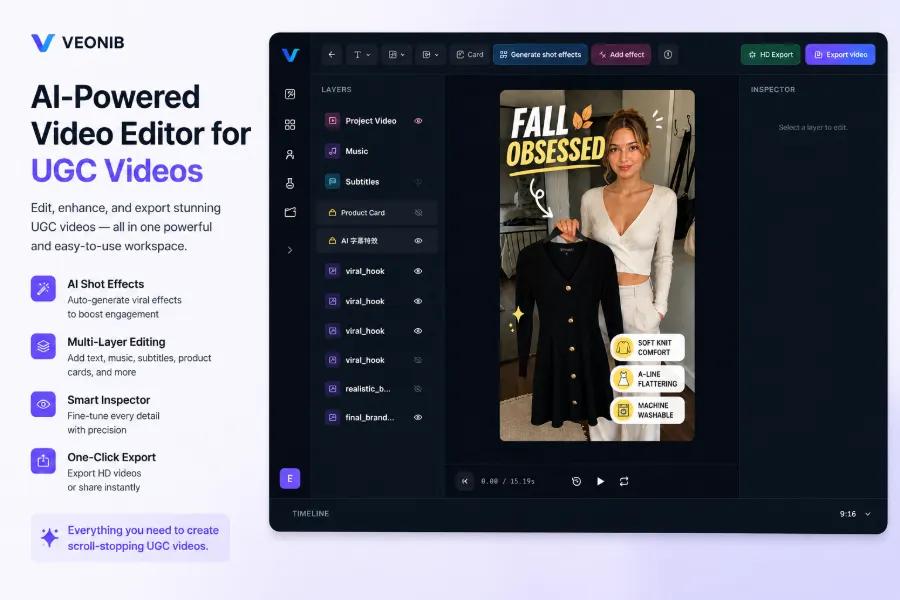
Thus CapCut’s positioning is a mass‑production tool, provided the material bottleneck has already been solved. Its dependency on material is hard‑wired—no footage, no editing. Because of this dependency, workflows that “link directly to output” exist to fill the gap: tools like VEONIB turn product links into footage and scripts, while CapCut handles fine‑tuning subtitles and platform adaptation, fitting together neatly.
A single SKU that must support both TikTok Shop and Amazon doubles the material volume; relying solely on manual editing can’t keep up. An earlier article discussed how one person can handle an entire content team’s workload (https://veonib-blog-video-integration.static.hf.space/index.html) by separating material generation from editing; the reverse order leaves even many people unable to fill the material gap.
Choosing E‑commerce Video Tools: Identify Your Bottleneck First, Then Talk Tools
The decision framework is simple: first determine which stage is your bottleneck. Missing material → problem lies in generation; missing editing → problem lies in post‑production; missing scalable production capacity → the issue isn’t single‑video quality but a reproducible process.
Three typical combinations: if you have material but lack editing, CapCut templates are the easiest; if you need hero shots and have editors, generate footage with Runway then polish manually; for a brand‑new store with no material or editing staff, a “link‑to‑final‑video” workflow is the shortest path.
A SKU on TikTok Shop and Amazon usually needs 3‑5 different video versions (one for traffic, one for “grass‑planting,” one for conversion). Doing them manually one‑by‑one is unsustainable. Platform specifications also differ—vertical ratio, length, subtitle placement—see the compiled differences for Amazon, Shopify, and TikTok Shop ad videos here.
Tool combinations shift with order volume. With a single SKU, a manual pipeline works; as SKUs increase, per‑video refinement becomes a capacity issue. A pragmatic approach is to start with the smallest viable workflow: get one video from product info to live ad, then decide where to invest—generation, editing, or scaling. No combination is fixed; bottlenecks move as scale changes.
FAQ
Q1: Between Runway, Pika, and CapCut, which should I pick for e‑commerce videos?
Identify your bottleneck first. If you lack footage, choose Runway or a direct‑link‑to‑video workflow; if you lack re‑created material, choose Pika; if you lack editing efficiency, choose CapCut. The three tools sit at different pipeline stages, and combined use is more common than picking just one.
Q2: Can a video generated by Runway be used directly for TikTok ads?
No. Runway output lacks subtitles, selling‑point annotations, and hook structure; you must return to an editor for vertical adaptation and copy, typically adding 1–2 days. Short‑form competition hinges on the first 3 seconds; without a hook, even the most beautiful footage won’t retain viewers.
Q3: Is CapCut considered an AI video generation tool?
Not strictly. CapCut offers AI subtitles and smart editing features, but its core is still an editing suite; footage must be supplied externally, and it handles assembly and adaptation.
Q4: Are Pika’s effects suitable for product ads?
They work well as auxiliary material, not as the main content. Effects are great for memorable moments (e.g., a transition during unboxing); relying entirely on effects can overwhelm the selling point, especially for categories requiring high realism.
Q5: For an e‑commerce seller with no raw footage, where should the first video start?
Start with material acquisition, not editing. Resolve “do we have anything to edit” first—either generate footage and scripts directly from product links or shoot a few quick raw clips—before moving on to templates and effects. Once the material bottleneck is filled, editing becomes meaningful.
Share Article


