Zero Real-person Filming, AI Batch Generates UGC‑style TikTok Live‑commerce Videos

Open TikTok and the screen is filled with real‑person reviews, unboxings, and handheld product demos, while your warehouse only has a few product images and a dry product description. Hiring a creator to shoot a UGC video costs a few hundred dollars just to start, and the back‑and‑forth revisions take several days, extending the rework cycle—independent sellers on cross‑border e‑commerce sites can’t afford that. But what if you could paste a product link, have AI automatically抓 selling points, generate a script, plan the storyboard, and output a genuinely native‑feel UGC video without any people or shooting? Would that sound a bit far‑fetched?
I tried this approach for the first time in early 2024, with a “let’s see” mindset, and hit more pitfalls than I expected. After a few rounds of parameter tuning, the results truly made the expensive outsourced assets look inferior.
Why Your TikTok Ads Need a “Pseudo‑UGC” Feel
The difference between UGC videos and polished brand ads boils down to three words: roughness, authenticity, first‑person perspective. A kitchen unboxing shot with a tilted phone, flickering lighting, and casually typed subtitles—this “imperfection” actually makes users trust it more. TikTok users are getting faster at spotting sleek ads, and the frequency of thumb‑scrolling past them is increasing daily. Industry data shows that UGC‑style ads have click‑through rates 4–5 times higher than polished brand ads because they break through the “filter fatigue” immunity barrier.
High‑conversion videos share obvious traits: a smartphone‑filmed look, non‑professional lighting, conversational scripts. A genuine UGC video feels like a friend recording with a phone—background may be a bit messy, speech may stutter, but that illusion is precisely the conversion key. Independent sellers face a real dilemma: they can’t find suitable local creators, cross‑border communication and translation are costly, and they can’t scale batch production. You can’t hire a creator for each of the fifty SKUs in your store.
The feasibility of AI‑generated UGC‑style videos isn’t about “faking reality,” but about using algorithms to simulate the logic of real usage scenarios. It doesn’t replace real‑person filming; it reproduces the psychological signals of UGC in a scalable way when real‑person filming isn’t possible.
Mainstream UGC Styles Deconstructed: What Exactly Is AI Imitating?
There are roughly three UGC structures that work on TikTok: surprise unboxing, problem‑solution, and daily recommendation. Each corresponds to a different visual language. Unboxing needs close‑up handheld feel and rapid cuts; problem‑solution relies on before‑and‑after visual rhythm; daily recommendation places high value on a natural background—too clean a background can betray the illusion.
A successful AI‑generated UGC video must include very specific elements: product selling points must be naturally integrated into usage scenes (no direct manual shots); the background should be unforced, showing signs of everyday life; speech speed and visual rhythm must match, avoiding robotic narration. Typical UGC videos run 15–30 seconds, and the first three seconds’ retention rate determines 50 % of ad performance—so the opening three frames almost decide the fate of the material.
AI’s analysis of “authenticity” differs markedly from human creation. AI excels at structured execution—it can precisely reproduce a storyboard or transition rhythm, but it naturally leans toward “perfection.” You don’t need to tell it to film more beautifully; you must teach it where the “roughness threshold” lies. In an early project, I spent six weeks discovering that the default lighting parameters I set for AI were too high, making the video look like studio footage; TikTok’s full‑play rate plummeted until I lowered the sharpness to a level comparable to handheld shooting, after which volume recovered.
AI video generation has progressed from purely abstract animation to scenes with realistic feel. You can see the industry‑leading AI video generation tech here; video model iteration speeds far outpace what most sellers imagine.
From Product Link to UGC Video: Four‑Step Workflow
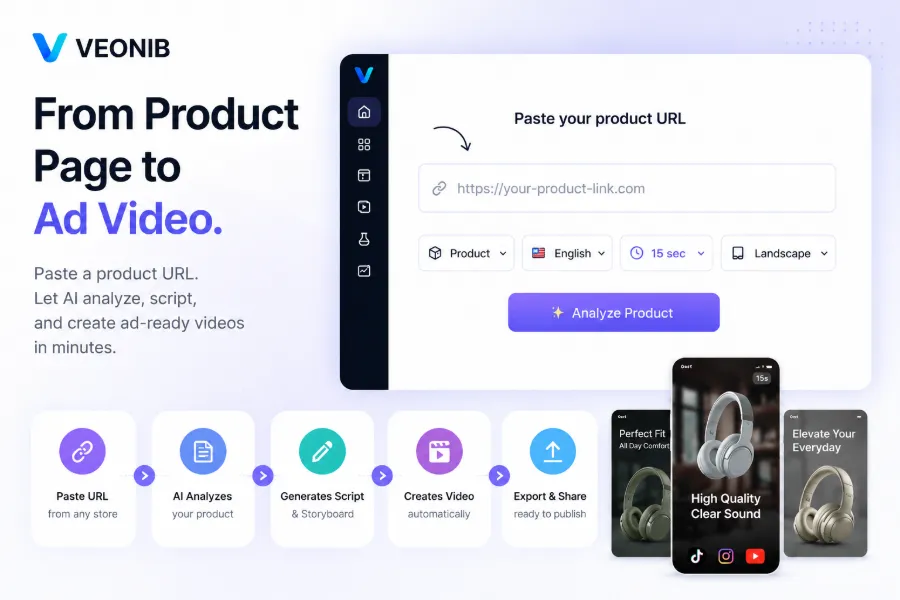
Step 1 – Paste the product URL. AI automatically fetches product images, title, feature description, and even extracts high‑frequency words from user reviews to use as script material. The key is that the URL itself must contain enough descriptive information, especially authentic feedback in the positive‑review section—these are the gold mines for UGC scripts. This method also works across platforms; for example, the complete guide on converting AliExpress products into ad videos explains the same logic in detail.
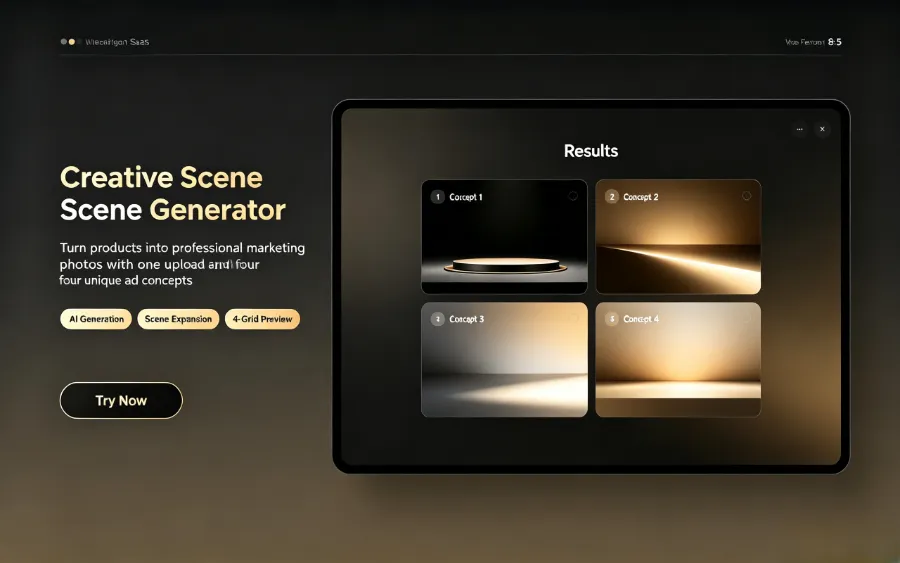
Step 2 – Choose video style. Here’s the underlying difference between UGC mode and Luxury mode: lighting is completely different—UGC uses natural diffused light, Luxury employs multiple fill lights to simulate a studio; camera movement logic also differs—UGC mimics handheld shake, Luxury pursues stable dolly shots; copy tone is worlds apart—UGC uses conversational first‑person, Luxury uses third‑person point‑selling statements.
Step 3 – AI generates script and storyboard. The system outputs readable storyboard descriptions; each copy block is conversationally processed, not a direct translation of the product description. I often manually reread the AI‑generated script, deliberately breaking up overly smooth sections and adding a couple of filler words so that the exported voice sounds more human.
Step 4 – One‑click export to MP4. It automatically adapts to TikTok’s vertical 9:16 ratio; subtitle layers can be adjusted later. The whole process involves no manual keyframe or timeline work; in tests, from pasting the link to having the first batch of videos ready averages about 60 seconds. If you need to quickly overlay text or watermarks after export, VEONIB includes a batch‑processing module, so you don’t need extra editing software.
Scaling Up Production: How AI Turns UGC Into Your Ad Assembly Line
Generating a single UGC video in isolation is no longer enough; the key is scaling. A store with a few dozen SKUs, or even hundreds, would take at least 2–3 weeks with traditional methods, whereas AI assistance can complete an entire batch in 1–2 hours.
With AI, “one link, one video” is achievable. VEONIB can automatically match each product to the most suitable TikTok UGC template, generating a distinct vertical asset for every SKU. After batch export, you can use the built‑in overlay tool to quickly add brand watermarks—adding text and logo watermarks in bulk is crucial for protecting creative assets from competitors, especially in the cross‑border community where material theft is far more common than many assume.
A practical A/B testing approach is straightforward: generate 2–3 different script directions for the same product, then test click‑through and conversion rates. The logic is discussed in the guide on creating high‑conversion AI video ads for Shopify products. Multi‑version testing is more valuable than obsessing over a single script’s perfection. The real lever is eliminating reliance on human scheduling—no filming conflicts, no cross‑border translation delays, no creators dropping out at the last minute. For a full strategy, see the 2026 low‑cost video marketing plan for independent stores. Community feedback on Product Hunt also confirms that AI‑generated UGC is being validated by an increasing number of e‑commerce teams.
Most people worry that AI‑generated content will be detected by the platform, but TikTok’s algorithm cares more about content quality and user interaction signals than about the generation method. In comparative tests, identical scripts—one AI‑generated, one real‑person filmed—showed no structural differences at the algorithm level; what drives volume is click‑through and full‑play rates, not the source.
For a store with 50 SKUs, traditional UGC production takes at least 2–3 weeks; AI assistance can finish the batch in 1–2 hours. This isn’t an exaggeration; it’s measured data. One caution: AI defaults to perfection, but in a UGC context, “authenticity” isn’t about lowering image quality; it’s about recreating the psychological cue of a friend recording with a phone. You need to teach the tool that “imperfections make it credible”—this cognitive reversal is the root cause of many early‑stage failures.
Frequently Asked Questions and Pitfall‑Avoidance Guide
Q1: Can TikTok’s algorithm now “recognize” AI‑generated UGC videos? Will they be throttled?
TikTok’s review focuses on content value and policy violations, not on how the video was created. As long as the material lacks mass‑copy watermarks and misleading information, it won’t be throttled for being AI‑generated.
Q2: What post‑production tweaks do I need to make the video feel more human?
The most effective adjustment is reducing saturation by 10‑15 % and adding pauses and conversational filler words in the script. AI’s default output is too “smooth”; deliberately inserting a few imperfect transitions feels more natural.
Q3: I have no studio or professional lighting—will the AI’s default visuals be too polished and look fake?
Yes. AI’s default UGC mode is still relatively “clean.” In the style settings, shift the lighting bias to “natural diffusion” rather than “studio fill,” increase the roughness level by one tier, and choose a “living scene” background instead of a solid color.
Q4: Can the same product generate multiple different script UGC videos? How many versions can I test?
Absolutely. One product can generate 3‑5 different script directions in a single run. It’s advisable to keep at least two versions online for testing, monitor differences in full‑play and click‑through rates, and iterate on the better‑performing direction.
Q5: The generated video has Chinese subtitles, but my target market is Southeast Asia—how should I handle language?
AI supports outputting subtitles and voice‑overs in various languages. First, identify the dominant language for each market—e.g., Indonesian for Indonesia, Thai for Thailand—and keep subtitles and voice‑overs consistent. AI’s language handling covers most major Southeast Asian languages, but a quick human review of the script is recommended to avoid overly literal translation.
Share Article


