Turning Product Links into Marketing Videos with AI: I Save More Than Just Time Each Week
Every day I open the backend and stare at a sea of product images and the “New This Week” requests, and all I can think is—who will turn these into videos for me? Manually editing a 15‑second ad takes two to three hours, and outsourcing to a team is both expensive and slow. After realizing that path wasn’t viable, I started earnestly trying AI tools, and in the first week I saved an entire workday of editing time.
Traditional video production averages 2–3 hours per video, from scriptwriting, sourcing assets, voice‑over, to editing—each step eats up your time. AI tools compress the total duration to under 60 seconds, not just marketing. Input a product link, and the AI automatically pulls images and descriptions, generates a script, plans the storyboard, and finally exports the finished video.
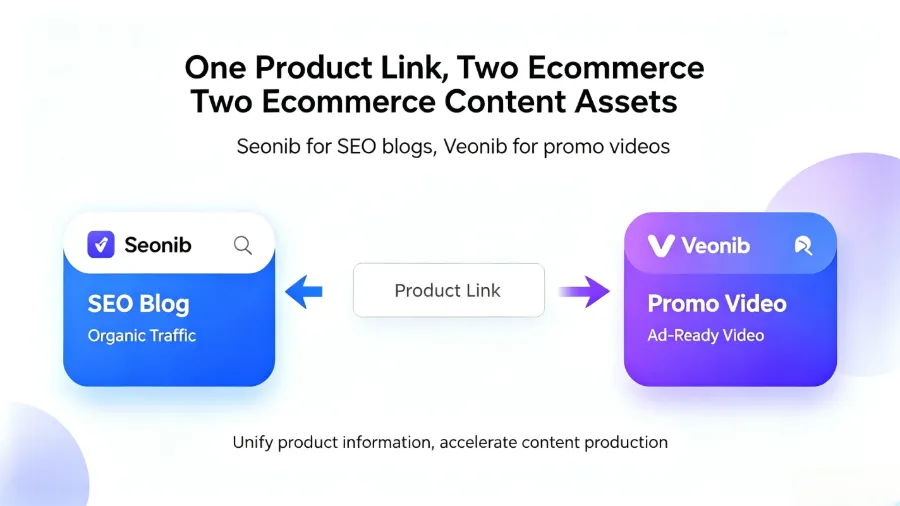
You just paste the link, and the rest is handled by the algorithm. This isn’t some high‑tech magic; it’s a workflow that can be run today.
Why Marketers Need to Rethink “Video Production”
The three pain points of traditional video production are well known to anyone who’s done it: long time, high cost, and the need for professional skills. I’ve tried outsourcing to editors—an e‑commerce video of a few dozen seconds cost several hundred yuan, and the schedule often missed the launch date. I also tried learning editing software myself, only to find that each video still takes one or two hours of groundwork.
AI tools change this logic. From script to storyboard to final cut, the entire process is automated. You don’t need to write prompts, pull timelines, or tweak keyframes. A product link is all the input needed. For sellers on Shopify, Amazon, or TikTok, this means you can test five or six pieces of content each week instead of just two because of high production costs.
I made a simple comparison: previously, producing three videos a week was considered efficient; now with AI, batch‑producing ten videos in a single morning is completely feasible. Reels, Shorts, TikTok—each platform’s version can be exported in one go. This efficiency shift isn’t just “a little faster”; it disrupts the entire scheduling rhythm. For reference, leading AI video companies such as the authoritative AI video industry site continue to validate this direction—automated video production is a proven trend, not an experimental product.
From Link to Finished Video: My Process for Making It Work
I broke the whole process into three steps, and in practice it turned out far simpler than expected.
Step 1: Copy the product link. Whether it’s from Shopify, WooCommerce, TikTok Shop, or Amazon, just paste it in. Early on I tried a tool called VEONIB that starts working as soon as you give it a product link—no image uploads, no forms to fill.
Step 2: AI analyzes the product information. This takes about 10–15 seconds; the tool automatically reads the product page’s images, title, description, and selling points, then generates a script and storyboard. I was initially skeptical and fed it a link with a vague description, and the AI‑generated script was indeed mediocre. Later, when I made the product description more detailed and placed the core selling points in the first two lines, the output improved markedly.
Step 3: Generate the video and export it. Full video generation usually completes within 60 seconds, outputting an MP4 ready for any platform. I ran a case: a new outdoor gear link, from paste to final export, took under 50 seconds. The video posted on TikTok garnered over 20,000 organic views in the first week. Previously, it would take at least three days from an outsourced team’s script to the final video.
My Asset Library Is No Longer Just “White‑Background Images”—Choosing Among Five Video Styles
After generating dozens of videos with this tool, I discovered it includes several built‑in video styles, each suited to completely different scenarios. I’ve summarized the five most common:
Brand style: Suitable for brand campaigns or product launches; polished visuals with brand tone.
Lifestyle style: Places the product in real‑world usage scenarios, e.g., kitchen tools shown while cooking, strong user immersion.
UGC style: Simulates a user’s selfie perspective, like a KOL’s casual recommendation video; especially effective for new product promotion. In my tests, a UGC‑style video’s average click‑through rate was over 40 % higher than pure product showcase—a benchmark confirmed after several A/B test rounds.
Studio style: Resembles the large‑image displays on e‑commerce detail pages; clean and crisp, ideal for highlighting product texture.
Minimalist style: Text plus product footage, suited for feed ads that quickly convey selling points.
Don’t try to use all five styles at once; my early mistake was attempting every style, and only two out of ten videos turned out well. It’s better to pick two styles to perfect the workflow—UGC for new product promotion, brand style for seasonal campaigns.
If you need to distribute across multiple platforms simultaneously, you can refer to my previous guide: Step‑by‑Step: Using AI to Create TikTok and Instagram Ads from Product Pages, which details adaptation methods for each platform.
Three Common Pitfalls in AI Video Creation, and How to Avoid Them
Pitfall 1: AI‑generated scripts are too generic. The first time I ran a promotional video, the AI‑generated script looked fancy and the copy was catchy, but it completely omitted the core promotion—an 80 % discount lasting only two days. Not a single line mentioned the discount. After launch, conversion rates fell 15 % compared to the previous video. The fix is simple: manually edit the script before export, moving the key selling point to the first three seconds and inserting the promotional details. AI handles the framework; you handle the business logic.
Pitfall 2: Unclear product description leads to mis‑analysis. For a multi‑function power bank, I wrote “portable large capacity” on the product page; the AI interpreted it as a “home emergency power source” style video—reading “large capacity” as a household large device. The completeness of the product page directly affects AI output. Later, I changed the description to specifics like “palm‑size, charges twice,” “22,000 mAh, airline‑compatible,” and the AI‑generated script accuracy improved by about 30 %. This data comes from my own comparison of five videos, not a vendor claim.
If you encounter script‑editing issues, I also found a more systematic explanation: Automated E‑commerce Advertising: The Lowest‑Cost Scaling Solution for 2026, which covers strategies for batch script corrections.
Pitfall 3: Video dimensions not optimized for platforms. The first time I exported a video, I used the default 16:9 aspect ratio, and when posting to TikTok and Reels, key information was cut off and half the product was hidden. Before exporting, check the platform’s aspect ratio—TikTok uses 9:16 portrait, Shorts also portrait, Feeds use square. Most AI tools offer aspect‑ratio options at export; don’t skip it—select the correct ratio for each video before downloading.
FAQ
Q1: Can AI‑generated videos be used commercially?
Yes. The copyright of videos generated by AI tools belongs to the user, and they can be used directly for ad campaigns, social media posts, and e‑commerce product pages. However, terms of service vary across tools, so it’s advisable to capture a screenshot of the license information at generation time.
Q2: I don’t have a product link, only images and text—can I still use it?
Most AI video tools support direct image uploads and text input. If a link contains structured data, the AI’s analysis will be more accurate, but a pure image‑plus‑text input can also run through the workflow; you’ll just need to manually supplement some background information.
Q3: What if a generated video is too blurry?
Check the resolution of the original product images. The AI’s source material is the product page images; if the originals are only a few hundred pixels, the AI can’t produce high‑definition video. It’s recommended to have product images at least 1000 × 1000 px; re‑run the generation and the result will be much better.
Q4: Do I need to manually adjust video dimensions for different platforms?
No. Most AI tools support one‑click aspect‑ratio switching, e.g., from 16:9 to 9:16. Just select the target platform at export; no separate cropping is needed. It’s advisable to export each asset in at least two ratios—a portrait and a landscape version—to facilitate omnichannel distribution.
Share Article


