2026 Must‑Have for Shopify E‑commerce Sellers: How to Choose and Use an AI Video Generator
When I first started on Shopify, every new product launch forced me to shoot a product video. I’d spend two and a half days on lighting, filming, and editing, only to see a few hundred views on TikTok. Later, a friend who runs ads told me to try feeding the product link directly into an AI video generator. I tried it and got five different script video versions within five minutes; the most outrageous one hit 100,000 views.
After testing almost ten different AI video tools and hitting a lot of potholes, I finally figured out which ones actually work. This article doesn’t rank tools or brag about efficiency; it explains from start to finish what a reliable AI video generator looks like, how to evaluate it, and how to embed it into your daily product‑listing workflow.
What can an AI tool do for you? It doesn’t replace your product understanding. You just drop the product link in, and within minutes you get a script, storyboard, voice‑over, and a rendered video file. This saves you the time of building everything from scratch, not the responsibility of making decisions.
Why Traditional Manual Video Production Can’t Keep Up With Shopify Sellers’ Pace
In my first week I used: ChatGPT for the script, another tool for images, Premiere to assemble the timeline, and then discovered the exported 16:9 video didn’t display fully on TikTok. The whole process felt like building with LEGO but never finding the last piece; a 15‑second video took about five hours, and the product changed the next day.
It’s not laziness. It’s a structural problem: manual video production includes scripting, sourcing assets, recording, editing, color grading, and exporting in the right format—each step tied to a person or a separate tool. Twenty new products a month, one video per product, means at least sixty hours of pure production each week. If Shopify sellers spend all that time editing, who will do product selection, monitor ads, or handle customer service?
Cost is another reality. Outsourcing a 15‑second product video on a domestic platform costs between ¥800 and ¥1,500, not including revisions. If you create multiple versions for A/B testing, creative costs per product can jump to ¥3,000–¥4,000. For most new Shopify sellers, this exceeds the ad‑testing budget for a single product.
Multi‑format adaptation is another hidden time sink. TikTok needs 9:16 vertical, Instagram Reels the same ratio but with different subtitle placement, Facebook Feed 1:1 square, YouTube Shorts back to 9:16 with a different safe‑zone standard. Exporting the same material three times, adjusting three times, and checking three times adds at least forty minutes per version.
I remember once at 2 a.m. staring at a blank audio track that appeared on the timeline—an audio file I’d imported incorrectly, but it had already been rendered for two hours. After that, I started seriously looking for alternatives, not because I can’t edit, but because that timeline shouldn’t belong to an e‑commerce operator.
The Four Hard Metrics I Use When Picking an AI Video Generator
After a round of testing, I found most tools hype themselves, but the reality shows up quickly. The following four points are the must‑test items for my screening; anything that fails is skipped without hesitation.
1. Scope of Link Parsing
Can the tool directly read your Shopify product page? That determines whether you have to re‑enter parameters for every new product. I tested some tools that, when given a Shopify link, only captured the title and price; the main image and description were missed, resulting in a video with placeholder graphics. The problem is even more pronounced with Amazon and Temu links—some tools are optimized for specific platforms and fail elsewhere.
Ideally, a tool should read the product title, selling points, main image, price, and SKU, then generate a matching script and storyboard. The tool I’m currently using parses links from Shopify, Amazon, WooCommerce, AliExpress, and Temu, covering the major e‑commerce platforms.
2. Editability of Script and Storyboard
If the generated script can’t be edited, the tool is just a template machine. The useful part is that after preview, you can replace hook copy, reorder storyboard frames, or adjust voice‑over speed before export. This step determines whether the final video is differentiated.
I abandoned a tool after three days because it didn’t allow any script modifications; every generation followed the same structure: product showcase, feature demo, limited‑time offer. By the time ad data came back, consumers were already bored.
3. Coverage of Output Formats
9:16 (TikTok, Reels, Shorts), 1:1 (Facebook Feed), 16:9 (YouTube) are all essential. I hit a pitfall with a tool that only exported vertical video; later I had to re‑crop in HandBrake, which cut off half the frame and removed product labels.
4. Real Value of Free Preview
Most tools claim “free trial,” but you can’t see the full storyboard preview or the video without a watermark unless you pay. A truly useful model lets you paste a link, view the full script, each frame’s storyboard image, and a voice‑over sample—then you decide whether to pay for export. This filters out 90 % of unsuitable tools.
If you want tighter cost control, see this guide on Low‑Budget Video Marketing Strategies, which outlines methods that work without a big budget.
There’s no perfect tool, only one that fits your current workflow. Even after passing the four tests above, you still need to spend an afternoon running the full process to see if it feels right.
A Simple 3‑Step Workflow – From Product Link to Publishable Video
When I actually generate a product video, I don’t need to toggle between four windows. Below is the repeatable process I’ve used for weeks, with notes on each step.
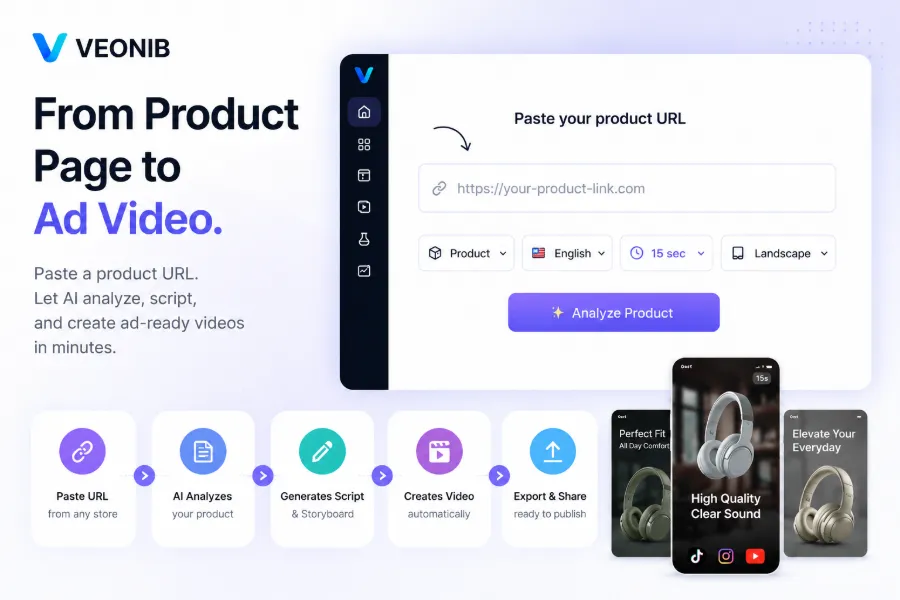
Step 1: Paste the Product Link
Copy the product page URL from Shopify and paste it into the tool’s input field. I used to think the parameters didn’t matter, but later discovered that links with custom parameters (e.g., ?variant=12345) cause some tools to fail. The safest approach is to use the base URL without tracking parameters.
At this stage the tool automatically pulls product info—title, description, images, price. If the fetched data doesn’t match what you see on the page, the tool likely lacks proper platform integration, and you should switch.
Step 2: Generate and Edit the Preview
After parsing, the tool returns a set of hook copy, script drafts, and storyboard previews. I recommend spending at least five minutes reviewing each hook—AI‑generated hooks usually have 3–5 variants, and one or two may be a perfect match for your target audience. The rest are either too generic or miss your product’s selling points.
I recently tested VEONIB, which does this solidly: after pasting a Shopify link, it returned eight hook variants with corresponding storyboard frames. In the preview, I changed the third hook to a more direct price‑anchor phrase, adjusted the angle of the second frame, and confirmed voice‑over speed before moving on. The whole step took about four minutes.
The key here is not to accept the default blindly. The tool gives you a draft pool to choose from and modify, not a final version.
Step 3: One‑Click Export in Multiple Ratios
Once everything looks good, click Render. Most videos export within sixty seconds. I usually select both 9:16 and 1:1 ratios so the same asset can be used on TikTok and Facebook without re‑cropping later.
I measured the entire three‑step process—from pasting the link to downloading the MP4—and it never exceeded sixty seconds. This speed lets you produce two differently angled video versions for a new product in five minutes, then feed them directly into your ad system for material selection.
If you run this workflow for every new product, twenty new items a week take less than two hours of production time, compared to at least sixty hours with the traditional path.
Pitfalls Others Have Hit – Over‑Reliance on AI Leads to Homogenized Videos
A very real issue: when everyone in a niche uses the same AI tool for scripts, do your videos become identical to others?
The answer: yes, if you don’t add differentiation.
A friend ran a Temu store at the end of last year and bulk‑generated fifty product videos using a popular tool. The first week’s ad CTR was 2.1 %—good for Temu. In the second week, after new videos went live, CTR dropped to 0.8 % and conversions were near zero. Comparing two ad screenshots, the opening hook was identical: “Stop buying X that doesn’t Y.” Temu users saw the same opening line too many times within seven days, creating ad fatigue.
The lesson isn’t the tool’s fault. The core value of an AI generator is to quickly produce multiple comparable versions, not to make the final selection for you. My friend later increased the number of hook variants per product from the default three to at least one hundred before filtering. There’s a detailed article on this issue titled Stop Using 5 AI Tools to Make One Product Video, which mentions “tool splicing causing workflow breakpoints”—exactly the pitfall I experienced.
Looking back, tools like VEONIB that provide multiple hook variants still let me run A/B tests; sticking with a default script would have been disastrous. Content homogenization isn’t caused by the tool itself—it’s the lack of further differentiation after using the tool, a problem that also existed in manual production.
Another common misconception is to upload AI‑generated videos directly without any watermark or anti‑theft measure. I recommend adding a watermark or ID tag after export to prevent competitors from stealing the footage. For the exact steps, see my guide on Batch Adding Text Watermarks to Protect Video Assets.
Real‑World Example: How a Shopify Mechanical Keyboard Seller Started From Scratch With AI Video
Here’s a case study from a friend. He sells custom mechanical keyboards on Shopify; his product page had only five static images and no video. His budget was ¥300 per month for material creation—far too low for an agency to produce a single 15‑second demo.
He fed the product link into an AI tool and generated five 15‑second TikTok videos from different angles: unboxing, typing sound demo, keycap close‑up, desktop setup scene, and price comparison. Each video’s hook was differentiated.
In the first week of ad spend, the POV (first‑person unboxing) version’s completion rate was 3.2× higher than the others. This data prompted him to increase the number of test variants per product from 1 to over 100, dramatically improving the odds of finding a winning creative. Notably, the worst‑performing version—a plain product showcase—had a completion rate less than 30 % of the POV version.
The case demonstrates two points. First, a Shopify seller in a niche category with zero video experience can go from zero to testing and optimizing assets within a week. Second, AI‑generated multiple versions amplify data value—not by picking the best version for you, but by creating a pool of options for data‑driven selection.
If you want to compare other tools on the market, check out the 2026 E‑commerce AI Video Tools Comparative Review, which breaks down parsing ability, output quality, and pricing.
FAQ
Q1: Can I use the videos generated by an AI video generator commercially?
Yes. Most mainstream AI video tools include commercial usage rights in the fee. Once exported, the video belongs to you and can be used for ads, social media, and your own site without additional royalty fees.
Q2: Does it support Chinese voice‑over and subtitles?
Most tools support voice‑overs in 30+ languages, including Chinese. After generation you can manually adjust subtitle font, position, and style to meet each platform’s specifications.
Q3: How many videos can the free version generate?
It depends on the tool’s policy. Some allow unlimited previews but limit the number of exported videos, charging only at export. Choose a tool that lets you see the full storyboard and script during the preview stage.
Q4: What resolution are the output videos?
Standard output is 1080p; some tools can export 4K. 1080p is fully sufficient for TikTok and Reels competition, and there’s no need to chase higher resolutions right now.
Q5: Does it support direct publishing to multiple platform accounts?
Most tools only generate and export; they don’t bind to your social media accounts. You’ll download the MP4 and manually upload it to TikTok, Instagram, or YouTube. This step isn’t a hassle, as you usually need to fine‑tune the thumbnail and copy per platform anyway.
Share Article


