How to Compress Product Video Files to Make Cross‑Border E‑Commerce Sites Load Faster

Open a product page and the main‑image video is delayed, leaving a blank space below the fold. Overseas buyers on weak networks click in, and many close the page before the video finishes loading. Opening the developer tools’ network panel immediately shows the culprit – large MP4 video files, often tens of megabytes.
Large video files directly slow down above‑the‑fold loading. Google Core Web Vitals recommends an LCP target of 2.5 seconds; once a video pushes loading past that line, the impact cascades: longer user wait times, higher bounce rates, and lower page‑weight scores. Many operations teams focus on image optimization while overlooking that videos are the real size hogs. This article explains, from compression parameters and editing/export to loading methods and content‑production workflow, how to keep product videos high‑quality without dragging down page speed. First analyze the source material, then discuss compression – doing it in the opposite order wastes effort.
Oversized Product Videos Lose First‑Fold Time and Conversions
The impact of main‑image videos and detail‑page videos differs. The main‑image video sits in the core above‑the‑fold area; a slow load directly drags down the initial render. Detail‑page videos are lower on the page, but if users scroll to them and still see a loading spinner, they’re lost too. A hidden cost is storage and CDN traffic – the same video gets downloaded repeatedly, consuming bandwidth each visit, especially problematic for overseas users on weak networks.
Many teams mistakenly believe “higher quality is always better” and export 4K high‑bitrate files across the board. In reality, e‑commerce product videos are mostly viewed on phones with limited screen size; ultra‑high resolution offers no perceptible benefit but inflates file size. Small teams with limited video budgets should not waste resources on transmitting and storing massive files; instead, set sensible specifications from the start. For how small teams can compete with big brands on video assets, see the analysis “Small Sellers Catch Up with Big Brands Using AI Video”, which stresses maximizing per‑frame efficiency when resources are constrained.
To judge whether a video is too large, look at more than just file size – consider whether its size matches its placement. A 15‑second main‑image video can comfortably be compressed to 2–3 MB; if the export ends up at 15 MB, there’s room for optimization.
Set Specifications Before Compressing: Bitrate, Resolution, and Codec Choices
Compression isn’t just “shrink the file with any tool”; you must define specs first. Codec choice sets the lower bound of file size. H.264 offers the best compatibility – virtually every device and browser can play it. H.265/HEVC saves about 30 %–50 % of size at comparable quality but requires newer hardware and browsers. AV1 yields even smaller files but has poor compatibility; most old devices can’t play it.
Resolution depends on placement. For main‑image videos on mobile, 720p is usually sufficient; use 1080p only for large‑screen ad placements. Bitrate control: VBR (variable bitrate) automatically raises bitrate for complex scenes and lowers it for simple ones, saving space compared to CBR (constant bitrate). A 30 fps frame rate is ample for e‑commerce; 60 fps adds little visual value but noticeably enlarges the file. Audio bitrate can also be lowered – 128 kbps is enough for voice‑over narration, no need for 320 kbps tracks.
| Codec | Size‑Saving Potential | Device Compatibility | Recommended Use Cases |
|---|---|---|---|
| H.264 | Baseline | Almost universal | Main‑image and detail‑page videos |
| H.265/HEVC | ~30 %–50 % | Supported by most devices from the past three years | Mobile‑first assets |
| AV1 | >50 % | Poor compatibility, old devices show black screen | Controlled environments only |
| Multi‑codec fallback | Depends on primary codec | Requires maintaining multiple file sets | Global market deployment |
A word of caution: ultra‑aggressive compression can black‑screen old devices. One team switched all assets to HEVC to save space, only to discover that many overseas users with older phones and browsers couldn’t play the videos. They had to fall back to H.264, export a second set of files, and manage two asset pipelines. The saved size never outweighed the compatibility cost – a lesson to consider when choosing codecs.
Editing & Export: The Stage Where Most Size Can Be Saved
Many size issues are introduced during editing. Black frames at the start/end, blank spaces for looping captions, and idle pauses add no user value but consume file size. Cutting these redundant segments is a zero‑cost way to slim the file.
Another common pitfall is repeated transcoding. Exporting from the editing software, then feeding the file to a compression tool, then uploading to a platform that re‑encodes – each extra transcode degrades quality and can even increase size. The correct approach is to decide the final use case first and export once with the proper container and bitrate. Export to an MP4 container and enable the “faststart” flag (also called “streamable” flag) so the video can begin playing before the entire file downloads, dramatically improving first‑fold experience.
Different platforms have varying spec requirements. TikTok and Instagram Reels favor vertical short formats; YouTube and product pages prefer horizontal. Manually adapting each platform multiplies workload. In practice, set export presets in the editing software for each target platform, and before export, drop unnecessary audio tracks or mute silent sections. For a comprehensive guide on multi‑platform ad video output, see “Output Adaptation for Multi‑Platform Video Ads”.
The typical editing‑export workflow is: trim redundant clips → unify resolution and frame rate → set target bitrate and export → verify faststart flag. Following this pipeline usually reduces file size by over 40 % with virtually invisible quality loss.
Instead of Post‑Compression, Produce Videos at Target Specs from the Start
Repeated compression is essentially paying for a design flaw. E‑commerce product short videos are inherently short, looping, often muted – they don’t need ultra‑high‑spec master files. Many size problems are baked in from the beginning because the source material wasn’t generated to target specs, and only later is slimming attempted.
A often‑overlooked point: most e‑commerce short videos are silent loops for small screens, so there’s no need to retain high‑fidelity audio or excessive bitrate. Users typically browse with sound off; audio quality has negligible impact on experience, yet it can dominate file size. Lower audio bitrate to the minimum acceptable level, set video bitrate based on placement, and you’ll save a huge chunk of size.
Short‑format assets are naturally page‑friendly; 15–30 second loops are more suitable than videos longer than 60 seconds. For many SKUs, manually slimming each file would be unmanageable. A better approach is to establish a unified short‑video production standard so every file meets target specs from generation. Automate repetitive format adaptations via a pipeline, dramatically reducing manual effort – see the “AI‑Automated Video Production Workflow” for the concept of moving specs to the generation stage.
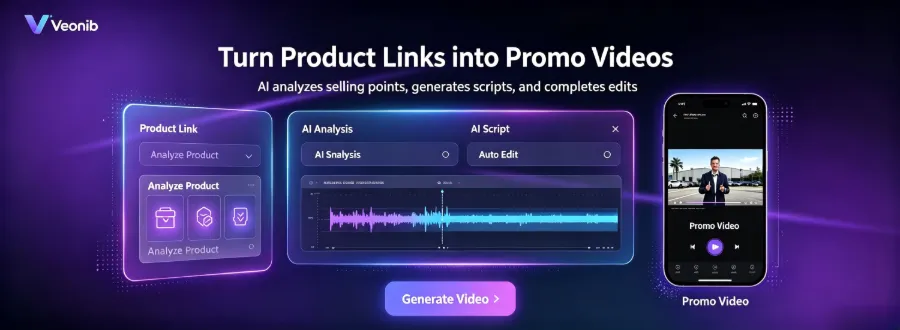
The pipeline we use is VEONIB. It extracts selling points from a product link, generates a script, and outputs videos according to target platform specs, producing a preview video in about 60 seconds. This “export according to the creator’s standard” method is far more effective than post‑hoc fixes. VEONIB’s assets are already sized for vertical short‑format platforms like TikTok and Reels, eliminating the need for manual second‑round compression. An automated pipeline with specs set up front removes the labor of running each file through a separate slimming process.
Loading Strategies Can Also Mitigate Size Issues: Control on Server and Browser
Even perfect compression won’t help if the loading method is wrong. Placement of the first‑fold short video determines rendering priority – lazy‑load non‑above‑the‑fold videos to keep the initial payload small; for the above‑the‑fold video, use a poster frame placeholder (a compressed JPG) while the video body loads asynchronously. This technique almost never sacrifices visual quality but significantly shortens the time the page becomes usable – the most common single‑point improvement.
The video’s preload attribute is also important. preload="none" tells the browser not to download the video until the user clicks play; preload="metadata" loads only metadata. For non‑above‑the‑fold videos, either setting avoids unnecessary bandwidth consumption. CDN distribution with regional edge caching dramatically reduces cross‑ocean latency – overseas users accessing a domestic origin experience very slow loads, whereas a nearby CDN node serves the file quickly.
WebM can be an optional fallback. Its compression efficiency exceeds H.264, but Safari support is incomplete, so it should be a supplement rather than the primary format. Multi‑language sites often overlook that the same video asset is referenced on multiple language pages; without cache deduplication, each language version triggers a full download. Place video files in a shared assets directory, reference them via a single URL, and leverage CDN caching to avoid duplicate downloads.
FAQ
How much can I compress a video before the viewing quality noticeably degrades?
When bitrate drops below 1.5 Mbps for 720p or 3 Mbps for 1080p, compression artifacts become evident, especially in fast‑moving product demos. For e‑commerce, aim for 2–3 Mbps at 720p and 4–6 Mbps at 1080p – this range balances quality and size well.
Why does converting to the smaller‑size H.265 sometimes make the video unplayable on certain devices?
H.265/HEVC requires hardware decoding support. Phones and browsers released before 2018 generally lack this support. If your target market includes emerging regions where older devices are common, the risk of black screens rises. For global deployments, H.264 remains the safest primary codec.
What’s the difference in compression strategy between main‑image videos and detail‑page videos?
Main‑image videos sit above the fold, so size priority is highest; keep them under 2–3 MB, even if it means sacrificing some bitrate for faster load. Detail‑page videos are lower; users have already waited a bit, so a size around 5 MB is acceptable to retain more visual detail.
Should I export each platform’s version separately or compress once and adapt?
Export separately per platform. TikTok/Reels favor vertical 9:16, product pages favor horizontal 16:9. Compressing once then adapting leads to a second transcode, degrading both quality and size. Setting export parameters for each target platform may take a bit more upfront time but avoids repeated transcoding losses.
Share Article


