Online AI One-Click Video Subtitle Removal: Hard Watermark Cleaning Solution for E‑commerce Video Assets
Video clips sourced in bulk from Taobao or Douyin often come with Chinese hard‑coded subtitles. When you upload them to TikTok or Facebook, the subtitles can’t be replaced and sometimes even block key product visuals. You may have tried covering them with Premiere Pro, blurring them with filters, and after a half‑day export the subtitle edges are still faintly visible. The problem isn’t translation; the subtitles are baked into the pixel data of the video, not an independent track you can toggle on or off.
Removing hard subtitles is essentially a frame‑by‑frame image restoration task. A 30‑second, 30 fps video contains 900 frames; the AI must detect the text region in each frame, infer the hidden background from surrounding pixels, and fill it in. Mainstream video editors on the market lack this text‑recognition‑and‑separation capability; the only viable solution is to leverage AI video‑repair and image‑inpainting technologies.
If you want to quickly generate high‑conversion video ads for e‑commerce products, see AI Video Ads for Shopify Products.
Why Subtitles Are Harder to Remove Than You Think: The Fundamental Difference Between Hard and Soft Subtitles
Soft subtitles are on a separate track that the player can hide, replace, or switch languages for at any time. Hard subtitles are different—they have the text pixels burned directly into the image, merging with the background. Simple cutting cannot solve hard‑subtitle problems—cutting out the subtitle area also cuts out the underlying image, and blurring leaves obvious processing artifacts.
Hard subtitles in e‑commerce ad assets are very typical. White‑label footage supplied by vendors almost always includes factory‑added subtitles; clips captured from Taobao Live come with the host’s commentary subtitles; watermark‑removal tools that re‑encode the video not only degrade quality but often make the subtitles clearer; old ad assets are a disaster—MP4s that were subtitled two years ago and now need to be re‑released in a different market language hit a major roadblock.
The problems caused by reusing old ad assets are often underestimated. You may have dozens of legacy clips that performed well in the past, each bearing subtitles in the original market language. When you try to target a new market, you’re stuck. Understanding how AI video ads boost click‑through rates helps you decide which old assets are worth salvaging and which are better discarded.
Hard‑subtitle removal isn’t simple cutting or covering; it’s a re‑understanding and reconstruction of the visual content. For a 45‑second clip, the AI must analyze each frame’s subtitle‑covered area, decide what is text, what is product, what is background, and then fill it in accordingly.
If you want a more economical way to generate bulk video ads, check out Automated Video Ads for E‑commerce.
Main Technical Paths and Tool Landscape for Online AI Subtitle Removal
Current online subtitle‑removal tools roughly follow three technical routes. The first is AI‑based video inpainting: detect subtitle regions and fill the hidden background frame by frame—this is the most common and mature approach. The second is source‑level multi‑version replacement: some footage has separate subtitle and background layers in the source file, but such assets are extremely rare in e‑commerce. The third is hybrid processing: first separate foreground and background, then locally reconstruct; it yields the best results but is computationally expensive, and free tools rarely offer it.
Traditional online editors are almost useless for this task. Clipchamp’s subtitle feature only adds subtitles, not removes them; Canva’s video editor can only blur regions; CapCut’s removal works barely for static subtitles and fails on dynamic or decorative text. Proprietary AI tools like Unscreen Video and Kapwing’s subtitle‑erasing feature are more complete, but output quality varies.
Real‑world concerns for online video processing focus on three dimensions: upload limits, duration limits, and quality loss. Most free online subtitle‑removal tools cap videos at 10 minutes and output at most 720p; quality loss is a hard drawback. After painstakingly cleaning subtitles, you may find the exported video’s details are smeared, making product textures unreadable.
| Tool Type | Subtitle‑Handling Method | Output Quality | Suitability for Reusing E‑commerce Assets |
|---|---|---|---|
| General video editors (CapCut) | Region blur / crop | Up to 1080p | Not recommended; artifacts are obvious |
| AI generative inpainting online tools | Frame‑by‑frame detection & fill | Mostly 720p | Barely usable; needs detail check |
| AI e‑commerce asset regeneration tools | Directly rebuild scenes | Native HD | Recommended; avoids subtitles at source |
What to Do After Removing Subtitles: The Gap in the E‑commerce Asset Production Workflow
Online subtitle removal is only the first step; the cleaned asset usually still needs new voice‑over, fresh subtitles, and a revised three‑second hook to ensure ad performance. Most subtitle‑removal services only handle the visual layer and do not address voice‑over, lip‑sync, or subtitle reinsertion. Consequently, after subtitle removal you often find the asset still can’t be used—missing a new language track or mismatched lip‑sync.
The first three seconds of an e‑commerce short video determine nearly 50 % of completion rates. If you strip subtitles but don’t re‑record voice‑over, the result is almost indistinguishable from doing nothing. You’ve removed Chinese subtitles, but the on‑screen person is still speaking Chinese; the lip‑sync doesn’t match the new voice‑over, and viewers instantly spot the splice, eroding trust.
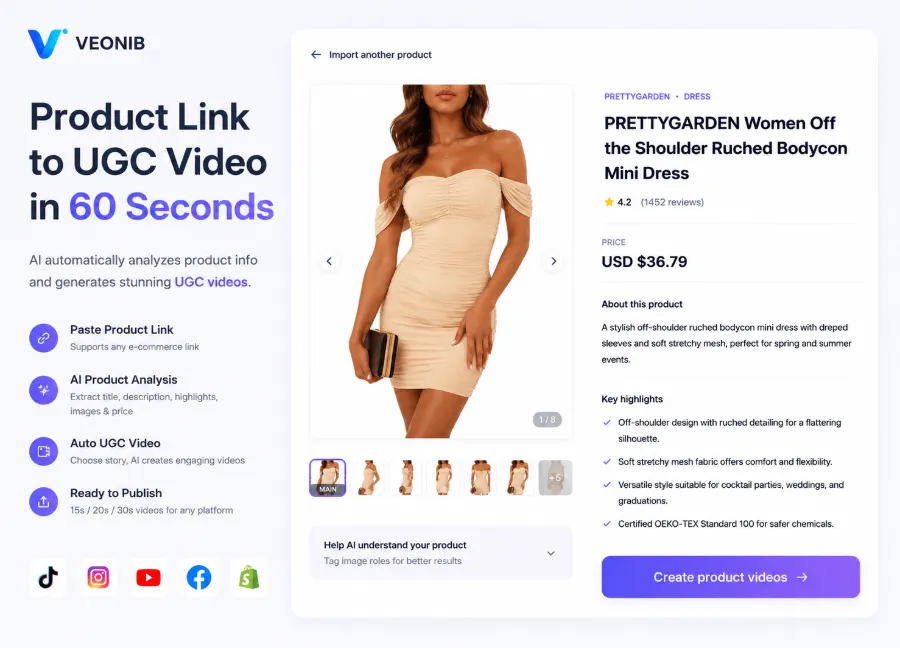
You need to clarify a key question: Do you want “the old video without subtitles,” or “a new video ready for deployment”? If it’s the latter, rather than repeatedly cleaning old assets, hand the material to a tool like VEONIB that can generate complete, market‑ready UGC assets directly from a product link. It bypasses the “subtitle‑removal → voice‑over → lip‑sync → subtitle reinsertion” loop and directly produces a video adapted to the target market language.
For TikTok Ads and Facebook Reels, a conversational hook copy matters more than the visuals themselves in determining whether users stay. Even if you clean old subtitles perfectly, the hook copy is still the one from years ago, and its language and phrasing may not suit the new market.
For more case studies on how AI can fully automate marketing pipelines, read Firing Your Marketing Agency — How AI Automates the Entire SEO, Copywriting & Video Pipeline.
Three‑Step Path to “Subtitle‑Free and Ready to Deploy”: From Cleaning to Reinsertion
Step 1: Audit the subtitle distribution in existing assets. Drag the video into an editor and preview segment by segment, marking the time ranges and coverage areas of subtitles. Some clips have subtitles only in the first few seconds; others have them throughout, requiring completely different strategies. For assets with subtitles throughout, it’s usually better to discard cleaning—cost‑benefit is too low.
Step 2: Compare the cost of removal solutions. Using an AI online tool to clean a 45‑second clip typically requires 1–2 hours of frame‑by‑frame inspection for repair artifacts. If the source material has already been re‑encoded multiple times, quality loss is evident, and the cleaned result may still not meet ad standards. In that case, consider rebuilding the asset from the original product link rather than re‑processing the old clip, because the original may have already lost bitrate and resolution—this “degradation” can’t be fully restored later.
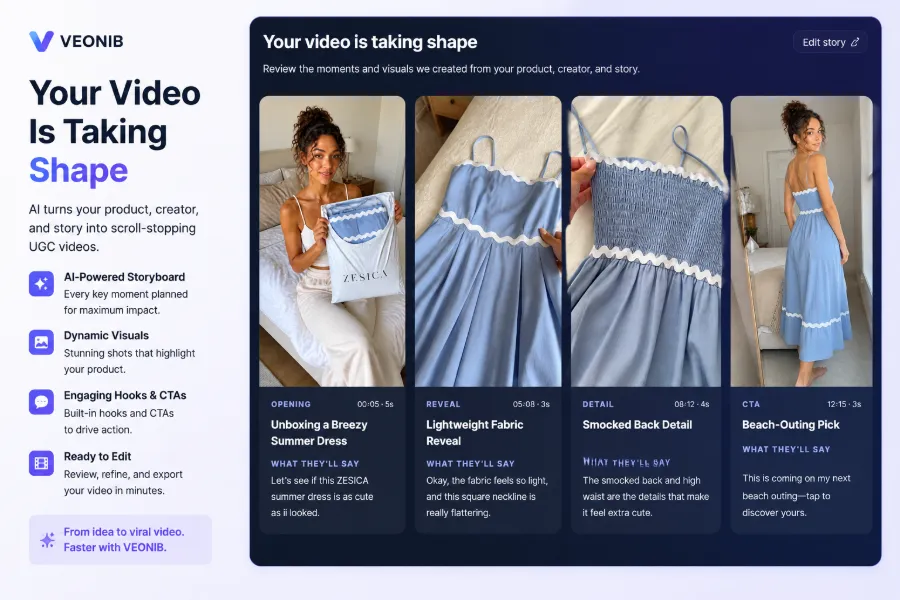
Step 3: When reinserting new language audio and subtitles, take a forward‑looking approach. Instead of repeatedly repairing the old clip, generate a new video that natively expresses the target market language. VEONIB’s product capabilities are suited for directly creating market‑native videos, eliminating the time‑consuming loop of “subtitle removal → voice‑over → lip‑sync → subtitle reinsertion.” For a production method that doesn’t rely on shooting, see the TikTok Shop ad creation workflow without filming; the concept is similar.
The traditional “subtitle removal → re‑voice‑over → lip‑sync → re‑export” manual chain takes roughly 3–5 hours; generating a new asset from a product link averages under 60 seconds of download time. This time gap can be decisive during major sales events when you need to keep up with rapid ad batch iterations. Regarding material authenticity, regenerating from the product link yields more faithful results than re‑processing old clips—old clips have been compressed multiple times, causing color and detail loss, whereas freshly generated assets preserve accurate product information.
Long‑Term Maintenance and Bulk‑Production Constraints for Subtitle‑Free Assets
Once a material is live and you need to switch subtitle language, you must repeat the entire cleaning process. When a store runs ads in three or more language markets, the repetitive manual subtitle work quickly becomes a weeks‑long effort. During peak seasons and major promotions, the pressure to iterate ad batches spikes, and the subtitle‑processing bottleneck becomes starkly apparent.
As asset volume grows, “removing subtitles once” evolves from a one‑off task into an ongoing maintenance cost. You’ll be adding new assets every month, each requiring a subtitle‑cleaning pass, and the workload accumulates. Some teams try to chain multiple AI tools together, but the practice of linking five AI tools for a single product video illustrates that a longer toolchain introduces more failure points and higher debugging time.
Instead of maintaining a library of degraded old assets, shift the production source forward—generate compliant assets directly from product links for each language version. This fundamentally reduces subtitle‑cleaning frequency. For cost‑control ideas on bulk asset production, refer to scalable automated video‑ad strategies, which focus on cutting intermediate steps rather than adding more tools.
A notable observation: many sellers cling to “the video with subtitles removed” instead of preserving the original subtitle‑free master. This forces a full re‑run of the workflow for every new language addition. Proper asset management should acquire the subtitle‑free master at source, not repeatedly clean hard‑subtitle files. Suppliers usually keep a subtitle‑free master; you just have to request it. Include “provide subtitle‑free master” in your next procurement contract—this is more effective than any subtitle‑removal tool.
FAQ
Will online AI subtitle removal damage video quality?
Yes, especially with free tools. Most free online services cap output at 720p, and the inpainting algorithm slightly blurs the background texture where subtitles were removed. If the original is 1080p or higher, the quality loss is noticeable. Paid tools usually preserve the original resolution, but the repaired areas may still exhibit subtle pixel jitter.
Can a subtitle‑removed video still be used for TikTok and Instagram ads?
It can, but you must consider platform moderation and completion‑rate issues. Incomplete subtitle removal may be flagged as low‑quality content, affecting recommendation traffic. More importantly, if the video isn’t re‑voiced, the on‑screen person will still be speaking the original language, causing viewers to drop out within the first three seconds.
What’s the difference in difficulty between hard and soft subtitles?
Soft subtitles are separate tracks; deleting or replacing them takes seconds and causes zero quality loss. Hard subtitles are baked pixels; AI must detect text per frame and reconstruct the background, which can take minutes to hours and may leave repair artifacts. Supplier‑provided assets for e‑commerce are almost always hard‑subtitle, which is industry standard.
Can free online tools remove dynamic subtitles or decorative text?
Generally no. Free tools mostly handle static subtitles. Rolling captions, bouncing text, or outlined decorative text dramatically reduce recognition rates. Even if they barely detect them, the fill algorithm often misinterprets motion trails as background, leaving ghosting artifacts.
Is the cleaned subtitle‑free material commercially usable?
That depends on the original copyright ownership, not the subtitle‑removal act. If the source material is licensed for commercial use, the cleaned version is also usable. However, some supplier agreements explicitly forbid modifying the content; subtitle removal counts as a modification and could breach contract terms. Always verify the original licensing before commercial use.
Share Article


