Veonib Three‑Tier Monthly Subscription Plan Review: Finding the AI Video Solution That Best Fits Your E‑Commerce Team
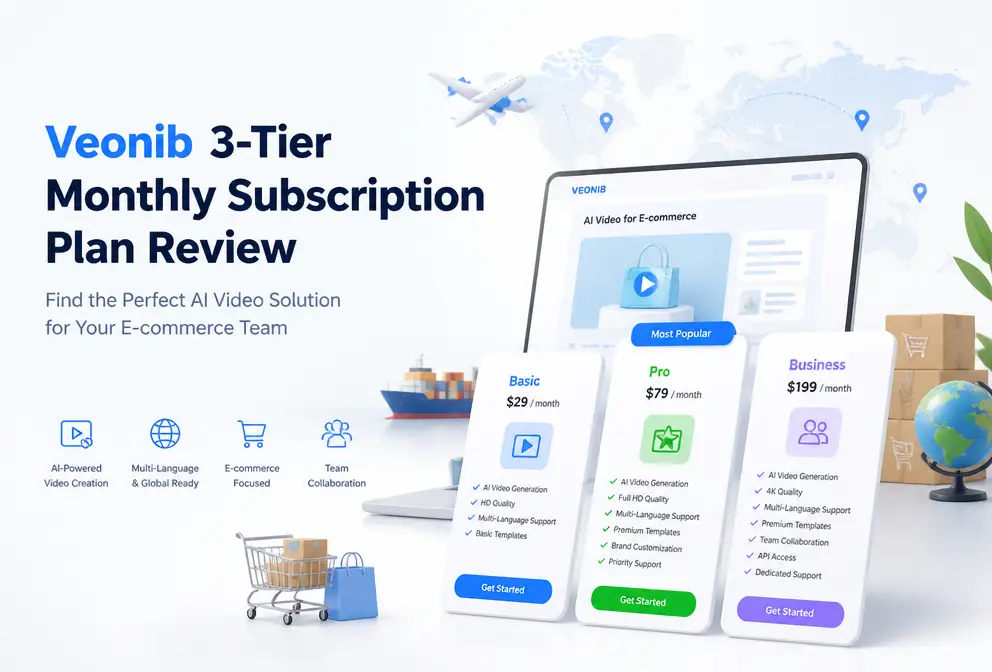
Open Veonib’s pricing page and three options appear before you—Starter, Growth, Agency. Each tier differs in monthly price, video quota, video quality, and queue priority. I read the page repeatedly and hit pitfalls during real‑world testing. The most immediate takeaway: choosing the wrong plan not only wastes money but also leaves you scrambling when supply runs out during peak season. In this article I break down my hands‑on comparison results to help you pick the subscription that fits your current stage.
Core Differences Between the Three Plans: Quota, Quality, and Priority
The differences across the three plans are actually quite clear on key dimensions, but most people overlook how queue priority and quality limits affect actual output. I initially thought that as long as the number of videos was enough, everything would be fine, but it turned out to be more complex.
A side‑by‑side comparison table is the most intuitive:
| Plan | Monthly Price | Monthly Video Count | Video Quality | Queue Priority | Customer Support | Suitable For |
|---|---|---|---|---|---|---|
| Starter | $11 | 30 videos | Basic quality | Standard | Standard | New small sellers |
| Growth | $23 | 90 videos | Full quality | Priority | Priority | Established e‑commerce brands |
| Agency | $47 | 240 videos | Full quality | Highest priority | Highest priority | Managed services, ad agencies |
From the table, it makes sense that Growth is positioned as the flagship plan. Ninety videos per month is roughly three per day, which nicely covers most e‑commerce ad testing and iteration cycles. If you only need 1‑2 test assets per day, Starter will suffice; but once you move into stable scaling, you’ll quickly find that 30 videos are far from enough—something I’ll detail later.
The decision logic is simple: use Starter for everyday testing, Growth for scaled campaigns, and Agency for multi‑client managed services.
One pitfall I didn’t notice at first: the basic quality of Starter shows a noticeable difference on social platforms like TikTok and Reels, especially when showcasing product details; compression artifacts become amplified. However, if you only embed the video on a product detail page, basic quality is perfectly adequate—this is a trade‑off many people miss.
From a Link to a Video: How the AI Workflow Affects Your Billing
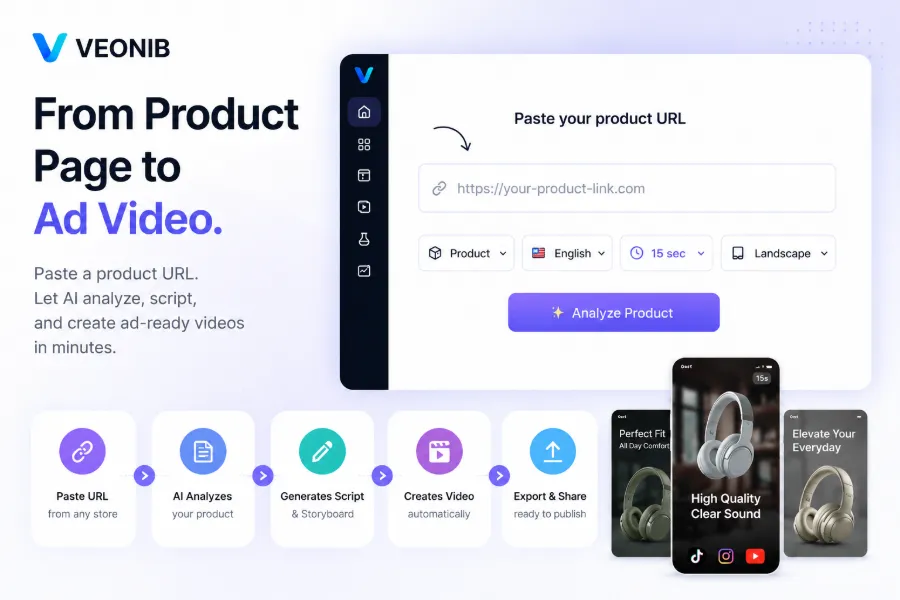
The core workflow of VEONIB is straightforward: paste a product link, the AI automatically analyzes the product information, generates a script and storyboard, then outputs a video. The whole process finishes in about 60 seconds. Each video consumes one quota unit, meaning your monthly quota directly determines how many ad assets you can produce.
A commonly overlooked issue: running out of video slots isn’t always because you have many products, but often because A/B test version iteration is too fast. A single product may need 5‑10 versions to generate statistically meaningful data. I’ve seen a seller who, to test three products from different angles, burn through more than 20 quota units in one week—Starter’s 30 slots may not survive two weeks during peak season.
The specific quota allocation logic is:
- Starter – 30 per month: suitable for testing 3 products with 5 versions each, plus a buffer.
- Growth – 90 per month: suitable for testing 5 products with 4 versions each each week, keeping assets rotating.
- Agency – 240 per month: suitable for a managed‑service agency serving 4‑6 small‑to‑mid‑size clients.
Growth’s 90 videos per month, assuming a 22‑day weekly schedule, averages about 4 videos per day—enough to support daily A/B testing and asset rotation. If you need to handle multilingual video content, check out the built‑in One‑Click AI Video Translation with Perfect Lip‑Sync feature (https://veonib.com/s/tools/one-click-ai-video-translation-with-perfect-lip-sync-veonib-seonib)—it lets you reuse existing assets without re‑creating the video.
Limited‑Time 40% Discount: Current Subscription Billing Strategy and Locked‑In Value
All plans are currently offered at a limited‑time 40% discount, which is crucial for locking in long‑term costs. For example, Growth’s regular price is $23/month; after the discount it drops to $13.8/month, saving roughly $110 per year.
The cost breakdown shows the real impact of the discount:
- Growth: $23 → $13.8/month (90 videos) → ≈ $0.15 per video
- Starter: $11 → $6.6/month (30 videos) → ≈ $0.22 per video
- Agency: $47 → $28.2/month (240 videos) → ≈ $0.12 per video
Small sellers locking in the lower tier during the promotion is a sensible move. If your team has already validated product‑market fit, Growth offers the best value—$0.15 per video is extremely low compared with any other ad‑asset procurement channel.
However, the promotion is time‑limited, so decide based on your next month’s video production plan. If your testing schedule is already set, securing the current price is cheaper than paying full price later. By the way, the tool is already featured on Product Hunt: veonib on Product Hunt.

From Starter to Agency: When Should You Upgrade?
The upgrade timing is easier to spot than you might think. Here are a few concrete signals:
Quota depletion is the first trigger I encountered. During peak season, the 30‑video quota was exhausted within two weeks, forcing an emergency upgrade to Growth. The upgrade took about two days of communication with support, during which testing assets were unavailable, directly impacting conversion data continuity. Upgrading a week earlier would have avoided that downtime.
Quality bottleneck is another signal. When you post videos to TikTok or Instagram Reels and notice blurry product details or color distortion, that’s usually the basic quality limit. Switching to full quality noticeably improves completion rates for the same asset.
Multi‑brand or multi‑client management scenarios benefit from Agency’s API and multi‑brand workspaces, dramatically reducing switching costs. Agency’s 240 videos per month (≈ 8 per day) can serve 4‑8 small clients. If your agency already handles three or more clients, Agency becomes more cost‑effective than Growth.
For a cost comparison, see the 2026 AI Video Generator Pricing Comparison guide (https://veonib.com/s/guides/ai-video-generator-pricing-comparison-2026-free-plans-credits-real-cost-per-video-veonib/index.html), which analyzes the fee structures of major tools on the market.
Upgrade threshold logic:
- Starter → Growth: when daily output exceeds 1 video or you start testing multiple versions across several products.
- Growth → Agency: when you need API integration, multi‑brand workspaces, or serve more than two clients.
If you run 10 products with 10 versions each, Growth is just enough; but if your testing pace reaches 5+ videos per day or you begin building a content matrix, jump straight to Agency. For ideas on scaling content output with AI video, check out the “Content Multithreading” article (https://seonib.com/c/landing-pages/growth/content-multi-threading-turn-one-high-traffic-blog-post-into-30-monetizable-short-videos).
VEONIB’s three‑tier design actually provides a clear upgrade path. The core recommendation: if you run out of your monthly quota even once, don’t force it—upgrade to the next tier. The time and testing window you save far outweighs the modest price difference.
Frequently Asked Questions
Is the Starter plan suitable for sellers just starting to test?
Yes. Thirty videos per month are enough to test 3‑5 products with 2‑3 versions each, and basic quality is fine when embedded on product detail pages. If you plan to run ads on social platforms, consider Growth directly, as basic quality degrades noticeably after TikTok compression.
How many videos can Growth generate per day? Is 90 enough?
Assuming a 22‑day weekly schedule, Growth averages about 4 videos per day. This volume supports everyday A/B testing and asset rotation. If you need more than 6 new assets daily, consider Agency.
How does Agency’s multi‑brand workspace work? How many clients can it support?
Agency provides separate workspaces for each brand, each with its own asset library and generation history. With 240 videos per month, you can typically serve 4‑8 small‑to‑mid‑size clients, depending on each client’s testing frequency.
How long does the 40% discount last?
It is listed as a limited‑time offer; no exact end date is published. If you have a clear video production plan, lock in the price soon—saving roughly $110 per year for Growth when paying annually.
Can I upgrade temporarily if I run out of video quota?
Yes, you can upgrade to a higher tier at any time, and the new quota and features take effect immediately. Downgrades must wait until the next billing cycle. Temporary upgrades usually take 1‑2 days to process, so plan ahead before peak periods.
Share Article


