How to Edit Videos with AI Text Prompts: A Complete Workflow for E‑Commerce Sellers

It’s 11:30 p.m., and a message pops up in the operations group: the new product ad that needs to go live tomorrow morning must be turned into a 15‑second version that highlights the “7‑day effect” selling point, based on a 30‑second clip of a serum. The editor has already left for the day, and the footage sits untouched in the cloud drive.
In the past, you’d either force yourself to open a editing tool, hunt for keyframes on the timeline, adjust transitions, and reorder shots—working until 2 a.m.; or you’d wait until the editor returned the next day, pushing the launch back by a day. Now there’s a third option: describe the desired changes in natural language, let the AI understand and execute the edit. Delete the opening voice‑over, replace the second segment with a product close‑up, shorten the final logo section—these instructions can be written directly in text.
For e‑commerce sellers, this text‑prompt‑driven editing method changes not just efficiency but the whole rhythm of material iteration. This article gets straight to the practical steps: what can be changed with prompts, how to do it, common pitfalls, and how to embed prompt‑based editing into the production pipeline when the volume of assets grows.

Basic Logic of AI Text‑Prompt Video Editing
Traditional editing is fundamentally timeline manipulation. You must understand what each second of footage contains, then decide where to cut, how to splice, and which transitions to add. This process demands high tool proficiency; concepts like keyframes, tracks, and masks keep non‑professionals out.
Text‑to‑Edit works entirely differently. The AI first performs a content understanding of the video—identifying product close‑ups, voice‑overs, usage‑scene demos, etc.—and converts the timeline into a semantically annotated “content list.” You don’t need to know exactly which shot occupies seconds 12‑15; you just say “move the product close‑up segment later,” and the AI finds the corresponding clip on the timeline and executes the change.
Current mainstream implementations fall into two categories. One uses large language models (ChatGPT, Claude, etc.) to parse video content into a structured description, then a editing engine executes the commands. The other, such as Runway or Pika, are generative tools that rewrite the visual directly from text commands. For e‑commerce material, the former is better for fine‑grained edits of existing footage, while the latter suits creating new scenes from scratch.
In e‑commerce scenarios, the editing tasks suitable for text prompts share clear characteristics: the edit logic is straightforward (delete a segment, replace a segment, reorder), there are no complex visual effects, and the required visual precision isn’t overly strict. A typical text‑prompt edit of a 30‑second e‑commerce short video can be rendered in under 60 seconds—fast enough to test multiple versions quickly. Industry views on this workflow are evolving; see this trend analysis article on product‑link‑driven AI video generation.
What Parts of an E‑Commerce Short Video Can Be Edited with Prompts
Not every editing operation is suitable for textual description, but a large portion of routine tweaks in e‑commerce short videos can be covered by prompts. Here’s a breakdown by dimension:
Delete and reorder shots. This is the most common need. Cutting a 30‑second original down to 15 seconds—deciding which shots to keep, which to drop, and how to reorder—can be described in text far faster than dragging clips on a timeline.
Replace voice‑over and copy. If the spoken script needs to change, just tell the AI the new wording. For example, replace “brighten skin tone” with “7‑day effect,” and the AI will regenerate the voice‑over and sync the subtitles.
Adjust aspect ratios. The same footage may need to be posted on TikTok, Reels, YouTube Shorts, and product detail pages, requiring 9:16, 1:1, and 16:9 versions. Traditional workflows involve manual re‑framing; with prompts, the original clip can generate at least four different aspect‑ratio versions automatically, with the AI deciding which part of the frame to preserve for each ratio.
Change background and setting. Swap an indoor background for an outdoor scene or a solid‑color studio shot; such scene replacements can be triggered with a textual description.
Add subtitles and selling‑point annotations. E‑commerce videos almost always need subtitles and product‑selling text. Just tell the AI where to place them, what style to use, and what content to add.
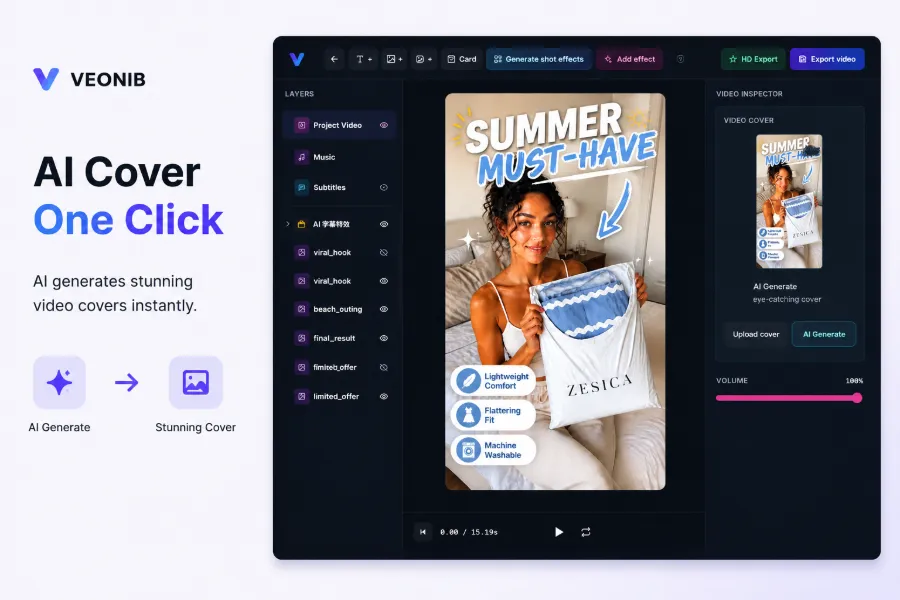
But we must distinguish between “AI automatic re‑editing” and “AI‑assisted fine‑tuning.” Automatic re‑editing is ideal for bulk‑producing multiple versions of the same product (e.g., testing different hook openings); fine‑tuning is for when you already have a near‑final video and need localized adjustments. The former prioritizes quantity and speed; the latter prioritizes control. Both have their place in e‑commerce ad creation, but don’t expect AI automatic re‑editing to be perfect in one go—you usually generate a first draft, then refine it with step‑by‑step prompts.
In a generative workflow, prompts are not just “commands”; they also convey creative direction. Writing “recommend this serum in a genuine user voice, emphasizing changes after one week” guides the AI in selecting shot pacing and narration tone. For a more comprehensive overview of how AI video content evolves from product assets to ad‑ready creatives, see the industry analysis article.

Step‑by‑Step Practical Workflow for Prompt‑Driven Video Editing
Here’s a concrete five‑step process you can follow.
Step 1: Define the requirement and write a descriptive prompt. Don’t start with “edit this video for me.” First, clarify what you need: which segment to delete, which to keep, which selling point to emphasize, and which platform it’s for. Write a complete sentence, e.g., “Delete the first 5 seconds of voice‑over, keep the product close‑up shot, change the copy ‘brighten skin tone’ to ‘7‑day effect’, and output a 9:16 vertical version.”
Step 2: Prepare the source material. In e‑commerce, source material is usually either an existing video file or a product link. The latter is more convenient—the AI can extract product information, images, selling points, and price directly from the link, eliminating manual asset gathering.
Step 3: Let the AI parse the content and generate a editing script. Many skip this step, but it’s crucial. The AI must first understand what each segment of the original video contains before it can execute your commands correctly. If the parsing is vague, even the best prompts will edit the wrong part. Have the AI output a “video content list” (e.g., “seconds 0‑5: voice‑over, seconds 5‑12: product close‑up, …”) and verify its accuracy before proceeding.
Step 4: Apply text commands one at a time. Change a single element, review the result, then move to the next. Avoid dumping five or six modifications in one batch; the AI can lose focus when handling multiple instructions simultaneously.
Step 5: Export the final product in the appropriate platform specifications. Different platforms have varying length, aspect‑ratio, and bitrate requirements. TikTok, Reels, and YouTube Shorts each have preferences—confirm the specs before exporting.
The more specific the prompt, the more controllable the result—a rule that’s even more pronounced in video editing than in text‑to‑image generation. A complete prompt usually contains 15–30 essential constraints; the longer, the higher the controllability, up to a point. You can structure a prompt into four elements: Object (what segment), Action (what to do), Location (where on the timeline), Style (how it should look). For example: “Replace the product close‑up (object) with a usage‑scene demo (action) placed in the middle of the video (location) while keeping a warm color tone (style).”

Another special case: AI‑generated hallucinations. When the AI creates product details, it may misstate ingredients, usage time, etc., e.g., mistakenly writing “3‑day effect” instead of the correct “7‑day effect,” which can mislead consumers. The remedy is validation—after generation, compare the video against the product detail page line by line for ingredients, usage instructions, and efficacy claims. If discrepancies appear, add factual constraints to the prompt and regenerate. For guidance on avoiding product‑information distortion in AI video ads, see the dedicated discussion on preventing AI video editing from misrepresenting product information.
Common Mistakes and Troubleshooting
Text‑prompt video editing looks simple but fails frequently in practice. Here are typical pitfalls.
Ambiguous commands cause the AI to edit the wrong object. “Change the opening” doesn’t specify whether you mean the voice‑over, the visual, or the subtitle. The AI might rewrite the entire opening narration when you only wanted to delete a filler line. Lesson: always specify both the object and the action; the more precise, the better.
Describing style without specifying concrete shots. “Make the video feel more premium” gives the AI no actionable direction. It doesn’t know whether you want slower pacing, fewer text overlays, or a different color palette. Style descriptions must translate into concrete operations.
Incorrect factual statements about the product. This is the most dangerous error in e‑commerce. I once processed a serum clip; using unconstrained prompts produced five drafts, all of which mis‑stated the usage period—some said “3‑day effect,” others exaggerated ingredient concentration. All five were discarded, costing an entire generation round. After embedding the exact ingredient list, usage instructions, and efficacy claims from the product page as hard constraints in the prompt, accuracy improved dramatically. The whole process took over an hour and required an extra generation pass.
A useful rule of thumb: an unconstrained, vague instruction is roughly 2–3 times more likely to require rework than a structured, constrained one. Therefore, iterate as “one command → one edit → one verification,” rather than dumping a batch of commands and checking everything at once.

Troubleshooting isn’t complex. When the output is wrong, first verify the AI’s parsing of the source material—have it output its understood content list and check for mis‑identified timestamps. Next, ensure the prompt contains sufficient factual constraints. Finally, confirm that the edit command targets the correct object. Most issues can be pinpointed with these three checks.
When the volume of assets grows, manually writing prompts for each clip becomes a bottleneck. At that point, consider embedding prompt editing into a more automated pipeline, such as using standardized command templates and importing product links to reduce input effort. Some tools already head in this direction; for example, VEONIB parses product links, extracts selling points, and strings together video generation in a single pipeline, minimizing manual prompt entry. After importing the product link, the AI automatically extracts selling points, writes a script, plans shots, and you only need to fine‑tune the initial draft with text commands—far more efficient than starting from scratch.
Connecting Prompt‑Based Editing with Automated Video Pipelines
When the asset count shifts from occasional to dozens per week, the problem changes: it’s no longer “how to edit one video with prompts,” but “how to keep prompt editing from slowing down the entire production rhythm.”
Teams that need to refresh more than ten ad assets weekly usually standardize prompt editing. The approach is to build a library of command templates—fixed prompt frameworks for different product categories, selling points, and platforms—so each new asset only requires swapping the product name and key phrases. For example: “Use (product name)’s (core selling point) as the opening hook, keep the (usage scene) shot, delete (irrelevant content), output a (platform spec) version.” After templating, writing a new prompt drops from five minutes to under a minute.
A further step is to drive prompt editing directly from product data. Product links already contain structured information—title, description, selling points, price, images—which can be fed straight into the prompt instead of manually typing them each time. The AI parses the link, auto‑generates a cutting script, and you make micro‑adjustments on top of that. This turns prompt editing from “write from scratch each time” into “make localized edits on the AI‑generated draft,” dramatically reducing input cost.
A workflow for bulk‑processing product links into ad videos can be found in the guide on batch converting product links into ad videos.
Once this pipeline runs smoothly, the cadence of material iteration changes noticeably. Previously, changing a selling point meant re‑editing, re‑recording voice‑over, and re‑exporting; now you just tweak a few keywords and regenerate. Tools like VEONIB already chain product‑link parsing, selling‑point extraction, script generation, and video output into a complete workflow—your job is to confirm direction, fine‑tune with text commands, and export for deployment. When your team needs to produce dozens of different hooks and angles each week for testing, this integration is essentially the only way to keep up with the pacing of ad deployment.
FAQ
Do I need programming skills to edit videos with text prompts?
No. Text‑prompt editing is designed for non‑technical users. You simply describe the desired changes in natural language; the AI handles understanding and execution. No code or timeline manipulation knowledge is required. The real effort is learning how to articulate your modification requirements clearly—this is a communication issue, not a technical one.
Will more detailed prompts always yield better AI edits?
Generally yes, but there is a ceiling. Adding object, action, location, style, and factual constraints to the prompt significantly improves controllability. However, beyond a certain length the returns diminish, and overly long prompts can cause the AI to lose focus. Aim for 15–30 essential constraint characters; clearly stating the key edits and hard product facts is sufficient.
How long of a video can text prompts handle?
It depends on the tool’s content‑understanding capability. Most AI video editing tools work best with short videos ranging from 30 seconds to 2 minutes—the typical length for e‑commerce ads. For footage longer than five minutes, the AI’s parsing accuracy drops, leading to mis‑identified segments. Long videos are best processed in segments and then stitched together.
What if the AI‑edited video’s product information doesn’t match the actual product?
This is the most common issue in e‑commerce. The AI may misstate ingredients, efficacy, or usage periods. The solution is verification: after generation, compare the video against the product detail page line by line. A proactive approach is to embed the exact ingredient list, usage instructions, and efficacy claims from the product page directly into the prompt as hard constraints, reducing the chance of errors at the source.
How does prompt editing differ from directly generating video from text?
Direct text‑to‑video generation creates visuals from scratch based on your description; prompt editing modifies existing footage, telling the AI how to change what’s already there. In e‑commerce, the former is good for generating brand‑new showcase shots, while the latter excels at fine‑tuning and adapting existing assets for multiple platform versions. They complement each other rather than replace one another.
Share Article


