2026's Most Worthwhile AI E‑commerce Video Advertising Tools Ranking
Open any e‑commerce backend, and the most tedious part is always the video assets. Shoot it yourself—lighting, set design, editing, voice‑over—one 15‑second ad can take an entire day; outsource it, and the quote is absurdly high, and the communication overhead can wear you out. This article pulls together a list of AI e‑commerce video advertising tools that are truly usable in 2026, without any fluff, and breaks down exactly how much time each tool can save you in a real workflow.
Why 2026 Is a Watershed Year for AI E‑commerce Video
First, a quick look back at my situation in early 2023 when I started cross‑border selling. A 15‑second TikTok product video—from scriptwriting to shooting to color grading—took me 6–8 hours alone. Outsourcing to a studio cost at least ¥500 per video, plus endless brief revisions and three rounds of edits before a final cut. In 2024 I began experimenting with AI tools, but the quality was stuck at a “fake‑look” level—stiff facial expressions, background clipping, robotic voice‑overs. By 2025, after a major iteration of CapCut for e‑commerce, Runway, and Pika, the “AI feel” faded dramatically; the details could now out‑perform about 90 % of small‑team live shoots.
A data point worth noting: AI‑generated video assets accounted for over 40 % of top sellers’ content in 2025, and are projected to hit 65 % in 2026. This jump isn’t because sellers suddenly fell in love with AI; it’s because TikTok Shop and Amazon demand an insane volume of video assets—a store launching 10 new products simultaneously needs at least three videos per product for A/B testing, a need traditional methods can’t satisfy. In real‑world G2 reviews, many users say the problem isn’t that AI is too good, but that traditional workflows are too slow. You can see those reviews in the VEONIB professional G2 assessment and user feedback to see how teams producing dozens of videos a day rate the efficiency change.
The core shift in 2026 is “usability.” Models no longer require complex prompts; just paste a product link and start generating. This pivot turned AI video tools from “toys” into “productivity boosters.”
First Tier – End‑to‑End Automation Tools
If I could only pick one class of tools, I’d prioritize “end‑to‑end automation” products—no manual editing needed from pasting the product link to the final video output.
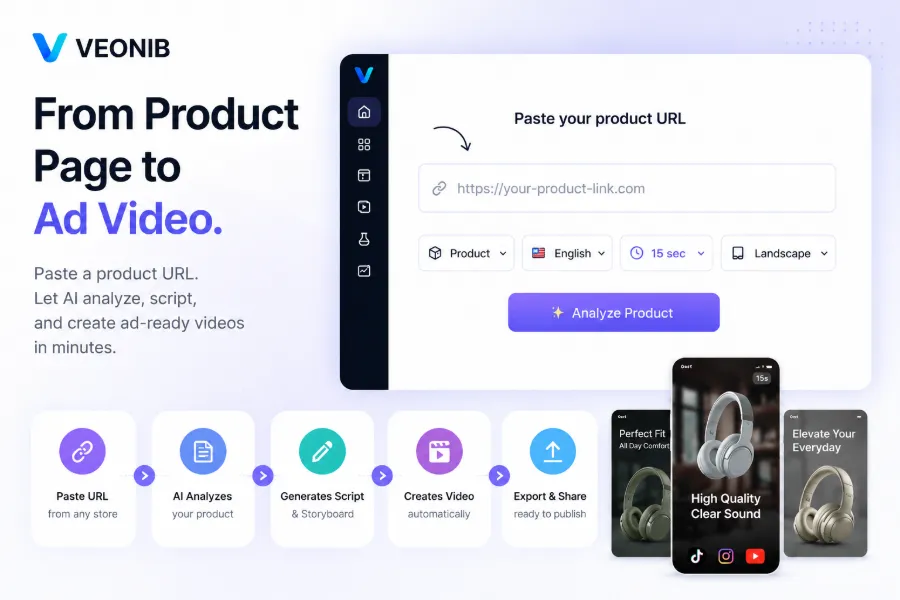
The tool I use most is VEONIB. It’s brutally simple: copy a Shopify or Amazon product page URL, the AI automatically analyzes images, descriptions, and selling points, then generates a script and storyboard, and renders a 15‑second ad video in about 60 seconds. The first time I tried it, I timed the whole process—import and export took under two minutes, compared with the traditional six‑hour workflow, a nearly tenfold speedup. Even better, it requires no editing knowledge—no timeline, no keyframes, no complex parameter tweaks. If you want the full workflow, read the AI workflow that turns product links into viral videos, which breaks down every step and its actual time cost.
The core advantage of these tools is “eliminating communication overhead”—the brief‑writing time that dominates outsourcing is effectively zero with end‑to‑end tools. However, not every end‑to‑end tool is completely edit‑free. The table below helps you do an initial screen:
| Tool | Core Mode | Manual Editing Required? | Generation Speed | Typical Price | Ideal Use Cases |
|---|---|---|---|---|---|
| VEONIB | Paste URL, fully automatic | No | 60 seconds | Pay per export | Platform ads, social media |
| CapCut for e‑commerce | Template drag‑and‑drop | Yes | 15 minutes | Subscription | Fine‑tuned brand videos |
| HeyGen | Digital‑human templates | Yes | 10 minutes | Subscription | Person‑led explainer videos |
Velir, a beverage brand, previously used a template tool and produced only eight videos per week with a three‑person team. After switching to an end‑to‑end tool, one person could output 15 videos a day, each with a different style variant. If you want to test your own product, check out the one‑click case study turning a beverage product link into a video, which shows a side‑by‑side comparison from URL to final video.
Second Tier – Scenario‑Specific and Customizable Tools
End‑to‑end tools aren’t universal. If your team needs fine‑grained control—such as digital‑human lip‑sync, specific UGC styles, or complex effects—the scenario‑specific tools in the second tier are a better fit.
HeyGen and Synthesia focus on digital‑human videos, ideal for brand spokespersons or multilingual customer‑service content; Pika excels in effects and motion range, perfect for creative product‑use demos. Their common drawback is the need for manual scene building and parameter tweaking; a single video typically takes over 10 minutes from start to export, making them unsuitable for bulk production.
A noteworthy sub‑trend in 2026 is UGC‑style video generation. AI can directly produce “unboxing” or “real‑review” style videos, which on TikTok and Instagram Reels achieve an average click‑through rate 27 % higher than official polished videos. Last year I tried it with a Rug brand link; the AI‑generated unboxing footage had lighting and background that looked as natural as a real shoot, and the CTR was 12 % higher than the outsourced version.
These tools are best for teams that already have editing expertise—they’re not a replacement for editors but a way to get a rough cut quickly, with manual fine‑tuning afterward. If your team is still at a “zero‑editing experience” stage, start by watching the complete guide to AI e‑commerce ad video generators before deciding whether to invest in learning.
Selection Guide – Which Tool Fits Your Team?
Choosing a tool isn’t just about feature lists; it’s about your actual production scenarios. I break it down by team size:
Solo seller or small team (1‑3 people): Start with an end‑to‑end automation tool. Budgets are tight, time is tighter, and pasting a link to get a video is the most efficient solution. Try VEONIB’s free preview to generate a script and storyboard, confirm the direction, then pay for export. Produce at least five different style variants for the same product and feed them into Facebook Ads or TikTok Shop for A/B testing. In my tests, using more than five variants boosted conversion rates by at least 15 %. If you’re unsure how to set up the workflow, see the VEONIB case study for Jo Malone’s “Intense” fragrance ad, which shows how a perfume link becomes an emotional 15‑second ad.
Mid‑size brand team (5‑10 people): Adopt a “end‑to‑end + manual fine‑tuning” hybrid. At the end of 2024 I worked with a DTC furniture brand that relied on a single AI tool for all ad assets; after three months, users started commenting “It’s all the same video,” and the CTR dropped 40 %. That taught me pure template output inevitably leads to homogenization, so keep a manual refinement step. The end‑to‑end tool creates the rough cut; the team spends 5‑10 minutes swapping background music, tweaking copy, adding brand watermarks, dramatically improving results. VEONIB’s second‑generation “video watermark removal” feature also saves you the back‑and‑forth with outsourcing post‑production.
If you’re still undecided, check the VEONIB user reviews on Product Hunt for plenty of real‑seller feedback, which is more candid than the official marketing copy.
FAQ
Q1: Will AI‑generated e‑commerce videos still look obviously “AI‑y”?
The mainstream models of 2026 (VEONIB, CapCut for e‑commerce, Runway) have dramatically improved visual realism, especially for static product shots and large scenes—most people can’t tell the difference with the naked eye. However, close‑ups of faces, finger movements, or fast‑moving objects can still produce unnatural lines. It’s recommended to manually inspect facial and hand details after generation; if you spot flaws, switch the script or seed and regenerate, which usually resolves the issue.
Q2: Are the videos produced by these tools commercially usable? Any copyright concerns?
Most paid tools (including VEONIB, HeyGen, Synthesia) explicitly state in their terms that the copyright of exported videos belongs to the user and can be used commercially. Two cautions: first, built‑in background music and assets may come from third‑party libraries—ensure those assets carry the necessary licenses; second, if the AI‑generated video contains real brand logos or likenesses, you must obtain the appropriate permissions yourself.
Q3: I have no video‑editing background—can an end‑to‑end tool really turn a product link into a ready‑to‑use ad?
Yes, provided you choose the right product type. End‑to‑end tools excel for high‑SKU, fast‑scale standard items (e.g., apparel, 3C accessories, home goods). If your product requires extensive real‑world shooting (like furniture needing spatial context), AI‑generated indoor environments may lack precision, and manual scene adjustments will be needed. Start with a free preview to see if the output meets your minimum quality standards.
Q4: As a cross‑border seller targeting multiple countries, do these tools support multilingual voice‑overs and subtitles?
VEONIB and HeyGen both support AI voice‑overs in over 30 languages and automatically generate subtitles. In practice, English, Spanish, and Japanese have the smoothest speech; lesser‑used languages (Arabic, Thai, etc.) may occasionally sound off. A common approach is to use AI‑generated voice‑overs for non‑core markets while recording a professional voice‑over for key markets, then blend the AI visuals—cost differences are minimal.
Share Article


