Change Only One Part of a Video, How to Avoid Reworking the Entire Video
A UGC advertisement video that is almost finalized, and the client suddenly says the product packaging held by the model needs to be updated to a new version. You open the project file and discover that the only thing that needs to change isn’t just the packaging— the subtitle timeline must be realigned, the order of selling points mentioned in the voice‑over script must be adjusted, and the background music has to be re‑timed because the shot lengths have changed. In the end, you spend more time than the original production, re‑doing the whole video from scratch.
This “change one thing but have to redo the whole video” scenario is an almost daily hidden cost in cross‑border e‑commerce video production. The key to rework is never about regenerating everything, but treating the video as an object that can be partially replaced. With a different mindset, rework time can be compressed to one‑fifth of the original.
Why “Change Only One Part” Always Ends Up as “Reshoot the Whole Video”
In cross‑border e‑commerce videos, the frequency of local modification requests is higher than most people imagine. Changing product packaging, updating price tags, tweaking a data point in the voice‑over, swapping background music—these are routine operations. The problem is that AI video generation and traditional editing software handle these changes with completely different underlying logic.
In editing software, a video is a layered structure—text layer, visual layer, audio track—each independent, so changing one layer doesn’t affect the others. AI video generation, however, is generative output; every frame, every voice‑over segment is produced as a whole. If you change a word in the prompt, the model may reinterpret the entire composition, lighting, and character actions.
The cost of this difference is immediate. A “change one part” rework, if done through a full‑video redo, typically takes about 60%–80% of the time of the original production. You have to reconfirm selling points, regenerate the voice‑over, and go through the review process again. I’ve seen a team redo an entire video just to change a product‑angle shot—spending two days regenerating all shots, ending up with inconsistent voice‑over narration, and seeing a noticeable drop in ad performance. Ungraded change handling inflates costs like this.
Do a Change‑Level Classification Before Reworking, Don’t Let Small Issues Trigger a Full Process
When you receive a modification request, don’t rush to open the generation tool. Spend two minutes categorizing the change; you can save half a day of rework later. I usually split changes into three levels:
- Text Layer: Hook copy, subtitles, price tags, CTA button text—these can be replaced with an overlay layer.
- Shot Layer: Visual assets, angles, or scenes for a specific shot—handle with partial regeneration.
- Structure Layer: Shot order, storyline, overall pacing—this is when a full redo makes sense.
About 70% of rework requests involve text or sticker layers, which require no touching of the video’s core. Yet many people, upon receiving a request, habitually regenerate the whole video, turning a simple text swap into a full‑video rebuild.
For text‑layer changes, simply overlay a new text layer onto the existing footage. For shot‑layer changes, keep the outputs of the other shots and only locally regenerate the problematic shot. Only when the structure layer changes—e.g., turning a problem‑solution narrative into an unboxing showcase—should you consider a full redo.
If you’re unsure whether your tool supports a certain degree of partial editing, compare the partial‑editing capabilities of various AI video tools before deciding on a workflow. The judgment is simple: does the change touch the narrative skeleton of the video? If not, handle it locally; if it does, consider rebuilding.
Practical Path: Replace Full‑Video Rebuilds with Partial Regeneration
Most current AI video tools support product‑link parsing, but link‑parsing failures are common—products get delisted, pages are redesigned, regional restrictions apply. In those cases, the key operation is to upload product screenshots for material parsing instead of abandoning the partial‑editing approach.

As long as the screenshot contains the product title, description, selling points, and price, the tool can parse the material. This means that even if the original link is dead, you can still replace the material for a specific shot within the existing video framework. For example, if the original video only shows a front view of the product and the client wants a side view, you can generate a multi‑angle view from a single product image and replace the shot without recreating the whole video.
In practice, preserving the original script structure is crucial. When the video “looks like only one element changed,” the real rework cost comes from the drift between regenerated text and visuals, not from the element itself. Regenerating the voice‑over script will also shift visuals, subtitles, and pacing, making consistency hard to maintain. Keeping the script and only regenerating the problematic segment minimizes this risk.
When product‑link parsing is limited, tools like VEONIB allow you to upload product screenshots for parsing; the system automatically extracts the title, description, selling points, and price, then performs partial generation only for the shots that need replacement. Using a “keep script, partial regeneration” approach for single‑point edits can compress rework time to 20%–30% of the original production.
Let Changes Remain—Overlay Layers, Version Management, and Reuse Thinking
Every partial edit should be saved as an independent layer rather than merged directly into the video core. This way, next time you need to change it, you don’t have to relocate, regenerate, or realign—just replace that layer.
Dynamic element layers are the most typical example. Price tags, promotional stickers, hook text, social proof elements—these are high‑frequency changing information. By making them independent overlay layers, swapping a promotional message takes about 1–2 minutes instead of regenerating an entire video segment. This workflow is already implemented in video generation tools; VEONIB’s AI effect layer library follows this concept.
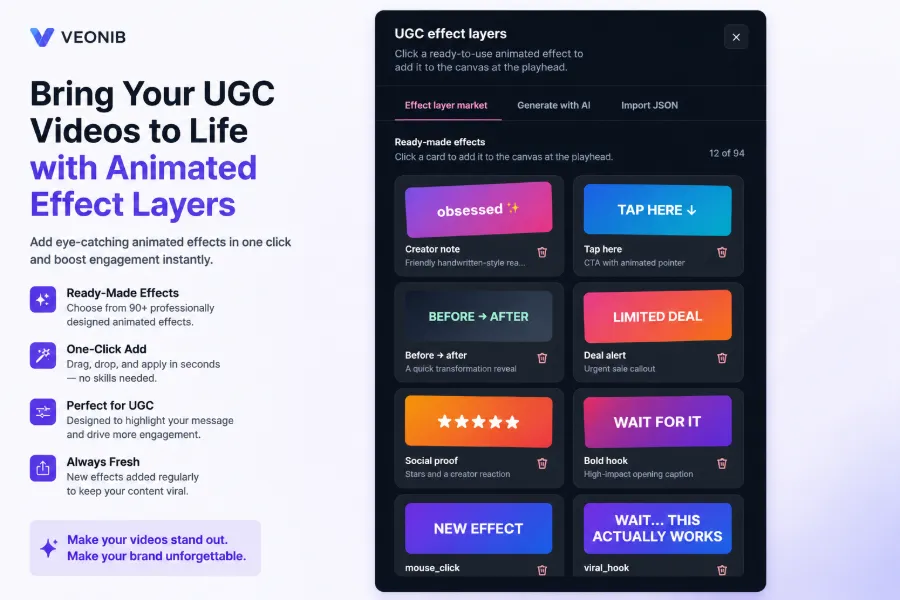
Layered thinking also brings an extra benefit: material reuse. The same core video can generate multiple versions by swapping individual layers—one hook text for TikTok, a set of promotional tags for Amazon, a different CTA for a standalone site. Iterative rebuilds have linear cost; layered reuse has marginal cost, and the difference grows with the number of versions.
The frequency of modifications itself is a hidden signal. If a video needs frequent tweaks, the problem often lies not in production but in material planning—price, promotional copy, and other volatile information should never be hard‑coded into the video core; they should be detached as independent layers from the start.
When Changes Accumulate, How to Judge Whether to Overhaul the Whole Video
Partial edits are not a panacea; they have clear boundaries. When the number and frequency of changes reach a certain point, a full redo becomes more economical. My rule of thumb: if the cumulative time spent on partial edits exceeds half the time of a full redo, it’s time to rebuild.
Another rule of thumb: if the same video undergoes four or more partial edits within a month, the total cost of continuous patching surpasses that of a clean rebuild. Each partial edit requires a new review, consistency check, and publishing workflow, and those hidden costs add up, often exceeding a single, tidy redo.
The frequency itself tells you that the video’s framework may no longer hold. Instead of keep patching, start a new draft based on the previous script, structure, and assets. Redoing doesn’t mean starting from zero—the previous shot structure, voice‑over script, and asset library can be reused; you only need to adjust the narrative framework.
This “full conversion loop from ad video to landing page” mindset also applies to video iteration—material reuse relationships are essentially the same as the handoff logic from ad to landing page. If you’re unsure about a redo decision, look at how a single piece of content can be split into multiple short videos; the material‑reuse criteria are the same. Additionally, the data in the article about using AI product videos to boost Amazon conversion rates can help you assess whether the expected ROI after a redo justifies the investment.
Content Multi-Threading for short videos
Run VEONIB video ads on TikTok & Meta
Increase Amazon conversion with AI videos
FAQ
If the product packaging or appearance changes, does the whole video need to be regenerated?
No. If only the packaging appearance changes, it’s a shot‑layer modification. Keep the original script and voice‑over, and locally regenerate the product‑display shot. The only caveat is if the voice‑over script mentions packaging details; then you’d also need a minor text‑layer tweak.
How long does it usually take to change subtitles or price text?
If subtitles and price are independent overlay layers, replacement takes 1–2 minutes. If the text is baked into the video image, you must locate the corresponding shot, regenerate that segment, and realign the timeline, which takes about 15–30 minutes.
Between AI‑generated video and editing software, which is better for partial edits?
Editing software is better for fine‑grained edits because of its layered structure, provided you have the full project files. AI video generation tools excel when you lack engineering files; by keeping the script and using partial regeneration, they can also achieve point‑specific edits, suitable for teams without professional editing expertise.
When there are many edits, is it cheaper to keep editing or to redo the whole video?
If a video receives four or more partial edits within a month, the total cost of continuous patching becomes higher than a full redo. The rule is: if cumulative partial‑edit time exceeds half the time of a full redo, it’s time to rebuild.
Will swapping out a single shot affect the overall flow of the video?
It can, but you can control it. When locally regenerating a shot, keep the original script and the visual parameters of adjacent shots so the new shot matches lighting, tone, and composition. If the result still feels jarring, first check whether the voice‑over script aligns with the visuals rather than immediately discarding the whole video.
Share Article


