Small and Medium Independent Site Sellers, Should You Use AI Video Tools Now? Check This Veonib Real-World Review and Package Pitfall Guide First

Last week I launched three new products on Shopify and, as usual, needed video ads. The old way was to outsource a product showcase video for ¥800; three videos cost ¥2,400, which left enough budget to test another product. Learn editing yourself? I tried CapCut; from organizing footage to dubbing and syncing, each video took about two hours just to get a rough cut, and the exported video often had such severe quality compression it was unwatchable. This is the deadlock every independent‑site owner has faced—video conversion rates are indeed high, but the production cost of the videos becomes the biggest bottleneck in new‑product promotion.
Traditional outsourcing for a single e‑commerce ad video usually starts at ¥500–¥2,000, and that’s just for one piece of material. If you need 3–5 different creative directions while testing, the budget multiplies. The “5‑minute video editing” tutorials on social media quickly reveal that getting from “can edit” to “can edit ads that run” takes dozens of late nights.
The traditional production cost for a professional e‑commerce ad video is roughly ¥500–¥2,000 per video. For small sellers who need to update 5–10 products a month, that cost is never justified.
Why Are We Stuck in the “Video Is Important, But Too Expensive” Loop?
When I first started an independent site, video ads relied on two methods: outsourcing or filming yourself. Outsourcing a 30‑second product video from a decent studio started at ¥600; adding effects or a real‑person cameo pushed it over ¥1,500. Doing it yourself? Buying lights, learning camera moves, learning editing—time‑consuming and labor‑intensive, and the final video placed in Facebook ads often had a lower CTR than the outsourced one.
Even more critical is the pressure to refresh ad assets. Facebook ad creatives decay after about 2–3 weeks; after a set of assets runs its course, you must replace them. If each refresh costs a few hundred yuan to outsource, video production alone can burn several thousand yuan a month. That doesn’t even account for the product launch cadence—within an independent‑site supply chain, you typically push 3–5 new products simultaneously, each needing 2–3 videos. Traditional production can’t keep up.
For a systematic, batch‑production approach, see this article on how AI video tools solve e‑commerce ad bulk‑production problems.
This dilemma directly impacted my product promotion strategy—often a great product had to rely on images for a few days because there were no videos, and by the time the video was ready, competitors had already captured the first wave of traffic.
Veonib Beginner Tutorial: A Link, Can It Really Produce a Video?
When I first opened VEONIB, I was skeptical. The homepage claimed “Paste any product link, AI writes the script, plans the storyboard and generates cinematic video,” which sounded too perfect to be real.
I selected my first test product—a pet hair cleaner—pasted its Shopify link. After a few seconds of loading, the AI automatically recognized the product images, title, description, and selling points, then presented several template options.
I chose a UGC‑style template, clicked “Generate,” and went make a a water. When I returned, the progress bar was complete—about 58 seconds in total. The export was a 1920×1080 MP4 with AI‑generated voiceover and background music.
The whole process from pasting the link to receiving the final video took less than two minutes. No script writing, no storyboard design; the AI generated a complete marketing video directly from the product page content. The voiceover smoothness and visual matching exceeded my expectations—of course, it’s still a step below professional production, but for social‑media ads this quality is sufficient.
Which Video Types Fit Which Operational Stages?
After a few days I realized the real advantage of AI video tools isn’t “replacing editors,” but giving you flexibility to adjust video types at every operational node.
Veonib supports product videos, brand videos, social videos, demo videos, and UGC videos. I tested each in different scenarios:
- New product launch: Product videos quickly generate a basic showcase, saving 3–4 hours compared to the old method and shortening the gap between launch and ad start to the same day.
- Big‑sale warm‑up: Brand videos paired with limited‑time offers, batch‑generated for different time slots.
- TikTok Reels: Social video format exported directly as 9:16 vertical video, eliminating post‑production cropping.
- Testing phase: UGC‑style videos are cheap, allowing you to test 5–10 creative directions simultaneously; the ones that perform can be scaled up.
One data point left a strong impression: product pages with video assets see conversion rates increase by 30%–80%. Even if the video quality is just passable, the boost often covers the production cost.
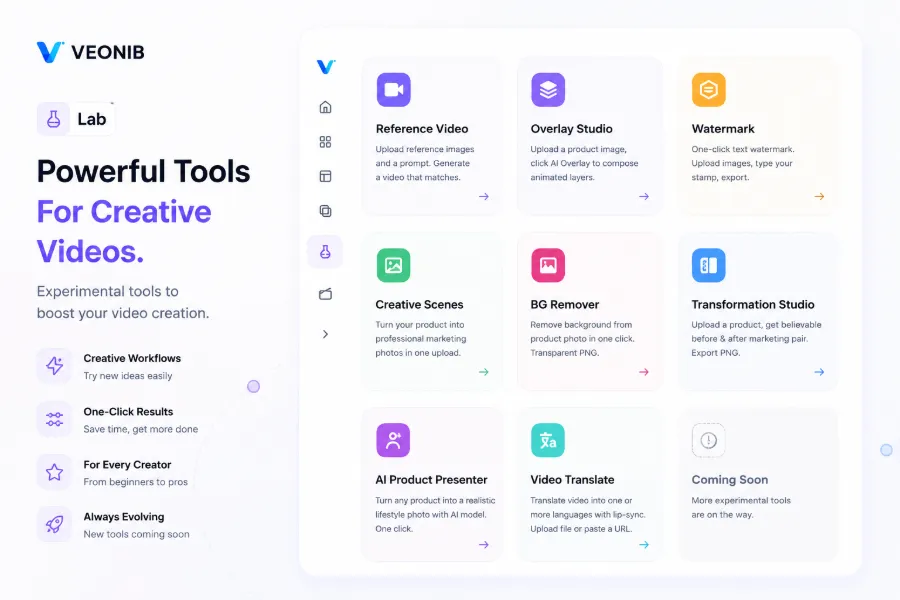
The studio’s background‑removal and comparison‑image features are also worth mentioning. Background removal turns product images into transparent PNGs with one click for use in video scenes. The comparison‑image tool is ideal for “before/after” assets, especially for home‑goods and beauty products. These auxiliary tools may seem minor, but they save repeated masking and re‑shooting time in the actual workflow.
The industry is already discussing more possibilities extending from this direction—moving from manual creation to AI automation, the future of e‑commerce content creation is accelerating.
How to Choose Between the Three Packages? The Most Common Pitfalls for Independent Sellers
Honestly, the thing that puzzles me most about Veonib isn’t the tool itself but the package selection. There are three tiers: Starter $11/mo (30 videos, discounted to $6.6), Growth $23/mo (90 videos, discounted to $13.8), Agency $47/mo (240 videos, discounted to $28.2).
Three common pitfalls: assuming 30 videos are enough, picking the cheapest Starter and then having to buy extra, and not having a clear sense of how many videos you actually need.
If a seller launches one new product per week and creates three different creative videos per product, the monthly consumption is about 12–14 videos. At that pace, the Starter’s 30 videos seem sufficient, right? But the problem is you won’t get a perfect creative on the first try. In our initial test of five videos, only two were usable; the other three required template changes or copy revisions and re‑rendering. So testing a single product can consume 5–8 videos. By the time you test a second product, the Starter quota is already tight.
| Package | Monthly Video Count | Monthly Cost (discounted) | Ideal Use Cases | Common Pitfalls |
|---|---|---|---|---|
| Starter | 30 | $6.6 | Testing phase, occasional releases | Assuming 30 videos are enough; a few creative tests can exhaust them quickly |
| Growth | 90 | $13.8 | Ongoing operations, weekly launches | Best balance for independent sellers |
| Agency | 240 | $28.2 | Multi‑store, agency work, bulk production | Individual sellers may waste videos |
Take Veonib’s Growth plan as an example: 90 videos per month is more than enough for most independent sellers. My current rhythm is 2–3 new products per week, each with four different‑direction videos (main visual, feature highlight, usage scenario, user review), totaling about 30–45 videos per month. This fits comfortably within Growth, leaving room for A/B testing or data‑driven iterations.
If you run multiple stores or provide agency services, the 240‑video Agency plan makes sense—combined with the studio’s comparison‑image and background‑removal tools, you could even offer video production services to other sellers. But for a solo operator with one or two stores, the Agency quota will likely go unused.
Another often‑overlooked point: output stability. A high quota is useless if you don’t have a steady production rhythm. I recommend calculating your product‑launch frequency and ad‑asset refresh cycle over the past three months before picking a tier.
For a systematic look at using AI tools to boost conversion rates, see the case study on AI‑generated before‑and‑after marketing images.
My Real Experience: One Failure, Two Successes
To be honest, my first Veonib video was disappointing.
I used a hand‑cream product link; the AI analyzed the page, generated a script and storyboard. The preview showed mechanical cuts and a voiceover that sounded like a standard AI read‑aloud. The product close‑up even had a color shift—the on‑screen hand‑cream color didn’t match the actual product. I closed the page, thinking it was just a toy.
Later I realized the problem: my product description was terrible—just a copied supplier spec line, with no usage scenarios or user feelings. The AI’s script, based on that sparse page, lacked depth.
On my second try, I enriched the description with terms like “office women,” “winter hand dryness rescue,” and manually selected a softer‑style template. The regenerated video was noticeably better—slower voiceover pacing, smoother cuts. It wasn’t until the third video (after adjusting the template) that I got a final product ready for use.
That failure taught me a key lesson: the lower bound of AI video is low, but the upper bound depends entirely on the product information you provide and the template you choose. It’s not a “paste link and get a perfect video” magic; you need to spend a little time understanding how it works.
After a few weeks of testing, my conclusions are:
AI video works well for: basic product showcases, short social videos, lightweight UGC reviews, and countdown ads for big sales. These scenarios don’t require deep creative depth; the core need is “quick content, data testing.”
It still can’t replace: high‑end brand films, ads with complex narrative logic, professional multi‑scene live‑action videos. Those still need a professional production team.
The real value of AI video isn’t “eliminate all human work,” but reducing the cost of “creative testing” from hundreds of dollars per set to a few dollars, allowing sellers to test many ideas at scale with low risk. It may not sound glamorous, but for small‑to‑medium sellers, that’s the most practical function.
FAQ
Q1: I only need to publish a few videos a month. Is the cheapest Starter plan enough?
It depends on whether you need creative testing. If every video is a final approved piece, 30 videos might be enough. But typically, testing 2–3 variations per video to find one usable one, plus A/B testing and different formats (horizontal + vertical), consumes videos faster than expected. I suggest trying Starter for a month, observing your consumption rate, then deciding.
Q2: The Growth plan costs twice as much as Starter; why is it recommended?
Because 90 videos give you room for iteration. With Starter, once you exhaust the quota you must wait for the next month’s reset, while ad optimization often requires rapid material changes within the same month. Growth’s flexibility prevents your promotion cadence from being blocked by quota limits; the smoother cost curve is worth more than a few dollars saved.
Q3: Can Veonib‑generated videos be used directly on TikTok and Facebook ads?
Yes. The exported MP4 is a platform‑compatible standard format. I’ve uploaded them to Facebook Ads Manager and TikTok Ads Manager without any review or delivery issues. Some TikTok assets may need manual subtitle repositioning to fit the UI, but the video itself doesn’t require re‑encoding.
Q4: If I don’t like the AI‑generated script, can I edit it manually?
Yes. Before video generation you can edit the AI‑generated script and storyboard description. My workflow is to let the AI produce a base script from the product page, then rewrite the opening hook—the most critical part—using my own experience. After editing the script, I click “Generate,” and the result is far better than relying solely on AI.
Share Article


