General AI Video Tools vs E‑commerce Dedicated Tools: The Gap Is More Than Templates—It’s “Understanding the Product”
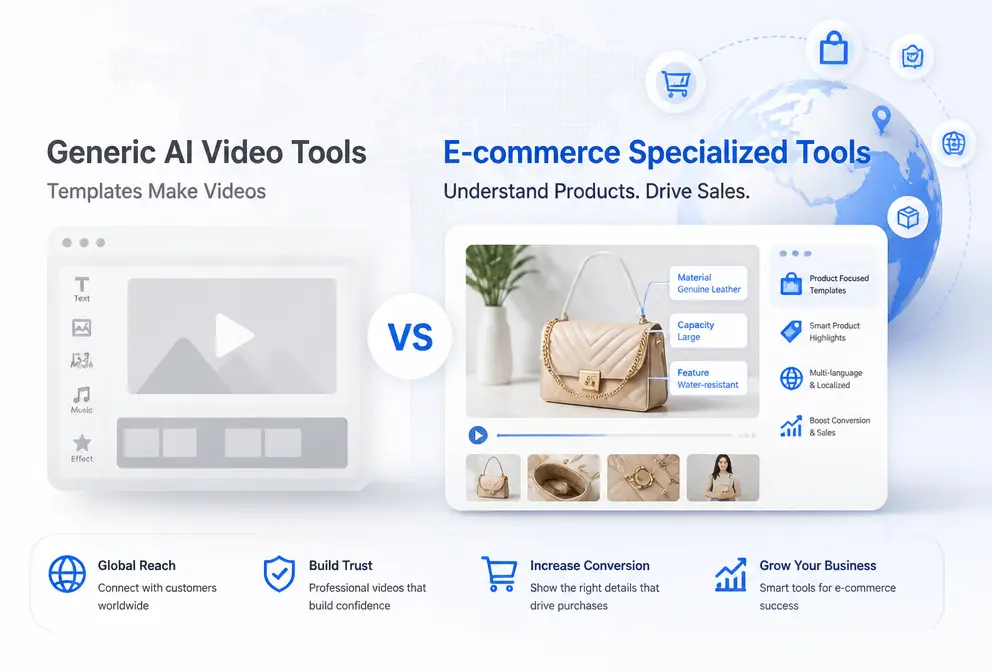
Operations staff translate the new product’s link, selling points, and usage scenarios into prompts line‑by‑line, then feed them to a general AI video tool to generate a video. After running this pipeline a few times, they notice the problems: the visual quality has no glaring flaws, the script keeps circling the selling points, the usage scenarios are guessed, and the ad performance is mediocre. The real scarcity has never been the number of templates, but the tool’s understanding of the product itself.
The difference between general AI video tools and e‑commerce‑dedicated tools is not in image quality or the number of templates, but in whether the product is structurally parsed. General tools shift the entire cost of understanding the product onto the prompts; switching products requires re‑writing the prompts. Dedicated e‑commerce tools read the product link directly and turn the selling points, script, storyboard, and scenes into a deterministic pipeline.
Shortcomings of General AI Video Tools: Acceptable Visuals, Guesswork on Selling Points
General text‑to‑video platforms accept only one input: a prompt. Product information must be manually paraphrased; titles, specs, and usage scenarios suffer layered loss during paraphrasing, so by the time the model generates, the selling points have become an ambiguous description. General tools shift the entire cost of understanding the product to the prompts, and this cost is amplified when scaling up new products.
A more common issue is the disconnect between visuals and marketing structure. Individual frames may look fine, but the whole video lacks a marketing skeleton composed of hook, selling point, and CTA. The first three seconds of a short video almost determine its completion rate; many videos lose most viewers at this stage. General platforms also offer e‑commerce templates, but the templates are just shells; the copy, storyboard, and pacing still need manual assembly.
The most time‑consuming part is iterative refinement. Switching a product invalidates the entire prompt, and material production can never keep up with the cadence of new product launches. Prompt iteration usually takes hours, while a Shopify store may add far more than a handful of new items each month. Even a large number of templates cannot solve this structural cost.
| Comparison Dimension | General AI Video Tool | E‑commerce Dedicated Tool |
|---|---|---|
| Product information input | Manually written into prompts | Paste product link for automatic parsing |
| Script structure | Freeform | Structured as selling point / Hook / CTA |
| Storyboard & scenes | Manually described | Automatically plans camera angles, lighting, composition |
| Production speed | Multiple revisions, hour‑level | Average 60 seconds |
| Editing barrier | Depends on timeline and keyframes | Zero editing experience required |
| Suitable scenarios | Mood and concept exploration | New product launches and bulk ad production |
What “Understanding the Product” Means: A Four‑Layer Structure from Parsing to Storyboard
Understanding a product is not just reading its description; it’s breaking the title, images, specs, and selling points into executable structures. Vertical tools start with product information parsing, automatically reading product images, descriptions, functions, and selling points—eliminating the time‑consuming paraphrasing step that general tools require.
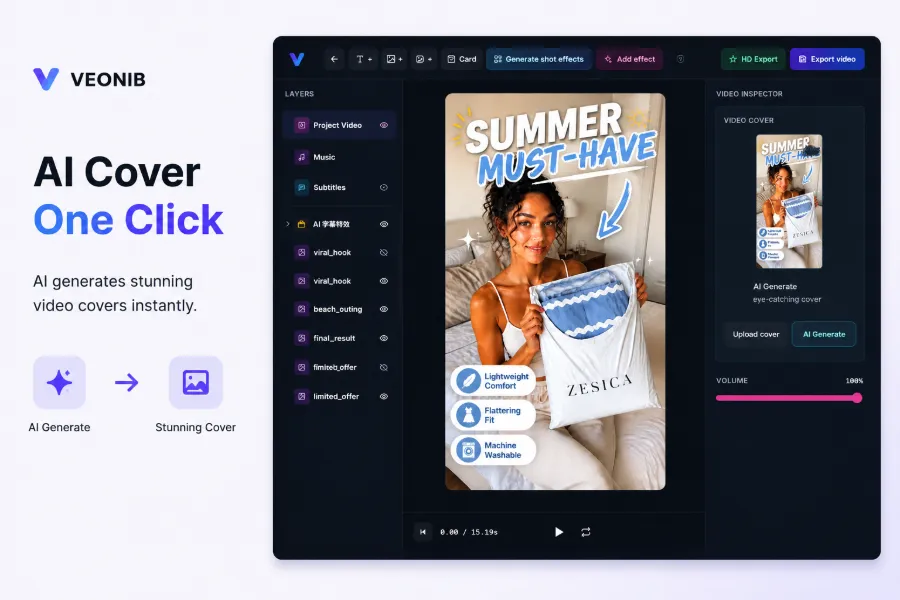
After parsing, the process moves to script and storyboard: the script is generated from selling points into a conversion‑focused copy with a hook, and the storyboard plans each shot to serve a specific information point. This step is the dividing line between “understanding the product” and “pretending to understand the product.” The case study of a kitchen‑ware product broken down into a high‑conversion ad shows how each selling point is mapped to a corresponding shot.
Scene planning fixes the camera angle, lighting, and composition for each shot before generation; most quality gaps stem from this layer. Tools like VEONIB parse, script, storyboard, and scene in a single 60‑second pass after pasting the product link. The four layers form a deterministic pipeline, and replicating a proven “viral” structure becomes a repeatable action.
From Product Link to Finished Video: Where Vertical Tools Fit in the Advertising Workflow
Advertising teams care most about how short the workflow can be. The standard path for vertical tools is: paste product link → AI parses product → export MP4 → distribute to TikTok/Reels/Shorts, Shopify landing pages, and Amazon listings. Three steps average 60 seconds per video, roughly ten times faster than traditional editing.
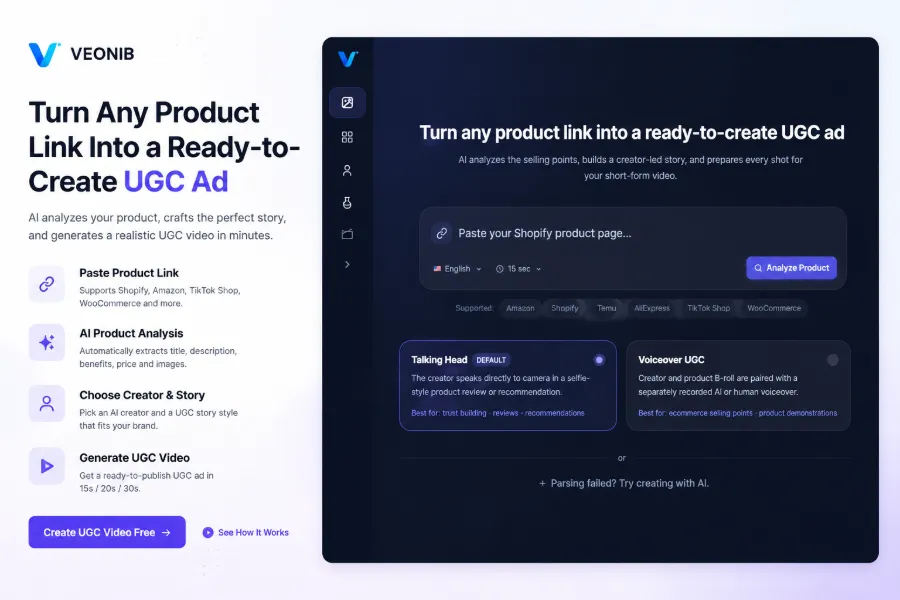
The editing stage is compressed to near‑nonexistence: there are no timelines or keyframes; hook copy, CTA, promotional tags, and social proof are all generated in one pass. In VEONIB’s workflow, humans only select style, review the final video, and download/distribute it. The article “How to turn a product URL into an e‑commerce ad video in minutes” describes exactly this single‑path process.
The advantage of bulk production lies in its structure: product selection, video generation, and distribution form a repeatable chain. The AI‑generated UGC video workflow for e‑commerce brands captures this whole chain; the faster the product‑launch cadence, the more valuable this determinism becomes.
It’s not always a smooth story. An e‑commerce team used a general tool to batch‑produce videos; after two weeks of testing, click‑through rates were clearly below expectations. Post‑mortem revealed that the video scripts deviated from the actual product selling points—the model’s understanding came from paraphrased prompts, and details lost during paraphrasing resurfaced during the ad run. All assets had to be re‑worked, and the ad budget was halved before the team switched to a vertical workflow.
How to Choose: General Tools for Exploration, Dedicated Tools for Delivery
General AI video tools still have a place. Brand mood videos, concept exploration, and style references don’t rely on precise product information, and general tools are more flexible for those needs.
Dedicated e‑commerce tools handle delivery: new product launches, bulk ad material production, listing videos, and social‑media “grass‑planting” content. Even users with zero editing experience can complete the entire pipeline from link to finished video, while general tools require both prompt‑writing and post‑production skills.
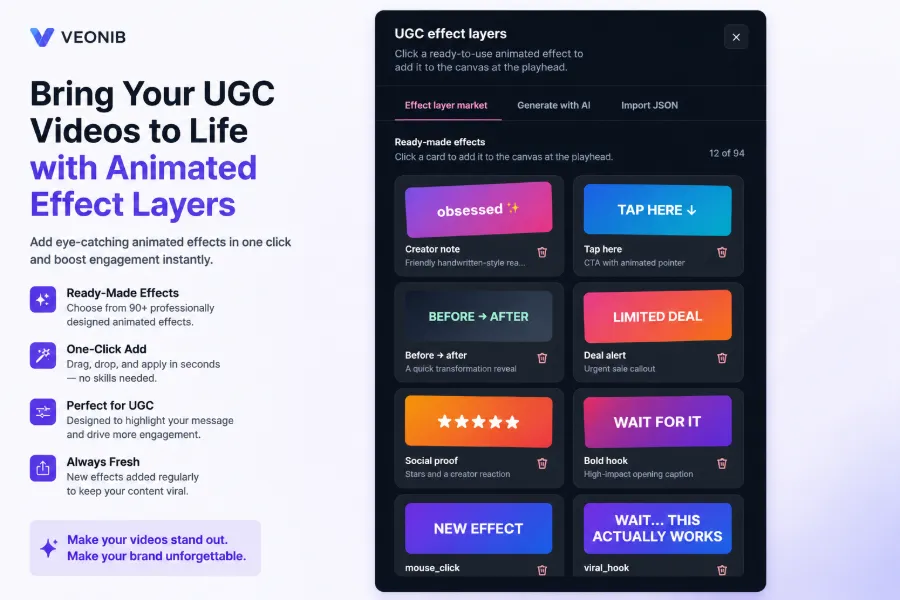
A more practical approach is a combined workflow. Use a general tool early on to set the style direction, then use a dedicated tool to batch‑produce videos based on product structure; the assets can later be re‑assembled into different lengths. The article “Automating the Entire Video Production Pipeline with AI” notes that the more standardized the steps, the more thorough the automation.
Emotion‑driven brand content also rests on product understanding. The automatic flow from product to brand story first clarifies selling points, then expands into brand narrative; reversing the order makes the story drift.
After combining, responsibilities become clear: exploration stays with exploration tools, delivery stays with delivery tools. Mood exploration can tolerate some distortion of selling points, but ad delivery cannot.
Template differences are superficial; the real dividing line is whether the tool performs structural product parsing. When video value heavily depends on accurate product representation, verticalization is inevitable. “Understanding the product” is the true watershed.
FAQ
Can general AI video tools and e‑commerce dedicated tools be used together?
Yes, this is currently a common practice. General tools set the style and validate concepts, while dedicated tools batch‑produce delivery assets based on product structure. After a couple of iterations with the general tool to lock in direction, each new product can be turned into a usable video in about 60 seconds with the dedicated tool.
How does a dedicated e‑commerce tool “understand the product”?
It uses a four‑layer structured parsing: first it reads images, descriptions, and specs from the product link; then it generates a hook‑filled script based on selling points; next it plans the storyboard; finally it fixes camera angles, lighting, and composition for each shot. The whole process completes in a single 60‑second pass, without relying on multiple prompt iterations.
Can someone with no video‑editing experience start using a dedicated e‑commerce tool right away?
Yes. These tools remove timelines and keyframes entirely; scripts, storyboards, and dynamic elements are generated in the creation stage. The complete workflow is: paste link → select style → export MP4. From zero to finished video usually takes less than a minute.
What if product images are low quality or information is incomplete—can the dedicated tool still understand the product accurately?
Low‑quality images affect the final visual fidelity, but product understanding mainly relies on the title, description, specs, and selling points, with images being just one source of information. The more complete the textual data, the more accurate the parsing. Even without images, the tool can still generate scripts and storyboards based on the available text.
Share Article


