The switch-shopping problem is a preview of every cross-border product-research problem
Cross-border sellers spend their days making decisions about physical products they cannot touch: a factory sends a sample photo, a supplier quotes a spec sheet, and an operator in Shenzhen, Kraków, or Austin has to guess whether the thing will feel right in a buyer’s hands. So when I saw Switch Lab, a browser-based 3D keyboard that lets you audition 100 mechanical switches and type on each one, I did not file it under “hobbyist toy.” I filed it under “the demo layer that most DTC catalogs are still missing.” The product itself is narrow — mechanical keyboard switches, a niche inside a niche — but the pattern it demonstrates is one every seller of tactile, audible, or fit-sensitive goods should study. The maker is DongSup_Ahn, and the honest caveats he volunteers in the comments are as instructive as the feature list.
What Switch Lab actually solves — and for whom
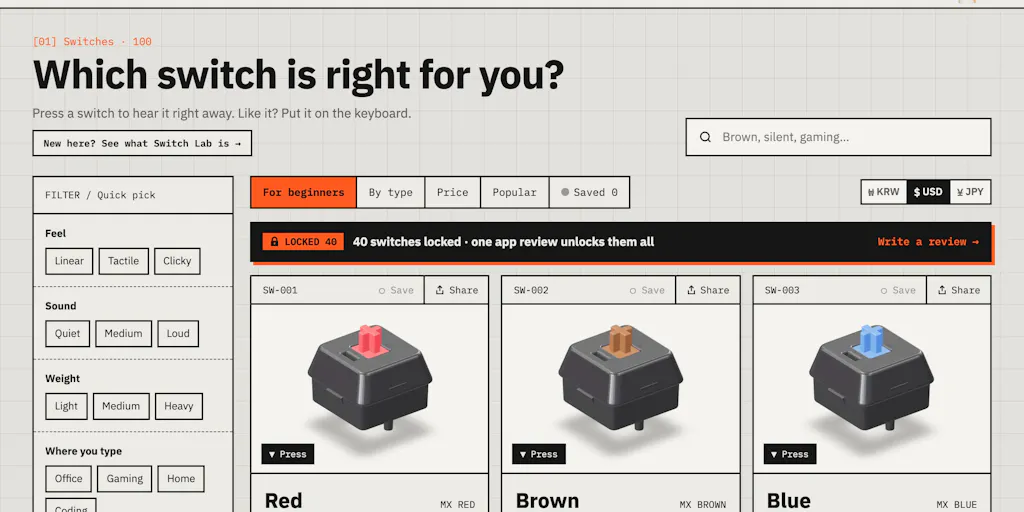
The core problem is stated plainly in the launch post: you can watch sound-test videos and buy sample packs, but you still don’t really know how a switch feels until it’s mounted on your own board. That gap — between spec sheet and sensory reality — is the same gap that kills conversion on everything from fabric weight to mattress firmness to the click of a button on a handheld device.
Switch Lab’s answer is a browser-native 3D keyboard where you swap switches in one click and start typing immediately, comparing, say, a silent linear against a clicky blue on the identical board. It layers on price comparison across shops for each switch, three typing games (Typing Marathon, Stem Drum, and Switch Metro), no sign-up requirement, and English, Korean, and Japanese interfaces. The whole thing is free at switchlab.app.
Why this matters more to marketplace sellers than to Shopify brands
A Shopify DTC brand controls its product page and can embed anything it wants. An Amazon or Temu seller is stuck inside a template: seven images, a video slot, A+ content if they’ve earned it, and a bullet-point character limit. For those operators, the lesson isn’t “build a 3D configurator” — it’s “find the one sensory doubt that blocks the add-to-cart and attack it with the cheapest possible proxy.” Switch Lab’s proxy is a simulated board. Yours might be a 15-second handheld video shot on a phone, a slow-motion fabric drape, or a weight-in-hand comparison against a household object. The mechanism is substitutable; the discipline of naming the doubt is not.
How it differs from the incumbents — and where the comparison gets uncomfortable
The obvious competitors here are not other Product Hunt launches. They’re the incumbent research surfaces in the mechanical keyboard hobby: sound-test YouTube channels, group-buy forums, and retailer sample packs. Switch Lab is, in effect, an aggregator layered on top of the first of those — the maker is explicit that the sounds were not recorded by him but cut from sound-test videos by 38 YouTube channels, with several processing approaches tested before settling on one that adds a short, light room echo so keystrokes don’t cut off abruptly. Volume differences between switches were kept deliberately, because loudness is part of the buying decision.
That honesty is refreshing, and it’s also the product’s structural weakness. In the comments, Adam Petritsis asks the exact question any rigorous operator would: with sounds pulled from 38 different channels, don’t different mics and rooms make some switches sound off? The maker concedes the point — the 3D board is constant, but each clip carries its original board, keycaps, mic, and room. Loudness is normalized so no switch sounds louder purely because of the recording, but the mic and room character can’t be removed. His own verdict: best for rough comparisons, not a replacement for trying the switch in person, with a long-term goal of recording everything himself on one board.
I’d compare this to how Helium 10 and Jungle Scout handle estimation: they give you directional numbers with known error bars, and the professionals who use them well treat the output as a screening tool, not a verdict. Switch Lab is that, for sound. The moment you treat it as ground truth, you’re the seller who sources 5,000 units off a spec sheet and discovers the “soft-touch” finish feels like chalk.
The price-comparison feature deserves its own note. Cross-shop price checking on switches is genuinely useful in a hobby where the same switch sells at wildly different prices across regional vendors — but it also quietly positions Switch Lab as a demand-generation surface for shops it doesn’t own. That’s a business-model question the launch post doesn’t answer, and I’ll come back to it.
What cross-border operators should borrow from this
Three things, in descending order of transferability.
First, the “no sign-up” decision. Switch Lab lets you type on a switch within seconds of landing. No email gate, no account, no onboarding modal. For cross-border sellers running paid traffic into a product page, every field between the ad click and the sensory moment is a tax on conversion. If your product’s appeal is experiential — sound, texture, motion, fit — the demo should be the landing experience, not a reward for handing over an email.
Second, the localization choice. English, Korean, and Japanese at launch is not an accident; it maps to the maker’s own market and two of the deepest mechanical-keyboard enthusiast markets in the world. Cross-border operators routinely localize checkout and skip localizing the research layer. If you sell into Japan, your sizing guidance, your material callouts, and your comparison charts should read as if written there, not machine-shifted from a US listing. The same logic applies to how you brief Klipfolio-style dashboards or any analytics surface your regional teams touch — localize the decision inputs, not just the storefront.
Third, the games. Typing Marathon, Stem Drum, and Switch Metro are engagement mechanics bolted onto a comparison tool. I’m skeptical of gamification as a growth strategy for most catalogs, but the underlying idea — give the visitor a reason to spend ninety seconds with the product instead of nine — is exactly what a TikTok Shop livestream or an interactive Etsy listing tries to do. The metric to watch is time-on-demo, not plays.
Where the math breaks for a real catalog
A 3D configurator works for switches because the variable space is small and the object is simple. Try the same approach on apparel and you’re building a cloth-simulation engine; try it on furniture and you’re in AR territory with device-fragmentation nightmares. The honest read is that most sellers should not build this. They should rent it — through a Shopify app, a WooCommerce plugin, or a lightweight embed — and only for the one or two SKUs where sensory doubt is measurably suppressing conversion. If you can’t name the doubt in a sentence, you don’t have a demo problem; you have a positioning problem.
Where my judgment says it falls short
The audio provenance issue is the big one, and to the maker’s credit he doesn’t hide it. But from an operator’s perspective, “rough comparisons” is doing a lot of work in that sentence. A shopper who hears a switch on a stranger’s board, through a stranger’s mic, in a stranger’s room, and then buys based on that impression has been given a demo that is directionally useful and specifically unreliable. That’s acceptable for a free hobby tool. It would be unacceptable as the basis of a paid product-recommendation engine, and it’s a warning for any seller tempted to build a “virtual try” layer on scraped or third-party media.
The business model is also undisclosed. Price comparison across shops, no sign-up, free access — something has to pay for the bandwidth and the eventual re-recording project. Affiliate links are the obvious guess, but the launch post doesn’t say, and I won’t invent it. Operators evaluating tools for their own stack should always ask this question early, because the answer determines whose interests the tool ultimately serves.
And the catalog is 100 switches. In a hobby where enthusiasts track hundreds of variants, group buys, and limited runs, that’s a solid starting set but not a reference library. The maker is actively soliciting additions, which is the right posture, but it means the tool’s usefulness is a moving target.
The Amazon-seller reading of the caveat thread
The most valuable paragraph in the entire launch is the maker’s reply to Petritsis. Read it as a template for how to talk about your own product’s limitations in a listing or a support macro: acknowledge the specific mechanism of the flaw, state what you did to mitigate it, state what remains, and tell the customer what the tool is and isn’t for. That is a trust-building pattern that works on Amazon Seller Central just as well as on Product Hunt, and it’s rarer than it should be.
What I’d watch / test next
This week, if you sell anything where touch, sound, or fit drives the purchase, do three things. One: pull your top three return reasons from the last ninety days and see whether any of them are sensory surprises rather than sizing or damage — that’s your demo candidate. Two: open Switch Lab yourself and time how long you spend with it before you form an opinion on a switch; that number is your benchmark for how long a good demo should hold a stranger. Three: prototype the cheapest possible proxy for your own product — a phone video, a comparison photo against a familiar object, a 20-second audio clip — and run it as a listing image or A+ module against your control for two weeks.
Watch the maker’s promised single-board re-recording project; if it ships, it becomes a genuine reference tool rather than a rough screening aid, and the pattern becomes worth copying more seriously. And watch whether the price-comparison layer stays neutral or starts steering toward paying shops — that’s the tell for whether this grows into infrastructure or stays a clever demo.