Why a Markdown Notes App Matters More to Your Cross-Border Business Than Another SEO Tool
If you are running a cross-border e-commerce operation—whether you’re launching a new product on Amazon, managing a Shopify store, or scaling a DTC brand on TikTok Shop—you are drowning in proprietary silos. Your ad data lives in a platform-specific dashboard. Your inventory files are in a CSV that only your 3PL can parse. Your supplier communications are scattered across WeChat, email, and WhatsApp. Your product research notes are trapped inside a Notion workspace that exports like a half-baked PDF. And every time you switch tools or move from one marketplace to another, you lose context, time, and money.
That is the real problem: data lock-in, not feature gaps.
I’ve been watching the Product Hunt launch of Bamboo for a few days now, and while the product itself is a simple markdown note-taking app, the architectural decisions behind it are a masterclass in what every e-commerce operator should demand from their tech stack. The maker, Johnny Chan, has built something that prioritizes portability, local control, and optional AI—values that are almost absent in the tools we use to run our businesses. This essay is not a review of a note-taking app. It’s a critique of how we choose our cross-border tooling, and why the principles baked into Bamboo are the ones you should steal for your own stack.
The Problem That Bamboo Actually Solves (and Why You Should Care)
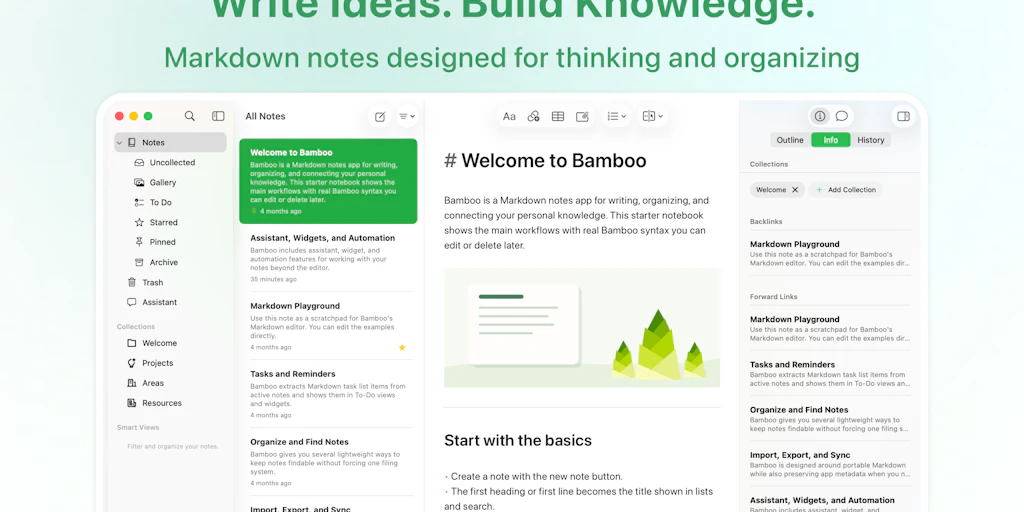
Bamboo is a markdown-first notes app for iPhone, iPad, and Mac. It stores every note as plain markdown, syncs through your own iCloud account, and offers AI features that are entirely optional and bring-your-own-key. The product is aimed at knowledge workers who are tired of being locked into systems that hold their notes hostage.
But read the comments on the launch page. The questions that real users are asking are identical to the questions you should be asking about your e-commerce tools.
- “How does the cross-device sync actually work under the hood, and is my data ever routed through your servers?” – Selma
- “What happens to my notes if you ever shut down the service?” – Saniye Örikli
- “When I export, do wiki links come out as portable markdown that still resolves in another editor?” – Valeria
These are not niche concerns. They are the exact same fears that surface when you try to migrate from one marketplace aggregator to another, or when you realize your entire listing optimization history is locked inside Helium 10 or SellerSprite, or when you discover your Shopify order data can’t be easily combined with your Amazon Seller Central numbers without a dedicated data pipeline.
Bamboo solves this by making data portability the default. Your notes are markdown files. They can be opened in any text editor. They back up via your own cloud account. The creator explicitly states: “Bamboo is not tied to a required backend service that we operate, so your notes are not locked behind our servers.” – Johnny Chan on vendor lock-in
Now map that to your cross-border stack. How many of your tools have that same guarantee? Your Klaviyo data is exportable, but it comes in a CSV with no relational structure. Your TikTok Shop analytics live in a proprietary dashboard with no API for third-party tools. Your Temu supplier communications are inside an app that doesn’t even let you download chat history.
The core lesson: If your tool’s data is not open, portable, and backable without the tool’s permission, then that tool owns your business intelligence.
How Bamboo Differs from the Incumbents (Notion, Evernote, Craft)
Let’s be honest: the note-taking space is crowded. Notion dominates team knowledge bases. Evernote is the aging giant. Craft is the beautiful challenger. Obsidian is the developer darling. Bamboo’s differentiator is not a feature list—it’s a philosophical stance.
No Proprietary Storage
Notion stores your pages in a database that exports to markdown but loses internal links and database views. Evernote uses its own .enex format. Even Obsidian, which is markdown-first, has long had arguments about wiki link compatibility. Bamboo stores notes as plain markdown files in your iCloud folder. That means you can open them with TextEdit, VS Code, or any markdown editor. The wiki links [[Note Title]] survive export intact. The maker explicitly states: “Notes and web clippings are stored as Markdown. Wiki links are preserved as [[Note Title]] style links in Markdown/TextBundle exports, so they remain readable and portable.” – Johnny Chan on export
For a cross-border seller, imagine if your product research database could be exported as plain markdown with linked pages—and then imported into any other tool. That is the opposite of what you get with most e-commerce SaaS.
No Backend Vendor Lock-In
Bamboo uses iCloud for sync, not its own servers. This is a huge risk transfer: Apple stores the data, not Bamboo. If Bamboo goes bankrupt, your notes live on. Compare that to Jungle Scout or Keepa—if those companies change pricing or shut down, your historical data is gone unless you manually exported.
No AI Credit Markup
The AI feature is pass-through with your own API key. “If you bring your own key, it is pass-through. Bamboo does not add a markup, resell AI credits, or bill per token.” – Johnny Chan on AI pricing
This is radical. Most SaaS products that offer AI embed a hidden margin—they charge you $10/month but use GPT-4o, which costs them $3. That margin is fine if you don’t want to manage keys. But for a power user who runs multiple API calls (e.g., running product descriptions through OpenAI daily), the markup adds up fast. Bamboo says no: you bring the key, you pay the provider directly, and Bamboo just enables the feature.
What Cross-Border Sellers Can Borrow from Bamboo
You are not going to use Bamboo to run your fulfillment. But the design principles are directly transferable to how you should evaluate your e-commerce tool stack.
1. Demand Data Portability Contracts
When you adopt a new tool—whether it’s for supplier communication, inventory management, or PPC analytics—ask the vendor: “If I want to leave, how do I get my data out, in a format that can be imported elsewhere?” If the answer is “CSV export” or “we’ll give you a JSON dump,” you are accepting partial lock-in. Instead, demand tools that store your data in open formats (markdown, JSON, SQLite) or that offer a documented API that you can use to migrate.
This is not hypothetical. I have seen sellers lose years of competitor research because they used a proprietary note-taking tool inside a marketplace that then got acquired and closed. Bamboo’s approach—pure markdown, no separate backend—is the gold standard.
2. Build Your Own “Local-First” Knowledge Base
Your product research workflow likely involves copy-pasting data from Amazon listings, TikTok videos, and supplier catalogs into spreadsheets or Notion. That data degrades over time because it’s not structured, not linked, and not versioned.
Take Bamboo’s architecture as inspiration. Use a markdown-based knowledge base like Obsidian or Logseq (or Bamboo itself) to store each research item as a note with wiki links between related products, suppliers, and keywords. Use a local folder structure that you back up to your own cloud. That way, your research is never trapped in a single SaaS dashboard.
3. Use AI Only Where It Has Clear ROI, Not as a Feature Toggle
Many sellers I talk to subscribe to AI-powered tools because they feel pressured. “Every competitor uses AI listing generators, so I must too.” But Bamboo’s model—optional, bring-your-own-key, no hidden costs—is a better fit for cross-border operations. You can connect your own OpenAI API key, run models like GPT-4o, or even use local models via Ollama. That gives you control over cost, privacy, and model choice.
For example, if you’re writing German product titles for Amazon.de, you might want to use a fine-tuned model that costs less than GPT-4. Bamboo’s approach lets you swap models without paying a middleman. In contrast, most SaaS tools lock you into their AI provider and pricing.
4. Build Redundancy into Your Sync and Backup
Bamboo syncs via iCloud, but notes are also stored locally. If you lose internet, you still have your notes. Compare that to cloud-only tools like Airtable or Google Workspace—if your internet goes down or the service has an outage, you are blocked.
For e-commerce, this is critical for inventory management. If your ShipStation goes offline during a flash sale, you need a local fallback. The same applies to your product research and supplier data. Having a local-first copy of your core data (supplier contacts, SKU master files, cost tables) prevents business stoppage when a SaaS vendor has a bad day.
Where My Judgment Says Bamboo Falls Short
No tool is perfect, and Bamboo has real limitations for a cross-border operator—some of which are architectural, some are just missing features.
The Apple-Only Limitation
Bamboo is currently only on iPhone, iPad, and Mac. That’s fine if your team is all-Apple, but most cross-border operations involve a mix of Windows, Android, and Linux (especially for virtual assistants or overseas teams). The maker could add a web version, but that would require a backend server, which would break the “no backend” promise. For now, if you have a Windows-based assistant in Shenzhen, they can’t use Bamboo. Compare that to Notion or Obsidian, which are cross-platform.
Weak Team Collaboration
Bamboo is a personal notes app. There is no sharing, no comments, no real-time collaboration. For a solo seller, that’s fine. But if you have a team of product researchers, ad buyers, and supply chain managers, you need shared workspaces. Bamboo’s iCloud sync is per-user. You could use a shared Apple ID, but that’s messy. For collaborative research, Notion or Craft are better suited—even if they lock you in more.
No Auto-Discovery for Local Models
The maker offers a workaround to connect local models via OpenAI-compatible API, but “there is no special Ollama/LM Studio auto-discovery yet.” – Johnny Chan on local models. For a non-technical user, this is a barrier. Many sellers I know have a tech-savvy colleague, but not all. If Bamboo wants to appeal to the e-commerce crowd, they need a simple “Connect to Ollama” button.
Wiki Link Relocation Still Manual
When you rename a note, the [[Note Title]] references in other notes do not update automatically. The maker confirms: “Bamboo does not yet rewrite them into relative links automatically.” – Johnny Chan on wiki links. For a knowledge base that grows over months, this creates broken links. Obsidian has graph-level refactoring. Bamboo lacks that. For cross-border sellers who maintain a large product research database, broken links would be a dealbreaker.
Why Amazon Sellers Should Care More Than Shopify Ones
Let me call out a specific dynamic. Shopify sellers often have a more modular stack—they use Klaviyo for email, ReConvert for post-purchase, and ShipStation for fulfillment. Each tool has a defined API and export. Amazon sellers, by contrast, are trapped in a closed ecosystem. Seller Central is the only source of truth for orders, PPC data, and inventory. Third-party tools like Helium 10 and SellerLabs must scrape or use limited APIs. If Amazon changes its data access policies (as it did with the SP-API migration), your tools break.
Bamboo’s model—where the data lives on your device, synced through your own cloud—is a direct answer to that dependency. You don’t need Amazon’s permission to back up your research notes. You don’t need a third-party tool’s goodwill to export your keyword lists. For Amazon sellers, the ability to keep a portable, offline, markdown-based research database is a form of insurance.
Where the Math Breaks
Bamboo’s pricing is simple: Pro unlocks AI features. But if you’re a heavy user of GPT-4o for product copywriting, the cost of the API calls can eclipse the $5/month subscription. That’s fine—you are paying OpenAI directly, not Bamboo. However, many sellers might prefer a bundled plan that includes a fixed number of AI tokens. Bamboo’s raw pass-through model requires you to monitor your API usage separately. That adds friction. For a busy operator, friction is death.
What I’d Watch / Test Next
This week, I’m not going to tell you to switch your entire note-taking workflow to Bamboo—especially if you’re on Windows or need team collaboration. But I am going to tell you to steal its principles.
Here are three concrete steps you can take in the next seven days:
1. Audit your current tool stack for data portability. List every SaaS tool you use for product research, supplier management, ad optimization, and inventory. For each, ask: “Can I export my data in a structured, open format without losing relationships?” If the answer is no, start looking for alternatives. At a minimum, create a manual export schedule every month and store the exports in a local folder.
2. Build a local-first product research vault using markdown. Whether you use Bamboo, Obsidian, or even a plain text editor, start writing your research notes in markdown. Use [[Product Name]] links between related items. Store the vault in a folder that syncs to your own cloud (iCloud, Dropbox, or a self-hosted Nextcloud). This gives you a portable, backup-friendly archive that no SaaS can hold hostage.
3. Test connecting a local AI model to your workflow. If you have a Mac or Linux machine, install Ollama and pull a small model like llama3.2:1b. Then configure Bamboo (or another markdown tool) to use it via the OpenAI-compatible API. Run a test: generate a product description for a German Amazon listing. See how the quality compares to GPT-4o and note the cost difference (zero for local vs. ~$0.01 per description for GPT-4o). You might find that local models are good enough for drafts, and you only pay for cloud AI on final copy.
The most important takeaway from Bamboo is not the app itself. It’s the reminder that your business data is your asset, not your tool vendor’s. The tools that respect that principle are the ones worth betting on. The ones that don’t? They are just future migrations waiting to happen.


