The quiet security tax on every cross-border storefront
Every cross-border seller I know runs a storefront they did not fully build. You inherited a theme, bolted on a page builder, layered in a review widget, a currency switcher, a size chart app, and a chat bubble — and at some point you stopped being able to explain why the product page renders the way it does. That opacity is not just an engineering annoyance. It is a conversion problem, a compliance problem, and increasingly a security problem. So when a tool shows up that reads a live page’s real design system without asking for blanket access to every site you’re logged into, I pay attention — not because I’m a front-end purist, but because I’ve watched too many operators hand “read and change all your data on all websites” to a closed-source Chrome extension and never think about it again.
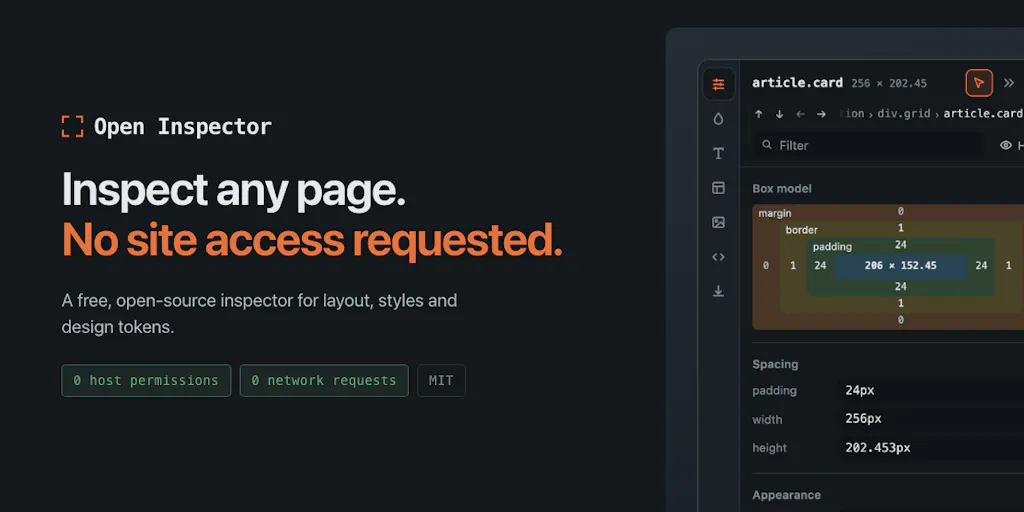
That’s the lens I want to use for Open Inspector, a free, MIT-licensed CSS inspection extension built by Patryk Lasek. On the surface it’s a developer tool. For anyone running Shopify, Amazon, TikTok Shop, or a DTC stack across multiple markets, it’s a small case study in how to build trust into a tool that touches production surfaces — and a reminder of how much of your stack you’ve never actually audited.
What problem it actually solves
The pitch is narrow and honest: existing CSS inspector extensions demand broad host permissions. As Lasek puts it, every one he tried asked to “read and change all your data on all websites” — which, for someone juggling staging environments, internal dashboards, and logged-in admin panels, is a real risk. His alternative asks for nothing beyond activeTab, which the browser grants only when you click, scoped to one tab, and revokes when you navigate away. The install dialog shows no site access at all. He also claims zero network requests, enforced by a build step that scans source and shipped bundles for fetch, XHR, WebSocket, and beacon calls and fails the build if any appear.
On the functional side, it surfaces things DevTools buries: the spacing scale a page actually follows, its type scale, grid/flex anatomy, the font that actually rendered, and a page-wide WCAG contrast audit. It can export a design system as CSS variables, Tailwind config, SCSS, JSON, W3C design tokens, or a Markdown handoff for Cursor or Claude. Edits are live but revert on close. It’s free forever, MIT licensed, and triggered with Alt+Shift+I.
For a cross-border operator, the interesting part is not “another inspector.” It’s the permission model and the export formats.
Why Amazon sellers should care more than Shopify ones
Shopify merchants can, within limits, edit theme code and see what’s happening. Amazon sellers cannot. Your Amazon Seller Central storefront, A+ Content, and Brand Store are rendered by Amazon’s own stack. You don’t control the CSS. But you do control the assets you upload — image dimensions, text hierarchy, brand colors — and you frequently have to reverse-engineer what Amazon’s template is doing to make your brand assets look coherent next to competitors. A tool that tells you the actual rendered type scale and contrast ratios on a live listing page is genuinely useful for diagnosing why your hero image looks washed out or why your A+ module text fails accessibility expectations in some markets.
The same logic applies to TikTok Shop and Temu storefronts, where you have even less control and where mobile-first rendering means your carefully designed desktop assets may be getting scaled, cropped, or recolored in ways you never see.
The permission model is the real product
Lasek’s exchange with Gal Dayan in the comments is the most instructive part of the launch. Dayan argues the activeTab-only approach “is the actual selling point here, not a footnote.” I agree, and I’d extend it: for cross-border operators, the permission model is a proxy for how much you should trust any tool in your stack. If you’re installing extensions on a browser where you’re logged into Seller Central, Shopify admin, your 3PL dashboard, and your ad accounts, every extension is a potential exfiltration vector. A tool that structurally cannot phone home is a different category of risk than one that promises it won’t.
This is the same reasoning that should make you skeptical of the long tail of “Amazon keyword” and “Shopify spy” extensions that ask for full site access. Most are fine. Some are not. The ones that can’t misbehave are easier to trust than the ones that merely say they won’t.
What cross-border sellers can borrow from it
Three transferable ideas, none of which require you to install anything.
First: design tokens as a handoff format. The export options — CSS variables, Tailwind, SCSS, JSON, W3C tokens, Markdown for Cursor/Claude — matter because they map onto how modern cross-border teams actually work. If you’re briefing an agency in another timezone, or feeding a page builder, or asking an AI assistant to generate a landing page variant, a token file is a far better input than a screenshot and a paragraph of vibes. Most DTC brands I’ve audited have no canonical token file. They have a Figma that’s six months stale and a live site that has drifted. Tools like this at least let you extract the truth from production.
Second: contrast audits as a market-entry checklist. WCAG contrast is not just an accessibility nicety. In the EU, the European Accessibility Act obligations are phasing in, and in the US, ADA-related e-commerce litigation keeps climbing. If your storefront fails contrast in a market where you’re also handling GDPR data, you’re stacking compliance exposure. A page-wide contrast audit is a five-minute check that most operators never run.
Third: the build-step enforcement pattern. The detail that the build fails if it finds any network call is worth stealing conceptually. Whatever your stack, you should have at least one automated check that makes a bad thing structurally impossible rather than merely discouraged — whether that’s a script that flags product feeds missing required attributes before they hit Google Merchant Center, or a CI check that blocks a theme deploy if tracking pixels are missing.
Where the math breaks
Dayan’s follow-up question cuts to the real limitation. When a site uses CSS-in-JS with generated class names and no real design system, does the export produce something coherent, or a flat list of one-off values? Lasek’s answer is refreshingly honest: the tool ignores class names entirely and reads computed styles of what’s on screen. Near-identical colors get merged, and they’re named by appearance — blue-600, gray-100 — not by semantic role. You won’t get “primary” or “surface,” because that intent isn’t on the page. Spacing is the weak spot: it works out the base unit (his example: “8px, 92% of values fit”) but still lists every value it finds, including outliers. On a messy site, that list gets long, and cleanup is on the roadmap.
Dayan suggests bucketing odd values into “nearest multiple of the base unit, off by Xpx” rather than listing them raw — which would tell you whether a value is rounding drift or an intentional one-off without pretending to know intent. That’s a good idea. It’s also the kind of distinction that matters when you’re trying to figure out whether your theme is broken or your page builder is doing something deliberate.
Where my judgment says it falls short
I like the tool. I’m not going to pretend it’s more than it is.
It’s a developer utility, not a merchandising tool. It will not tell you why a product page converts poorly, which hero image wins, or whether your PDP is too long for mobile. It reads what’s rendered; it doesn’t interpret commercial intent. If you’re a solo operator without front-end chops, the exports will be more confusing than useful until you have someone who can consume them.
The spacing export is, by the maker’s own admission, not clean yet. If you’re using it to build a token library from a legacy theme, budget time for manual pruning.
The Markdown handoff for Cursor/Claude is a nice gesture toward AI-assisted workflows, but I’d want to see how it performs on a real, messy storefront before treating it as a production input. AI tools are only as good as the structure of what you feed them, and “every spacing value we found, including the weird ones” is not a great prompt.
And the trust claims — zero network requests, MIT license — are verifiable in principle but you should still verify. The whole point of preferring a structurally safe tool over a promising one is that you don’t have to take the promise on faith.
What I’d watch / test next
This week, if you run a storefront across more than one market, do three things. First, open your highest-traffic PDP in Chrome and run a contrast audit — manually or with a tool like this — and note every element that fails. You’ll probably find at least one, and it’s a five-minute fix that reduces legal exposure. Second, pull your actual rendered type and spacing scale from production and compare it to whatever your brand guidelines claim. The gap between the two is usually wider than anyone on the team believes. Third, audit your browser extensions: list every one installed on the browser you use for Seller Central, Shopify admin, and ad accounts, and check what permissions each one holds. Anything asking for “all sites” that you can’t justify should go.
On the tool itself, I’d watch whether the spacing cleanup ships, whether the AI handoff format gets real-world testing, and whether anyone forks it into a hosted service for teams that don’t want to manage extensions. The permission model is the interesting part. If it works, it’s a template for how the rest of your stack should be built.