The $9 Bet That Screen Recording Finally Becomes a Cross-Border Ops Skill
Cross-border sellers live and die by asynchronous video. A sourcing walkthrough sent to a factory in Dongguan. A listing audit recorded for a VA in Manila. A TikTok Shop creative brief that a UGC editor in Warsaw needs to execute without a single follow-up call. Every one of those workflows dies a slow death the moment the person recording has to stop, scrub the timeline, and hand-place zoom keyframes over every click. That’s the tax nobody invoices for. So when a maker shows up on Product Hunt claiming the zoom-and-pan can be generated automatically from cursor telemetry — and prices it at a one-time $9 — I pay attention, because the operators I know are running lean content teams across time zones and cannot afford an hour of editing per five minutes of footage.
What Lumiko Actually Solves (and What It Doesn’t)
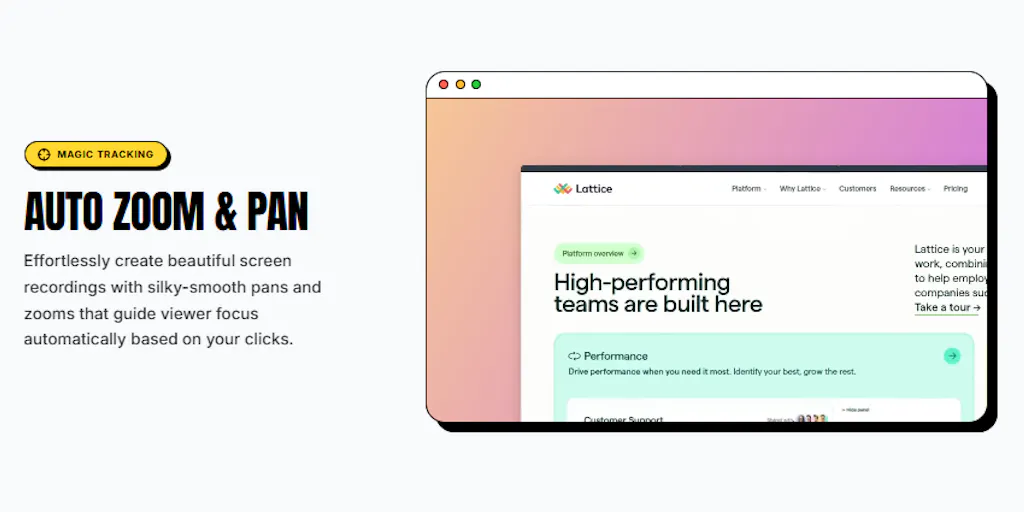
Lumiko, built by Ashish Patnaik, is a screen recorder that watches where your cursor moves while you record, then auto-generates zoom and pan movement the moment you stop. The pitch in the maker’s own words is blunt: he “kept losing an hour to keyframes after every five-minute recording,” and the zoom-and-pan you see in polished tutorial videos “usually comes from someone manually placing markers over every click.” That’s the entire wedge. You still get a timeline editor for trimming and reordering clips, plus a Smart Blur feature for hiding sensitive info like API keys before you share anything. Rendering happens locally — no account, no upload step, no server queue.
For a cross-border seller, the local rendering point matters more than the maker probably realizes. If you’re recording a walkthrough of your Amazon Seller Central dashboard to hand off to a new account manager, you are showing supplier names, ad spend, ACOS, sometimes margin data. Uploading that to a cloud recorder is a compliance question your ops lead should be asking. Local-only is a quiet feature until it’s the only feature that matters.
The pricing is the other headline: Pro is $9, one time, no subscription. It removes the watermark, unlocks 4K exports, and covers 3 devices for life. In a SaaS landscape where Loom has pushed most teams onto per-seat monthly billing and Screen Studio sits at a materially higher one-time price, a $9 lifetime unlock reads less like a pricing strategy and more like a positioning statement.
Why Amazon sellers should care more than Shopify ones
Shopify operators tend to work in a browser with a clean UI and a design system that already looks presentable on camera. Amazon sellers do not. Seller Central is dense, dated, and full of numbers you don’t want on a YouTube tutorial. The workflow that benefits most from auto-zoom isn’t “make a pretty product demo” — it’s “walk a VA through the exact sequence of clicks in the FBA inbound workflow without them pausing the video forty times.” Cursor-driven zoom does that natively, because the zoom literally follows the click path. Smart Blur covers the rest.
How It Stacks Up Against the Incumbents
The screen recording category is crowded, but it’s crowded in a specific way: most tools compete on sharing, collaboration, and cloud infrastructure. Loom won the async-video-for-teams narrative by making the link the product. Tella chased the creator segment with better editing primitives. Screen Studio went the other direction — beautiful auto-zoom and motion, macOS-only, one-time price, and a reputation among indie hackers for producing footage that looks like it cost ten times what it did.
Lumiko is closer to Screen Studio in spirit than to Loom. The differentiator isn’t the editor — it’s the input signal. Screen Studio’s auto-zoom is largely driven by click events and post-hoc smoothing. Lumiko’s claim is that it watches cursor movement continuously, which is why the maker can answer a user like Justin Rockmore — who flagged that “cursor position is right most of the time and wrong on the takes where I’m moving the mouse while I talk” — with a concrete override path rather than a promise. The fix is documented in-thread: click the blue Zoom block on the timeline, change Position from Follow cursor to Fixed, drag the target box where you want it, and adjust or delete the block entirely. That’s a real editing model, not a black box.
The browser extension angle is the second differentiator. Lumiko ships as a Chrome extension, which puts it in the same install path as the rest of a seller’s stack — Helium 10, Jungle Scout, Keepa, whatever your team already runs. No desktop app to provision, no IT ticket. For a distributed team of VAs, that’s the difference between “everyone has it by Friday” and “three people have it, two are on the wrong OS.”
Where the math breaks
$9 lifetime for 3 devices is a great deal for a solo operator. It is not obviously a business. The maker is answering support threads personally — the activation flow involves opening the extension, recording one second, stopping, clicking Upgrade to Pro, selecting 4K from the Export dropdown, clicking “Already purchased?”, and pasting a key in the format LUMIKO-XXXX-XXXX-XXXX. That’s six steps for a paying customer to unlock what they already bought. It works, and the maker walked a frustrated buyer through it politely, but six steps is six places to lose someone. At scale, that’s a support queue, not a product.
What Cross-Border Operators Should Borrow From This
Three things, and none of them are about video.
First: instrument the boring input. Lumiko’s insight is that the cursor already contains the information you need — you just have to record it. Cross-border sellers have the same opportunity in their own operations. Your 3PL’s scan events, your Shopify order timeline, your Amazon return reasons, your TikTok Shop ad delivery logs — these are cursor telemetry for your business. Most operators look at the output (revenue, ACOS, return rate) and ignore the input trace. The teams that build dashboards on the raw event stream are the ones who catch a fulfillment regression two weeks before it shows up in the P&L.
Second: local-first is a feature, not a compromise. Lumiko renders on your machine. No upload, no account, no queue. For sellers handling supplier pricing, ad account credentials, or customer PII, that’s not a nice-to-have — it’s the reason you can use the tool at all. When you evaluate your next SaaS purchase — a repricing tool, a review automation platform, an AI listing optimizer — ask where the data goes. “Cloud-native” is a marketing phrase until it’s a data processing agreement you can’t sign.
Third: one-time pricing is a wedge, not a moat. $9 lifetime will get Lumiko attention on Product Hunt and in indie hacker circles. It will not fund a support team, a Windows build, or a mobile app. If you’re a seller deciding whether to build your workflow on top of it, that’s fine — the export is a video file, not a lock-in. But don’t build a process that depends on a $9 tool staying alive. Treat it like a utility, not a platform.
The distribution problem nobody on Product Hunt talks about
Lumiko’s launch thread is a textbook case of a maker doing support right — fast, specific, non-defensive. But look at who’s commenting: indie hackers, other makers, a buyer who can’t find the activation screen. That’s the Product Hunt audience. It is not the cross-border seller audience. The seller who needs this most is a 34-year-old Amazon brand owner in Shenzhen or Austin who has never opened Product Hunt and finds tools through a YouTube tutorial, a Slack community, or a VA agency’s recommended stack. Lumiko’s growth problem isn’t the product. It’s that the people who’d pay $9 without thinking are on a different website.
If I were advising the maker, I’d say: get this into the hands of three Amazon agencies and let them record their onboarding videos with it. The auto-zoom on Seller Central clicks is the demo. Not the cursor tracking.
Where My Judgment Says It Falls Short
The override flow is real but manual. Justin’s complaint — cursor position wrong when the mouse moves while talking — is the exact failure mode that kills auto-zoom tools for anyone doing voiceover-heavy content. The fix (switch to Fixed, drag the box) is fine for a power user. For a VA recording their first walkthrough, it’s a stumble. The tool needs a “re-record this zoom” or “nudge the anchor” gesture that doesn’t require opening a properties panel.
Windows support is not mentioned in the source. For a cross-border seller with a mixed-device team — Macs for the founders, Windows for the warehouse and the VAs — that’s a silent dealbreaker. Not disclosed, and worth asking before you standardize on it.
The 3-device lifetime cap is generous for an individual and awkward for a team. If you’re running five VAs, you’re buying two licenses and figuring out which three devices matter. That’s fine at $9. It becomes a conversation at any other price.
And the biggest gap: there’s no mention of a team library, shared presets, or brand templates. Every operator I know who runs content at scale wants the same zoom behavior, the same blur rules, and the same export settings across every recorder on the team. Lumiko is a personal tool right now. The team version is the one that would actually change how a cross-border brand produces video.
What I’d Watch / Test Next
This week, if you run any kind of recorded handoff — VA onboarding, supplier briefs, listing audits, UGC direction — do three things. First, install the Lumiko Chrome extension and record a five-minute Seller Central or Shopify Admin walkthrough with voiceover. Watch the auto-zoom behavior specifically on the takes where you’re talking while moving the mouse. That’s the edge case that decides whether it’s a tool or a toy for your workflow. Second, test the Smart Blur on a screen that contains an API key or a supplier name, and verify the blur holds through export at 4K, not just in preview. Third, price out the alternative: one hour of a UGC editor’s time versus the $9 lifetime license, multiplied by the number of recordings your team ships per month. If the math favors the tool, standardize on it for one team, not the whole company, and revisit in 90 days when you know whether the maker has shipped Windows support and a team library. If he hasn’t, you’ve lost $9 and learned something about how you record. That’s a cheap experiment in a category where the incumbents charge monthly.