The note-taking rabbit hole is a supply-chain problem in disguise
Every cross-border seller I know runs on the same brittle substrate: a Google Drive graveyard of supplier quotes, a Notion wiki nobody reads, a Slack channel where the TikTok Shop creative brief went to die, and a founder’s brain holding the whole thing together. We obsess over fulfillment latency and ad spend, then lose a $40k MOQ negotiation because the spec sheet lived in an email thread from March. So when a tool shows up promising to restructure how ideas connect, I pay attention — not because I care about note-taking as a hobby, but because product research, compliance docs, and creative pipelines are all note-graphs wearing different hats. That’s why Understory, launched by maker Allen Ussher, is worth a look from operators who’ve never once described themselves as “PKM people.”
What Understory actually does, and why the mechanic matters
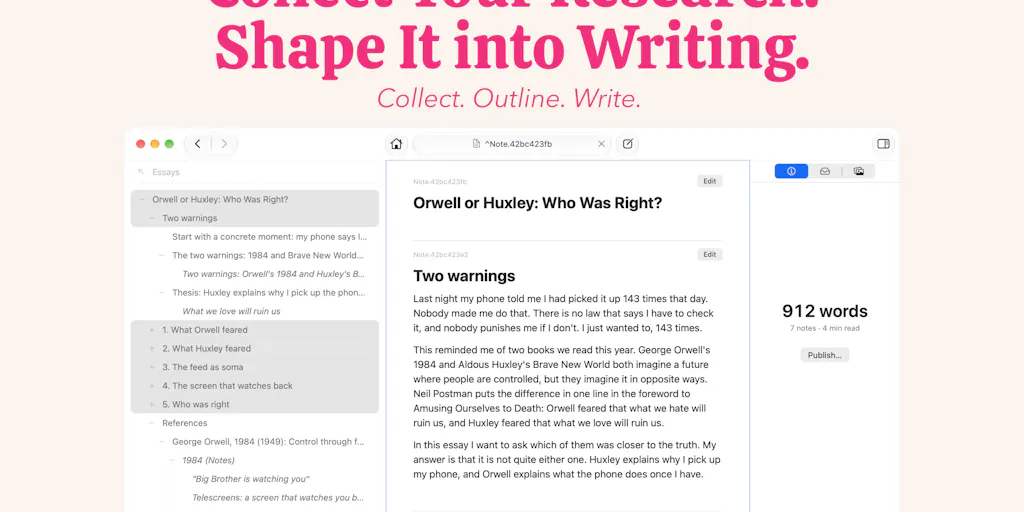
Ussher’s pitch is blunt: networked note apps make you connect ideas with wiki-style links, and that gets tedious fast. He says he spent two years and at least half a dozen UIs hunting a better interaction model before landing on this one. In Understory, you link notes by placing them. Drop one note beneath another and it becomes a subnote — the two are connected automatically. The output looks like an outline, except for one twist: the same note can be a subnote of as many parents as you like. That single property turns a tree into a network, and per Ussher it “replaces both folders and most links.”
The practical consequence is what he calls neighborhoods of ideas: related notes end up physically adjacent, and because a note can live in several neighborhoods, it functions like a portal — follow it and you step from one cluster into another. That’s where, in his framing, you spot connections you didn’t know existed.
Current constraints, straight from the launch: Mac only for now, free to try with a one-time purchase and no subscription, no account required, and notes stored as plain Markdown files. If you want the full pitch and the comment thread, it’s on the Product Hunt launch page.
Why operators who’ve never opened Obsidian should still read this
Here’s my thesis: the multi-parent subnote is not a productivity gimmick. It’s a data-modeling decision, and it happens to model cross-border operations better than folders ever did.
Consider a single supplier in Shenzhen. In a folder world, that supplier lives in exactly one place — /suppliers/shenzhen/. But in reality that supplier touches your Amazon listing (the product they make), your TikTok Shop creative pipeline (the samples they ship for UGC), your compliance file (the test reports they provided), and your Q4 negotiation log (the MOQ discussion). Four contexts, one entity. Folders force you to pick one home and leave breadcrumbs everywhere else. A multi-parent graph lets the same supplier note sit under all four, and editing it once updates every context.
That’s the same reason Shopify separated products from collections from metafields instead of burying everything in a category tree, and the same reason Amazon Seller Central lets one ASIN belong to multiple browse nodes. Merchants already think in graphs. Most note tools force them back into filing cabinets.
How it differs from the incumbents you’re probably already paying for
I’ve watched the note-tool category long enough to know the defaults. Notion is where most DTC teams live — great databases, mediocre graph thinking, and a sync model that gets sluggish once you’re past a few thousand blocks. Obsidian is the power-user option: local Markdown, wiki-links, and a plugin ecosystem that can do almost anything if you’re willing to maintain it. Roam Research pioneered the bidirectional-link religion and then got leapfrogged. Logseq took the outliner-plus-graph approach and made it open source. And Apple Notes remains the tool 80% of sellers actually use, because it opens instantly and never asks them to think about structure.
Understory’s differentiation is narrow but real: it rejects wiki-links as the primary linking gesture and replaces them with spatial placement. In Obsidian, linking note A to note B is a syntax act — you type [[B]] inside A. In Understory, it’s a drag act — you put B under A. Michias Hailu Alemu made exactly this point in the launch comments, saying wiki links are “exactly why I quit obsidian.” Jaewon Seo added that the multi-parent mechanic “didn’t click til i actually tried it,” and that he kept expecting drag to move the note rather than link it. That second comment is the honest one: there’s a real learning curve, and the gesture collides with a decade of drag-to-reorganize muscle memory.
The Markdown question matters more than it sounds. Hailu Alemu asked how the multi-parent structure survives when you open the folder in another editor. Ussher’s answer: each note has a unique identifier, and the front matter of each Markdown file lists the IDs of every subnote beneath it, plus other metadata. That’s a clean design — the graph lives in front matter, the content stays portable. But it also means the hierarchy is invisible in any editor that doesn’t parse front matter as structure. Open the folder in VS Code and you’ll see files, not neighborhoods.
The portability trade-off nobody advertises
Plain Markdown is a genuine selling point for operators who’ve been burned by SaaS shutdowns. I’ve watched brands lose years of SOPs when a startup pivoted or died. Local files with no account requirement is the right architecture for anyone who’s been through that.
But “portable” and “usable elsewhere” are different claims. Understory’s graph is encoded in front matter conventions that are, as far as the source indicates, Understory-specific. Export your notes to another tool and you keep the text but lose the network. That’s a softer lock-in than a proprietary cloud database, but it’s lock-in nonetheless — the switching cost just moved from “can I get my data out” to “can I reconstruct the relationships.”
What cross-border sellers can borrow from this, even without buying it
You don’t have to install anything to steal the underlying pattern. The multi-parent subnote is a mental model, and it maps onto three workflows I see broken in almost every seller I audit.
Product research that doesn’t collapse into a spreadsheet
Most sellers run product research as a linear funnel: scrape Helium 10 or Jungle Scout data, filter by margin, shortlist, validate, launch. The problem is that a candidate product belongs to multiple research threads simultaneously — it’s a candidate for your US Amazon storefront, a maybe for your UK expansion, and a test for your TikTok Shop content angle. In a spreadsheet, you either duplicate the row or you lose the cross-context insight.
A multi-parent structure lets one product note sit under all three threads. When you learn something new — say, a supplier quote drops 12% — you update it once and every thread inherits the update. That’s not a note-taking feature. That’s a single source of truth for SKU decisions, which is the thing most $1M–$10M sellers claim to have and almost none actually do.
Compliance and certification files that survive an audit
This is where I’d push hardest. If you sell on Amazon in the EU, you’re juggling CE marking, EPR registrations, GPSR responsible-person details, and a pile of test reports that all reference the same underlying product and the same manufacturer. Auditors don’t ask “show me the folder.” They ask “show me everything about this ASIN.” A folder structure forces you to guess which folder they mean. A graph lets the ASIN note be the portal — follow it and you land in compliance, supplier, and listing neighborhoods in one step.
Creative pipelines for TikTok Shop and UGC
The same logic applies to content. One hook concept might work for three different SKUs, two creator briefs, and a paid social test on Meta. In a folder world you pick one home and cross-link manually. In a graph, the hook note lives in all of them, and when a creator’s version outperforms, you update the note once and every downstream brief sees it.
Why Amazon sellers should care more than Shopify ones
Shopify operators tend to run tighter, smaller catalogs and lean on apps with their own databases. Amazon sellers, by contrast, accumulate sprawl: dozens of ASINs, multiple marketplaces, variations, suppressed listings, and a compliance layer that Shopify merchants mostly don’t touch. The more entities you have that legitimately belong in multiple contexts, the more a multi-parent model pays off. If you’re running 40 SKUs across three marketplaces, folders are actively costing you money.
Where my judgment says it falls short
I want to like this more than I can currently justify for a team.
Mac only is a real blocker, not a footnote. Most cross-border ops teams are Windows-first, or split across Windows and Mac. A tool that only runs on one OS can’t be the shared brain for a team of five. Ussher is upfront about it — “Mac only, for now” — but “for now” has no date attached, and until it ships cross-platform, this is a solo-operator tool.
No account means no collaboration, and possibly no sync story. The “no account, plain Markdown files” design is a privacy win and a portability win. It’s also, as described, a single-player architecture. How notes sync across two Macs isn’t addressed in the launch material. For a founder working alone, fine. For a team, it’s a non-starter until there’s an answer. I’d want to see whether iCloud Drive or Dropbox folder sync is a supported path, and what happens to front-matter IDs when two devices edit the same file.
The learning curve is real and the source admits it. Ussher says it “takes a little use to click,” and Seo’s comment confirms the drag gesture fights existing habits. That’s a tax on adoption, and adoption taxes are what kill tools inside busy teams. If you can’t onboard a VA in fifteen minutes, it won’t stick.
Source attribution is an open question. Stanly Thomas asked whether a note keeps its source when it comes from something you read, and whether a published PDF or site could carry a footnote back to the origin. Christian Mardan asked whether a note stays linked to its source when moved into an outline. Neither question has a maker reply in the thread. For research-heavy workflows — supplier vetting, competitor teardowns, regulatory reading — that’s the feature that would decide it for me, and it’s unresolved.
Where the math breaks
Run the numbers honestly. A one-time purchase with no subscription is cheap against Notion’s per-seat pricing. But if Understory can’t be your team’s shared workspace, you’re not replacing Notion — you’re adding a second tool. Two tools means two places to search, two backup routines, and a migration decision every time someone leaves. The cost isn’t the license. It’s the coordination overhead.
What I’d watch / test next
This week, before you install anything, do one exercise: pick your ten most-referenced operational entities — your top five suppliers, your three best-performing ASINs, two compliance docs — and count how many distinct contexts each one legitimately belongs to. If the answer is mostly “one,” you don’t have a graph problem and folders are fine. If the answer is three or more, you’ve just quantified the cost of your current filing system.
Then, if you’re a solo Mac operator, grab the free trial and stress-test the one thing that matters: move a supplier note into four different parent notes, edit it in one place, and verify the change propagates everywhere you expect. If that works cleanly, it’s worth the one-time purchase. If you’re running a team, wait — and watch for three specific signals: a Windows build, a documented sync path, and a maker answer to the source-attribution question Thomas and Mardan raised. Until at least two of those land, treat Understory as a personal thinking tool, not an operational system of record. The idea is right. The product isn’t ready to be your company’s brain yet.


