The Operator’s Time Problem Is a Margin Problem
Cross-border sellers don’t lose money in dramatic single events; they lose it in fifteen-minute fragments. A supplier reply you answered four hours late, a PPC bid you meant to check before the EU morning peak, a restock PO that sat unapproved while you were deep in a creative review. I’ve watched seven-figure Amazon brands run on a founder’s memory and a chaotic Apple Notes file, and I’ve watched smaller DTC shops out-execute them purely because someone on the team had a system for deciding what happens next. So when a productivity tool lands that is explicitly built around time-blocking as execution, not task-hoarding, I pay attention — because the operational bottleneck for most cross-border teams isn’t ideas or capital, it’s attention allocation across time zones.
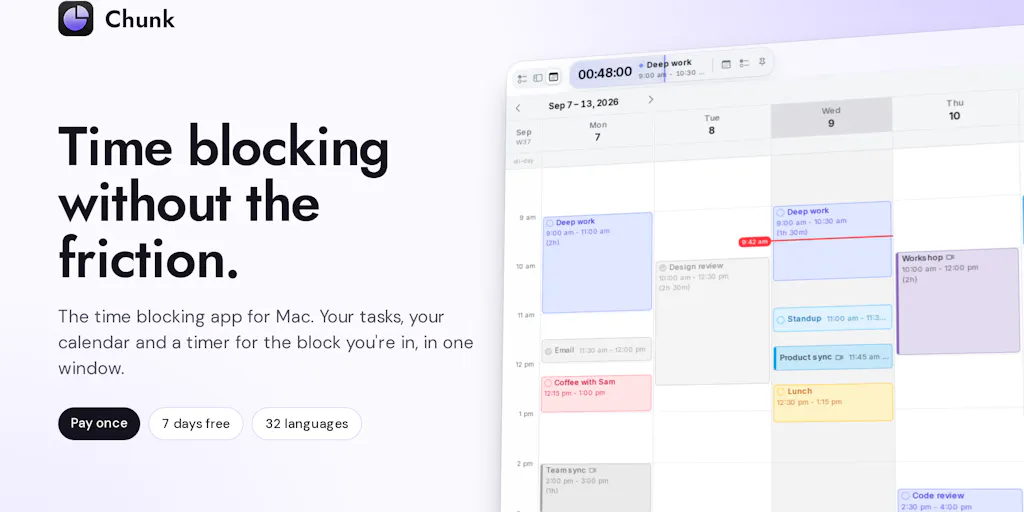
That’s the lens I’m bringing to Chunk, the macOS time-blocking app from developer Dudley Spence that just shipped its latest major iteration. On paper it’s a consumer productivity app. In practice, it’s a case study in the exact workflow discipline that separates sellers who scale from sellers who spin.
What Chunk Actually Solves (And Why It’s Not Another To-Do List)
The core mechanic is almost aggressively simple, and that’s the point. As Spence describes it in the launch thread, “your tasks sit on one side, your calendar on the other. Drag a task onto a time and it becomes a block.” While you’re inside a block, a countdown shows how much time remains, and a small floating timer persists on screen even when the app is closed. When the block ends, you get a fullscreen alert offering three choices: tick it off, take more time, or push it later.
If you’ve used Todoist, Things 3, or Notion databases for task management, you already know the failure mode this addresses. Those tools are excellent at capturing work and terrible at scheduling it. Your list grows; your calendar stays empty; the important-but-not-urgent work — supplier negotiations, listing optimization, creative briefs — never gets a slot. Chunk’s bet is that the drag-to-calendar gesture is low-friction enough that you’ll actually do it.
The new version, per the maker’s launch notes, adds a full window with three layouts (Tasks, Plan, Calendar), faster Apple Reminders sync with notes and priority support, cross-search across tasks, reminders and calendar events, priorities, links and Markdown notes on tasks, private iCloud sync between Macs with no account required, and — this is the interesting one — a Claude integration that can create tasks and move things around in your calendar.
It syncs both ways with Google Calendar, Outlook, and Apple Calendar. Pricing is a one-time $29.99 with no subscription and a seven-day free trial that doesn’t require a card.
Why the one-time price matters more than the feature list
I want to dwell on that pricing for a second, because it’s a strategic signal, not a marketing detail. Every SaaS tool in the seller stack — Helium 10, Klaviyo, Jungle Scout — bills monthly, and those bills compound into a four-figure annual software line item before you’ve paid a single VA. A $29.99 perpetual license is a deliberate counter-positioning against subscription fatigue. For a solo operator or a two-person brand, that math is trivial to justify. For a ten-person agency, it’s a rounding error. The question is whether a one-time-payment model can fund the ongoing development that a calendar-integrated tool requires — more on that in the shortcomings section.
How It Stacks Up Against the Incumbents
Let me be specific about the competitive set, because “productivity app” is a useless category label.
Notion Calendar (formerly Cron) is the closest thing to a direct competitor for the drag-and-drop time-blocking gesture, and it’s free with a Notion account. Its weakness is that it’s calendar-first — tasks live in Notion databases and the interaction model assumes you’re already a Notion power user. Motion goes further, using AI to auto-schedule your tasks into available calendar slots, but it’s priced per seat per month and it’s opinionated about how you work in a way that frustrates operators with irregular schedules. Sunsama is the closest philosophical cousin — daily planning ritual, calendar integration, task import — and it charges a monthly subscription.
Chunk sits in a specific niche: macOS-native, privacy-first, one-time-purchase, with a manual drag-to-block interaction rather than algorithmic auto-scheduling. That’s a real differentiator. The maker is explicit that “Chunk is a privacy first app. All your data is stored on device and not in a hosted database,” which is also why there’s no web app or browser extension — the Claude integration runs through a local MCP rather than a cloud API.
Why Amazon sellers should care more than Shopify ones
Here’s my operator’s read: this tool maps better onto Amazon FBA workflows than onto DTC brand workflows, and the reason is structural.
An Amazon seller’s week is dominated by recurring, time-boxed, calendar-anchored tasks. Deal submissions, coupon windows, Amazon Seller Central case follow-ups, inventory replenishment lead times, Lightning Deal check-ins, PPC dayparting adjustments around peak hours. These are blocks, not projects. You don’t need a Kanban board; you need a Thursday 9am slot that says “review search term report and negate.”
A Shopify DTC operator, by contrast, tends to work in longer creative and campaign cycles — a Klaviyo flow rebuild, a TikTok Shop creator outreach sprint, a Meta Ads creative refresh. Those are better served by project tools with dependencies and briefs. Time-blocking helps, but it’s not the primary constraint.
Where both camps benefit equally: the cross-time-zone coordination problem. If you’re managing a sourcing agent in Shenzhen, a 3PL in New Jersey, and a VA in Manila, your day is a sequence of narrow windows where someone is awake and responsive. Blocking those windows deliberately — rather than hoping you’ll remember — is the difference between a 24-hour supplier turnaround and a 72-hour one.
What Cross-Border Sellers Can Borrow From This
Even if you never install Chunk, there are three transferable operating principles here that I’d argue belong in every cross-border seller’s playbook.
1. The countdown timer is the underrated feature
Spence notes the countdown is “a popular feature with our ADHD users,” and one commenter, Stephane Thrasher, flags it as “a small detail but I can see it being really useful during a busy day.” I’d go further. The countdown is the entire behavioral mechanism. Task lists tell you what; timers tell you when to stop. For sellers, the highest-leverage application is capping open-ended tasks that expand to fill available time: listing copywriting, competitor teardowns, ad creative review. Give a task ninety minutes and it takes ninety minutes. Give it three hours and it takes three hours, with diminishing returns after the first ninety.
2. The “push it to later” button is a decision, not a deferral
Most task apps let you reschedule silently, which means you never confront the cost of postponement. Chunk’s fullscreen end-of-block alert forces an explicit choice: done, extend, or move. That’s a small UX detail with real operational consequences. If you’re constantly pushing the same restock analysis to tomorrow, the app surfaces that pattern. Your to-do list won’t.
3. The Claude integration is a preview of the agentic operator stack
The most forward-looking element here is the local MCP integration with Claude. A commenter, Grayson Bass, asks whether you could say “move my afternoon tasks to tomorrow” and have it just happen. The maker confirms the mechanism works through a local MCP rather than a hosted API — meaning the AI operates on your local data without it leaving your machine.
For cross-border sellers, this is the shape of things to come. The next generation of operational tooling won’t be dashboards you check; it’ll be agents you instruct. “Move my PPC optimization block to Thursday because the deal starts Friday.” “Reschedule the supplier call to overlap with Shenzhen morning.” The privacy-first architecture is a constraint and a selling point — especially for sellers handling supplier pricing, MOQs, and margin data they’d rather not pipe through a third-party cloud.
Where My Judgment Says It Falls Short
I like the product. I’m not going to pretend it’s a fit for every operator, and there are three structural concerns I’d flag before you commit.
The macOS-only bet is a real ceiling
Chunk is macOS-native, full stop. The maker is explicit that there’s no web app or browser extension by design, because the privacy architecture depends on local storage. That’s a principled stance, but it’s also a hard constraint. If your ops lead runs Windows, if your VA works from a Chromebook, if you’re managing a team across mixed hardware — Chunk is a solo tool, not a team tool. For a cross-border operation with distributed staff, that’s a meaningful limitation. The maker acknowledges a mobile app is on the roadmap but explicitly says “there will be a few updates still before we get to a mobile app.” No timeline given.
No Slack integration (yet)
Jay Janarthanan asks directly whether Chunk can block external items like Slack. The answer is no — Chunk integrates with Google Calendar, Apple Calendar, Outlook, and Apple Reminders, but not Slack. The maker says they’ll add it “if enough of our user-base requests it.” For sellers, this matters more than it sounds. A huge share of cross-border operational communication — supplier threads, 3PL coordination, VA task handoffs — happens in Slack or WhatsApp. If your task source of truth is Slack and your calendar is Chunk, you’re maintaining two systems.
The one-time-pricing sustainability question
I raised this earlier and I’ll close the loop. A $29.99 one-time purchase is fantastic for the buyer and structurally difficult for the developer. Calendar integrations break when Google, Apple, or Microsoft change APIs. Claude’s MCP spec will evolve. A perpetual license with no recurring revenue has to either convert to a paid upgrade model (v4, v5) or find another revenue stream. That’s not a reason to avoid the tool today — it’s a reason to think about your switching costs if you build your weekly operating rhythm around it. The 7-day free trial with no card required is the right way to test that exposure.
Where the math breaks for teams
One more judgment call: this is a solo operator’s tool. The lack of account-based sync (iCloud sync is per-user, between your own Macs) means there’s no shared team calendar of blocks, no way to see whether your ops manager has actually blocked time for the restock review. If you’re running a five-person cross-border team and you want visibility into how everyone is allocating attention, Chunk won’t give you that. You’d need something like Motion at the team tier, or a lightweight shared Google Calendar convention. Chunk is for the person doing the work, not the person managing the work.
What I’d Watch / Test Next
If you’re a cross-border operator reading this and you want to act this week, here’s what I’d do.
Download the trial and run a single experiment. Don’t migrate your whole system. Take one recurring task that you consistently fail to do — for most Amazon sellers, that’s the weekly search term report review, or the biweekly supplier check-in — and block it for the next two weeks. See whether the countdown and the end-of-block alert actually change your behavior. The seven-day trial requires no card, so the cost of the experiment is your time.
Test the Claude integration specifically. If you already use Claude for listing copy, ad creative, or supplier email drafting, the local MCP integration is the most differentiated feature here. Try instructing it to move a block and see whether the interaction model fits how you actually think about your week. This is the feature that will determine whether Chunk is a 2026 tool or a 2027 one.
Watch the mobile roadmap. For cross-border sellers who travel — Canton Fair, supplier factory visits, trade shows — a macOS-only tool has an obvious gap. If a mobile companion ships, the value proposition changes materially. If it doesn’t within two quarters, factor that into your decision.
And watch the Slack question. If enough sellers ask for it, the maker has signaled willingness to build it. That’s the integration that would make Chunk a genuine operational hub rather than a personal productivity app. Until then, treat it as what it is: a sharp, cheap, privacy-respecting tool for the operator who already knows what needs doing and just needs help doing it on time.