Why a Local-First Notes App Matters More to Sellers Than Another AI Hype Tool
Every week, a new AI-powered repricing tool or “autopilot” ad platform hits Product Hunt, promising to triple your ROAS. But the real bottleneck in cross-border e-commerce isn’t ad creative or inventory forecasting—it’s operational chaos. Your business runs on a thousand tiny decisions: a supplier quote in one spreadsheet, a customer complaint in your email, a compliance deadline in a Slack thread. When context fragments across tools, you lose money in the seams. That’s why the launch of SpacebarX, a local-first notes-and-tasks workspace, caught my eye. It’s not trying to automate your ad spend. It’s trying to fix the messy, human layer of running a business—the part that no SaaS dashboard can solve. For sellers drowning in disconnected tools, the idea of a single, offline-first outline where tasks and notes live together isn’t just a productivity nicety; it’s a competitive advantage that compounds daily.
The Problem: Your Ops Stack Is a Context Black Hole
Let me paint a picture that every Amazon FBA seller will recognize. It’s Monday morning. You’re managing a listing that’s about to go out of stock. You have the supplier’s email promising a restock date, a note in your phone about a potential tariff change, and a Trello card for the listing optimization that’s overdue. To make one decision—whether to raise the price or risk a stockout—you have to open three apps, recall what you wrote where, and mentally stitch together the timeline.
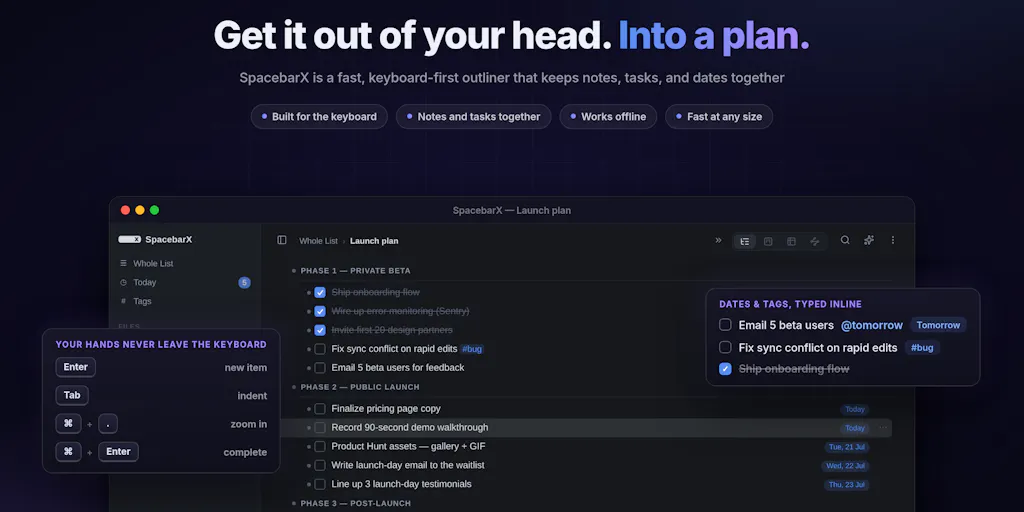
This is the “context switching tax” that SpacebarX directly targets. The maker, Selvan, describes the core pain perfectly: “I was constantly splitting my brain between two apps: notes in one, tasks in the other, and the context I needed always somewhere else.” For a solo seller or a lean DTC operator, this is existential. You don’t have an operations manager to keep the threads together. You are the thread.
Most tools try to solve this with more features. Notion gives you a blank canvas, which is great until you spend more time building your workspace than working in it. Asana and ClickUp are built for teams with rigid hierarchies, not for a two-person brand where the founder is also the customer service rep. What I find compelling about SpacebarX is the radical simplicity of the “nested outline.” It’s a concept that echoes Workflowy, but with a task-management layer bolted on. You start with a thought, and if it becomes a task, you make it a task. No project setup, no predefined templates. This is the exact opposite of the “enterprise-ready” bloat that plagues modern SaaS.
How SpacebarX Differs from the Incumbents
To understand where SpacebarX fits, you have to look at the current landscape of note-taking and task management. On one end, you have Notion, the do-everything workspace that requires a significant investment of time to structure. On the other, you have Todoist, which is excellent for capturing tasks but useless for storing the context behind them. Then there’s the new wave of “second brain” apps like Obsidian, which are powerful but have a steep learning curve with plugins, graph views, and syntax.
SpacebarX positions itself as the middle path. It has the simplicity of an outline, but with the “focus and efficiency of a task manager.” The key differentiator is the local-first architecture. In an era where every tool is trying to hoard your data to train their AI models, SpacebarX is making a bet on privacy. Your files stay local. You can work fully offline. If you want sync, you connect your own Google Drive or Dropbox. There is no SpacebarX server storing, reading, or controlling your notes.
This is a massive philosophical shift. For a cross-border seller, this isn’t just about privacy paranoia. It’s about data sovereignty. Think about your supplier terms, your landed cost calculations, your profit margins. Do you really want that sitting on a server that could be compromised or subpoenaed? Probably not. The fact that the sync is bring-your-own-storage (BYOS) is a feature that enterprise tools charge a premium for, and it’s being offered as a core principle here.
Why Amazon Sellers Should Care More Than Shopify Ones
Shopify sellers often live in the app ecosystem—they’re used to connecting a dozen tools to their store. Amazon sellers, particularly those doing private label, live in a world of spreadsheets and email. They are more paranoid, and rightly so. Amazon is a walled garden, and the data you generate outside of it (your P&L, your supplier contacts) is your only moat. For Amazon sellers, a local-first tool like SpacebarX isn’t just a nice-to-have; it’s a security measure. It keeps your “source of truth” away from the prying eyes of algorithm-driven platforms. It allows you to work on a plane, in a warehouse with no Wi-Fi, or in a supplier’s factory overseas, without losing access to your critical notes.
What Cross-Border Sellers Can Borrow from This Launch
Beyond the tool itself, there are three operational philosophies from the SpacebarX launch that you can apply to your business immediately.
1. The Power of the “Whole View” SpacebarX offers a “Whole View” that turns your separate files and folders into one connected outline. This is a killer feature for sellers. When you’re managing a product launch, you have a checklist (tasks), a copy doc (notes), and a pricing sheet (files). Usually, these are in three different apps. SpacebarX lets you see them all in one stream. This forces you to think in terms of outcomes rather than artifacts. Instead of asking “What tasks are due today?”, you ask “What does the state of my Q4 launch look like?” That holistic view is what separates operators from managers.
2. “Start with a Thought, Not a Template” The maker emphasizes that you can start with a thought and let it become a task. In e-commerce, we often over-engineer our processes. We buy expensive project management software and then spend weeks setting up workflows before we actually start working. SpacebarX’s ethos is the opposite: capture first, organize later. This is a lesson for your SOPs. Don’t wait until you have the perfect standard operating procedure to document your process. Just write down the steps as you do them. Once it’s in the outline, you can structure it later. The friction of starting is the enemy of execution.
3. The “Bring Your Own Key” AI Model The Pro tier offers “bring-your-own-key AI.” This is a brilliant feature for sellers who are worried about data leakage. Instead of using a generic AI that trains on your data, you plug in your own API key, meaning your queries go directly to the model provider without being stored by the app. For sellers dealing with proprietary product formulations or unique marketing angles, this is a secure way to use AI for brainstorming without giving away your secrets. It also means you can use the best model available (like GPT-4 or Claude) without waiting for the app to integrate it.
Where the Math Breaks: My Critical Take
I like the philosophy, but I’m not ready to move my entire business into it yet. Let’s look at the friction points.
First, the PWA limitation. The maker notes that it’s a PWA (Progressive Web App) you can install from your browser, with native apps “in progress.” For a cross-border seller working across time zones, this is a concern. PWAs are great, but they can be inconsistent on mobile, especially on older Android devices or in regions with poor connectivity. The promise of offline is there, but until the native apps drop (which the maker says should be “in the next few weeks”), the mobile experience will feel like a compromise. If I’m in a warehouse in Shenzhen, I need the camera app and the note app to work flawlessly offline.
Second, the sync architecture is a double-edged sword. Using your own Google Drive or Dropbox is great for privacy, but it introduces a dependency on third-party infrastructure. If your Dropbox is full or your Google account has a sync error, your notes are stuck. The maker mentions iCloud Sync is coming with the native apps, which will help, but currently, the lack of a first-party sync solution might confuse non-technical users. The “seamless” sync mentioned by an early commenter is promising, but I’ve seen too many local-first apps fail when the user accidentally deletes the local folder and the cloud sync decides to “help” by deleting everything everywhere.
Third, the pricing model. The free tier is “free forever,” which is great. The Pro tier is available monthly, yearly, or as a $99 Lifetime plan, normally $199. This is a smart move to get early adopters. However, for a tool that is essentially a fancy text file organizer, $99 lifetime is on the higher end when you consider that Obsidian is free for personal use and Notion has a generous free tier. The value proposition here is the task management integration with the outline. If that integration is flawless, it’s worth the money. If it’s just a checkbox inside a bullet point, you’re paying for a gimmick.
The “Nested Task” Trap
There is a danger in the nested outline approach. It can become a black hole for information. With a tool like Asana, you are forced to assign a project and a due date. With SpacebarX, you can just write a thought and leave it there. This is great for capturing, but terrible for prioritization. The feature where tasks set as due “anywhere inside deeply nested lists automatically show up in the Today view” is smart, but it relies on the user to actually assign a due date. If you don’t, you’re back to having a massive, unprioritized list of thoughts. The tool doesn’t force a workflow on you, which is both its greatest strength and its fatal flaw.
What I’d Watch / Test Next
I’m not going to switch my entire ops stack this week, but I am going to test SpacebarX for a specific use case: product research and launch planning. Here’s my concrete plan:
- Start a “Q4 Launch” outline. I’ll import my current launch checklist (from a spreadsheet) and all my ad copy notes (from a Google Doc) into a single SpacebarX file. I’ll use the “Whole View” to see if it actually helps me spot gaps in my plan that I missed when they were in separate tools.
- Test the offline capability. I’ll spend a day working on my laptop with the Wi-Fi turned off. I’ll try to update my inventory spreadsheet (linked as a note) and mark tasks as complete. If it works flawlessly, it earns a permanent spot in my travel setup. If it hiccups, I’ll stick to Notion for that.
- Evaluate the BYOK AI. I’ll plug in my own OpenAI API key and use it to generate a listing description from my rough notes. The question is whether the context of my outline makes the AI output better than if I just pasted the text into ChatGPT. If it does, that’s a game-changer for content workflows.
- Check the native apps. As soon as the native mobile app drops, I’ll test it on my iPhone in a low-signal area (like a warehouse). The PWA is fine for the desk, but the native app is where the “offline-first” promise will be proven or broken.
The bottom line is that SpacebarX is a thoughtful tool for a real problem. It’s not trying to be another AI shill; it’s trying to be the quiet, reliable workspace where your business logic lives. In a world of bloated SaaS and data-hungry platforms, a local-first outline that respects your privacy is a refreshing—and potentially profitable—change of pace. I’ll be watching the next few weeks of development closely, because if the native apps are solid, this could become the default “second brain” for lean operators who value control over convenience.


