Why a Docker Ops Tool Deserves Your Attention Even If You Sell Socks on Shopify
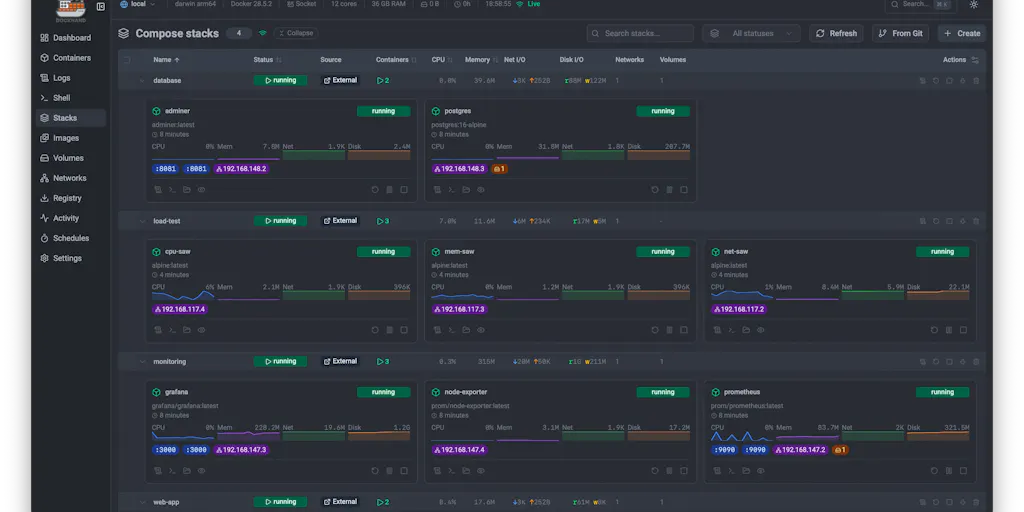
Let me be blunt: if you run a cross-border e-commerce operation of any real scale, you are already a software company. You might not want to admit it, but the moment you’re stitching together a Shopify storefront, an Amazon Seller Central backend, a TikTok Shop catalog feed, and a warehouse management system that talks to a 3PL, you’re managing distributed systems. The only question is whether you’re doing it with the same rigor as your product development or just hoping the duct tape holds. Most operators I meet are in the second camp, and that’s exactly why a tool like Dockhand — which on its surface looks like a developer utility for managing Docker containers — should actually be on your radar. It’s not about containers. It’s about having a single pane of glass for every piece of infrastructure that keeps your storefronts, your fulfillment integrations, and your data pipelines alive, without requiring you to become a DevOps engineer overnight. The cross-border angle here isn’t subtle: the more markets you enter, the more compliance, localization, and data residency requirements you pile on, and the more your infrastructure sprawls. Dockhand is a tool built by someone who got tired of juggling terminal tabs, and that frustration is one you share every time you log into yet another dashboard to check whether your inventory sync job actually ran last night.
The Real Problem: Your Ops Stack Is a Mess of Half-Abandoned Dashboards
The maker, Jarek Krochmalski, frames the origin story in terms of homelabs and enterprise environments, but strip away the technical jargon and the pain is universal. He says they built Dockhand because managing Docker meant “juggling terminal tabs, half-abandoned dashboards, and SSH sessions — and none of them did everything we needed in one place.” Sound familiar? That’s the same complaint I hear from every DTC operator who has three different tools for inventory, two for shipping, and a spreadsheet that’s somehow still the source of truth for anything important. The problem isn’t that you lack tools; it’s that your tools don’t talk to each other, and you end up spending more time managing the management than actually operating the business.
For the e-commerce operator, the infrastructure isn’t Docker containers per se — it’s the glue that connects your Shopify store to your Amazon FBA shipments, your Klaviyo flows to your post-purchase surveys, your ad spend data to your margin calculations. Every one of those connections is a small piece of software running somewhere, and every one of them can fail silently. Dockhand’s pitch is that it gives you one clean UI for every host — local, remote, or NAT’d behind an agent — which means you can see, at a glance, whether the service that syncs your Amazon Seller Central orders to your accounting system is actually healthy. That’s not a nice-to-have; that’s the difference between catching a sync failure before it causes a stockout and discovering it three days later when a customer complains.
The deeper issue here is that most cross-border sellers treat their tech stack as a collection of point solutions rather than a system. You buy a tool because it solves one problem — listing optimization, repricing, review management — and then you bolt on another tool when a new problem appears. Before long, you have eight different logins, none of which share data, and you’re spending every Monday morning reconciling numbers across platforms. Dockhand’s approach — pulling everything into one dashboard with a consistent view — is the same philosophy that tools like Helium 10 bring to Amazon keyword research, but applied to the infrastructure layer. It’s an acknowledgment that the operational layer matters as much as the marketing layer, and that visibility is the first step toward control.
How Dockhand Differs From the Incumbents You Already Know
If you’re a Shopify seller, your first instinct might be to compare Dockhand to something like Docker Desktop or Portainer, and the maker addresses that head-on in the comments. Docker Desktop is a local dev tool; Portainer is a general orchestration UI. Dockhand is aimed at people “running real services across hosts who want ops to be safe and pleasant.” The distinction matters because it maps directly to how you should think about your own tooling. A local dev tool is like a staging environment for your product — useful for testing, but not something you’d trust with production traffic. An orchestration UI is like a warehouse management system — it helps you organize what you have, but it doesn’t necessarily make better decisions for you.
What Dockhand adds that the incumbents don’t is a set of guardrails that prevent you from making mistakes before they happen. The Compose validator catches host-network, root-mount, and secret mistakes before you deploy. In e-commerce terms, that’s the equivalent of a system that checks your shipping address before you send a package to a customer, or a pricing rule that flags a margin-killing discount before you publish it. You don’t need to understand the technical details of what a “root-mount” is to appreciate the value of a tool that says “hey, this configuration is going to cause a problem, are you sure you want to proceed?” That’s the kind of friction that saves you from the 2 AM emergency call.
The other differentiator is the CVE scanning in the update loop — the ability to scan for known vulnerabilities before anything ships, and to block an auto-update if the new image is more vulnerable than the current one. This is where the cross-border seller should pay attention, because it’s not just about security theater. If you’re running any kind of custom integration that handles customer data — and you are, even if it’s just a shipping API that passes addresses — then a vulnerability in your infrastructure is a compliance issue, not just a technical one. The GDPR fines in Europe, the consumer protection laws in Australia, the data localization requirements in China — all of these are reasons why you can’t afford to run outdated, vulnerable software. Dockhand’s approach of scanning before deploy and giving you the option to block an update is the kind of proactive risk management that most e-commerce operators don’t even know they’re missing.
Why Amazon Sellers Should Care More Than Shopify Ones
Here’s a controversial take: if you’re a Shopify seller, you can probably get away with ignoring Dockhand for a while longer. Shopify’s whole value proposition is that it abstracts away the infrastructure — you don’t need to think about servers, containers, or deployments because Shopify handles all of that for you. The trade-off is that you’re locked into their platform, their pricing, and their rules. Amazon sellers, on the other hand, are already used to a world where they’re responsible for their own operational excellence. You have to manage your own inventory, your own shipping, your own customer service, and your own compliance with Amazon’s ever-changing policies. Adding one more piece of self-managed infrastructure isn’t a big leap — it’s just another thing you have to keep an eye on.
But the deeper reason Amazon sellers should care is the multi-channel reality of modern e-commerce. Most serious Amazon sellers aren’t just on Amazon anymore; they’re also on eBay, Walmart, TikTok Shop, and their own DTC site. Each of those channels has its own integrations, its own data feeds, and its own quirks. Managing all of that is a distributed systems problem, whether you realize it or not. Dockhand’s ability to handle “unlimited hosts in one dashboard” — local sockets, remote TLS daemons, and NAT’d/VPS boxes via a small outbound agent — is exactly the kind of unified view you need when you’re juggling five different sales channels and trying to keep inventory consistent across all of them. It’s not about the containers; it’s about the visibility.
Where the Math Breaks: The Allowlist Problem
One of the most interesting exchanges in the comments is between the maker and a user named Gal Dayan, who asks about CVE scanning. Gal’s point is sharp: the feature that decides whether they keep using the tool past week two is whether there’s a way to accept or allowlist a specific CVE on a specific image, so the scanner stops nagging you about something you’ve already decided is an acceptable risk. The maker confirms this is on the roadmap, but Gal raises a follow-up that should make any operator think twice: will the allowlist be scoped per-image, or global across the fleet? A global allowlist is faster to set up, but it’s also “how a genuinely new CVE in a different image quietly gets ignored because it shares a CVE ID with something you already accepted elsewhere.”
This is a classic tooling trade-off, and it maps directly to how you should think about risk in your e-commerce operation. The easy path — a global allowlist, a blanket rule, a “just ignore it” checkbox — is almost always the wrong one, because it optimizes for short-term convenience at the expense of long-term visibility. I’ve seen this play out in e-commerce countless times: a seller decides that a certain type of customer complaint is “acceptable risk” and stops tracking it, only to discover months later that the issue has quietly become a systemic problem that’s tanking their seller rating. The same logic applies to inventory management, where a seller decides that a certain stockout rate is tolerable, only to find that the cumulative effect of those stockouts is a permanently suppressed Best Seller Rank. The math never works out in your favor when you choose convenience over precision.
The lesson for cross-border sellers isn’t about CVE scanning specifically; it’s about the philosophy of risk management. When you’re evaluating any tool — whether it’s a Docker management dashboard or a repricing algorithm — ask yourself how it handles exceptions and edge cases. Does it give you granular control, or does it force you into binary choices? Does it let you make informed decisions about acceptable risk, or does it just nag you until you disable the feature entirely? The best tools are the ones that respect your intelligence and give you the information you need to make good decisions, rather than trying to make the decisions for you.
What Cross-Border Sellers Can Actually Borrow From Dockhand
Even if you never deploy a single Docker container, there are three principles from Dockhand’s design that you should steal for your own operation. The first is the idea of Compose from Git with auto-sync — the ability to deploy straight from Git and redeploy on change, with a diff of what’s about to change before it does. In e-commerce terms, this is version control for your operations. Right now, most sellers are running their businesses on a chaotic mix of spreadsheets, email threads, and tribal knowledge. If your head of operations leaves, how much of your institutional knowledge walks out the door with them? Adopting a Git-based approach to your operational workflows — whether that’s your SOPs, your pricing rules, or your supplier contracts — means you have a history of every change, you can see what’s about to change before it happens, and you can roll back if something goes wrong. That’s not a technical nicety; that’s a business continuity strategy.
The second principle is secrets from your vault, injected at deploy, never written to disk. This one is about credential hygiene. How many times have you shared a password over Slack or email? How many former employees still have access to your Shopify admin or your Amazon seller account? If you’re like most operators I meet, the answer is “too many, and I’m not sure.” Dockhand’s approach — pulling secrets from a vault like 1Password or Vault and injecting them at deploy time, so they never touch disk — is the same principle you should apply to your own access management. Centralize your credentials, rotate them regularly, and make sure that access is revoked the moment someone leaves. It’s not glamorous, but it’s the difference between a minor security incident and a catastrophic data breach.
The third principle is the encrypted backups of volumes and stack files to local/S3/GCS. This is the one that most e-commerce operators neglect until it’s too late. You think you have backups because you have a spreadsheet somewhere, but do you have a tested, automated backup and recovery process? If your laptop dies tomorrow, or your cloud provider has an outage, or your warehouse management system goes down during peak season, can you recover quickly? Dockhand’s approach — automated, encrypted backups to multiple destinations — is the kind of redundancy that separates professional operations from hobbyists. The cost of setting this up is a few hours of work; the cost of not having it is potentially your entire business.
The Tooling Stack Reality Check
Let me be clear about one thing: Dockhand is not a silver bullet, and it’s not going to solve your e-commerce problems by itself. It’s a tool for managing infrastructure, and if you don’t have infrastructure to manage, it’s not for you. But the larger point is that the e-commerce tooling stack is maturing, and the tools that are winning are the ones that provide visibility, control, and automation across the entire operation. The days of bolting together point solutions and hoping for the best are coming to an end. Whether you’re looking at TikTok Shop integrations, Temu and SHEIN marketplace management, or Etsy and eBay cross-listing, the operators who thrive will be the ones who treat their operations as a system to be managed, not a collection of disconnected tasks.
The comparison to Portainer and Docker Desktop in the comments is instructive because it shows how the market is segmenting. Portainer is fine if you just want a GUI for Docker; Docker Desktop is fine if you’re a developer working locally. But Dockhand is targeting a different user: the person who is running real services across multiple hosts and wants “ops to be safe and pleasant.” That’s the same segmentation we’re seeing across the e-commerce tooling landscape. There are tools for beginners, tools for intermediates, and tools for operators who are serious about scaling. The serious operators are the ones who understand that tooling is not an expense; it’s an investment in operational excellence.
Where My Judgment Says Dockhand Falls Short
For all its strengths, Dockhand is not without its limitations, and the comments reveal some of them. The allowlist feature is still on the roadmap, which means early adopters will have to deal with scanner fatigue — the very problem that Gal Dayan identifies as the reason people abandon security tools after week two. That’s a real issue, because the best security tool in the world is useless if nobody uses it. The maker’s response — “a whitelist of CVEs is on the roadmap” — is honest, but it’s also a reminder that this is a young product with a young team. The tech stack — Svelte on Node.js, with a Go agent for remote connections — is modern and sensible, but it’s not the kind of battle-tested, enterprise-grade architecture that larger organizations might demand.
There’s also the question of adoption. Dockhand is self-hosted, which is great for privacy and security, but it also means you’re responsible for maintaining it. If you’re not a technical person, or if you don’t have a technical person on your team, self-hosting is a non-starter. The tool is free for personal use, which is generous, but the pricing for commercial use is not disclosed, and that’s a potential barrier for smaller operations. Finally, there’s the ecosystem question: Dockhand is new, and it doesn’t have the plugin ecosystem or community that tools like Portainer have built up over years. That’s not a reason to avoid it, but it’s a reason to be cautious if you’re planning to build your entire infrastructure around it.
What I’d Watch / Test Next
If you’re intrigued by the Dockhand approach but not ready to commit, here’s what I’d do this week. First, check out the Product Hunt page and read the comments — the conversation between the maker and the early users is genuinely informative and will tell you more about the product than any marketing copy. Second, if you have any kind of self-hosted infrastructure — even if it’s just a small server running a few cron jobs that sync your inventory — spin up Dockhand in a test environment and see how it feels. The “free for personal use” pricing makes it a low-risk experiment. Third, and this is the most important step, take the principles I outlined above and apply them to your existing operations regardless of whether you adopt Dockhand. Start with version control for your operational workflows, centralize your credentials, and set up automated, tested backups. These are the investments that pay off regardless of which tools you use.
The broader takeaway is that the line between “software company” and “e-commerce company” is disappearing. Every serious operator is now a software operator, whether they like it or not. The tools that win will be the ones that make that reality easier to manage — not by hiding the complexity, but by giving you the visibility and control to handle it with confidence. Dockhand is a small piece of that puzzle, but it’s a piece that points in the right direction. The question isn’t whether you need it; it’s whether you’re ready to treat your operations with the same rigor you treat your product. If the answer is yes, you know where to start.


