The Thinking Tool That Makes Me Rethink How We Run Product Launches
Every cross-border e-commerce operator I know suffers from the same bottleneck: not data, not tools, but unstructured thinking. We drown in transcripts, meeting notes, and half-baked ideas that never get structured into actionable decisions. Amazon product research sessions turn into scattered spreadsheets. TikTok content brainstorming ends with a dozen voice memos nobody revisits. The real cost isn’t the time spent talking—it’s the decisions we miss because the structure of our thinking evaporates before we can act on it. I’ve been watching Weave because it doesn’t just transcribe—it maps thoughts into linked, decision-ready cards as you speak. For any seller juggling multiple marketplaces, this is the kind of tool that could turn a chaotic brainstorm into a reusable decision map, and that’s worth a serious look.
What Problem This Actually Solves (Spoiler: It’s Not Note-Taking)
Most tools in the “thinking out loud” space—Otter.ai, Fireflies.ai, even the voice mode in ChatGPT—treat your spoken words as raw material to be stored or summarized. You get a transcript, maybe an AI-generated bullet list. But that assumes you already know the structure of your thinking before you start talking. Cross-border operations rarely work that way. A product launch brainstorm might start with “should we test TikTok Shop or stay with Amazon?” and spiral into logistics costs, compliance risks, ad creative ideas, and supplier reliability—all at once. Standard transcription flattens that mess into a wall of text.
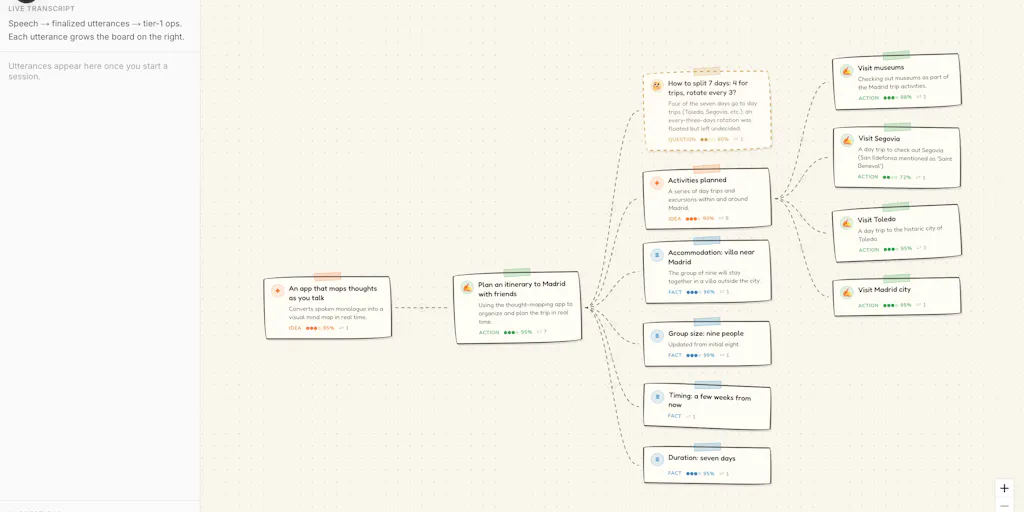
Weave solves a different problem: it captures the architecture of your thinking while you’re still in the messy phase. As you speak, your words become linked cards—decisions, facts, questions, risks—each one atomic and connected. The maker, Emmanuel Adesola, describes it as “your words become linked cards in seconds—decisions, facts, questions, risks—each one atomic, each one connected.” That’s not just a nicer transcript; it’s a fundamentally different output. When a seller is mapping out a product’s competitive landscape, the links between “competitor X launched a similar product” and “our margin advantage on material cost” are what matter, not the full transcript of the conversation.
The pause-triggered questions are the killer feature for decision-making. When you go quiet, Weave floats specific, glance-length questions tied to the card you just spoke about. The maker notes that “questions only show up when they’re specific. If Weave has nothing sharp to ask, it stays silent.” For a seller reviewing a product risk—say, a potential trademark issue on an Amazon listing—the tool might ask “What about health insurance?” (if that’s relevant) or more likely “What’s the patent filing date?” That’s the kind of prompt that saves you from overlooking the obvious.
Why Amazon Sellers Should Care More Than Shopify Ones
Amazon sellers deal with a higher volume of ambiguous, high-stakes decisions: split-testing pricing, analyzing reviews for quality issues, deciding whether to FBA or FBM for a new SKU. The meeting capture feature in Weave—which maps a Meet or Teams conversation with speaker labels so you can “see who committed to what, and where two people actually disagree”—is directly useful for product development meetings with suppliers or internal team debriefs on listing performance. Shopify store owners, especially DTC brands, often work alone or with smaller teams; their thinking bottlenecks are more about creative direction than multi-stakeholder decision mapping. Weave’s replay feature—where you can “scrub back through how a decision actually unfolded”—also has more value for Amazon sellers who need to audit past decisions (why did we drop that supplier? why did we abandon the A+ content redesign?) than for a Shopify brand owner iterating a landing page.
How Weave Differs From Existing Options (And What That Means for Your Tool Stack)
The obvious comparison is Miro or Milanote—whiteboarding tools where you manually drag boxes and draw connections. The maker explicitly calls out the pain: “mind-mapping apps where I spent more time dragging boxes than deciding anything.” Weave’s live mapping changes the equation: cards appear while you’re mid-sentence, and manual edits always win. For a seller who hates spending 30 minutes updating a diagram after a meeting, that’s a meaningful time saver.
Then there’s the note-taking layer. Notion’s AI can summarize a transcript, but it doesn’t preserve the tentative nature of thinking. Weave treats half-finished thoughts differently: “say ‘maybe’ and the card appears dashed; it stays provisional and keeps reshaping until you settle it.” That’s crucial for cross-border ideation where early-stage assumptions (e.g., “maybe we can use Amazon Global Logistics for this route”) need to stay flexible until validated.
The export to Markdown—complete with nested outlines, a Connections section with labels, and an Open questions section—is another differentiator. The maker confirmed that the export does not flatten: it includes full link structure and open questions. That means you can pipe your thinking directly into an Obsidian vault or into a Claude prompt for deeper analysis. For sellers using AI tools for product research or ad copy generation, having structured input is far more useful than raw text.
Where the Math Breaks
Let’s be honest about the numbers. Weave’s free tier is 15 voice minutes per month with no card export. The Pro tier is $4.99 a month for 100 minutes. For an individual seller running a few strategy sessions a month, that’s probably fine. But if you’re a team of five having weekly meetings lasting 30 minutes each, you’ll blow through the 100 minutes in under a week. The pricing is clearly aimed at solo power users, not at multi-user e-commerce teams. The lack of a team plan or collaboration features (shared boards, real-time multi-user mapping) is a gap. If you need to share decision maps with a remote team, you’re limited to read-only links or exports. That works for a solo operator, but for an Amazon brand with three account managers and a supply chain lead, it’s not enough.
Also, the meeting capture currently supports Google Meet and Microsoft Teams, but not Zoom—a notable omission given Zoom’s dominance in cross-border calls with suppliers in Asia. The maker didn’t mention Zoom support, which is a practical hurdle for sellers whose logistics partners prefer Zoom.
What Cross-Border Sellers Can Borrow From It This Week
Even if you don’t adopt Weave as a daily tool, the thinking pattern it embodies is worth stealing. The core insight—that pauses are triggers for better questions—can be applied manually in any meeting. Next time you’re in a weekly ops call, deliberately insert silence after each decision point and ask “what are we not seeing here?” That’s the Weave mental model for free.
But if you do try it, here’s the most valuable use case I see: product research debrief mapping. Load a product you’re considering—say, a kitchen gadget for Amazon US—and talk through the risks: patent landscape, competitor pricing, review sentiment, shipping weight, seasonal demand. As you speak, Weave builds a map that surfaces the connections you might miss on a spreadsheet. Then export the Markdown and feed it into a Claude prompt for a structured checklist. The creator himself noted that you can “integrate into your Obsidian or straight into Claude.”
Another concrete use: supplier negotiation preparation. Before a call with a factory, talk through your negotiation positions, walkaway terms, and risk scenarios. Weave’s mapping will show you which risks are linked to which negotiation points, and the pause-triggered questions might surface something like “What if they raise MOQ by 20%?” that you hadn’t considered.
What I’d Watch / Test Next
I’m going to run a test this week: take a real decision—whether to expand a product line from Amazon US to Amazon UK—and map it in Weave. I’ll time myself, note how many useful questions the pause trigger surfaces, and then export the Markdown to Claude to see if the AI can generate a more structured launch checklist than I could manually. If the tool saves me even 30 minutes of rethinking, the $4.99 monthly cost is trivial.
For teams, I’d watch for two things: Zoom support and a team plan. If the maker adds those, we might have a serious tool for cross-border ops teams that replaces the chaotic mix of voice memos, bullet lists, and mind maps. Until then, it’s a sharp personal productivity tool for the solo seller who thinks out loud. That’s a niche, but for exactly that niche, it’s the most interesting thinking tool I’ve seen in months. If you’re tired of staring at blank pages and waiting for structure to appear, give yourself 15 minutes of silence and start talking. The map will follow.