Why a $0 Mac Utility Matters More Than Your Next Amazon Repricer
Every cross-border operator I know has the same dirty secret: we spend our mornings writing in a language we didn’t grow up in, to customers we’ve never met, through interfaces that were designed by engineers who think autocorrect is a solved problem. The cost of that friction is invisible but brutal — a typo in a listing title that tanks conversion, an awkward phrasing in a customer service reply that turns a refund into a chargeback, a Slack message to your overseas warehouse manager that gets misread and triggers the wrong shipment. We’ve thrown six-figure budgets at repricers and review automation, yet the single most expensive software on our laptops is the spellchecker that keeps failing us. So when I saw a tiny macOS utility called Tidy that promises to fix text anywhere, locally, with no API keys and no cloud dependency, I didn’t see a productivity toy. I saw a potential wedge into one of the most overlooked cost centers in e-commerce: the words we type between the systems that actually run our businesses.
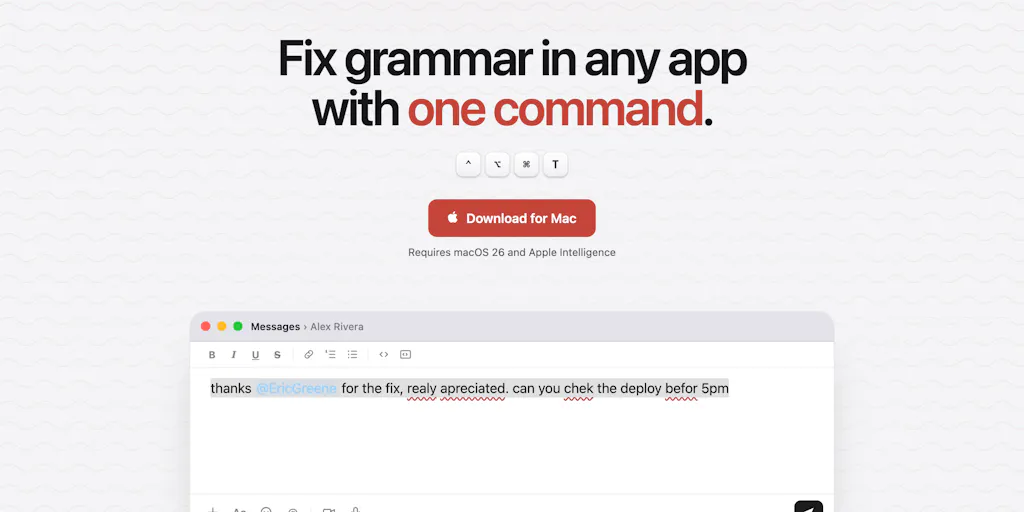
The pitch from Eric Greene, the maker, is disarmingly personal. He built it for himself because he was editing two-thirds of his Slack messages — accidental caps, misspelled words like “operator” or “restaurant” — and he noticed that macOS spellcheck is wildly inconsistent across apps. Slack barely checks at all, while Gmail, Docs, and Notes each have their own half-baked rules. Tidy is one shortcut that behaves the same everywhere: select text, press ⌃⌥⌘T, and it fixes the whole selection in place. There’s a second shortcut, ⌃⌥⌘S, that rewrites selected paragraphs to strip out the telltale signs of AI-generated slop. It runs entirely on the Apple Intelligence local model built into macOS, so nothing leaves your machine. No API keys. Free. Fast. Local. That’s the entire product, and honestly, it might be enough.
The Problem It Actually Solves: The Broken Promise of Platform-Native Writing Tools
Let me be precise about why this matters to someone running a seven-figure Amazon business or a DTC Shopify brand. We don’t live in one writing environment. We live in fifteen. The average day for a cross-border seller looks like this: draft a product description in Google Docs, paste it into Amazon Seller Central’s listing builder, answer a customer message in the buyer-seller messaging system, coordinate with a Shenzhen supplier over WeChat or WhatsApp, update a Shopify blog post, fire off a Slack message to a VA in the Philippines, and reply to a TikTok Shop comment from a buyer in Austin. Every single one of those platforms has its own editor, its own spellcheck implementation, and its own tolerance for bad grammar. The result is that we’ve all developed a weird cognitive overhead — we’re constantly proofreading ourselves in real time, because we can’t trust the tool to do it.
What Tidy does is collapse that entire problem into a single keystroke. Instead of relying on Slack’s barely-functional checker or hoping that Amazon’s listing tool catches your typo before you hit submit, you write naturally, select the text, and invoke one universal shortcut. The correction happens in place, which is a subtle but important design decision — you’re not copying text into a separate window, getting a corrected version, and then pasting it back with formatting mangled. The tool understands context well enough to leave product names alone — Greene specifically demonstrated that it wouldn’t de-capitalize “ProductHunt” in a sentence, which is the kind of thing that drives me insane about aggressive autocorrect systems that think every capitalized word is a sentence-start error.
For non-native English speakers — which describes a huge portion of the cross-border seller community, particularly those operating out of China, Vietnam, and Eastern Europe — this is more than a convenience. As one commenter, Germán Merlo, put it, this solves a real pain point for people who know what they want to say but constantly fight the mechanics of spelling and grammar. The maker’s response acknowledges this explicitly, noting that the non-native speaker use case is one of the most compelling ones. When you’re writing in a second or third language, every typo erodes your credibility — a customer who sees “recieve” in your listing assumes you’re a fly-by-night operation, not a serious brand with a real fulfillment infrastructure.
Why Amazon Sellers Should Care More Than Shopify Ones
Here’s where I’ll get contrarian. Shopify sellers have more writing tools at their disposal — the platform’s blog editor is decent, and there are countless apps that integrate grammar checking into the product creation flow. Amazon sellers, by contrast, are stuck with Seller Central’s notoriously clunky text inputs, which seem to have been designed in 2008 and never updated. The buyer-seller messaging system is even worse — it’s a walled garden where you’re trying to resolve a return or a negative review with limited characters and no formatting, and the stakes of a miscommunication are enormous. One poorly worded reply can trigger an A-to-Z claim, a negative feedback, or a suspension. The ability to select a draft reply, hit ⌃⌥⌘T, and have it cleaned up before you hit send is genuinely valuable in that context, because the alternative is composing carefully in a separate document and then pasting it in — which loses the thread of the conversation and adds friction to every single exchange.
The second shortcut, the de-slopper, is arguably more interesting for Amazon sellers than for anyone else. We’re all using AI to draft listing copy now — that’s not a secret. But the output is increasingly homogenized, and Amazon’s algorithms are getting better at detecting AI-generated content that reads like it was written by a committee of chatbots. The “delve” and “furthermore” tells that Gal Dayan mentions in the comments are real — customers can smell it too, and it undermines trust. The de-slop shortcut promises to rewrite a paragraph to strip out the machine-written rhythm while preserving the core meaning. For a seller who’s drafting a product description with AI assistance but wants it to sound like a human wrote it, that’s a workflow that could save real time and improve conversion.
How It Differs From the Incumbents: Grammarly, ChatGPT, and the Cloud Dependency Problem
The natural comparison is to Grammarly, which has dominated the writing-assistant space for a decade. Grammarly works as a browser extension and a desktop app, and it’s genuinely good at catching grammar errors and suggesting style improvements. But it has three problems that Tidy addresses head-on. First, Grammarly is a cloud service — your text is sent to their servers for analysis, which raises legitimate concerns if you’re drafting a sensitive negotiation email to a supplier or a cease-and-desist letter to a former employee who stole your product photos. Second, Grammarly’s integration quality varies wildly across platforms — it works beautifully in Chrome, but its desktop app coverage is spotty, and it doesn’t reliably catch errors in Slack or in native desktop apps like Notes. Third, Grammarly’s suggestions are often over-engineered — it wants to rewrite your entire sentence structure even when you just need a spelling fix, which adds cognitive load rather than reducing it.
The other comparison is to the AI writing tools we’re all using — ChatGPT, Claude, and the rest. These are powerful, but they’re not integrated into your workflow. You have to copy text out of your document, paste it into a chat window, write a prompt explaining what you want fixed, wait for the response, copy it back, and then deal with formatting loss. That’s a five-minute process for what should be a five-second correction. Tidy’s insight is that the correction should happen in place, in the app where you’re already working, with a single keystroke. That’s the difference between a tool you use occasionally and a tool that becomes part of your muscle memory.
There’s also a middle ground that Tidy is implicitly competing with — the built-in AI features that Apple is rolling out across macOS. Apple Intelligence, which is reportedly coming to iOS 27 with new Foundation models, includes writing tools that can proofread and rewrite text. But Apple’s implementation is still app-by-app — it works in Mail and Notes and Pages, but it doesn’t reliably extend to third-party apps like Slack or to web-based interfaces like Amazon Seller Central. Tidy’s approach is different: it’s a global shortcut that works anywhere you can select text, because it hooks into the operating system’s text selection mechanism rather than relying on each app to expose an AI API. That’s a meaningful architectural advantage, and it’s why the tool can claim to be “one shortcut that behaves the same everywhere.”
Where the Math Breaks: The macOS 26 Requirement and the Local Model Trade-Off
Here’s where my enthusiasm gets tempered. Tidy requires macOS 26 with Apple Intelligence enabled, which is a significant barrier. As the maker himself admits in the launch post, “nobody has turned on Apple Intelligence by the way” — it’s a feature that most Mac users haven’t enabled, either because they don’t know it exists, they don’t trust it, or their hardware doesn’t support it. The requirement effectively limits Tidy to users with recent Mac hardware running beta or latest-release macOS, which is a much smaller market than the broader cross-border seller community. Many operators I know are running older MacBooks because they don’t need the latest hardware to run Seller Central or a Shopify backend — they need a reliable browser and a decent spreadsheet. If Tidy requires them to upgrade their operating system and potentially their hardware, the cost of adoption jumps from zero to several hundred dollars.
The local model trade-off is also worth examining. Running entirely on-device means zero data privacy concerns — nothing leaves your machine, which is a genuine selling point for anyone drafting sensitive business communications. But it also means the model’s capabilities are limited by what Apple Intelligence can do on local hardware, which is not yet on par with the frontier models available through cloud APIs. The maker acknowledges this implicitly in his response to a comment about style memory — he says he can add that as a feature, but it’s not there yet. The local model can fix typos and do basic rewriting, but it’s not going to match the nuanced understanding of a GPT-4-class model when it comes to preserving your voice or understanding complex business context. For a seller who needs a paragraph rewritten to comply with Amazon’s restricted-products policy, the local model might not have the sophistication to catch the subtle policy violation that a cloud model would flag.
Another limitation: the maker has confirmed that multiple language support is not yet available. A Brazilian Portuguese user Gabriel Marchesan Almeida noted that he had to switch his Apple Intelligence language to US English to get the setup to work, and the maker committed to localization as a “fast follow” — starting with Brazilian Portuguese. For a cross-border seller who operates in multiple languages — which is most of us — that’s a real constraint. If you’re drafting a customer service reply in German or a supplier negotiation in Mandarin, Tidy won’t help you yet. The tool is currently English-only, which limits its utility to the English-language portions of your workflow.
What Cross-Border Sellers Can Borrow From Tidy, Even If They Never Install It
The deeper lesson here isn’t about the tool itself — it’s about the workflow insight that motivated it. Greene identified a specific, recurring pain point in his own life — inconsistent spellcheck across apps — and built a targeted solution rather than trying to solve writing problems generally. That’s a mindset that cross-border sellers should apply to their own operations. We’re constantly adopting enterprise-grade tools that promise to solve everything, when the real wins come from identifying the narrow, repetitive friction points that eat an hour a day and building or buying a targeted fix.
The “de-slop” concept is also worth internalizing, even if you never use this specific tool. As AI-generated content proliferates across marketplaces, the ability to make your writing sound human is becoming a competitive advantage. Amazon’s algorithms are increasingly sophisticated at detecting AI-generated content, and customers are becoming more skeptical of listings that read like they were written by a chatbot. The discipline of reviewing your AI-drafted copy and stripping out the telltale patterns — the listy rhythm, the overuse of transition words, the generic enthusiasm — is a skill that every seller needs to develop. Whether you use Tidy’s shortcut or do it manually, the principle is the same: AI should be a starting point, not a finished product.
There’s also something to be said for the local-first approach as a broader principle. We’ve all become dependent on cloud services for everything — from Klaviyo for email to Helium 10 for keyword research — and that dependency creates real vulnerabilities. When a cloud service goes down, your entire operation stalls. When a cloud service changes its pricing or its API terms, your costs can spike overnight. The local-first model that Tidy embodies — where the core functionality works without a network connection and without sending your data to a third party — is a reminder that not every tool needs to be a SaaS subscription. There’s a place for software that just works, on your machine, without a monthly bill.
The Tooling Stack Question: Where Does a $0 Utility Fit?
For operators who are building their tooling stack, Tidy raises an interesting question about where the line is between a consumer utility and a business tool. At $0, with no API and no team features, Tidy is firmly in the consumer utility category. It’s not going to replace your content workflow or integrate with your Zapier automations. But that’s almost the point — it’s a reminder that some of the most valuable tools in your stack are the ones that do one thing well, without trying to become a platform. The best cross-border operators I know have a core stack of serious tools — an ERP, a repricer, an email platform — surrounded by a halo of small utilities that solve specific problems. Tidy is positioned to be one of those halo tools: not mission-critical, but quietly valuable, the kind of thing you don’t realize you need until you’ve used it for a week and can’t imagine going back.
The response from the Product Hunt community suggests that the maker is listening to feedback. The comment thread shows him engaging with users on language support, style memory, and the philosophical question of what counts as “AI slop.” That’s a good sign for the tool’s evolution — the roadmap seems to be driven by actual user needs rather than by a venture capital mandate to grow at all costs. For a cross-border seller evaluating whether to adopt a tool, that’s a meaningful signal. A tool that’s built by someone who uses it themselves, and who responds to community feedback within hours, is more likely to evolve in directions that actually help you than a tool that’s designed by a product team responding to quarterly OKRs.
Where My Judgment Says It Falls Short
I want to be clear about the limitations, because the cross-border community doesn’t need another hype cycle. Tidy is a genuinely clever utility with a well-defined use case, but it’s not a solution to the broader writing challenges that cross-border sellers face. The English-only limitation is significant — a seller who needs to draft listings in German, French, or Japanese won’t find this tool useful for those workflows, and the maker’s commitment to localization is still just a promise. The macOS 26 requirement is a hard barrier for many potential users, particularly those who are running older hardware or who have deliberately avoided upgrading to the latest operating system for compatibility reasons. And the local model’s capabilities are necessarily limited — it’s not going to catch the kind of nuanced cultural or regulatory issues that a cloud-based model with broader training data might flag.
The de-slop feature is also more limited than it might appear. The maker’s response to a question about how it decides what counts as “AI slop” is telling — he says it maintains your writing style and fixes the text, but the underlying model is the same Apple Intelligence model that powers the spelling and grammar fixes. That means the de-slopper is not a specialized tool trained to detect AI-generated text; it’s a general-purpose language model that’s being asked to rewrite a paragraph in a more natural style. The results will be variable, and the tool’s ability to distinguish between formal writing and AI slop — a distinction that Gal Dayan raises in the comments — is likely to be inconsistent. If you naturally write “furthermore” and “in order to,” the tool might flag those as AI tells even though they’re authentic parts of your voice.
There’s also the question of trust. The maker is honest that the tool runs on Apple Intelligence, which means its behavior is tied to Apple’s model updates. If Apple changes the underlying model in a way that degrades Tidy’s performance, the tool’s utility could shift without any action from the maker. That’s a structural dependency that users should understand before they build their workflow around it. For a cross-border seller who relies on the tool for customer-facing communications, a silent degradation in quality could have real consequences.
What I’d Watch / Test Next
Here’s what I’d do this week if I were a cross-border operator evaluating this tool for my own stack. First, check whether your current macOS version supports Apple Intelligence — if you’re on a Mac from 2021 or earlier, Tidy is not an option for you, and you should move on to other fixes for your writing workflow. If you are on compatible hardware, enable Apple Intelligence and install Tidy, then spend a day using the ⌃⌥⌘T shortcut on every piece of customer-facing writing you do — Slack messages to your team, replies in Amazon’s buyer-seller messaging, draft product descriptions, even email to your supplier. The test isn’t whether it catches errors — it will — but whether it catches errors without introducing new ones, and whether it preserves the specific product names, brand terms, and industry jargon that are unique to your business.
Second, test the de-slop shortcut on your existing AI-generated content. Take a paragraph from a product listing that you know was written by ChatGPT, select it, and hit ⌃⌥⌘S. Compare the output to the original and assess whether it sounds more human. Then take a paragraph that you wrote yourself and run it through the same process — if it significantly changes your authentic voice, that’s a signal that you should use the de-slopper selectively, not as a default for all your writing.
Third, watch the maker’s roadmap. He’s committed to Brazilian Portuguese as the first localization, and he’s mentioned style memory as a potential feature. If he delivers on those, the tool’s utility for cross-border sellers expands considerably. If the roadmap stalls after the initial launch, that’s a signal that Tidy might remain a niche utility rather than becoming a standard part of the cross-border tooling stack.
The broader takeaway is this: the next time you find yourself manually fixing the same type of error in the same app every day, don’t just accept it as a cost of doing business. Build a fix, buy a fix, or find a tool like Tidy that someone else built for the exact same problem. The most efficient operators aren’t the ones with the most tools — they’re the ones who’ve eliminated the small, repetitive frictions that everyone else has learned to tolerate. Tidy is a reminder that sometimes the biggest wins come from the smallest fixes.


