The Long Tail of Vertical SaaS Is Coming for Your Ops Stack
Cross-border sellers spend most of their tooling attention on the same dozen names — Shopify, Amazon Seller Central, Helium 10, Klaviyo — and almost none on the weird, vertical, single-purpose desktop apps that quietly run the unglamorous middle of the business. That’s a mistake, because the pricing and packaging patterns coming out of niche software like OmniDICOM tend to show up in e-commerce tooling twelve to eighteen months later. When a maker ships a per-machine perpetual-ish license with a metered trial and a hard “not for production use” disclaimer, that’s a signal about where the whole long tail of operator software is heading — and it’s worth reading closely before your next renewal cycle.
What OmniDICOM Actually Is, and Why It’s a Useful Mirror
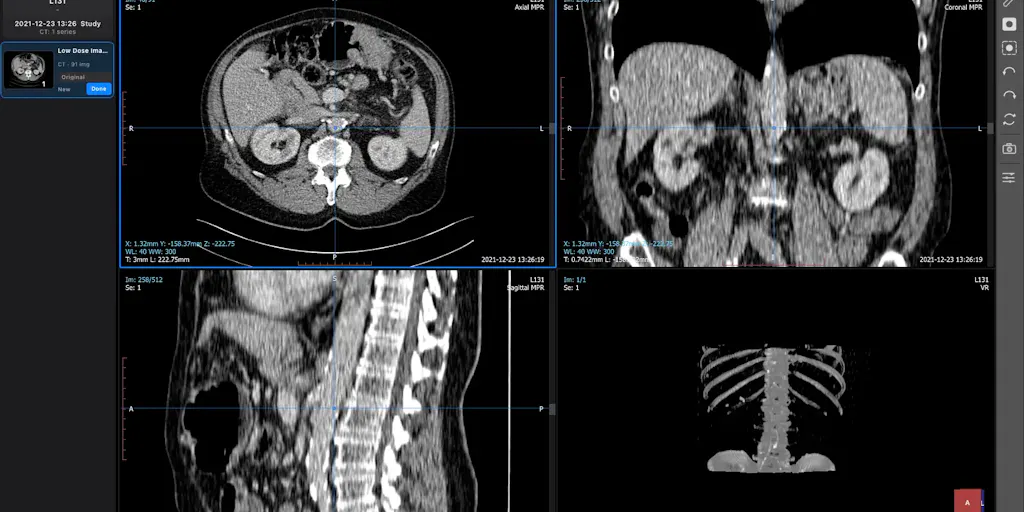
OmniDICOM is a desktop app for DICOM workflows in research and teaching, built by Youngrak Choi. The pitch is narrow on purpose: opening studies, comparing series, editing tag values, exploring MPR and 3D views, and exporting results — all from one app instead of four. Metadata editing is treated as a first-class workflow: inspect a tag, change its value, save, reopen the study to verify.
If you’ve never touched DICOM, the translation is this: it’s a file format with a rigid, nested metadata schema, where a single wrong field can render a dataset unusable and where “un-doing” an edit is often impossible because the original was overwritten. That is structurally identical to the problem every Amazon seller faces with flat files, every Shopify operator faces with metafield imports, and every TikTok Shop manager faces when bulk-editing variant attributes across a catalog.
The platform support is desktop-native, which is itself a statement: the Mac download supports Apple silicon on macOS 13 or later, and the Windows build supports 64-bit Windows 10⁄11. No web app, no browser tab, no shared cloud workspace.
Pricing as a Signal, Not a Fact
The commercial model is the part I’d actually study. A 14-day Professional trial starts at first launch, with export limitations — meaning you can evaluate the reading and comparison workflows but not the output workflows. Basic runs US$10/month or US$99/year per machine. Professional runs US$45/month or US$449/year. Taxes may apply. And the maker is explicit: OmniDICOM is for research and education only, not diagnosis or clinical decision-making.
Three things stand out for anyone who buys e-commerce software for a living:
- Per-machine, not per-seat. In a world where every SaaS vendor wants to charge per seat, per order, per SKU, or per GMV, per-machine pricing is a deliberate hedge against the “one power user, ten viewers” problem. Think about how many of your team actually need write access to your feed management tool versus how many just need to look at it.
- Trial that gates the valuable half. Export limitations during the trial mean you can validate the ingestion and inspection experience but not the deliverable. That’s a sharper trial design than the usual “14 days, everything unlocked, then paywall” — and it maps directly to how sellers should structure their own free-tier offers on DTC storefronts.
- Explicit scope disclaimers. “Research and education only” is a liability boundary, not a marketing line. If you sell into regulated categories — supplements, medical devices, children’s products, cosmetics in the EU — you already live inside these boundaries. Watching how a small vendor draws them tells you how your own compliance copy should read.
How It Stacks Up Against the Incumbents You Actually Use
Now the comparison that matters. The closest analog in the e-commerce stack isn’t a single product — it’s a category. Consider what Helium 10 does for Amazon sellers: a bundle of modules (keyword research, listing optimization, inventory forecasting, review automation) sold as one subscription, with a free tier that’s genuinely usable and a paid tier that unlocks the workflows you actually need at scale. OmniDICOM is doing the inverse — one narrow workflow, done deeply, sold as a desktop license. Both models exist because both buyer types exist.
Then look at Shopify and its app ecosystem. The reason sellers end up with twelve apps isn’t that any one app is bad; it’s that each app solves one slice and charges a monthly floor. A per-machine desktop tool with no per-order metering is a fundamentally different economic animal. If you’re running a catalog of 40,000 SKUs on Shopify and paying per-SKU overage on your feed tool, you already understand why.
For the marketplace-adjacent crowd, Amazon Seller Central itself is the ultimate cautionary tale about metadata editing at scale. Bulk flat-file uploads, partial-update templates, and the ever-present risk of overwriting a field you didn’t mean to touch — this is the exact pain OmniDICOM’s maker is describing, just in a different vertical. If you’ve ever uploaded a partial update and watched your variation relationships collapse, you know the feeling.
Why Amazon Sellers Should Care More Than Shopify Ones
Shopify operators have metafields, but they also have version history, theme rollback, and a reasonably forgiving data model. Amazon sellers have none of that. A bad flat file can suppress a listing for days while you open a case with Seller Support. A wrong variation theme can orphan child ASINs in a way that takes a week to unwind. The “work on a copy” advice the maker gives — preserve the original files before you edit metadata — is the single most transferable habit in this entire launch, and it’s the one most Amazon operators still don’t practice.
What Cross-Border Sellers Should Borrow From This Launch
Forget the medical vertical for a second. There are four operational patterns here that I’d steal immediately.
1. Copy-before-edit as a default workflow
The maker’s instruction is blunt: work on a copy if you need to preserve the original files. A commenter on the launch, Gal Dayan, pushed back on exactly this — asking whether there’s a built-in guardrail, like a warning before saving over the original file, or whether it’s entirely on the user’s backup discipline. That’s the right question, and it’s the same question you should ask of every tool in your stack that touches live catalog data.
If your PIM, feed manager, or bulk editor doesn’t have an undo or a staging environment, you are one bad CSV away from a very bad week. Build the copy step into your SOP even when the tool doesn’t force it.
2. Trial design that gates the output, not the input
Most DTC free trials give away the entire product and hope the habit sticks. The OmniDICOM trial inverts that: you can explore, but exports are limited. For a seller running a subscription box or a consumables brand, that’s a useful template — let people experience the discovery and personalization, gate the thing that creates lock-in.
3. Desktop-native as a moat in a browser-first world
Everything in e-commerce is a browser tab. That’s fine until you’re processing 200,000 rows of catalog data or running a local 3D render. Desktop apps handle local compute without per-minute cloud billing, and they sidestep the “your session expired, please re-authenticate” tax that eats an hour a week. If you’re doing heavy feed manipulation, a local tool is often faster than a web one — and the pricing reflects it.
4. Explicit scope disclaimers as a trust signal
“Not for diagnosis or clinical decision-making” is the medical equivalent of “this tool does not guarantee compliance with FTC, GPSR, or Prop 65.” The vendors who say this out loud are usually the ones who’ve thought hardest about where their liability ends. When you’re evaluating a new compliance or tax tool for your cross-border operation, the absence of a clear scope disclaimer is a red flag, not a green one.
Where the Math Breaks
Per-machine pricing sounds great until your team is distributed across three time zones and everyone needs access. At US$449/year for Professional, a five-person team on five machines is US$2,245/year — which is fine, but it’s also the point where a cloud tool with per-seat pricing starts to look competitive, especially if it includes collaboration, audit logs, and shared state. The per-machine model wins for solo operators and small teams; it loses for anyone who needs concurrent, shared, versioned access to the same dataset.
There’s also a subtler issue: no mention of any sync, cloud backup, or cross-device continuity. For research workflows that’s survivable. For a catalog team, it’s a dealbreaker — you cannot have your only copy of a 40,000-row feed living on one laptop.
Where My Judgment Says This Falls Short
A few honest reservations, in the spirit of the launch’s own comment thread.
The guardrail question is unresolved. Dayan asked whether there’s a warning before overwriting the original file, or whether it’s entirely on the user’s backup discipline. The maker’s response to that specific question isn’t in the source material I have. That’s not a knock on the product — it’s a knock on the launch page, which is exactly the kind of gap that costs conversions. If you’re launching a tool that touches irreversible data, the safety story needs to be in the first three lines of the description, not implied by a “work on a copy” aside.
“Not disclosed” is doing a lot of work here. There’s no information in the source about team size, funding, roadmap, integrations, or whether the app supports batch operations across many files at once. For a research tool that’s tolerable. For anything touching production e-commerce data, those are the first five questions I’d ask.
Desktop-only is a strategic bet, not a feature. Apple silicon on macOS 13+ and 64-bit Windows 10⁄11 covers most modern machines, but it excludes anyone on a Chromebook, an older Intel Mac, or a locked-down corporate image. If your ops team runs thin clients, this category of tool is simply not available to you — which is worth factoring into any “should we buy desktop or cloud” decision.
The vertical framing may be too narrow to generalize. DICOM is a genuinely specialized format with a small, well-defined buyer set. That’s a strength for the maker and a weakness as a template — the workflows transfer, but the willingness to pay US$449/year per machine for a single-format editor may not transfer to, say, a CSV cleaning tool, because CSV tooling is commoditized and DICOM tooling isn’t.
What I’d Watch / Test Next
Three concrete things to do this week.
First, audit your stack for irreversible operations. Find every tool that writes to live catalog data — your feed manager, your PIM, your bulk editor, your Amazon Seller Central flat-file workflow — and confirm whether it has a staging mode, a version history, or a rollback. If it doesn’t, add a manual copy step to your SOP today. This is the single highest-ROI habit in the entire launch.
Second, reconsider your own trial design. If you sell a subscription or a consumables product, look at what you’re giving away for free versus what you’re gating. The OmniDICOM pattern — full access to discovery, limited access to output — is worth A/B testing against your current offer.
Third, watch the per-machine pricing trend. If you’re evaluating new tooling this quarter, ask vendors directly whether they offer a per-machine or per-user tier, and run the math at your actual team size. The answer will surprise you more often than you’d expect, and it’s the kind of line item that quietly compounds across a dozen subscriptions.


