Why a Mac Menu Bar Utility Matters to Anyone Selling Across Borders
Let me be direct: the most expensive line item in your P&L is not your Amazon PPC bids, your TikTok Shop commission, or even your freight forwarder. It’s the silent tax of broken developer workflows — the hours your team burns fighting local environments while your competitors are shipping listing optimizations, launching new ad creatives, and testing checkout flows. Every minute a developer or technical marketer spends staring at a terminal trying to figure out why their local storefront preview won’t load is a minute not spent on your international expansion. This is the unglamorous, invisible cost that separates DTC brands that scale from those that stall. So when I see a tool like Port Radar for macOS — a menu bar utility that demystifies what’s running on your machine’s ports — my first thought isn’t “cute dev tool.” My first thought is “how much of my team’s billable time does this save, and why isn’t this already standard equipment?”
The Real Problem: Your Stack Is a Black Box
Here’s the scenario every cross-border operator knows. It’s Monday morning in Shenzhen. Your product listing manager in Manila is trying to preview the new Shopify theme. Your head of growth in Berlin is running a local instance of your headless storefront to test a new landing page. Your freelance developer in Kyiv is debugging a webhook integration. And all of them are hitting the same wall: something is already using port 3000, and nobody knows what it is.
The traditional answer has been lsof — the command-line utility that lists open files and the processes attached to them. It works, but it requires memorizing flags, parsing dense output, and understanding what a PID even means. For a cross-border team where half your members are not native English speakers and the other half haven’t touched a terminal since college, lsof might as well be written in Sanskrit. The alternative is Stack Overflow roulette — copy-pasting commands you don’t understand into a terminal you’re afraid of, hoping the output makes sense. This is where Port Radar comes in, and it’s worth understanding why its approach matters for your operation.
What Port Radar Actually Does
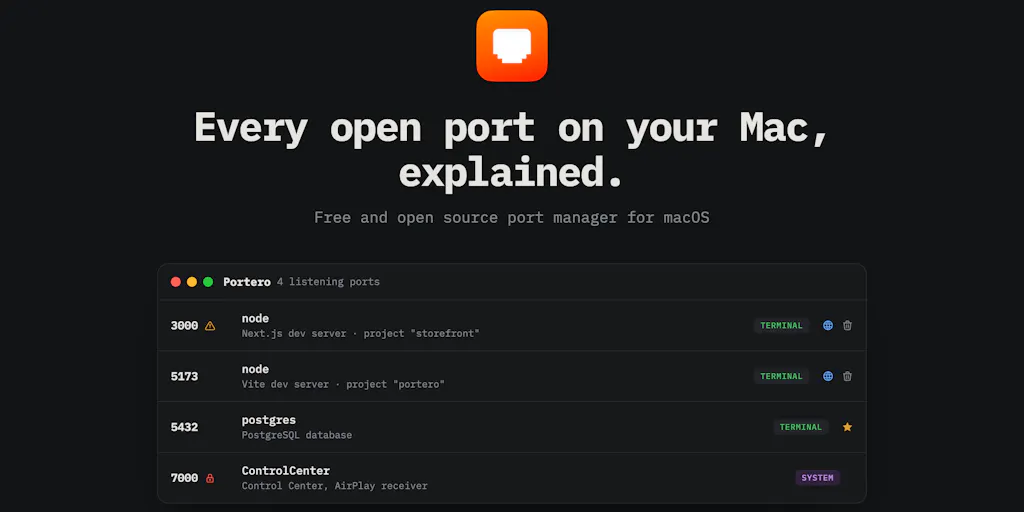
The tool sits in your Mac menu bar and does three things, according to the maker’s launch post. First, it shows every port your Mac is currently running — a simple, visual list instead of a wall of text. Second, it answers the question “what is this, and is it safe to stop?” using Apple Intelligence, entirely on-device. Third, it stops anything in one click. There’s also a bonus feature: turning a local site into a live shareable link via a one-click Cloudflare tunnel.
The on-device AI explanation is the differentiator. Instead of seeing “PID 4821, port 3000,” you get a plain-English answer: “This is your local Next.js development server, it’s safe to stop.” The maker, Sebastian Solano, explicitly states that nothing gets uploaded anywhere — the “never leaves your machine” promise is a hard rule, not a marketing slogan. That privacy stance is non-negotiable for anyone handling customer data, payment credentials, or proprietary storefront code.
How It Differs From What You’re Already Using
Every cross-border operator has a tooling stack. For Amazon sellers, that’s often Helium 10 or Jungle Scout for product research, plus Seller Central for day-to-day management. For DTC brands, it’s Shopify for the storefront, Klaviyo for email, and a mix of project management and communication tools. But the developer tooling — the actual code, the local environments, the staging servers — is usually a mess of undocumented processes and half-remembered commands.
Port Radar’s direct competitors are the command-line utilities like lsof and netstat, plus GUI tools like Little Snitch (which monitors network traffic but isn’t focused on port-level process management). What Port Radar does differently is threefold:
It removes the terminal barrier. No commands to memorize, no syntax to learn. This is huge for a cross-border team where the person debugging the issue might be a marketing ops lead, not a software engineer.
It adds intelligence to the output.
lsoftells you what process is using a port. Port Radar tells you whether it’s safe to kill it. That’s the difference between raw data and actionable insight. The maker’s response to a community question confirms this was the deliberate design choice: “The real value for me was having something intelligent looking at everything running on my ports, understanding what each process actually is, why it’s there, and whether it’s safe to stop.”It’s local-first. No cloud dependency, no data leaving your machine. For a cross-border operator dealing with GDPR compliance in Europe, PIPL compliance in China, or CCPA in California, this is not a nice-to-have — it’s a requirement.
Why Amazon Sellers Should Care More Than Shopify Ones
Here’s a counterintuitive take: if you’re running a Shopify DTC brand, you probably have a cleaner development workflow than an Amazon FBA seller. Shopify’s ecosystem is more modern, more API-driven, and more likely to have your team using local development environments with tools like Shopify CLI. Amazon sellers, by contrast, are often working with older, clunkier tooling — think spreadsheet-based inventory management, third-party repricers that run as local apps, and custom scripts for scraping your own seller reports.
That means the average Amazon seller is more likely to have random processes running on random ports — a repricer that hasn’t been updated in two years, a scraper script that’s still running in the background, a local database that’s holding a connection hostage. Port Radar’s “is it safe to stop” feature is arguably more valuable for this audience because the stakes of killing the wrong process are higher. Kill the wrong thing on your Amazon seller setup and you might lose a repricer that’s been managing your buy box for months. Port Radar’s AI explanation gives you the confidence to make that call without a panic attack.
What Cross-Border Sellers Can Borrow From This Tool
Beyond the specific utility, Port Radar is a case study in how to think about operational tooling. Here’s what I’d steal from its philosophy:
Local-first privacy as a competitive advantage. The maker’s insistence on on-device processing — even at the cost of gating features on unsupported hardware — is a lesson for anyone building or buying tools. In a cross-border context, where data sovereignty laws are increasingly strict, tools that keep data local are not just more secure; they’re more legally defensible. When a customer in Germany asks where their data is stored, you want to be able to say “on your device, nowhere else.” That’s a sales pitch and a compliance win.
Intelligence over raw data. Every tool in your stack should be moving toward answering “so what?” rather than just presenting information. Port Radar doesn’t just show you port numbers; it tells you what they mean and what to do about them. The same principle applies to your analytics dashboards, your ad reporting, your inventory forecasts. If a tool isn’t helping you make a decision, it’s just noise.
One-click action. The tool doesn’t just diagnose; it fixes. One click to stop a process, one click to create a Cloudflare tunnel for sharing a local site. In a cross-border operation where your team spans time zones and languages, reducing multi-step workflows to single actions is not convenience — it’s operational efficiency.
Where the Math Breaks
I want to be honest about the limitations. Port Radar is a macOS-only tool, which means it’s useless for the Windows-based developers who make up a significant chunk of the cross-border e-commerce workforce, particularly in Southeast Asia and parts of Europe. If your team is split between Mac and Windows machines, this tool only solves half the problem.
The Apple Intelligence requirement is another constraint. The maker confirmed in a comment that the AI-powered explanations only work on Apple Silicon Macs with recent macOS versions. On older Intel Macs, the core port monitoring still works, but the “what is this” feature is gated off entirely. That means if your team is running older hardware — which is common in cost-sensitive markets — you’re paying for a feature you can’t use.
And there’s the question of scale. Port Radar is designed for individual developers, not teams. It doesn’t have collaboration features, no shared dashboards, no way to see what’s running on a colleague’s machine. For a cross-border team that needs visibility into each other’s environments, this is a single-player tool in a multiplayer game.
My Judgment Call: Worth the Download, Not Worth Rebuilding Your Stack
Here’s where I land. Port Radar is not going to transform your cross-border e-commerce operation. It’s not a game-changer like Shopify was for DTC, or Helium 10 for Amazon research. It’s a utility — a well-designed, thoughtful utility that solves a specific, annoying problem.
But that’s exactly why it’s worth paying attention to. The best operational improvements are often the small ones: the tool that saves your developer 15 minutes a day, the feature that prevents one support ticket, the automation that eliminates one manual step. Port Radar is that kind of tool. It’s a reminder that the biggest wins in cross-border e-commerce often come from fixing the invisible frictions — not the flashy marketing campaigns or the new marketplace launches, but the quiet, daily annoyances that drain your team’s energy and focus.
For a solo operator or a small team where everyone wears multiple hats, Port Radar could genuinely save you hours per week. For a larger operation with dedicated DevOps staff, it’s a nice-to-have but probably not essential. The Cloudflare tunnel feature is genuinely useful for sharing local previews with clients or team members in other time zones — a feature that alone justifies the download for agencies that need to show work-in-progress to overseas clients.
What I’d Watch / Test Next
If you’re intrigued, here’s what I’d do this week:
Download Port Radar and spend 15 minutes exploring what’s actually running on your development machine. You’ll almost certainly find at least one process you didn’t know existed — and that’s the point. Understanding your own environment is the first step to optimizing it.
Test the Cloudflare tunnel feature with a colleague in another country. Set up a local preview of your storefront, share the link, and see if it works reliably across international connections. If it does, this could replace your current preview-sharing workflow — which probably involves uploading files to a staging server or sending screenshots back and forth.
Evaluate your broader tooling stack with the same lens Port Radar uses: local-first privacy, intelligence over raw data, one-click action. Ask yourself which of your current tools are just presenting information versus helping you make decisions. Cut the ones that aren’t pulling their weight.
Watch for the heuristic fallback the maker mentioned for unsupported Macs. If that ships, it makes the tool viable for teams with mixed hardware — which is most cross-border teams.
Consider the broader trend. Port Radar is part of a shift toward on-device AI that respects privacy while adding intelligence. That’s a trend worth tracking for your own tooling decisions. The tools that win in the next few years will be the ones that make your team smarter without making your data less secure.
The bottom line: Port Radar is a small tool with a big lesson. It’s proof that the best cross-border e-commerce tools aren’t always the ones with the biggest marketing budgets — they’re the ones that quietly solve a real problem, respect your data, and get out of your way. That’s the kind of tool I’d bet on, and the kind of thinking I’d want in every part of my stack.