The Real Cost of Running Blind: What a macOS Port Manager Teaches Us About E‑Commerce Infrastructure
Every cross-border operator I know—whether they’re running a ten‑SKU Shopify Plus store or a 200‑ASIN Amazon FBA catalog—has a version of the same headache. You’ve got a dozen integrations pinging inventory APIs, a headless front‑end hitting a custom middleware, a Klaviyo flow that talks to a third‑party returns endpoint, and somewhere in the stack a forgotten “node” process that grinds your development server to a halt. You know it’s there because “port 3000 is already in use,” but you have no idea which service, which project, or whether it’s safe to kill. That context gap is bigger than a minor developer annoyance—it’s a direct drag on the speed of your operation.
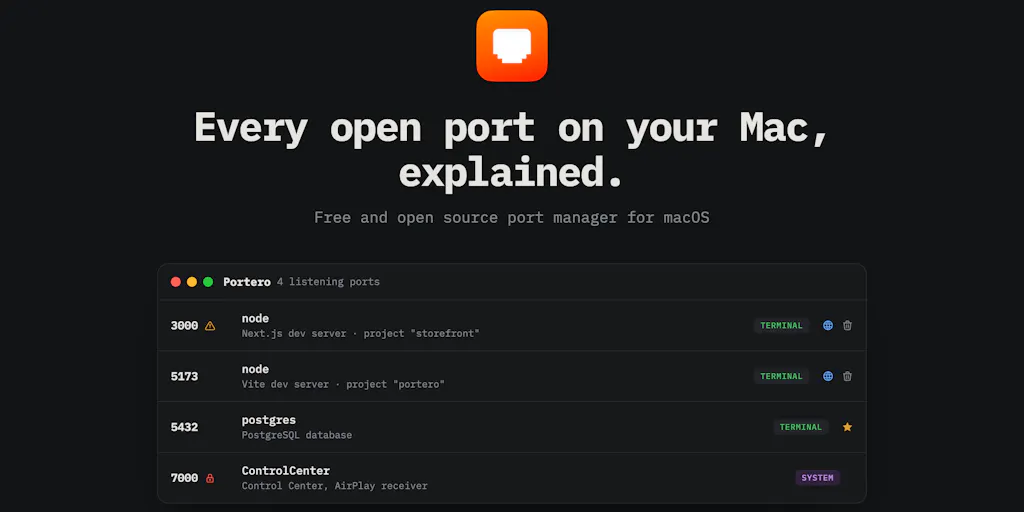
When I saw the launch of Portero on Product Hunt, I didn’t scroll past. The tool is a macOS utility that lists every open port on your machine and translates the raw process name into plain English: “Vite dev server, project storefront” instead of just “node.” Its maker, C3B, built it because he kept losing track of what was running on his own machine. But the insight—that seeing ports is easy, understanding them is hard—applies far beyond local development. It’s a perfect metaphor for the way most e‑commerce teams manage their infrastructure. We throw containers, microservices, APIs, and cron jobs at the wall, and we trust that a tool like lsof will give us the truth. But lsof speaks in PIDs and process names; we speak in “the checkout service” and “the inventory sync.”
This essay isn’t about whether you should install Portero on your Mac (though you might, if you run a local dev stack). It’s about what the problem it solves reveals about the state of our tooling, and what cross-border sellers, DTC operators, and Amazon brand owners can borrow from its approach to bring order to their own operational chaos.
The Problem Portero Actually Solves (and Why It’s Not Just “Port Management”)
The surface‑level pitch is simple: a GUI for lsof that turns cryptic process names into human‑readable labels. But the real product is contextual awareness at the point of action. When you see a conflict flag in Portero, you don’t have to chase down which process is squatting on port 3000. You see “Vite dev server, project storefront” and “Python background script, project data‑sync” side by side. The decision—kill one, or troubleshoot both—takes seconds instead of a Google rabbit hole.
For a cross-border seller, this maps directly to the nightmare of managing multiple tool stacks. You’re probably running a Shopify storefront, a Helium 10 dashboard for keyword research, a Seller Central session for order management, a Klaviyo flow builder, and a custom widget that handles international pricing conversion. Every one of those services touches an API endpoint, a webhook URL, or a server process. When something breaks—say, your inventory sync stops updating—you need to know not just which service is failing, but which underlying process and what it was supposed to be doing. That’s the same gap Portero closes.
The tool doesn’t just list ports; it labels the agent (e.g., “AirDrop and sharing” vs. “sharingd”). It also offers built‑in macOS firewall blocking, process killing (graceful or forced), and one‑click browser launch for HTTP‑responding ports. The maker’s comment about the globe icon only appearing when the port actually serves HTTP is a telling design detail: it avoids false positives. You can’t accidentally open your Postgres database in a browser.
How It Differs from the Existing Options
The incumbent here is lsof—a command‑line utility that every developer has memorized a dozen flags for. lsof -i :3000 gives you a PID and a process name. It doesn’t tell you “which project,” “what tool,” or “how safe to kill.” There are also dozens of GUI port scanners (Paessler PRTG, SolarWinds, even the built‑in macOS Network Utility), but they’re either overpriced enterprise tools or designed for network admins, not for a developer who just needs to untangle a local mess.
Portero’s differentiation is the plain‑English translation layer. When a user asks about Docker containers, the maker admits the current version only labels “Docker, container port forwarding” without resolving to the specific compose project. That’s a gap, but it’s acknowledged openly, and the roadmap includes querying the Docker socket to map port → container → compose project. Compare that to lsof which would just say “docker‑proxy”—zero context.
For cross-border sellers, the analogous incumbents are the chaos of spreadsheets, Slack messages, and memory for tracking what runs where. You might have a Google Sheet listing your API keys, a shared Notion doc for webhook endpoints, and three conversations in Slack asking “who deployed that lambda?” The solution isn’t another spreadsheet; it’s a context‑aware catalog of your operational services.
What Cross‑Border Sellers Can Borrow from Portero’s Design Philosophy
1. Make the Invisible Visible (and Human‑Readable)
Portero doesn’t give you more data; it gives you better data. Your team already has too many dashboards. What you need is a single pane of glass that translates “PID 1234” into “the product sync job from last night’s cron.” In e‑commerce, this manifests as a tool like Datadog or a custom monitoring stack that labels processes with business context. But most sellers don’t have that luxury. They rely on platform dashboards (Amazon’s “Manage Inventory,” Shopify’s “Status,” TikTok Shop’s “Order Performance”) that speak in platform jargon, not in the language of your operation.
Take a lesson from Portero’s plain‑English labels: invest in a lightweight internal wiki or a tool like Notion that maps every automated process to a human‑friendly description. “Inventory reconciliation job” instead of “cron.php?job_id=42.” “Order export to ShipStation” instead of “webhook from Shopify.” It costs nothing but time, and it saves hours of cross‑team confusion when something breaks on a Friday night.
2. Flag Conflicts Before They Cause a Crisis
Portero’s “conflict flags” highlight ports where two processes are trying to use the same resource. That’s exactly the pattern you see in e‑commerce when two automation scripts both try to update the same product listing simultaneously, or when a webhook and a manual import collide on an inventory feed.
The solution isn’t reactive debugging; it’s preemptive conflict detection. If you’re using Make (formerly Integromat) or Zapier to connect Shopify to your ERP, you should set up alerts for duplicate triggers. If you run custom Python scripts for price scraping, enforce a locking mechanism. Portero’s approach—showing both processes with their labels and letting you decide—is better than a system that silently fails. In practice, that means investing in observability for your automation layer, not just your storefront.
3. The One‑Click “Open” Is a Workflow Speed‑Up, Not a Feature
The maker describes the ability to open a local server from the app as a “small workflow improvement.” But in the context of e‑commerce, that kind of friction removal is worth serious money. Every time a team member has to switch contexts to look up an endpoint, check a status, or find a URL, they lose 5–10 minutes of flow. Multiply that by a team of 10 across a 50‑hour week, and you’re hemorrhaging productivity.
The equivalent in your operation is one‑click access to real‑time data. Can you open your Amazon inventory snapshot from Slack? Can your customer support team check the latest DHL tracking without logging into three systems? Tools like Tray.io or a simple custom Slack bot can surface critical data without the friction of context switching. The goal isn’t a fancy dashboard; it’s a response that takes two seconds instead of two minutes.
Why Amazon Sellers Should Care More Than Shopify Ones
This might be controversial, but I believe the Portero lesson is more urgent for Amazon FBA owners than for Shopify DTC operators. Here’s why:
On Amazon Seller Central, your infrastructure is largely invisible. You don’t control the servers, the databases, or the APIs. But you do control the automation layer that talks to Amazon’s endpoints—price repricing tools, inventory syncs, advertising management scripts, and third‑party analytics. When something goes wrong (a stock‑out that wasn’t caught, a price that drifted, a PPC campaign that turned off), the cause is almost always a broken process that you can’t see without digging through logs. The stakes are higher because Amazon’s algorithm penalizes errors immediately.
A Shopify store owner, in contrast, can glance at the Shopify admin dashboard and see every product, order, and integration. The visibility is built in. Amazon sellers are flying blind on a third‑party platform. That’s why a tool that brings context to the underlying process—even a conceptual one—is so valuable. You need a map of your automated dependencies: which script calls the Amazon SP‑API, which cron job sends inventory updates, which webhook triggers a replenishment order. That map is your Portero equivalent.
Where I Think Portero Falls Short (and What It Tells Us About Our Own Tools)
1. macOS Only, No History Log
Portero is strictly a macOS tool, and it runs as a live snapshot, polling every 2–8 seconds. The maker acknowledges that ephemeral processes—those that grab a port and crash before you can inspect them—are a real gap, and a rolling event log is on the roadmap. For a cross‑border seller, this is a deal‑breaker for anything beyond development. You can’t use a macOS‑only tool on your production Linux servers, and you can’t retrospectively debug a transient failure without logs.
The lesson: history matters. In e‑commerce, the most costly errors are often silent ones. A price drops $5 in the middle of the night, and you don’t catch it for six hours. You need a system that records every significant action—every API call, every webhook receipt, every inventory change—so you can replay events after a failure. That’s why tools like Stocky (for Shopify) or SellerLegend (for Amazon) are popular; they provide historical context. Portero’s future log feature will be a nice addition, but today it’s a gap.
2. No Remote or Distributed Support
Portero only sees ports on the local machine. For a team that runs a multi‑server setup (which every serious cross‑border operation does, even if it’s just a staging server and a production server), that’s insufficient. You need a tool that aggregates port and process information across all your servers—or, more practically, a centralized logging solution like Datadog APM or New Relic.
Still, the concept of “context labels” applies even at scale. Instead of seeing a generic “python3” process on your production box, you want labels like “inventory_sync_v4” or “price_scraper_japan.” That requires instrumentation—either via a tool like Supervisord that names processes, or via custom logging that adds a service tag to every port‑bound process.
3. The “Safe to Kill” Decision Still Depends on Human Judgment
Portero never suggests killing a process; it only surfaces information. The maker explains that the tool “makes the decision safe” by showing plain‑words identity, conflict flags, and starred processes that can’t be killed. That’s a sensible design choice—automated killing is dangerous. But for a busy operator, the next step is actionable recommendations. When two processes conflict, which one should you kill? When an inventory sync hasn’t run in 24 hours, should you restart it or wait for the next scheduled run?
This is where AI‑powered tooling (the kind I’ve seen in startups like Sema for codebase understanding) could augment Portero. Imagine a “remedy suggestion” that says, “Port 3000 conflict between Vite dev server (project storefront) and Python script (data‑sync). The Vite server was started 15 minutes ago; the Python script has been running for 6 hours. Likely safe to kill the Python script.” That would be a game‑changer. For now, the human still has to decide.
Where the Math Breaks: Why “Just Use lsof” Isn’t a Solution
Some developers will argue that lsof + a few aliases is faster than any GUI. That’s true for a single developer who has memorized the flags. But for a team, especially a distributed team with varying technical skill levels, the plain‑English translation is a force multiplier. In e‑commerce, your team includes operations managers, customer support leads, and maybe a fractional CTO. They shouldn’t need to learn lsof to understand whether a process is safe to kill.
The traditional trade‑off is that GUIs are slower than command‑line for power users. Portero’s polling interval (2–8 seconds) might feel sluggish if you’re used to instant lsof output. But the maker notes that the interval is configurable. More importantly, the quality of information—the context—is far higher. That’s the same trade‑off you make when you use a GUI for inventory management instead of raw SQL. Speed of input isn’t the only metric; speed of understanding matters more.
What I’d Watch / Test Next
Portero itself is a niche tool for macOS developers, but the pattern it illustrates is directly applicable to your cross‑border operation. Here are three concrete steps you can take this week:
Catalog all your automated processes with plain‑English labels. Create a spreadsheet or Notion page mapping every cron job, webhook, script, and integration to a human‑friendly description and its dependencies. Include the port or API endpoint if applicable. This takes an afternoon, and it will pay for itself the next time you onboard a new team member or debug a midnight failure.
Install Portero on your development machine (if you run macOS) and use it to internalize the “context layer” concept. Watch how it labels processes and flags conflicts. Then ask: Where else in my operation do I have a “port 3000” problem—where I know something is running but I don’t know what it really is? That could be a forgotten AWS Lambda, a Node.js service on a VPS, or a Shopify webhook you set up months ago.
Evaluate tools that bring the same contextual awareness to production. For Amazon sellers, that might mean investing in Helium 10’s Profitero or SellerChamp’s alerting. For Shopify operators, look at Littledata or Triple Whale for integration visibility. The specific tool matters less than the principle: you need a single view that translates arcane process names into business actions.
The best tool you’ll ever own is a mental model that says: “I will never again stare at a cryptic error and guess.” Portero is a small, elegant implementation of that model. The question is whether you’ll apply it to your own stack.