The Unsexy Productivity Tool That Could Save Your E-commerce Operation Hours Every Week
Here’s a confession that would make most DTC operators cringe: the single biggest time-sink in my consulting work isn’t ad spend optimization, inventory forecasting, or even customer service triage. It’s the endless, soul-crushing cycle of copying, pasting, searching, and re-copying the same fragments of information across dozens of tabs, tools, and platforms. Every Amazon seller knows the pain of hunting for that one supplier’s WhatsApp number you copied three weeks ago, or the SKU list you swear you saved somewhere between Helium 10 and your email drafts. We’ve built elaborate systems of Notion databases, Airtable bases, and Google Sheets, yet the humble clipboard remains the most used—and most broken—tool in our stack. This is why the launch of Pastea, a smarter clipboard manager for macOS, caught my attention. It’s not flashy, it’s not AI-powered customer service, but it might just be the kind of operational friction-reducer that separates profitable sellers from those drowning in chaos. For cross-border operators juggling multiple marketplaces, currencies, and time zones, the ability to instantly retrieve a pasted piece of critical information isn’t a luxury—it’s a competitive advantage.
The Clipboard Problem Nobody Talks About
Let me paint a picture of a typical Tuesday for an Amazon FBA seller managing listings across US, UK, and EU marketplaces. You’re responding to a supplier in Shenzhen about a packaging revision, you need to pull the exact product dimensions from a spec sheet you copied yesterday, and you’re simultaneously drafting a response to a customer complaint that requires referencing your return policy. Your clipboard holds maybe the last five things you copied, and if you’re lucky, your OS history feature might have saved something from last week. But finding that specific piece of text among hundreds of random copies? Good luck.
The problem Pastea addresses is fundamentally about context-switching costs. As the maker Hamza Ait darhem points out in the launch post, the more things you copy, the harder it becomes to actually find and reuse them. This is the paradox of clipboard managers: they promise to remember everything, but if they don’t give you a way to find what you need, they’re just digital hoarding. For cross-border sellers, this isn’t just an inconvenience—it’s a direct hit to your bottom line. Every minute spent hunting for a tracking number, a supplier’s payment terms, or a customer’s order details is a minute not spent on listing optimization, ad testing, or product research.
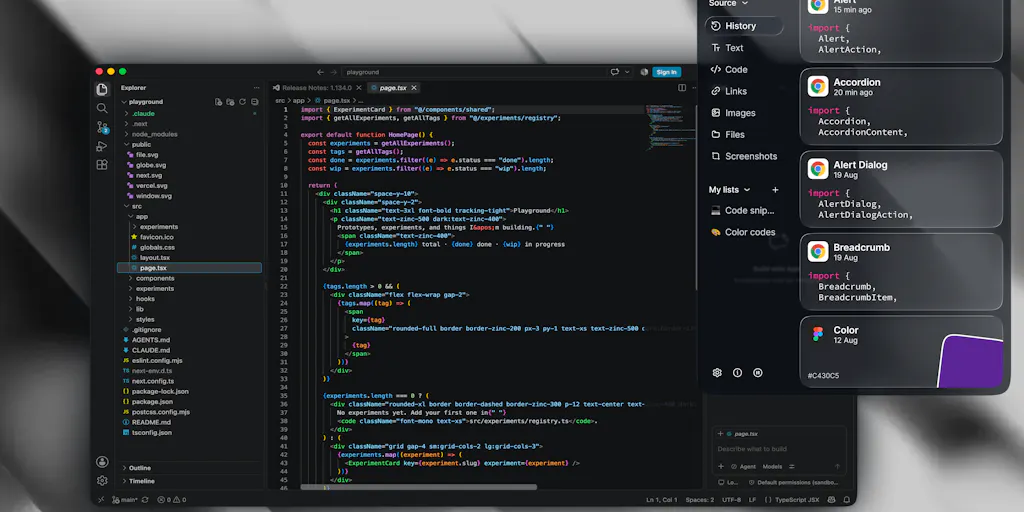
What makes Pastea different from the default macOS clipboard or even the built-in history features is the emphasis on structured retrieval. The ability to search by content, source app, type, and date is not revolutionary in itself—apps like Alfred and Raycast have offered clipboard history for years. But the combination of smart search, inline shortcuts, and lists/collections suggests a more intentional approach to how we reuse copied information. Instead of treating your clipboard as a passive archive, Pastea frames it as an active workspace where you can assign shortcuts like [@email](https://www.producthunt.com/@email) or [@signature](https://www.producthunt.com/@signature) to frequently used clips. For anyone managing multiple seller accounts, this kind of templated insertion could eliminate hundreds of repetitive keystrokes per day.
Why Amazon Sellers Should Care More Than Shopify Ones
Here’s where I might lose some readers, but I’ll say it anyway: Amazon sellers need this tool more than their Shopify-only counterparts. Why? Because the Amazon Seller Central ecosystem is a fragmented nightmare of tabs, reports, and messaging systems. You’re constantly switching between product pages, order details, customer messages, and supplier correspondence—often for the same order. Shopify sellers, by contrast, have a more unified dashboard experience, and many of their customer interactions happen through integrated apps like Gorgias or Zendesk, which maintain their own context. Amazon sellers are still living in a world where you might need to copy an order ID from one screen, paste it into a reimbursement claim form, then copy the confirmation number back into your tracking spreadsheet.
The quick preview feature that brings up Pastea near your cursor is particularly valuable here. When you’re deep in Seller Central’s labyrinthine menu structure, switching context to find a piece of information is costly. The ability to pull up your clipboard history without leaving the current screen means you can verify an order number while composing a response to a customer’s A-to-Z claim, or grab a supplier’s bank details while setting up a wire transfer in your banking portal. It’s the kind of micro-efficiency that compounds over hundreds of transactions.
Beyond Search: Actions That Actually Do Something
The most intriguing part of Pastea’s pitch isn’t the search—it’s the useful actions: extract text from images, rewrite or translate text, remove image backgrounds. This is where the tool starts to feel less like a clipboard manager and more like a mini productivity suite. For cross-border sellers, the translation angle alone is compelling. How many times have you copied a Chinese supplier’s product description, only to struggle with translating it accurately for your Amazon listing? Or received a customer message in German that you need to understand before responding? While dedicated translation tools exist, having this capability embedded in your copy-paste workflow removes a step from the process.
The text extraction from images feature also has practical applications for e-commerce operations. Think about all the product information that arrives as screenshots: supplier spec sheets, competitor pricing snapshots, customer-submitted photos with text overlays. The ability to copy an image and immediately search for text within it—as Hamza confirmed in response to a Product Hunt comment—means you can finally make that visual information searchable. This isn’t just about convenience; it’s about building a personal knowledge base from the chaotic flow of visual information that crosses your screen daily.
Where the Math Breaks
Before you rush to download Pastea, let me play devil’s advocate. The 7-day free trial is standard, but the real question is whether this tool justifies a permanent spot in your workflow. The pricing after the trial is not disclosed in the launch post, which is a red flag for budget-conscious operators. Clipboard managers are notoriously difficult to monetize—users expect them to be free or included in the OS. If Pastea prices itself at $5-10 per month, it’s competing with apps like Alfred (which offers clipboard history as part of its Powerpack) and Raycast (which is free for individual use). The value proposition needs to be clear: are the inline shortcuts and actions worth a recurring subscription?
There’s also the platform limitation. macOS only, at least for now. For operators who work across Mac and Windows—or who manage a team with mixed hardware—this creates a synchronization gap. Your clipboard history is tied to one machine, which means your carefully organized collections and shortcuts don’t travel with you. In a world where many cross-border sellers are working from anywhere, this feels like a significant constraint. The privacy-first approach (clipboard history stays on your Mac) is commendable, but it also means no cloud sync, no mobile access, and no team sharing. For solo operators, this might be fine. For growing brands with multiple VA’s or employees, it’s a dealbreaker.
What Cross-Border Sellers Can Borrow From This Approach
Even if Pastea isn’t the perfect fit for your stack, the thinking behind it offers valuable lessons for how we structure our operational tools. The core insight—that retrieval is more important than storage—applies directly to how we manage supplier information, product data, and customer history. Most of us are drowning in data but starving for information. We have CRM systems, ERP tools, and spreadsheets, yet we still can’t find the answer to “what did we quote this customer for shipping to Germany?” in under a minute.
The concept of lists and collections for organizing clips into projects, research, or marketing efforts is directly transferable. Instead of treating your knowledge management as a single massive database, think in terms of context-specific collections. When you’re working on a new product launch, create a collection for that product: copy all relevant specs, supplier communications, compliance documents, and pricing into one space. When you’re responding to a policy change on Amazon, create a collection for that too. This approach turns your clipboard from a passive record into an active organizing tool.
The inline shortcut feature also deserves attention. If you’re not already using text expanders or snippet tools, you’re leaving productivity on the table. Every time you type out your full return address, your bank details for international transfers, or your standard response to negative reviews, you’re wasting keystrokes. Tools like TextExpander have been solving this for years, but Pastea’s integration means you don’t need a separate tool—the shortcuts live where your copies live. For sellers managing multiple marketplaces, imagine typing [@sku](https://www.producthunt.com/@sku) and having your full SKU list appear, or [@hs-code](https://www.producthunt.com/@hs-code) to pull up your customs classification codes. The potential for reducing repetitive errors is enormous.
The Verdict: A Niche Tool With Broad Lessons
Pastea is not going to transform your e-commerce business overnight. It’s a utility, not a strategy. But the problems it addresses—information fragmentation, context-switching costs, and the gap between capturing and retrieving—are exactly the problems that scale with your business. The solo seller who can keep everything in their head might not need this. The operation doing seven figures across three marketplaces absolutely does.
Where Pastea falls short is in its positioning. The launch post focuses on general productivity benefits, but the real use cases for cross-border sellers are specific and compelling. The translation, text extraction, and image background removal features are buried in a list of “useful actions” rather than being highlighted as solutions to concrete problems. A version of this tool targeted at e-commerce operators—with templates for common seller workflows, integration with browser-based tools, and pre-built collections for listing optimization or supplier management—would be far more compelling.
There’s also the question of whether this solves a problem that other tools are already addressing. Raycast offers clipboard history alongside its broader launcher functionality. Alfred has Powerpack with clipboard features. Paste is a dedicated clipboard manager that’s been around for years. Pastea’s differentiation lies in the actions and shortcuts, but those are features that competitors could replicate. The moat is thin, and the switching costs for users who’ve already invested in another tool are high.
Why Amazon Sellers Should Care More Than Shopify Ones
I mentioned this earlier, but it bears repeating with more specificity. Amazon’s Seller Central is notoriously bad at maintaining context. You’ll be in the middle of a customer message thread, need to check an order, and the system will navigate you away from your draft. When you come back, your message is still there, but you’ve lost the order information you were looking for. The quick preview that brings up your clipboard near your cursor directly addresses this workflow gap. You can keep your place in the message composition while pulling up the order details you need from your clipboard history.
For sellers using tools like Helium 10 or Jungle Scout for product research, the ability to quickly capture and organize product data is also valuable. When you’re comparing competitor listings, you’re constantly copying ASINs, prices, review counts, and keyword data. Having a clipboard manager that lets you tag and organize this information by product or niche transforms your research workflow from chaotic note-taking to structured data collection. The lists and collections feature in Pastea is particularly suited for this use case.
What I’d Watch / Test Next
If you’re intrigued by the potential of Pastea but not ready to commit, here’s what I’d suggest testing this week:
Download the trial and create a collection for your current project. Whether it’s a new product launch, a supplier negotiation, or a listing optimization sprint, start actively copying everything related to that project into Pastea. After three days, assess whether you’re finding information faster than before.
Set up inline shortcuts for your most frequently used text. Your bank details for international wire transfers, your standard response to negative reviews, your Amazon seller support case template—anything you type more than three times a week. Time yourself for a day without shortcuts, then a day with them. The difference will surprise you.
Test the text extraction feature on real work documents. Copy a screenshot of a supplier’s spec sheet, a competitor’s pricing table, or a customer’s message with an order number. See if you can find it later by searching for text within the image. This is the feature that could genuinely change how you work.
Compare it against your current clipboard workflow. If you’re already using Raycast or Alfred, run them side-by-side for a week. The question isn’t whether Pastea is good—it’s whether it’s good enough to justify switching.
The broader takeaway is this: the tools that save you hours each week aren’t always the flashiest ones. Sometimes it’s the quiet utility that sits in your menu bar, remembering what you’ve already done so you don’t have to do it again. Whether Pastea becomes that tool for you or simply inspires you to rethink how you handle information, the exercise is worthwhile. Your clipboard is where your business lives—it’s time to treat it like the operational asset it is.