The Agent Sprawl Problem Is Coming for Your Ops Stack, Not Just Your Terminal
Every cross-border operator I know is quietly running three to five AI agents at once — one drafting listing copy, one scraping competitor reviews, one triaging supplier emails, one babysitting ad spend. The tooling industry has spent two years selling us more agents and almost no time selling us orchestration. That asymmetry is the real story behind Clippo, a Windows-native workspace that lets you spread multiple terminal agents across a visual canvas and hand them instructions by dragging a line from a note to a terminal. It is a developer tool, not an e-commerce tool. But the problem it names — context loss, tab-switching tax, agents that “do not talk to each other and keep forgetting the guidelines” — is exactly the problem your Amazon PPC workflow, your Shopify merchandising stack, and your TikTok Shop content pipeline are about to inherit at scale. If you sell cross-border, read this as a preview of the coordination layer you’ll be buying within eighteen months.
What Clippo Actually Solves (And What It Doesn’t)
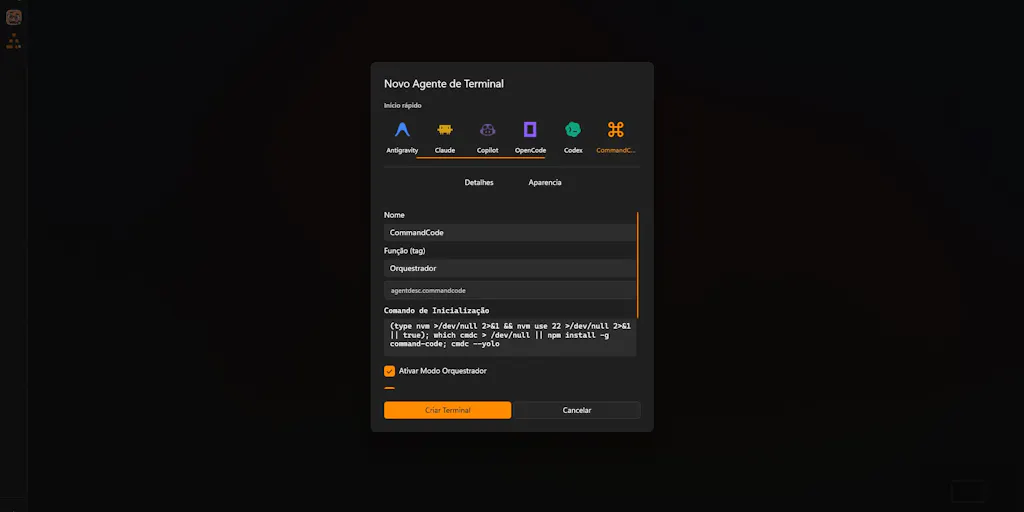
Let me strip the launch-page gloss. The maker, Thiago Grião, frames the pain precisely: running one terminal agent is fine, running Claude Code, OpenCode, Codex, and CommandCode simultaneously “turns into chaos within minutes.” His fix is architectural rather than model-level. Clippo is a wide visual canvas — think Miro for processes, not files — where each terminal sits as a tile, project notes sit as separate objects, and a drag gesture wires a note to a terminal as a handoff instruction. An on-device local memory layer persists context between tasks, which the maker claims saves tokens, and the whole thing runs with “no logins, cloud dependencies, or slowing down your machine.”
The distribution choice is telling. Clippo ships first on the Microsoft Store with a free tier that includes a full workspace. Not a web app. Not a Mac-first SaaS. Windows-native, local-first, free to try. That’s a deliberate bet on the population of operators who already live inside a desktop environment all day — the same population that runs their Amazon Seller Central tabs, their Helium 10 dashboards, and their supplier WhatsApp Web side by side on a 34-inch ultrawide.
What it does not solve: it does not give the agents shared memory in a semantic sense. Local memory that “handles keeping context between tasks” is a persistence layer, not a reasoning layer. If Agent A is optimizing your Shopify collection pages and Agent B is writing Klaviyo flows, Clippo keeps both alive and visible. It does not make them agree on your brand voice, your margin floor, or your return policy. That’s still your job — and that gap is where the real product opportunity sits.
Why Amazon sellers should care more than Shopify ones
Here’s my contrarian read: the seller segment that benefits most from a tool like Clippo is not the DTC Shopify crowd. It’s Amazon FBA brand owners running multi-marketplace operations. Why? Because Amazon sellers already live in a world of parallel, semi-autonomous workstreams that refuse to share context — listing optimization, Amazon Seller Central reporting, inventory replenishment, Amazon PPC bid management, review monitoring, and compliance documentation. Each of those is a candidate for its own agent. Each one needs the same underlying facts: your COGS, your target ACOS, your IPI score, your category restrictions.
A Shopify DTC operator, by contrast, tends to run a tighter, more linear funnel — traffic, conversion, retention — where one well-configured agent with good tool access can plausibly cover more ground. The sprawl problem hits hardest where the work is genuinely parallel and the context is genuinely shared. That’s Amazon, and increasingly TikTok Shop once you’re running live commerce plus affiliate plus paid simultaneously.
How It Differs From the Orchestration Tools You Already Know
The honest comparison set isn’t other terminal canvases — it’s the automation layers you’re already paying for. Zapier and Make orchestrate deterministic workflows: trigger, action, branch. They are excellent at “when an order ships, update the sheet, send the email.” They are terrible at “read this supplier thread, decide whether the MOQ change is worth renegotiating, and draft a reply in our tone.” Clippo sits in the second category — it orchestrates reasoning agents, not API calls, and it does so visually rather than through a builder UI.
The closer analogue is LangChain or CrewAI on the developer side — frameworks for multi-agent coordination. But those assume you’re writing Python, not dragging a line between two boxes on a canvas. Clippo’s bet is that the next wave of agent users won’t be engineers. They’ll be operators who think in spatial terms: this note belongs to this worker, that worker feeds that one.
There’s also a comparison worth making to n8n, the self-hosted automation tool that’s gained serious traction among technical e-commerce operators precisely because it keeps data local. Clippo shares that local-first instinct — “no logins, cloud dependencies” — and that’s not a minor detail for anyone handling supplier contracts, customer PII, or marketplace credentials. If you’re a seller who has ever hesitated to pipe order data through a third-party cloud, the local-memory pitch lands differently than it would for a hobbyist developer.
The genuinely novel piece is the drag-to-handoff gesture. Most multi-agent interfaces today are chat-based — you type into Agent A, then switch to Agent B and re-paste context. Clippo replaces the re-paste with a physical connection. It’s a small UX idea with outsized implications: it makes the relationship between a piece of context and a worker explicit and visible, rather than implicit in a prompt you’ll forget you wrote.
Where the math breaks
Token savings from local memory are real but easy to overstate. If Clippo keeps context alive across tasks, you avoid re-sending the same project brief every time an agent restarts — that’s a genuine reduction in input tokens. But the maker doesn’t disclose how much, and the savings scale with how repetitive your prompts are, not with how complex your work is. For a seller running a dozen short, varied tasks a day, the savings might be marginal. For one running long, context-heavy workflows — a full listing audit across 200 ASINs, say — the savings could be meaningful. The launch page gives no numbers, so treat the token claim as directional, not contractual.
The other place the math breaks is the Windows-only constraint. If your ops team runs Macs, or if your warehouse and 3PL partners are on Chromebooks, Clippo is a non-starter today. The maker says Windows explicitly and doesn’t hint at a roadmap. For a cross-border seller with a distributed team across Shenzhen, Manila, and Warsaw, that’s a real limitation — and it’s the kind of thing that quietly kills adoption in teams that don’t standardize hardware.
What Cross-Border Sellers Can Borrow From This
You don’t need to install Clippo to extract value from its design philosophy. Three transferable ideas:
One: make context a first-class object, not a prompt. Most sellers treat context as something you type into a tool each time — your brand guidelines, your margin rules, your prohibited claims. Clippo’s note-to-terminal wiring suggests a better pattern: maintain a persistent, editable context object, and route it to whatever worker needs it. You can replicate this today with a shared Notion page or a Google Doc that every agent prompt references by link. Crude, but it works.
Two: separate the canvas from the worker. The visual canvas is the innovation, not the terminals. It gives you a bird’s-eye view of what’s running, what’s stalled, and what’s waiting on input. Cross-border ops teams already do this with kanban boards in Trello or Asana — but those track human tasks, not agent tasks. The next step is a board where agent runs appear as cards with status, output, and cost.
Three: local-first is a feature, not a compromise. Every seller I know has a story about a tool that wanted OAuth access to their Seller Central account, or that stored customer data in a jurisdiction they couldn’t defend to their legal team. “No logins, cloud dependencies” is a positioning choice that will resonate more, not less, as AI regulation tightens in the EU and UK — both major markets for cross-border sellers.
The uncomfortable question: do you even need four agents?
Before you get excited about orchestration, ask whether you’re running four agents because the work demands it or because you haven’t consolidated. In my experience, most sellers running “multiple agents” are actually running one decent agent and three experiments they forgot to shut down. Orchestration tools are a tax you pay for sprawl — and the cheapest fix for sprawl is deletion, not coordination.
That said, there’s a legitimate case for genuine multi-agent setups in cross-border: language-specific agents (one tuned for Japanese marketplace listings, one for German compliance text), channel-specific agents (one for Etsy SEO, one for eBay listing optimization), and function-specific agents (one for sourcing, one for returns triage). If your sprawl is intentional and specialized, orchestration pays off. If it’s accidental, it doesn’t.
Where My Judgment Says It Falls Short
Three concerns, in order of how much they’d affect a real operator.
First, the free tier is a trial, not a tier. The maker says the free version “includes a full workspace ready to try.” That’s launch language for “you get to evaluate it.” There’s no disclosed pricing for what comes after, no seat model, no enterprise tier. For a seller budgeting tooling spend, that’s a planning problem — you can’t forecast a cost you can’t see. Not disclosed is not the same as free.
Second, the agent compatibility list is a snapshot, not a standard. The launch names Claude Code, OpenCode, Codex, and CommandCode. That’s a specific, fast-moving set. If the agents you actually use — or the ones your team standardizes on next quarter — aren’t on that list, Clippo’s value drops to zero overnight. The maker hasn’t described an open plugin model or a way to add custom agents. Until that exists, you’re betting on his roadmap matching yours.
Third, and most importantly: this is a developer tool wearing an operator’s clothes. The launch is on Product Hunt, the audience is terminal users, the vocabulary is “terminal agents.” Nothing about it is built for a seller who thinks in ASINs, SKUs, and ROAS. That’s not a flaw in the product — it’s a mismatch in positioning. If you’re a technical founder running your own brand, you’re the target user. If you’re a category manager at a mid-market seller, you’re not, and you shouldn’t pretend otherwise.
The “who maintains the canvas” problem
Every visual orchestration tool has a hidden cost: someone has to keep the canvas clean. Notes go stale, terminals get orphaned, the drag-lines multiply into spaghetti. Clippo’s value depends on disciplined curation, and discipline is exactly what’s scarce in a fast-moving ops team during Q4. If nobody owns the canvas, it becomes another dashboard nobody opens — the same fate that befell a thousand Notion workspaces before it.
What I’d Watch / Test Next
This week, before you evaluate any orchestration tool, do a two-hour audit of your own agent sprawl. List every AI tool your team touches, what it’s for, and whether it shares context with anything else. You’ll almost certainly find redundancy you can kill — and that’s free savings no product can sell you.
Then, if you’re a technical operator on Windows, install the free Clippo workspace from the Microsoft Store and run one real workflow through it — ideally a multi-step task like a competitor listing audit where you’d normally switch between three tools. Watch two things: whether the drag-to-handoff actually saves you time versus pasting context, and whether the local memory holds up across a task that runs longer than ten minutes. Those two data points will tell you more than any launch page.
Finally, watch the pricing announcement and the agent compatibility list. If Clippo adds an open plugin model and a Mac build within two quarters, it becomes a serious candidate for cross-border ops teams. If it stays Windows-only and closed, it stays a power tool for solo technical founders — useful, but not the coordination layer this industry actually needs. The sprawl is coming either way. The only question is who builds the map.