The MCP supply chain is now your problem, whether you sell on Amazon or not
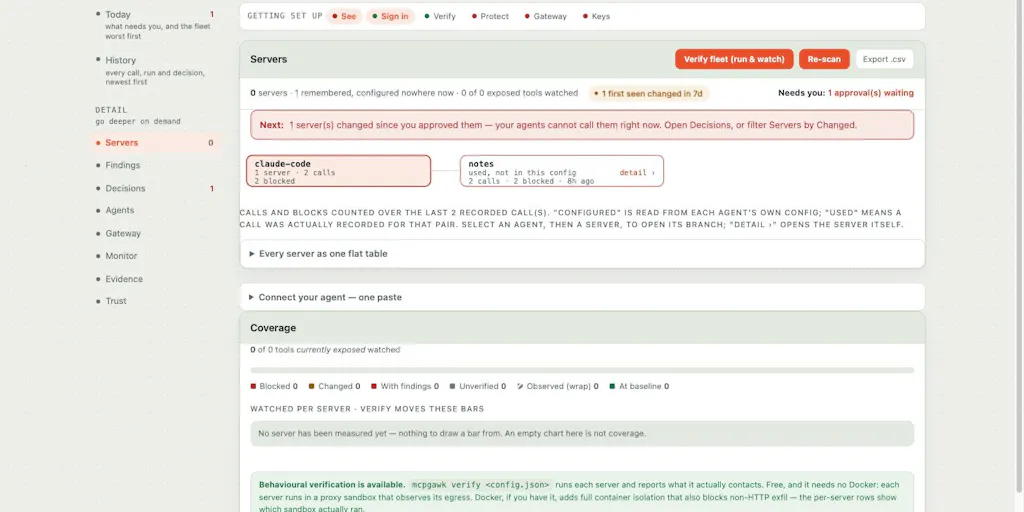
If you run a cross-border store, your “tech stack” stopped being a stack a while ago. It’s a mesh: a Shopify or Amazon storefront, a Helium 10 subscription, a Klaviyo flow, a fulfilment API, a Temu or TikTok Shop connector, and — increasingly — an AI agent wired into all of it through the Model Context Protocol. That last layer is the one nobody audits. mcpgawk, launched by Neelagiri Chettiyar, is a free, local checkpoint that sits between your coding agent and the MCP servers it can reach. For sellers who’ve handed listing optimisation, ad copy, or supplier email triage to an agent, this is the first tool I’ve seen that treats MCP servers as a supply chain to be monitored rather than a plugin to be installed once.
The problem mcpgawk actually solves
Here’s the maker’s own framing, and it’s the sharpest part of the launch: “approving an MCP server is a one-time yes to something that keeps changing.” On his own machine, one approved server changed six times across six releases and grew from 85 tools to 103. His agent, absent any guardrail, “would have called every new one without a second look.”
That’s the entire thesis. When you connect an MCP server to your agent — whether that’s Claude Code, Cursor, or Codex — you’re approving a snapshot. What you actually get is a live dependency that its maintainers can mutate at will. A tool description that said “read product titles from a CSV” can, three releases later, say something subtly broader. A new tool can appear with write permissions your agent will happily exercise because the server is already trusted.
For a seller, the blast radius is concrete. An agent with MCP access to your ad account can pause campaigns. One wired into your helpdesk can send refund emails. One connected to a supplier portal can place or modify orders. You approved the server when it had four harmless read tools. You did not approve the eleventh tool that writes.
mcpgawk’s answer is a local checkpoint with four moving parts, per the launch post:
- Inventory — see every MCP server your agents can reach, across Claude Code, Cursor, Codex and more.
- Approval with a recorded baseline — approve a server and record exactly what its tools said at that moment.
- Refusal on drift — a call gets refused once a tool rewrites its description or gains power you never approved, until you decide.
- Diff view — see what changed (description, inputs, or safety flags), old and new side by side.
The detail that commenter Lesya Pishchevskaya singled out is the one I’d flag too: approval is refused inside an agent session. The agent cannot approve its own escalation. That’s a small design decision with large consequences, and it’s the kind of thing you only build if you’ve actually sat with the anxiety of an autonomous system widening its own permissions.
Why this is a supply-chain story, not a developer-tools story
Cross-border sellers already understand version drift. You’ve lived it with Amazon Seller Central API deprecations, with Shopify app updates that quietly change scopes, with logistics middleware that adds a field and breaks your order sync. Every SaaS vendor in your stack ships on their schedule, not yours.
MCP servers are the same pattern, accelerated. They’re often maintained by small teams or solo developers, they ship frequently, and their “interface” is natural language — which means a change can be semantic rather than structural. A renamed parameter breaks loudly. A reworded tool description changes agent behaviour silently. Your integration tests won’t catch it because there’s nothing to test against; the contract is prose.
That’s the gap mcpgawk is aiming at. It’s not a firewall and it’s not a sandbox. It’s a change-detection and consent layer for a class of dependency that most teams haven’t yet admitted they have.
How it differs from what you’re probably already running
The honest comparison set here isn’t other MCP security tools — it’s the adjacent categories sellers already pay for, plus the default of doing nothing.
Versus doing nothing. This is the real incumbent. Most operators connecting an MCP server to an agent approve it once in a config file and never look again. There is no log of what the server’s tools said on day one, so there’s no way to detect drift even if you wanted to. mcpgawk’s value proposition is entirely contingent on you believing that silent drift is a real risk. I do, but it’s worth being clear that “nothing” is free and mcpgawk is also free at the CLI and VS Code extension tier, so the switching cost is mostly attention.
Versus observability platforms. Tools like Datadog or Sentry will tell you what your agent did. They won’t tell you what your agent could now do that it couldn’t last week. That’s a permission-surface question, not a telemetry question, and it’s a genuinely different product category. If you’re already piping agent traces into an observability stack, mcpgawk is complementary rather than overlapping.
Versus secrets and access management. 1Password, Doppler, or your cloud provider’s IAM will manage credentials. They won’t notice that a tool’s description now implies broader data access than the credential scope suggests. Again: adjacent, not competitive.
Versus the agent vendors themselves. Anthropic, OpenAI, and Cursor all ship their own permission prompts. But those prompts are per-session and per-call, not per-version. They answer “do you want to run this?” not “has this changed since you last said yes?” That’s the specific hole mcpgawk fills.
Where the math breaks
The pricing is stated plainly in the launch: the CLI and VS Code extension are free, and the team gateway is £29/month with a 7-day trial. That’s a reasonable number for a small team, but it raises the question every operator should ask about a new security layer: what’s the cost of the false positive?
If mcpgawk refuses a call because a tool description changed by a comma, and your agent stalls mid-workflow, you’ve traded a low-probability risk for a high-frequency annoyance. The launch post doesn’t detail how sensitive the drift detection is, whether you can whitelist cosmetic changes, or how noisy the refusal log gets on a busy server. Those are the questions that determine whether this becomes a habit or gets uninstalled in week two. Not disclosed, and worth probing before you roll it out beyond a test machine.
What cross-border sellers should borrow from this
Even if you never install mcpgawk, the mental model is worth stealing. Three things.
First: baseline your agent’s permissions today. Whatever MCP servers your team has connected — to your PIM, your ad platform, your 3PL — write down what they can currently do. Not the config file. The actual tool list and descriptions. If you can’t produce that document, you don’t know your own attack surface.
Second: treat agent permissions as a reviewed artifact, not a setup step. The same way you’d review a new Shopify app’s scopes or a new Amazon SP-API integration, review MCP servers on a cadence. Quarterly is probably enough for stable servers; monthly for anything touching money or customer data.
Third: separate read from write, hard. If your agent only needs to read listing performance, don’t give it a server that can also write. The mcpgawk framing — “gains power you never approved” — is a useful lens for every integration you own, MCP or not.
Why Amazon sellers should care more than Shopify ones
Shopify operators tend to run leaner, more modern stacks and are more likely to have an engineer who already thinks about this. Amazon FBA brand owners often inherit a tangle of third-party tools — repricers, review managers, PPC automation — and are now bolting an AI agent on top because everyone says they should.
That combination is the risky one. The agent is new, the tooling is legacy, and nobody owns the permission model. If you’re an Amazon seller who’s connected an agent to Seller Central data via an MCP server, mcpgawk’s inventory view alone is worth the install — just to see the list.
Where my judgment says it falls short
Three reservations, in order of how much they’d affect a real deployment.
It’s a young category with a young tool. The launch post is candid that this is early. The comparison set — other MCP governance tools — is thin, and the standards for what “drift” means aren’t settled. You’re buying into a moving target, which is ironic given the product’s own pitch.
Local-first is a genuine strength and a genuine limit. “It all runs on your machine. No account, nothing uploaded” is exactly the right default for a security tool, and I’d push back hard on any vendor who did otherwise. But it also means no central policy for a distributed team. If you’ve got contractors in three countries running agents on their own laptops, local-only means you’re trusting each of them to install and configure it. The team gateway at £29/month presumably addresses some of this, but the launch doesn’t spell out how much is centralised versus per-seat.
The agent-approval refusal is clever but not a complete boundary. Refusing approval inside an agent session stops the agent from self-escalating. It doesn’t stop a human from approving something they don’t understand at 11pm before a launch. Consent layers shift risk; they don’t eliminate it.
None of these are reasons to skip it. They’re reasons to treat it as one layer, not the layer.
What I’d watch / test next
If you run agents against your commerce stack, here’s what I’d do this week.
- Install the free CLI or VS Code extension from the mcpgawk Product Hunt page on one machine — ideally the one with the most MCP servers connected — and run the inventory. Just look at the list. Most operators will be surprised by the count.
- Record a baseline for every server you actually rely on, then note which ones have write access to money, customer data, or supplier systems. Those are the ones that need the drift detection first.
- Ask the maker the sensitivity question directly in the launch thread. How noisy is refusal on cosmetic changes? Can you tune it? That answer determines whether this is a daily tool or a quarterly audit tool.
- Watch the team gateway tier at £29/month with a 7-day trial. If you’ve got more than two or three people running agents, the centralised version is where the real operational value sits — and where the launch is currently thinnest on detail.
The broader bet I’m making: within a year, “which MCP servers can my agents reach, and what changed since I approved them?” will be as routine a question as “which Shopify apps have write access to my orders?” mcpgawk is early, but it’s asking the right question first. For cross-border operators who’ve already handed real workflows to agents, that’s worth twenty minutes this week.