Why a “Vibe Coding” Architecture Tool Should Matter to Every Seller Running on Spaghetti Code
Let’s be honest about the state of our operations. Most cross-border e-commerce brands aren’t running on elegant, enterprise-grade architecture. We’re running on a Frankenstein stack of a Shopify theme that’s been patched by three different agencies, a custom Python script for inventory reconciliation that only one contractor understands, and an Amazon repricer that was “temporarily” hardcoded two years ago. When you add AI coding tools like Claude or Codex into that mix, you’re not just adding a new feature—you’re adding a new author to a novel that has no outline. The problem isn’t that AI writes bad code; it’s that we have absolutely no idea where that code lives in the system, what it touches, and which logic it might be silently breaking.
This is precisely why I stopped scrolling when I saw Lucid Train on Product Hunt. The maker, Arnab Bhattacharya, built it out of a very specific frustration: he wasn’t sure what Claude or Codex wrote during his vibe coding sessions. For a DTC operator, that sentence is terrifying and liberating at the same time. Terrifying because we’ve all been there—watching an AI “fix” a bug in the checkout flow only to discover it broke the shipping rate calculator. Liberating because someone is finally building a tool that treats AI-generated code as a mystery to be solved, not a black box to be trusted. This isn’t a developer tool for Silicon Valley engineers; it’s an operational safety net for anyone whose business logic is increasingly being dictated by a probabilistic text generator.
The “Sloppy Code” Problem Is Your Tech Debt Problem
The maker’s own comment on the launch—that he built it to visualize “the architecture of the not so sloppy code”—hits at the core issue. We’re all vibe coding now, whether we admit it or not. You might not be writing the prompts yourself, but your freelance developer is. Your in-house automation specialist is. And the result is the same: a codebase that grows organically, without a blueprint, where the relationships between functions, APIs, and databases are known only to the AI that wrote them—and even that AI has a “context window” that forgets what it did three sessions ago.
The specific pain point here is visibility. In a traditional development workflow, you have code reviews, architecture diagrams, and documentation. In a vibe coding workflow, you have a prompt, an output, and a prayer. When you’re running a cross-border operation, this lack of visibility is amplified. You have to maintain compliance with different tax laws, payment gateways, and shipping carriers across multiple jurisdictions. If your AI-generated code is handling VAT calculations or currency conversion, and you can’t see how it’s wired together, you’re one bad prompt away from a compliance nightmare.
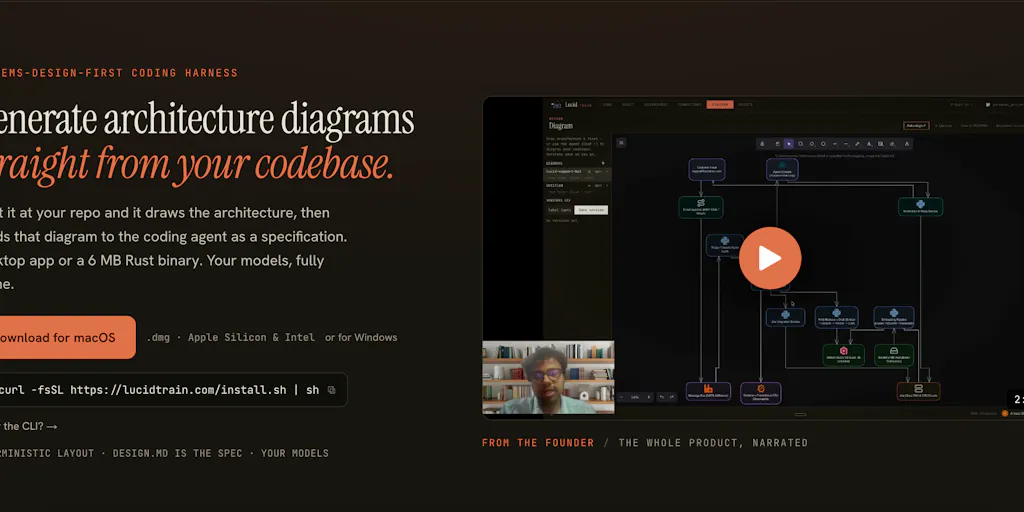
Lucid Train addresses this by generating a visual architecture of your codebase. It’s not just a linter or a syntax checker; it’s a map. For a seller who has inherited a Shopify store with 50+ custom apps and a tangled web of backend scripts, being able to see the architecture—even if it’s “sloppy”—is the first step toward understanding what you actually own. You can’t fix what you can’t see, and you certainly can’t scale it.
Why Amazon sellers should care more than Shopify ones
Shopify sellers have a relatively contained ecosystem. Your storefront logic is largely constrained by the Liquid template language and the App Store. Amazon sellers, on the other hand, are dealing with a chaotic mix of flat-file uploads, MWS/SP-API integrations, and a constant battle with Seller Central’s legacy UI. If you’re using AI to generate scripts that automate your Amazon inventory syncing or PPC bid adjustments, you are literally gambling with your buy box. A tool that shows you the architecture of your integration scripts is not a luxury; it’s a requirement for risk management. When your repricing algorithm breaks at 3 AM during a lightning deal, you need to know which module failed and why, not just that “something went wrong.” The local-first approach, generating system specs offline before handing them to an agent, is a game-changer for working with legacy code—and Amazon’s ecosystem is the definition of legacy.
How It Differs from the Incumbent Tooling Stack
We have to compare this to what we’re currently using. On one end, you have code editors like VS Code with extensions for visualization, but those are static. They show you the code as it is, not the architecture as it behaves. On the other end, you have AI coding assistants like GitHub Copilot or Cursor, which are great at writing code but terrible at explaining the system they’ve just modified. There’s also the heavy-duty enterprise tools like Miro for diagramming, but those require manual effort—you have to drag boxes and arrows to represent what you think the system looks like, which is often wrong.
Lucid Train sits in a unique middle ground. It’s not a linter, it’s not a documentation generator, and it’s not a diagramming tool. It’s a reverse-engineering visualization layer for AI-generated code. The comment from user ANKUSH BANERJEE on the launch page highlights a crucial differentiator: “the advantage is we can use any ai model of our choice not limited to claude / codex.” This is huge. The incumbents in the AI coding space are trying to build moats around their specific models. Lucid Train is agnostic. It doesn’t care if you vibe coded with Claude, Codex, or a local Llama model. It just looks at the output and maps it.
This model-agnostic approach is critical for cross-border operators because we’re not loyal to one AI. We use whatever is cheapest or most effective for the task at hand. We might use Claude for writing complex JavaScript for our landing pages, but use GPT-4 for parsing messy supplier CSV files. Lucid Train allows us to visualize the entire mess, regardless of the “author.” It’s the only tool that treats the AI as what it is: a high-volume, slightly unpredictable contractor that needs supervision.
Where the math breaks
There is a caveat here, and it’s a big one. The maker’s pitch is about visualizing architecture, but it doesn’t promise to fix the architecture. It gives you the map, but you still have to walk the terrain. The math breaks when you realize that visualization is only the first 20% of the problem. Once you see that your AI-generated code is calling an external API 10,000 times per hour because of a logic loop, you still have to manually rewrite that logic. The tool doesn’t refactor the code; it just shows you why it’s slow.
Furthermore, the “local-first” aspect, which was praised by user Vikram for generating system specs offline, is a double-edged sword. It’s great for security—you don’t want your proprietary Amazon selling logic sent to a third-party server—but it also means you’re responsible for the compute power. If you’re a small team running on a MacBook Air, parsing a massive monorepo might take a while. The value proposition is high, but the performance is dependent on your local hardware, which for many sellers is not exactly a “beefy” machine.
What Cross-Border Sellers Can Borrow from This (Even If You Never Open a Terminal)
You don’t have to be a developer to steal the philosophy behind Lucid Train. The core lesson is architectural awareness. We often treat our tech stack as a collection of independent apps—Shopify for the store, Klaviyo for email, Helium 10 for research, and a bunch of custom scripts to glue them together. But they aren’t independent. They are a system. When you change your shipping policy in Shopify, it affects the checkout script, which affects the order fulfillment webhook, which affects the inventory sync to Amazon. If you don’t have a map of that system, you are flying blind.
The “vibe coding” trend is just a new name for what we’ve always done: hacking things together quickly to meet a deadline. The difference is that now the “hacker” is an AI that doesn’t have the institutional knowledge of your brand. When you hire a human developer, they eventually learn your business logic. An AI doesn’t. It just writes code that looks right. Lucid Train’s approach forces you to confront that reality.
Here’s how you borrow the concept without adopting the tool wholesale:
- Audit your AI-generated code. Go through your Git history or your file system and identify every file that was likely written by an AI assistant. You can usually tell by the comments (or lack thereof) and the overly verbose function names.
- Map your data flow on paper. Before you run any new AI generation session, draw a quick diagram of what the code is supposed to do. Where does the data come from? Where does it go? What happens if it fails?
- Isolate your AI experiments. Don’t let Claude or Codex touch your production code directly. Have it generate code in a sandbox environment, review the architecture of that sandbox using a tool like Lucid Train, and only then manually move it into production.
The Verdict: A Niche Tool with a Universal Lesson
Where does my judgment land? I think Lucid Train is currently a niche tool for a very specific pain point. It’s not going to replace your Postman collection or your Datadog dashboards. It’s a utility, like a voltage tester for your codebase. You use it when you suspect something is wrong, not every day.
However, the idea is timely. As we move into 2025, the volume of AI-generated code in our industry is going to explode. Every seller is asking AI to build them a custom landing page, a scraper for competitor prices, or an automation for their TikTok Shop order routing. The ones who succeed will be the ones who treat this code with the same rigor they treat their inventory accounting. They will demand visibility.
The tool falls short in the “remediation” phase. It shows you the broken architecture, but it doesn’t suggest how to fix it. It lacks the prescriptive analysis that would make it a truly “game-changing” tool for non-developers. A senior engineer might look at the visualization and immediately know what refactoring is needed, but a DTC operator who just hired a freelance coder will not. For that, we still need human expertise.
What I’d Watch / Test Next
Here’s what I’d do this week if I were you.
First, test Lucid Train on your worst legacy script—the one you’re most afraid to touch. Don’t run it on your main storefront. Run it on that ugly Python script that reconciles your Shopify orders with your Amazon Seller Central inventory. See if the visualization matches what you think the script does. I bet you’ll find a few surprises—a dead API call, a loop that runs twice, a hardcoded warehouse ID.
Second, use the “local-first” principle as a security best practice. If you’re going to let AI touch your code, ensure you have a way to review the architecture without uploading your entire proprietary codebase to a cloud service. This tool respects that boundary, and you should demand that from any other AI tooling you adopt.
Third, check the Product Hunt launch page for updates. The comments section is often a better indicator of a tool’s future than the product itself. If the maker starts adding “refactoring suggestions” or “complexity scoring,” that’s when it moves from a niche utility to a must-have.
Finally, start a “vibe coding log.” Every time you ask an AI to write code, write down what you asked, what model you used, and what the output was. In a month, you’ll have a list of architecture fragments that you can feed into a tool like Lucid Train to see the whole picture. The goal isn’t to stop vibe coding—that’s impossible now. The goal is to vibe code with your eyes open.