The feedback loop is the real bottleneck in cross-border e-commerce operations
Most cross-border sellers I talk to don’t have a traffic problem, a sourcing problem, or even a margin problem in the abstract. They have a coordination problem. A listing gets built by a VA in Manila, reviewed by a brand manager in Shenzhen, localized by a copywriter in Berlin, and QA’d by an account manager in Toronto — and the feedback on that listing lives in five different places: Slack threads, Loom videos, WeChat screenshots, a Google Sheet, and someone’s memory. By the time a change ships, nobody can reconstruct why it shipped. That’s the context I read layernote’s launch through, and it’s why a tool that looks like a designer’s toy is actually worth an operator’s attention. The pitch is simple: pin a comment to the exact element on a live page, close the loop when it’s fixed. For a seller running dozens of PDPs across Amazon, Shopify, and TikTok Shop, that’s not a design nicety — that’s version control for the storefront.
What layernote actually solves — and what it doesn’t
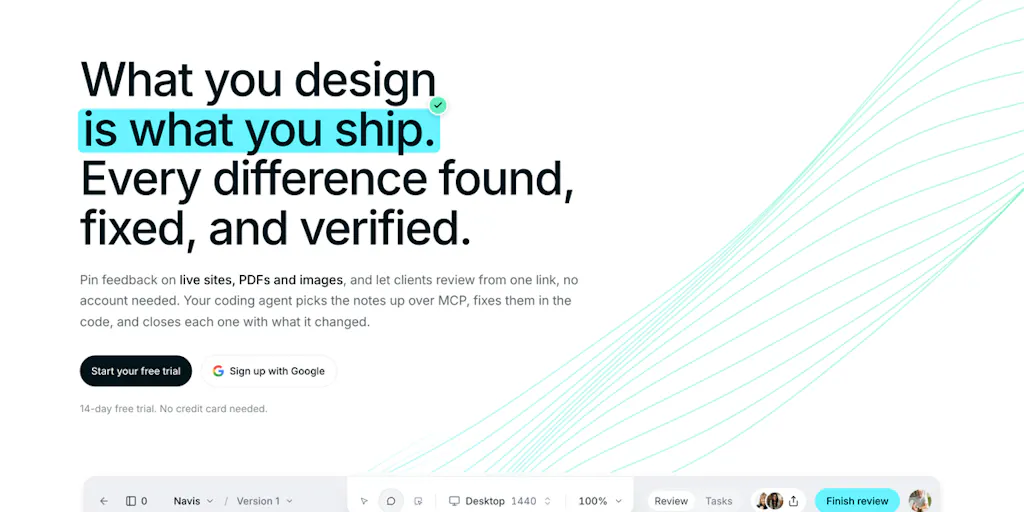
The maker is Dino Murselović, and his framing is refreshingly narrow: one loop. You build something, people pin comments on the exact element (not a screenshot), you fix it, and the note closes with what changed. It works on live sites, PDFs, and images. Clients comment through a share link without needing an account. On the Studio and Team tiers, every comment also becomes a task on a board. There’s a 14-day free trial with no credit card.
The interesting technical hook is the MCP integration: you can pull comments into Claude Code or Cursor over MCP, and the agent receives the element, the note, and the CSS behind it — so it doesn’t have to guess what “make this button pop more” refers to. That’s the part that made me sit up. The rest of the tool is table stakes; the agent handoff is the differentiator.
What it doesn’t do, at least not yet: the Figma integration is not open. Figma is still reviewing the app, so importing frames and the Figma-versus-live comparison are pending. The maker says the comparison piece is built and measures spacing, type, and color, letting you pick which differences become comments — but it’s gated behind Figma’s approval. That’s an honest disclosure, and I respect it, but it also means the most valuable feature for design-heavy teams is vapor until it isn’t.
Why Amazon sellers should care more than Shopify ones
Here’s my contrarian take: this tool matters less for pure Shopify DTC brands and more for Amazon FBA operators, and almost nobody is saying that.
Shopify gives you full control of the DOM. You can A/B test with Shopify’s native tools or a third-party app, ship changes instantly, and roll back trivially. The feedback loop is already short.
Amazon is the opposite. You’re operating inside a template you don’t own, on Amazon Seller Central, where a listing change goes through A+ Content modules, backend keyword fields, and image stacks that are notoriously painful to review asynchronously. A brand manager reviewing a PDP mockup has no way to annotate “this bullet contradicts the compliance line in the EU listing” directly on the asset. They screenshot it, paste it into Slack, and the context dies.
layernote’s share-link model — clients comment without an account — is exactly right for the agency-and-brand-manager relationship that dominates Amazon private-label operations. You’re not asking your client to learn a new tool. You’re sending a link.
Where the math breaks
Let me be blunt about the economics. If you’re a solo operator doing $30k/month on Etsy, this is overhead. You don’t have a feedback coordination problem; you have a “do I have time to eat lunch” problem. The trial is free, but your attention isn’t.
The tool earns its keep somewhere around the point where you have three or more people touching the same storefront — a designer, a copywriter, and a QA reviewer, minimum — or where you’re running an agency retainer with multiple client accounts. Below that threshold, Notion plus a Loom video does the same job for free. Above it, the “comment becomes a task on a board” feature starts to matter because it collapses two tools into one.
The pricing isn’t disclosed on the launch page beyond the free trial, which is a gap. For an operator comparing this against Markup.io, Pastel, or BugHerd, the per-seat math is the whole decision. I can’t do that math without numbers.
How layernote compares to the incumbents you’re probably already using
The website feedback and visual annotation space is not empty, and any operator evaluating layernote should know the field.
Markup.io is the closest direct competitor. It does live-site annotation, share links, and task tracking. It’s mature, widely adopted by agencies, and has a deeper integration library. If you’re already paying for it, layernote’s pitch has to beat it on the MCP/agent angle or on price — and price isn’t disclosed.
BugHerd is the agency-standard for website QA. It’s more expensive and more opinionated, aimed at dev teams shipping sites, not e-commerce operators reviewing PDPs. Overkill for most sellers.
Pastel is the lightweight, designer-friendly option. Fast, clean, no account needed for reviewers. It’s what a lot of Shopify agencies use. layernote’s live-site and PDF support overlaps heavily here.
Figma’s native commenting is the incumbent for anything that starts as a design file. The problem layernote is trying to solve — the gap between the Figma mockup and the live site — is real and annoying. Figma comments don’t survive the handoff to production. That’s the wedge.
Loom + Slack is the actual incumbent for most cross-border teams, and it’s free. A 90-second screen recording where someone says “change this, this, and this” is shockingly effective. The failure mode is that it’s not searchable, not closeable, and not linked to the element. Six weeks later, nobody knows if the change shipped.
Where layernote’s positioning gets interesting is the agent handoff. None of the incumbents above are shipping comments into Claude Code or Cursor with the element and CSS attached. That’s a genuinely new capability, and it’s the one I’d bet on.
The MCP angle is the real story, not the annotation
Let me zoom out. The reason I’m writing about a small Product Hunt launch at all is that it’s a tell for where the tooling stack is heading.
For the last two years, the e-commerce tooling conversation has been dominated by “AI writes your listings” and “AI generates your ad creative.” That’s the shallow end. The deeper shift is AI as the executor of a structured work queue — and that requires the work queue to be machine-readable.
A Slack message saying “the hero image is wrong” is not machine-readable. A layernote comment that carries the element selector, the note text, and the CSS is. That’s the difference between an agent that guesses and an agent that acts. If you’re a seller experimenting with Cursor or Claude Code for storefront work — and a growing number of technical DTC operators are — this is the missing plumbing.
I’d expect every annotation tool to ship an MCP server within twelve months. layernote got there first, which is worth something, but not worth everything. First-mover advantage in a feature that’s easy to copy is a head start, not a moat.
What cross-border sellers can borrow from this, regardless of whether you buy it
Even if you never open layernote, three ideas in this launch are worth stealing for your own operations.
One: pin feedback to the element, not the artifact. The single biggest time sink in cross-border listing management is the “which image are you talking about?” round trip. If your team is reviewing a PDP and the feedback is “the third bullet is wrong,” you’ve already lost. Force the discipline of element-level annotation — even if it’s a screenshot with a red box drawn on it — and you’ll cut review cycles in half. This is especially true when your reviewer is in a different timezone and a different language.
Two: close the loop with what changed, not a status. “Done” is a useless status. “Changed the hero headline from X to Y, updated the alt text, and swapped the second image” is a useful one. The reason is that in cross-border ops, the person who requested the change is often not the person who can verify it — and they’re asleep when it ships. A closure note that describes the delta lets them verify asynchronously without a meeting.
Three: make the reviewer’s friction zero. The share-link-no-account model is the right call, and it’s the same reason TikTok Shop seller tools that require account creation for affiliates underperform. Every step you add between a reviewer and their feedback is a step where the feedback doesn’t happen. If your current process requires a client to log into a portal, you’re losing feedback you paid for.
A note on the Figma gap
The undisclosed piece — the Figma-versus-live comparison — is the feature I’d actually pay for, and it’s not available. The maker says it’s built and waiting on Figma’s app review. That’s a real constraint, not a marketing dodge, but it means the tool’s most differentiated capability is on the wrong side of a gate you don’t control.
For an operator, the practical read is: if your workflow is Figma-first (designer builds in Figma, then it gets translated to the live site), layernote is not ready for you yet. If your workflow is live-first (you tweak the live site directly and want feedback on it), it’s ready today. Know which one you are before you start the trial.
Where my judgment says it falls short
Three concerns, in order of how much they’d cost you.
Pricing opacity. The launch page says 14-day free trial, no credit card, and mentions Studio and Team tiers — but no numbers. For a tool competing against free (Loom + Slack) and cheap (Pastel, Markup.io), the absence of pricing on the launch page is a friction point. I’d want to see per-seat pricing before I put a team on it.
The agent integration is only as good as your agent setup. Pulling comments into Claude Code or Cursor over MCP sounds great, but it presupposes you have a technical operator who’s comfortable with MCP, an agent workflow, and the ability to review AI-generated code changes to a live storefront. That’s a small slice of cross-border sellers today. For everyone else, the MCP feature is a bullet point, not a workflow. The tool is honest about this — it offers “or just fix them yourself” — but the marketing weight is on the agent angle, and most buyers can’t use it yet.
Single-point-of-truth risk. If every comment lives in layernote and layernote goes away, you lose your storefront’s institutional memory. Any tool that becomes the system of record for “why did we change this” needs an export path. The launch page doesn’t mention one. I’d ask before committing a team.
The honest counterargument
You could read this entire launch as a solution in search of a problem. Website annotation tools have existed for a decade. The MCP angle is new, but “new” isn’t “necessary.” If your team already ships fast and communicates well, layernote is a tax, not an accelerant.
I don’t think that’s the right read for cross-border operators specifically, because the cross-border context multiplies every coordination cost: timezones, languages, platform constraints, and the fact that your reviewer often can’t see the live page the way your customer will. But it’s a fair read for a domestic single-channel Shopify brand, and I’d rather say that than pretend the tool is universal.
What I’d watch / test next
If you’re curious, here’s what I’d do this week, in order.
Run the 14-day trial on one live PDP. Pick a listing that’s underperforming and that more than one person has opinions about. Send the share link to your reviewer — no account, no onboarding — and see whether the feedback quality changes versus your current Slack-and-screenshot process. That’s a two-hour test with a real answer at the end.
Ask about pricing and export before you commit a team. Specifically: per-seat cost at Studio and Team tiers, and whether comments and tasks can be exported. If there’s no export path, treat it as a tactical tool, not a system of record.
Watch the Figma release. If you’re design-first, put yourself on the early-access list the maker mentioned. The Figma-versus-live comparison is the feature that would change my recommendation, and it’s the one thing here I can’t evaluate.
Pressure-test the MCP handoff if you’re technical. If you already run Cursor or Claude Code, wire up one comment and see whether the agent actually gets usable element and CSS context. If it does, this becomes a genuinely differentiated tool for technical operators. If it doesn’t, it’s Markup.io with a newer coat of paint.
The broader bet I’m making: the next wave of e-commerce tooling won’t be about generation, it’ll be about structured handoff — getting human intent into a format machines can execute and humans can audit. layernote is an early, imperfect, but directionally correct entry in that wave. Worth a trial. Not yet worth a migration.


