The “never send” rule is the most interesting thing to happen to seller inboxes this year
Every cross-border operator I know is drowning in the same inbox. Amazon Buyer-Seller Messaging, Shopify’s contact form, TikTok Shop’s seller chat, Etsy convos, eBay Messages, support@ for the DTC side — and on top of that, supplier WeChat threads and freight forwarder emails in three time zones. The AI wave hit this problem hard in 2024–2025, and most of the tools that arrived promised the same thing: read the message, write the reply, send it, tell you afterwards. Fewer decisions. More autonomy. And every seller I’ve watched wire one of those up has, within a month, quietly turned the auto-send off — because one wrong refund promise or one badly-templated “sorry for the inconvenience” to a buyer threatening a chargeback costs more than the tool saves.
So when GhostWriter by MyHandler showed up on Product Hunt with the explicit pitch that it composes but cannot send — on purpose, my ears perked up. Not because it’s a better AI writer. Because the design constraint itself is the interesting product decision, and it maps almost perfectly onto how a serious seller should be thinking about AI in customer-facing workflows right now.
What GhostWriter actually is, and what problem it’s really solving
The maker is Tery Emilson, who describes himself as having shipped software for 40 years, starting on a Tandy CoCo with 4K of RAM. His prior claim to fame is a Pocket PC database called abcDB that he says stayed the #1 Pocket PC database for a decade across 135 countries. GhostWriter is a feature inside MyHandler, which he positions as “a local-first AI for Windows — think OpenClaw, for the rest of us who don’t have a Mac Mini in a closet.”
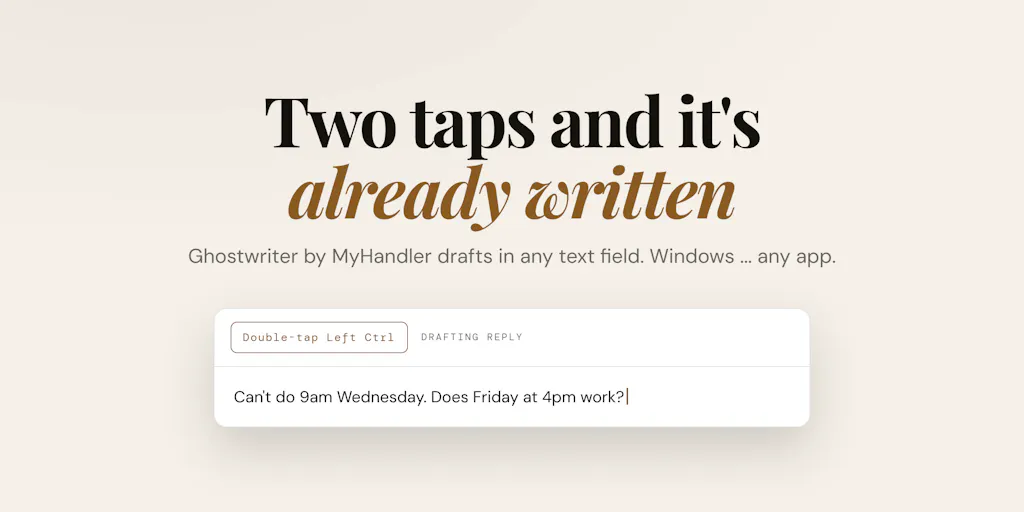
The mechanics, per the launch thread: you double-tap Left Ctrl in any text field in any app, the tool reads what’s on screen, and it drafts a reply in your voice, pulling context from your calendar, files, and past meetings. The vault that holds all that indexed material — screen text, files, mail, dictations, calendar, meetings — lives encrypted on your own drive, not the vendor’s servers.
The problem it’s solving isn’t “I can’t write an email.” It’s the task-switch tax. The maker’s own framing in the forum is the sharpest part of the pitch: you’re mid-reply, you need to check a document, you alt-tab to File Explorer, you lose the thread, you come back, you’ve forgotten the sentence you were about to finish. For a seller juggling a returns thread, a supplier quote, and a TikTok Shop dispute in the same twenty minutes, that’s not a productivity nitpick — it’s the actual texture of the job.
Why the “no send path” constraint matters more than the drafting quality
Here’s the thing most AI-inbox tools get backwards. They treat the human as the bottleneck to be removed. But in e-commerce, the human is the compliance layer. A drafted reply that a seller reviews and sends is a defensible business process. An auto-sent reply that misstates a return window is a policy violation, a negative review, and possibly a marketplace ding. The maker’s line — “Where OpenClaw acts for you, Ghostwriter never sends. There’s no send path in the product” — is a product constraint that doubles as a liability firewall. That’s worth more to a seller than another 10% of tone-matching accuracy.
How it stacks up against the incumbents you’re probably already paying for
If you sell on Amazon, your first thought should be: how is this different from the AI reply tools already bolted into Helium 10, Sellerboard, or the various Buyer-Seller Messaging assistants that have proliferated? The honest answer is scope. Those tools are trained on marketplace message templates and review-request cadences. They’re narrow by design, and they’re good at what they do. GhostWriter is trying to be the opposite — a horizontal layer that sits above every app on your Windows machine, marketplace or not.
The closer comparison is to the general-purpose assistants. ChatGPT and Claude can absolutely draft a buyer reply if you paste the context in. The friction is the pasting. GhostWriter’s bet is that the screen-reading plus local index removes the copy-paste step entirely, and that “in your voice” beats “in a generic helpful-assistant voice” for anything customer-facing.
Then there’s the Zapier / Make automation crowd, which solves the send problem the opposite way — it wires up the trigger and fires automatically. And on the CRM side, Klaviyo and Gorgias have been layering AI drafting into their helpdesk flows for a while. Gorgias in particular is the one I’d benchmark against if you run a Shopify store with real ticket volume: it lives where the tickets live, and its drafts are grounded in your macro library and past tickets. GhostWriter’s advantage is cross-app reach; its disadvantage is that it doesn’t know your helpdesk’s structure.
The local-first angle is the other differentiator. When a commenter asked directly what the tool actually sees when it reads the screen, the maker’s answer was specific: it captures the literal text Windows reports for the active window — UI labels, headings, paragraphs, any selectable text — plus indexed calendar, file, and recent-message content from the local vault. It does not read hidden code or images. That’s a meaningful disclosure, and it’s the kind of thing you should demand from any tool that wants to watch your screen.
Why Amazon sellers should care more than Shopify ones
Shopify sellers with a real support stack already have ticketing, macros, and a helpdesk that owns the reply flow. The marginal value of a screen-reading drafter is real but incremental. Amazon sellers are in a different situation: Buyer-Seller Messaging is deliberately constrained, templated, and policed, and the cost of a bad message is asymmetric — it can trigger a policy review, not just an annoyed customer. A tool that drafts and stops fits the Amazon compliance posture better than a tool that drafts and sends. If you’re running FBA and you’ve been nervous about wiring any AI into your messaging, this is the category of tool to look at first.
Where the math breaks
Free tier is 300 credits a month, no card required, and there’s a launch code — PRODUCTHUNT30 — for 30% off. The maker did not disclose the paid tier pricing in the thread, so I can’t do a real cost-per-reply comparison against Gorgias or a Klaviyo add-on. That’s a gap. Before you commit, price it against your actual monthly message volume, not against the free tier’s generosity.
What cross-border sellers can borrow from this, regardless of whether you buy it
The most useful thing about this launch isn’t the product. It’s the design pattern, and there are three things I’d steal from it this quarter.
First: separate drafting from sending in every AI workflow you own. If you’ve got AI writing product descriptions, ad copy, or supplier emails, put a hard human gate on anything customer-facing. The “no send path” principle is portable. You can implement it with process even if your tool doesn’t enforce it.
Second: local-first is a procurement criterion now, not a preference. If a tool wants to index your screen, your email, and your files, ask where that data lives. The maker’s answer here — encrypted vault on your own drive, not the vendor’s servers — is the right answer, and it’s the question you should be asking every SaaS vendor that touches your customer data. For sellers handling buyer PII across GDPR jurisdictions, this isn’t paranoia. It’s the difference between a clean data-processing story and a mess.
Third: the task-switch tax is a real line item. Most operators I know measure tooling ROI in hours saved on a specific task. The better metric is context switches eliminated. If a tool removes five alt-tabs per reply and you send 200 replies a week, that’s a thousand context switches gone. That math usually justifies the subscription before the drafting quality even enters the conversation.
The cross-app reach is the sleeper feature for multi-channel sellers
Here’s the scenario that made me take this seriously. You’re an Amazon FBA brand owner who also runs a Shopify DTC store and a TikTok Shop. A buyer who bought on Amazon emails your support@ address, which routes to your Gmail. You need to check their order in Amazon Seller Central, confirm the SKU, check whether the same customer has a Shopify order, and reply in a tone that matches your brand. That’s four apps, one reply. A tool that reads the active window and has your files indexed is genuinely useful in that flow in a way a marketplace-native tool can’t be. It’s the multi-channel operator’s problem, not the single-channel seller’s.
Where my judgment says it falls short
I’ll be blunt about the gaps, because the launch thread papered over most of them.
Windows-only, right now. The maker confirmed a Mac version is “scaffolded out” and offered a commenter beta access when it’s ready, but there’s no ship date. If your ops team runs Macs — and a lot of DTC brand teams do — you’re waiting. Not disclosed: when.
The screen-reading scope is narrower than the marketing implies. “It reads what’s on screen” sounds like it sees everything. The maker’s own clarification is more modest: literal text Windows reports for the active window, no hidden code, no images. That means if your buyer’s message is in an image, a PDF, or a canvas-rendered chat widget, the tool may not see it. Test that before you trust it.
No helpdesk integration means no ticket context. Gorgias and similar tools know the customer’s history, order value, and prior tickets because they own the ticket. GhostWriter knows what it can index locally. For high-volume support, that’s a real ceiling.
Pricing opacity. 300 free credits a month is a generous trial, but without published paid pricing, you can’t model the cost at scale. Ask before you build a workflow around it.
Voice-matching is a claim, not a proof. “In your voice” is the hardest thing to verify from a launch page. The only test that matters is whether your team’s actual replies, drafted by the tool, pass your own review without heavy editing. Run that test on ten real messages before you decide.
What I’d watch / test next
This week, if you’re curious, do three concrete things. One: install the free tier on a Windows machine that has real seller inbox traffic — not a test box — and run it against ten actual buyer messages. Score each draft on whether you’d send it with light edits or heavy edits. That ratio is your real ROI number. Two: deliberately test the edge cases the maker didn’t claim to handle — a message embedded in an image, a PDF attachment, a chat widget — and see what the tool does when it can’t read the context. Three: ask the vendor directly for paid-tier pricing and the Mac timeline, because both determine whether this is a tool you pilot or a tool you wait on.
The bigger thing I’m watching is whether the “compose but never send” constraint becomes a category norm or stays a niche position. My read: as marketplace AI policies tighten and as more sellers get burned by an auto-reply that promised something the business couldn’t deliver, the constraint stops being a quirk and starts being the feature. The tools that race toward autonomy will keep winning demos. The tools that stop short of the send button will win the operators who’ve already been burned.


