Every serious cross-border seller I know runs their operation from a Mac that is also a crime scene: supplier spec sheets, PPC exports, reconciliation CSVs, raw ad clips, store theme backups, and the same product photo lightly edited in three different countries. We manage inventory turnover obsessively, but storage turnover is a disaster. So when I looked at DuckDisk, a free open-source macOS storage analyzer, what got my attention was not that my hard drive is full — it is — but that the design philosophy is the right one for a lean operator: table-first, metadata-only, no unnecessary downloading. Cross-border e-commerce is a long discipline of deciding what to keep, what to move, and what to delete. DuckDisk makes those decisions legible. That is why this launch matters beyond the Mac power-user bubble.
The problem DuckDisk actually solves: storage as an inventory problem
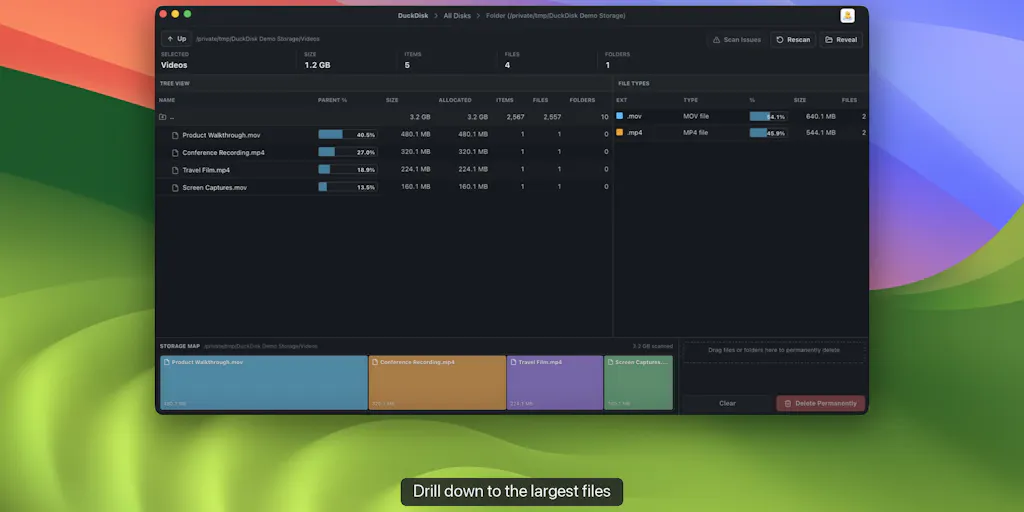
I am not going to review another “clean my Mac” toy. DuckDisk is not a toy. It is a storage analyzer for people who need answers, not colorful maps. The maker, puppypi, explains the frustration in the launch comment: most macOS disk cleaners draw a beautiful daisy map, but you still end up asking which folder owns this space, how much is allocated, how many files are inside, and what types dominate. That is the exact mental model of an e-commerce operator. We do not want a pretty picture of our failure. We want a breakdown by parent, a count of file types, and the ability to drill down without losing the context of the whole tree.
The cross-border relevance is more direct than it looks on a Product Hunt category page. In a typical multi-channel operation, the same digital assets are copied across local drives, OneDrive, and Google Drive. Supplier packaging files live in one place, ad creative in another, and “old” listing images are never deleted, only moved. When I audit a brand, the storage mess is usually a financial problem in disguise. You are paying for cloud storage you do not actually use. You are losing hours hunting for the right catalog photo. And you are risking compliance issues because someone saved the wrong version of a product label. DuckDisk treats storage like a database, and that is the right instinct.
According to the product page, DuckDisk scans local disks, OneDrive, Google Drive, and SSH servers from one interface. The cloud scans are metadata-only, which means file contents are not downloaded. That fact alone should make every cross-border operator pause. Most of our “storage management” habits involve downloading even more in order to understand what we already have. DuckDisk’s approach is to inspect before you sync. That is exactly how you should treat a supplier’s shared drive, an old agency’s handoff folder, or a video archive. You do not need a giant pile of 4K footage on your SSD to know that a folder called “TikTok raw — Q4” is the problem. The metadata already tells you enough to make a decision.
What DuckDisk actually does — and how it differs from the incumbents
The headline feature is a WizTree-style, table-first tree. If you ever spent time on Windows, you know WizTree is the scanner that people trust because it reads the NTFS Master File Table directly and shows a flat, sortable table instead of a treemap. DuckDisk brings that philosophy to macOS: the table-first tree keeps size, allocated space, parent percentage, item counts, and file-type totals visible while you drill down. It is less “where is the giant block” and more “which line item owns this folder and what is inside it.” In an e-commerce operation, that is the difference between a dashboard and an audit.
The current alternatives on the Product Hunt page make the difference clear. Daisy Disk is the polished paid scanner — the page calls it the #1 paid disk space analyzer for macOS. Space Gremlin answers the broad “what’s taking up space” question. DuckDisk is not trying to out-design or out-bundle them. It is trying to out-structure them. The table-first layout means you keep columns visible as you drill down; you do not lose the forest while examining one tree. For anyone who reconciles a P&L line by line, that is a familiar feeling.
The most distinctive part is the multi-source scan. Local disks and SSH servers are standard for developer tools, but OneDrive and Google Drive scanning with metadata-only is a rare combination. Google Drive scanning, in particular, is only available in the notarized direct build; the Mac App Store build stays inside Apple’s sandbox and supports local disks, OneDrive, and SSH. The maker also notes in the launch comment that rows are virtualized, results are cached, and cloud sources can refresh incrementally. The tool is explicitly designed for people who manage storage across a Mac, cloud accounts, and remote servers — the same profile as a cross-border operator managing marketplaces, fulfillment centers, and contractor laptops.
Why cloud metadata scanning is the cross-border feature
Most disk analyzers treat your local drive as the only universe. DuckDisk’s metadata-only cloud scanning means it does not download the content of files. For cross-border sellers this is a quiet breakthrough. When you have a supplier or a media buyer sharing a Google Drive folder with a huge amount of “final” creative, the last thing you want is to sync it all locally just to discover it is mostly deleted takes and duplicate renders. Metadata-only scanning shows file types, sizes, counts, and parent percentages before you commit to pulling anything. It is like doing a supplier audit by reading the invoice list before you open the container.
This is also a workflow I think DTC brands should steal, even if they never open DuckDisk again. Before you buy more cloud storage, run a metadata inventory of your cloud drives. Check which file types dominate. Count the files in folders named “final_v3” or “old” or “backup 2023.” The exercise will almost always reveal that the problem is not capacity; it is hygiene. And hygiene is a process, not a subscription.
What cross-border sellers should borrow from DuckDisk
I want to separate the product from the lesson. DuckDisk itself is a storage analyzer. But the thinking embedded in it applies directly to how an e-commerce operator runs their tooling stack and their team workflows.
First, table-first beats map-first for decisions. The same reason WizTree-style tables are better for disk analysis is the same reason a SKU-level P&L is better than a dashboard of total revenue. When you see the parent percentage column, you immediately know which folder is eating your drive. When you see a treemap, you see a big square but not the hierarchy. In e-commerce, too many operators look at total ad spend and total revenue instead of the allocation by campaign. The discipline of “columns over circles” is worth copying.
Second, metadata-first audits prevent expensive downloads. In cross-border operations, downloading is a cost. Downloading large creative files from a supplier’s cloud drive costs time and bandwidth and can trigger storage fees or security review. The habit of inspecting metadata before syncing content should extend to how you review supplier assets, how you onboard a new agency, and how you archive old marketplace listings. Ask for a file inventory first. If the vendor cannot provide one, run a metadata scan yourself. Know the shape of the data before you pay to move it.
Third, staged deletion is a returns policy for your file system. According to the launch comment, cleanup is staged for review: cloud deletions go to Trash, while permanent local or SSH deletion requires explicit confirmation. This is exactly how a healthy e-commerce operation handles destructive action. You do not write off unsellable inventory without review. You do not delete a listing without archiving it. You should not permanently delete a folder of ad creative from 2022 without a staging period. “Soft delete first, hard delete second” is a returns process, and DuckDisk makes it native.
Why Amazon sellers should care more than Shopify ones
If you are a Shopify brand, a lot of your operational data lives in the platform, not in local files. Your theme, products, orders, and customer data are in the cloud, and you can connect marketing or email tools without cluttering your drive. Seller Central is different. Amazon Seller Central is a report factory: inventory reports, payouts, reimbursement documents, storage fee reports, advertising search term reports, and monthly files that the platform gives you no clean way to reconcile. Sellers end up with years of CSV exports scattered across folders. Most of us keep them because an old report might be needed for a reimbursement case or a tax audit. DuckDisk’s ability to scan local, cloud, and SSH in one tree is genuinely useful for an Amazon operator who wants to find the folder with thousands of tiny CSV files and decide, deliberately, what to archive and what to delete.
There is a meta-point too. Most Amazon analytics tools run in the browser, so they do not create much local file sprawl. But the reports you download from Seller Central still land in a Downloads folder and then get moved into a “FBA reports” folder that nobody cleans. That is a storage problem. It is also a record-keeping problem. If you are audited, you need to know where the records are. A table-first, multi-source scan gives you a map of your record-keeping — not just of your disk.
Where the math breaks
My enthusiasm has limits. DuckDisk is a first release, and the launch footprint is modest: 69 followers and 106 points on Product Hunt at the time the page was captured. That is not a criticism; it is context. You are not buying an enterprise platform. You are testing a free, open-source utility from a developer who is asking for feedback on columns and workflows. The roadmap will be shaped by GitHub issues, not by a quarterly OKR.
The most obvious limitation is platform. DuckDisk is macOS-only. Many cross-border operations run with a mixed team: the brand owner is on a Mac, but a VA or media buyer is on Windows. WizTree already covers the Windows side very well, but the unified local-plus-cloud-plus-SSH view DuckDisk offers does not exist for a mixed team in one tool. If you need one answer across the whole company, DuckDisk only sees the Macs in the room.
Then there is the metadata-only tradeoff. It is a feature, but it is also a blind spot. Metadata will tell you that a file is a large .mp4. It will not tell you that the file is a corrupted render or a duplicate of another large .mp4 with a different name. Cross-border content libraries are full of exactly these traps: the same image exported as final_v2.png, final_v2_final.png, and final_2_final_approved.png. DuckDisk can show file-type totals, but it cannot perform content-aware deduplication. You will still need a real DAM or a scripted hash-based dedupe tool for that.
The licensing and distribution split is another thing to flag. DuckDisk is free and open source under AGPL, Apple-notarized, and available on the Mac App Store. I like open source, but AGPL is not “do whatever you want.” If you are the kind of operator who likes to extend internal tools, or if you hire a freelancer to customize a tool and then run it as an internal service, read the AGPL terms carefully before building a dependency. And the feature split between the sandboxed Mac App Store build and the direct build means the “same” product has different capabilities depending on where you got it. For a non-technical seller, that is a support headache: you install the convenient version and later discover that Google Drive scanning is missing.
Finally, it is not a cleanup suite. It will not uninstall applications, purge caches, or find duplicate photos. It is an analyzer. It tells you what is taking up space and gives you a staged path to delete it, but it does not automate the judgment of “what is safe to remove.” In my experience, that judgment is exactly what most sellers are bad at. The tool will not make the decision for you. It just makes the decision legible.
Size versus count: where the math gets operational
A brand that shoots product videos for TikTok Shop knows raw footage is usually measured in gigabytes per clip. A stack of marketplace PPC reports is small in bytes but big in compliance risk. A table-first analyzer shows both dimensions: size for the mass, item counts for the legal risk. That distinction — allocated space versus file count — is not a technical nicety. It changes how you set a retention policy. You compress and archive videos after a short window; you keep CSVs for at least the audit window. DuckDisk’s columns make that distinction visible at a glance. That is the real value of the tool, and it is why even a limited first release deserves attention.
What I’d watch / test next
I have a short list of tests I would run this week, and any cross-border operator can do the same without committing an afternoon to it.
First, download DuckDisk from the GitHub repository or the Mac App Store and run it against your main working drive. Do not delete anything. Just sort by parent percentage and see which folder has been silently owning your machine. Second, point it at your OneDrive or Google Drive metadata and look at file-type totals. If you find a huge pile of old video clips in a folder named “raw,” you have your answer about whether to buy more cloud storage or simply archive. Third, copy DuckDisk’s staged-deletion rule into your team’s standard operating procedure: nothing permanent gets deleted until it has sat in Trash for 30 days. That one rule will save you more than any scanner.
I also want to watch the roadmap. In the launch discussion, someone asked whether DuckDisk can flag known caches such as DerivedData, node_modules, and build folders, and the maker responded that the current version is purely size-driven but that cache-flagging is under consideration for a future release. That feature would make the tool far more useful for operators who keep project files on a Mac. If DuckDisk adds content-aware duplicate detection and a real archiving workflow, it stops being a clever utility and becomes an actual piece of the e-commerce tooling stack. Until then, treat it as a free, structured audit — and use the audit to change how your team treats storage.