The Real Bottleneck in Cross-Border Video Isn’t Creation — It’s Iteration
Every cross-border operator I know has the same video problem, and it isn’t the one the tooling industry keeps selling us. We don’t lack AI generators; we’re drowning in them. What we lack is the ability to take an existing asset — a product page, a supplier’s spec sheet, a spreadsheet of review data, a screen recording of our own checkout flow — and turn it into a dozen platform-native video variants fast enough to matter. TikTok Shop punishes creative fatigue within days. Meta ad accounts burn through hooks in a week. Amazon A+ and Sponsored Brands video slots reward freshness. The winners in 2025 aren’t the sellers with the best single video; they’re the sellers who can iterate a hundred mediocre-to-good ones and let the algorithm sort them out. So when a tool pitches “chat-to-video” with refinement-through-conversation as the core loop, my ears prick up — because that’s the part of the workflow that actually kills margin. CutBay, launched by Candy Rora, is making exactly that bet. Whether the bet pays off for sellers is a more interesting question than the launch page lets on.
What CutBay Actually Solves (and What It Doesn’t)
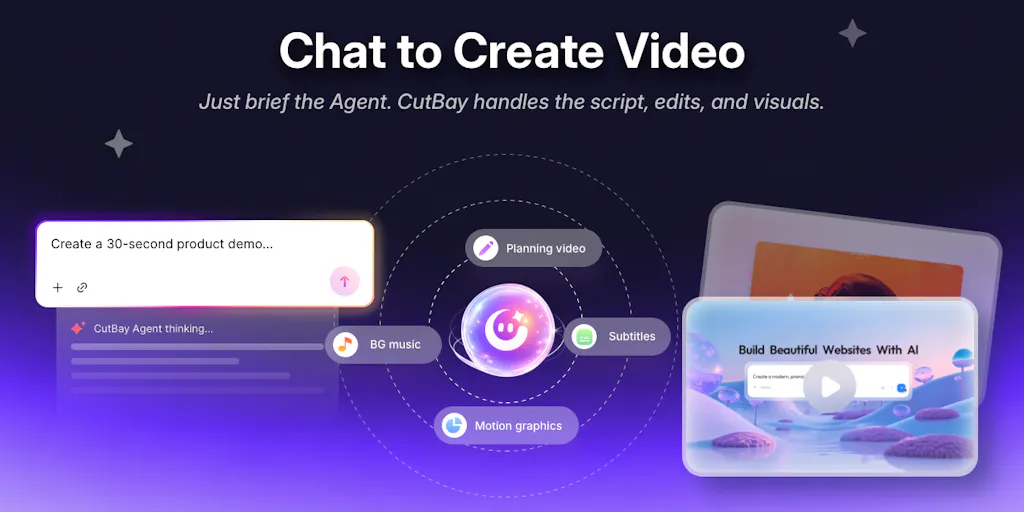
Strip away the launch-day enthusiasm and CutBay is an AI video agent — the maker’s own framing — that ingests a source (URL, PDF, document, presentation, spreadsheet, image, or uploaded media like screen recordings) and outputs a finished video with planning, scripting, visuals, voiceover, subtitles, and editing handled end-to-end. The differentiator isn’t the generation step; it’s the conversational refinement loop. You don’t generate once and then drop into a timeline editor. You keep talking to it: change the colors, swap a scene, adjust pacing, re-do the voiceover. That’s the pitch, and it’s a meaningfully different interaction model from the “prompt → generate → export → re-edit elsewhere” pattern that defines most of the category.
The problem it’s aimed at is real and specifically painful for cross-border sellers. Most of us don’t have a dedicated video editor on staff, and the ones who do are bottlenecked. A product manager in Shenzhen sourcing from a 40-page supplier PDF, a DTC operator in Los Angeles trying to turn a Klaviyo performance export into a founder-update video, an Amazon brand owner who needs a 30-second Sponsored Brands clip by Friday — none of these people want to learn keyframes. They want to describe the outcome and iterate. CutBay’s demo set makes the intended use cases explicit: product assets to ad video, spreadsheets to data-visualization video, presentations to training video, and idea to social video. Note what’s not in that list: product photography to UGC-style testimonial, or review mining to hook generation. The demos skew toward business-communication video, not conversion creative. That’s a tell.
Why Amazon sellers should care more than Shopify ones
Here’s a judgment call the launch page doesn’t make, so I will. Shopify and DTC operators already have a mature creative stack — Canva for statics, CapCut for edits, Creatify or Arcads for AI UGC, and a freelancer pool on Upwork for the rest. The marginal gain from a chat-to-video agent is incremental for them; they’re already iterating fast. Amazon sellers are the opposite. Amazon Seller Central gives you almost no native creative tooling, Sponsored Brands video specs are rigid, and the A+ Content module builder is a glorified WYSIWYG. An FBA brand owner who can turn a supplier spec sheet or a competitor-review spreadsheet into a compliant 15–30 second brand video via chat is unlocking a channel most of their category ignores. The spreadsheet-to-video demo is the one I’d actually test first, because review-mining and spec-sheet-to-benefit-translation are the two highest-leverage creative jobs in Amazon land.
How It Stacks Up Against the Incumbents
The honest comparison set isn’t “AI video generators” broadly — it’s three distinct buckets, and CutBay sits awkwardly across them.
Bucket one: document-to-video specialists. Synthesia owns the enterprise training-video lane and has a mature avatar library and brand-kit system; it’s expensive and oriented toward L&D, not commerce. HeyGen is the closest functional cousin — avatar-led, strong on localization, and increasingly pushing into marketing use cases. If your need is a talking-head explainer in eight languages, HeyGen is the incumbent to beat, and CutBay’s conversational refinement doesn’t obviously win there.
Bucket two: prompt-to-ad generators. Creatify, Arcads, and a dozen others are built specifically for performance marketers — they scrape your product URL and spit out UGC-style ad variants optimized for Meta and TikTok. These tools are narrower than CutBay but deeper on the one job e-commerce operators actually pay for: conversion creative at volume.
Bucket three: timeline editors with AI sprinkles. CapCut, Descript, and FlexClip — notably, a FlexClip maker showed up in CutBay’s own comment thread offering prompt-writing tips, which is a small but telling signal that the category is crowded and the players watch each other. Descript’s text-based editing is arguably the closest philosophical ancestor to chat-to-video: edit the transcript, edit the video. CutBay’s twist is that you edit by conversation rather than by text surgery.
Where CutBay genuinely differentiates is the source-material breadth combined with conversational refinement. No incumbent does all of: ingest a spreadsheet, generate a data-viz video, then let you say “make the second chart blue and slow the voiceover down” without leaving the chat. That’s a real gap. Whether it’s a moat or a feature is the question every operator should ask before building a workflow around it.
Where the math breaks
The launch offer is 100 free credits with code PH100 (first 100 users) and 10% off all plans with code PRODUCTHUNT. Fine for a trial. But “credits” is the tell — video generation is compute-expensive, and chat-based iteration multiplies compute because every refinement is another render. The economics of “keep chatting until it’s right” only work if the per-iteration cost is low enough that you don’t ration your prompts. I’ve watched too many operators treat a chat-to-video tool like a slot machine, burning credits on cosmetic tweaks, and end up worse off than if they’d just briefed a freelancer. The math breaks the moment your team starts iterating for taste rather than for performance. Set a hard rule: every refinement prompt must map to a testable hypothesis (hook, color-contrast, CTA timing), or you’re just paying to fiddle.
What Cross-Border Sellers Can Borrow From This
Even if you never sign up, three things in CutBay’s design are worth stealing for your own creative ops.
First, the “source-first” mental model. Most sellers start video briefs from a blank page or a competitor swipe. CutBay’s insistence on starting from an existing asset — a URL, a PDF, a spreadsheet — is the right discipline. Your product page copy, your review corpus, your supplier spec sheet, and your ad-performance export are all richer creative briefs than any prompt you’ll write cold. Build your own version of this: a shared drive folder per SKU containing the five source docs every video brief should draw from.
Second, conversational refinement as a brief. The FlexClip maker’s comment in the thread — treat your prompt like a creative brief, specify scene flow, pacing, and visual placement — is the single most useful piece of advice on the page, and it applies to every AI tool you use. Vague prompts produce vague video. The operators who win with these tools are the ones who write briefs, not prompts.
Third, the “AI Video Agent” framing itself. The maker explicitly says the product evolved from “another AI video generator” into an agent that works with your content and refines through conversation. That’s the correct strategic read of where the category is going, and it should inform your tooling stack decisions. Stop buying generators. Start buying agents that can hold context across an iteration loop. The same logic applies to your copy tools, your ad-optimization tools, and your customer-service stack.
A sidebar on localization
One thing the launch page doesn’t address, and which matters enormously for cross-border: multi-language output and cultural adaptation. CutBay’s demos are English-centric. For a seller running TikTok Shop in the UK, US, and Southeast Asia simultaneously, the ability to regenerate the same video with localized voiceover, subtitles, and on-screen text is table stakes — and it’s where HeyGen has a real head start. If CutBay’s roadmap includes localization, it becomes a much more serious contender for cross-border operators specifically. If it doesn’t, it’s a domestic-market tool with a global-ambition pitch. I’d ask that question directly before committing.
Where My Judgment Says It Falls Short
Three reservations, stated plainly.
One: the demos don’t show conversion creative. Every demo on the page is business-communication video — ads for the product itself, data updates, training, social education. None of them show the thing cross-border sellers actually need most: a scroll-stopping, platform-native, UGC-style product ad that performs on TikTok Shop or Meta. That’s a different craft from “turn a spreadsheet into a video,” and I’m not yet convinced a general-purpose agent beats a specialized tool like Creatify on that specific job. The maker’s own comment — “high-converting video demos and content” — claims it, but the demos don’t prove it.
Two: the refinement loop’s quality ceiling is unclear. Chat-based editing is delightful for macro changes (swap a scene, change colors) and frustrating for micro ones (tighten this cut by four frames, fix the subtitle timing on word 47). Professional editors exist for a reason. The question is whether CutBay’s conversational control is granular enough for the last 10% of polish that separates “fine” from “good.” The launch page doesn’t say, and the demos are too short to judge.
Three: the competitive moat is thin. The category is crowded, the incumbents are well-funded, and “conversational refinement” is a UX pattern that will be copied within two quarters. CutBay’s durable advantage, if any, will come from workflow depth — integrations with Shopify product catalogs, Amazon Seller Central asset libraries, Klaviyo campaign data — not from the chat interface itself. The launch page shows none of those integrations. That’s the gap I’d watch.
Why this matters beyond one tool
The bigger story here isn’t CutBay specifically. It’s that the AI video category is consolidating around agentic workflows, and the winners will be determined not by generation quality (which is commoditizing fast) but by context retention across iterations and integration depth with the commerce stack. Sellers should be evaluating every new video tool against those two axes, not against demo sizzle. The tool that remembers your brand kit, your top-performing hooks, and your platform specs across a hundred iterations — and plugs into your Shopify or Amazon asset library — will beat the tool with the prettiest single output every time.
What I’d Watch / Test Next
This week, before you spend a credit: pull one SKU and run the source-first test. Take your product page URL, your top-20 review export, and your supplier spec PDF, and feed all three into CutBay’s free tier using the PH100 code. Don’t judge the output on aesthetics — judge it on whether the refinement loop lets you get from draft to testable variant in under fifteen minutes. If it does, you have a new iteration engine. If it doesn’t, you’ve learned something about the category for free.
Then run the same test through HeyGen and Creatify with the same source material. Compare not the first output but the fifth — the fifth iteration is where these tools reveal whether they’re agents or just generators with a chat skin. Finally, ask CutBay’s team directly about localization roadmap and Shopify/Amazon integrations. Those two answers will tell you more about whether this is a cross-border tool or a domestic one than any launch-day demo. Watch the pricing page for how credit costs scale with iteration depth — that’s the number that determines whether chat-to-video is a workflow or a toy.