The Real Cost of a Stolen Keyboard Is Measured in Chargebacks and Missed SLAs
Every cross-border operator I know has a version of this story, and it almost never involves a baby. It involves a warehouse lead leaning on a laptop during a peak-season handoff, a toddler on a video call in a Shenzhen sourcing office, a cat walking across a MacBook mid-Q4 reconciliation. The launch I want to talk about today is a small, single-purpose Mac utility called Baby Desk, built by indie maker GUNWOO KO. On its face it is a parenting app — a $1.99 one-time purchase that turns your Mac into a baby-safe playground and swallows every keypress, including system shortcuts like ⌘Q, ⌘Tab, and screenshots. That framing undersells it. For anyone running Amazon FBA replenishment, TikTok Shop live calendars, or a Shopify storefront with a two-person ops team, Baby Desk is a case study in a category of software that cross-border sellers chronically under-invest in: the last line of defense between a human accident and an unrecoverable business event.
I want to use it as a lens, not a product review. The interesting question isn’t “should you buy a $1.99 Mac app.” It’s why a two-dollar keystroke blocker solves a problem that enterprise SaaS at fifty times the price still gets wrong, and what that tells us about the tooling stack most cross-border operators are actually running.
What Baby Desk Actually Solves — and Why “Baby App” Is the Wrong Category
Strip away the marketing and Baby Desk does one thing with unusual rigor: it intercepts input at the OS level and refuses to pass it through. The maker’s own framing is blunt — he built it after handing his laptop to his baby and watching a happy keyboard mash quit his terminal, delete his slides, and end a call, all in one burst. That’s the entire origin story, and it’s honest in a way most Product Hunt copy isn’t.
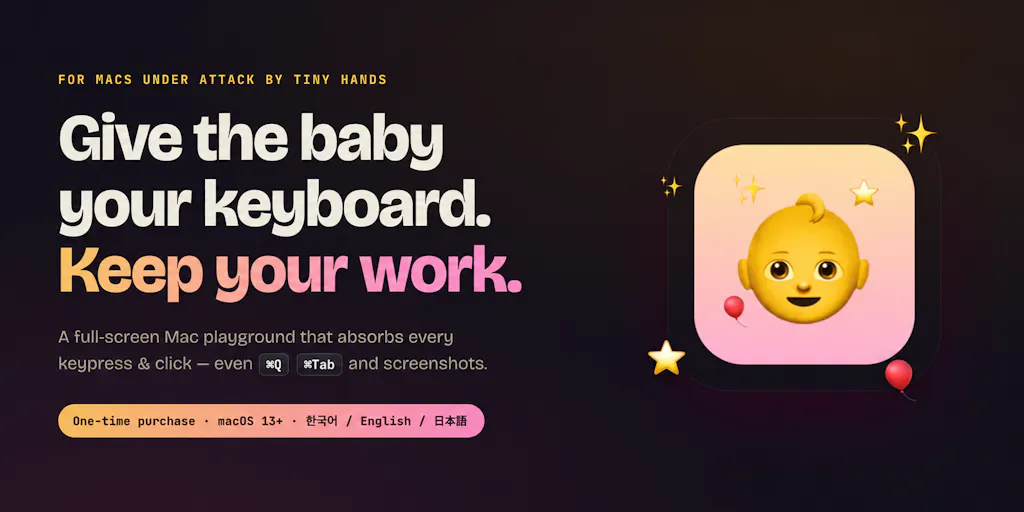
The mechanics matter more than the mascot. The app swallows every keypress and click, including system shortcuts like ⌘Q, ⌘Tab and screenshots, while layering a child-facing UI on top: stars, letters, a rainbow drawing trail, and poppable balloons with gentle sounds. Underneath, your code, docs, and meeting stay exactly where they were. Exit requires a hidden combo plus Touch ID or PIN, and there’s a play timer, dim mode, and volume cap. It’s signed and notarized by Apple, and the interface follows your system language across English, 한국어, or 日本語. Launch pricing is $1.99 instead of $4.99, a one-time purchase rather than a subscription.
Notice what’s absent: no cloud sync, no account creation, no telemetry pitch, no “AI-powered” anything. That restraint is the product. In a market where every utility wants to be a platform, Baby Desk is a single-purpose tool that does its one job and gets out of the way. Cross-border sellers should be paying attention to that design philosophy, because it’s the opposite of how most of their existing stack behaves.
Why Amazon sellers should care more than Shopify ones
Here’s the asymmetry that jumps out at me. A Shopify operator who loses a browser session loses a theme edit or a half-finished product upload — annoying, recoverable, version-controlled if they’re disciplined. An Amazon seller working inside Seller Central who loses a session mid-task is often staring at something worse: a partially submitted flat file upload, an interrupted inventory reconciliation, or a sponsorship campaign edit that didn’t commit cleanly. Amazon’s interfaces are notoriously unforgiving about half-finished state. There’s no undo button for a botched bulk operations feed, and a support ticket to fix it can eat three to five business days you don’t have during Q4.
Multiply that by the reality that many cross-border teams work in shared physical spaces — sourcing offices in Guangzhou, fulfillment partner warehouses in New Jersey, co-working desks in Warsaw — where a laptop is frequently left open and unattended. The threat model isn’t just babies. It’s anyone who doesn’t know what ⌘Z does to a live listing.
How It Differs From the Incumbents You’re Probably Already Running
Most operators I talk to treat “protect the machine” as an IT problem, and they solve it with one of three tools: a screen lock, a remote management agent, or a dedicated kid-mode app. Let me compare honestly, because the gaps are instructive.
Screen lock and OS-level controls. macOS and Windows both ship with fast user switching and lock screens. The problem is latency. A lock screen requires you to remember to trigger it, and the moment you forget — because a supplier called, because a live stream needed a prop, because you stepped away for ninety seconds — you’re exposed. Baby Desk’s value proposition is that it’s a state you enter deliberately and can’t accidentally exit. That’s a meaningfully different threat model from “remember to lock your screen.”
Remote management tools like Jamf or Kandji are the enterprise answer. They’re excellent at fleet policy, device compliance, and remote wipe. They are also priced, deployed, and licensed for organizations with an IT function. A five-person DTC brand running three MacBooks does not need — and will not pay for — Jamf. Baby Desk costs less than a coffee and requires zero deployment.
Dedicated kid-mode apps are the closest competitors, and here’s where Baby Desk’s specific choices matter. Many existing options are either iPad-first (designed for a tablet handed to a child, not a laptop you need back in thirty seconds) or browser-locked (they contain the child inside one window but leave system shortcuts live). Baby Desk’s insistence on intercepting system shortcuts — ⌘Q, ⌘Tab, screenshots — is the detail that separates it from the pack. That’s the exact vector that kills your session.
And then there’s the category nobody names: the accidental-input problem isn’t unique to children. The comment thread on the launch page makes this explicit. One commenter, Maria Anosova, describes the universal version of the failure — you look away for a second, fingers type nonsense, and it gets sent to someone. Another, Art Stavenka, immediately asks for cat protection next. Uddipta Mahanta points out the real insight: babies are weirdly good at finding key combos you didn’t know existed. That’s not a parenting observation. That’s a threat-model observation, and it applies to any unpredictable input source — pets, toddlers, a colleague’s elbow, a spilled coffee cup that lands on the spacebar.
The pricing decision is the strategy
I want to dwell on the $1.99 one-time purchase for a second, because it’s a deliberate strategic choice that cross-border operators should study. Most SaaS in the seller-tooling space — Helium 10, Jungle Scout, Klaviyo — runs on recurring subscriptions, because recurring revenue is the only model that sustains a venture-backed company. Baby Desk is a solo-maker product with no cloud component and no ongoing server cost. That means it can be a one-time purchase, and that means it competes on a completely different axis.
For operators, the lesson is about tooling economics. You should be auditing which parts of your stack genuinely need to be recurring (anything with data sync, API calls, or market data) and which parts are being sold to you as subscriptions when they could be one-time. A shocking number of “seller tools” are static utilities wrapped in a monthly fee. Baby Desk is a useful counterexample to hold in your head when the next $49/month pitch lands in your inbox.
What Cross-Border Sellers Can Borrow From This
I don’t want to oversell a keystroke blocker. But there are four transferable ideas here that apply directly to how you run a cross-border operation.
1. Design for the failure you actually have, not the one that sounds serious. Baby Desk solves for the ninety-second window when a laptop is unattended. Most seller security tooling solves for dramatic threats — account hijacking, credential theft, marketplace suspension — while ignoring the mundane, high-frequency failure modes that actually cost you money. When was the last time you audited your operation for boring risks? The half-finished bulk upload. The supplier email sent from the wrong account. The ad campaign paused by a misclick during a live event.
2. Friction should be asymmetric. Baby Desk makes entry trivial and exit deliberate — a hidden combo plus Touch ID or PIN. That asymmetry is exactly right, and it’s the same principle behind good warehouse SOPs: easy to do the right thing, hard to do the destructive thing. If your returns process, your listing-edit permissions, or your payment approval flow doesn’t have that asymmetry, you’re one accident away from a bad week.
3. Single-purpose beats platform, sometimes. The temptation in cross-border tooling is always to consolidate — one dashboard for everything. But consolidation creates single points of failure and bloated interfaces where a stray click does more damage. A small, focused tool that does one thing and can’t be misconfigured is often the better choice for the narrow job. This is the argument for keeping some tools deliberately dumb.
4. Localization is table stakes, not a feature. Baby Desk follows system language across English, 한국어, or 日本語 — three languages for a two-dollar app. Meanwhile, I regularly see cross-border sellers running six-figure monthly GMV through tools that only speak English, then wondering why their overseas ops hires make configuration mistakes. If a solo Mac developer can ship trilingual UI at this price point, your vendor’s excuse for English-only is not a technical constraint. It’s a prioritization choice.
Where the math breaks
Let me be the skeptic, because this is where I’d push back if the maker were in the room. Baby Desk is Mac-only. That’s a real limitation for cross-border operations, where the device mix is genuinely mixed — finance on Windows, ops on Mac, warehouse leads on whatever the fulfillment partner issued. A tool that protects one platform leaves the rest of your fleet exposed, and partial coverage can create false confidence.
There’s also a scope question. The app blocks input, but it doesn’t block network activity, doesn’t lock down file access, and doesn’t prevent a determined older child from doing something the input layer can’t see. For a toddler, that’s fine. For a seven-year-old who’s figured out that the trackpad does things, the protection is thinner than the marketing implies. And the exit mechanism — hidden combo plus Touch ID or PIN — is only as strong as your PIN hygiene, which, if you’re anything like the average operator, is not your strong suit.
Finally, the single-device, single-purpose nature means it doesn’t scale as an organizational control. If you’re managing a team, you need policy, not per-machine apps. Baby Desk is a personal tool wearing a business-adjacent hat.
Where My Judgment Says It Falls Short
Three honest reservations.
First, the category framing is a ceiling. “Baby app” is a great hook for Product Hunt and a terrible hook for a procurement conversation. The maker’s own pitch — what would make this a must-have for you — is aimed at parents, and that’s the right audience for a $1.99 download. But the underlying capability, OS-level input interception with a deliberate exit, has obvious applications in kiosk mode, demo stations, point-of-sale terminals, and warehouse scanning stations. None of those are being addressed, and probably won’t be by a solo maker. That’s not a criticism of the product; it’s a note that the product is smaller than the problem space it gestures at.
Second, distribution is a one-time-purchase problem. A $1.99 app with no subscription has no recurring revenue to fund ongoing development, security patches, or macOS compatibility updates. Apple ships a new macOS version every year, and every major release breaks a percentage of low-level utilities. I’d want to know the maker’s commitment to maintaining this through the next three OS cycles before I’d build it into any kind of standard operating procedure. Not disclosed on the launch page.
Third, and this is the operator’s version of the critique: the tool solves a symptom, not a system. If your operational risk is “unattended laptop gets random input,” the real fix is a device policy and physical discipline, not a two-dollar app. Baby Desk is a good patch. It is not a substitute for thinking about who has access to what, and when.
What I’d watch / test next
This week, do three things. First, install Baby Desk on one Mac in your operation — ideally the one most likely to be left open in a shared space — and run it for a full week to see whether the friction of entering and exiting is tolerable in your actual workflow. Second, run a two-hour audit of your boring failure modes: list every task that, if interrupted halfway, would create a support ticket or a reconciliation headache. Third, check the language settings on every tool in your stack and flag any that force your overseas team into English-only interfaces.
The bigger watch item is whether the input-interception category expands beyond parenting. If a solo maker can ship signed, notarized, trilingual OS-level input control for two dollars, the enterprise kiosk and shared-terminal market is overdue for disruption. I’d keep an eye on whether Baby Desk’s maker follows the cat-protection suggestion into a broader “unpredictable input” positioning — that’s the version of this product that cross-border operations teams would actually standardize on.