The Unsexy Control Layer Is Where Cross-Border Operations Actually Bleed
Every cross-border operator I know is chasing the same three things this quarter: cheaper acquisition, faster fulfillment, and fewer humans touching repetitive tasks. We obsess over ad platforms, 3PL integrations, and marketplace fee changes. Then we quietly lose hours — and margin — to the physical and administrative friction of actually running the machines that run the business. That’s why a small Mac remote-control utility caught my attention. It’s not a commerce tool. It’s a reminder that the highest-leverage automation in a lean cross-border shop is often the boring layer nobody writes a case study about: the keyboard, the screen, the hand that has to be in a specific place to click one thing.
What Control My Mac Actually Solves
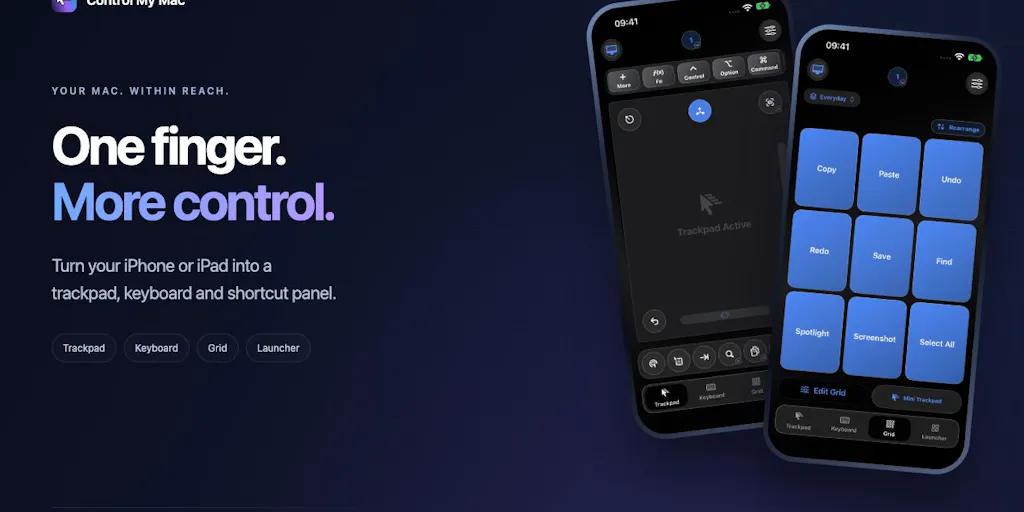
The maker, Sebastian Škoić, built it for a genuinely mundane reason: he kept getting off the couch to click one thing on a Mac mini sitting under his TV. That origin story matters because it tells you exactly what category this is. It is not a remote desktop product in the TeamViewer or AnyDesk sense — it’s not about accessing a machine across the world at high fidelity. It’s about turning your iPhone or iPad into a one-finger control surface for a Mac that’s physically nearby but inconvenient to reach.
The feature set, per the launch page, is deliberately narrow and physical:
- Your phone becomes a trackpad — move, click, right-click, scroll.
- It becomes a keyboard, either live key-by-key or by composing a whole message and sending it in one go.
- It becomes a Grid of shortcut buttons that switches automatically depending on which Mac app is in front.
- It becomes an app launcher and window switcher.
The engineering choices are the interesting part for anyone who runs a business on this stuff. There’s no account, no servers, no ads — the phone talks straight to the Mac over Wi-Fi or Bluetooth, encrypted. Pairing is a single QR scan, with no IP addresses and no firewall configuration. The Mac app is free, the iPhone app has a free Essentials tier, and the Full App is an optional upgrade with a 7-day free trial plus a one-time Lifetime option for people who hate subscriptions — which, as the maker notes, includes him.
Why This Belongs on a Cross-Border Operator’s Radar
Here’s the honest framing: if you’re running a Shopify DTC brand or an Amazon FBA account, you are almost certainly not the target user for this app. And yet the underlying pattern — a cheap, local, no-cloud control layer that removes a physical dependency — is exactly the pattern that separates operators who scale past $2M without hiring eight people from the ones who don’t.
Why Amazon sellers should care more than Shopify ones
Shopify operators live in a browser tab. Their entire stack — Klaviyo flows, Meta Ads Manager, their 3PL dashboard — is web-native. If they need to check something, they open a laptop.
Amazon sellers don’t have that luxury. A meaningful slice of serious Amazon Seller Central work still happens in desktop contexts: bulk upload flat files, Helium 10 desktop tooling, Keepa data pulls, repricing dashboards, QuickBooks reconciliations, and the endless spreadsheet gymnastics of inventory forecasting. A lot of that lives on a Mac mini or Mac Studio acting as the “operations box” in a home office or a small warehouse back room. If that box is under a desk, behind a monitor arm, or in a rack, you’ve just created a physical dependency on a human being standing in exactly the right place.
That’s the real thesis. Cross-border sellers don’t lose money to dramatic failures. They lose it to a 90-second round trip that happens forty times a day.
The “one finger” constraint is the actual product
Most remote-control tools optimize for fidelity — resolution, latency, multi-monitor support. This one optimizes for reduced input surface. One finger. That constraint is what makes it useful in situations a full remote desktop client is useless: a cast on your arm, an RSI flare-up, a sleeping baby on one shoulder, or — more relevant to this audience — a warehouse worker with gloves on who needs to trigger a label print without walking to the terminal.
For a cross-border operation, the interesting version of this isn’t “control my Mac.” It’s “control my packing station.” Or “control my returns desk.” Or “let the night-shift picker advance the order queue without touching a keyboard that’s covered in dust and tape residue.”
What Cross-Border Sellers Can Actually Borrow From This
Strip away the Mac specifics and there are three transferable lessons here, and they’re worth more than the app itself.
1. Local-first beats cloud-first for operational tooling
The maker explicitly chose no accounts, no servers, no ads, with the phone talking directly to the Mac over Wi-Fi or Bluetooth, encrypted. That’s a deliberate architectural stance, and it’s the opposite of what most SaaS vendors pitch you.
Think about your own stack. How many of your operational tools require an internet round trip to function? Your Slack alerts, your Zapier automations, your Gorgias helpdesk, your ShipStation label flow. Every one of those is a dependency on someone else’s uptime. When AWS us-east-1 hiccups — and it does, roughly annually, in a way that takes down half the internet — your warehouse stops.
A local control layer doesn’t replace those tools. But it’s a reminder to audit which parts of your operation must survive a cloud outage, and to keep those parts on hardware you own. For most sellers, that’s printing labels, scanning orders, and accessing the local inventory database. If those three things can’t run without the internet, you have a single point of failure you’ve probably never priced.
2. The QR-scan pairing model is the correct UX for warehouse tooling
“Pairing is one QR scan. No IP addresses, no firewall stuff.” That sentence is doing enormous work.
Anyone who has tried to deploy handheld scanners or tablets in a warehouse knows the pain of network configuration. Static IPs, VLANs, firewall rules, IT tickets. It’s the reason so many small 3PLs and fulfillment operations still run on paper and clipboards. The friction of getting a device onto the network exceeds the benefit of digitizing the workflow.
A QR-scan pairing model collapses that. You print a QR code, tape it to the station, and any device that scans it is instantly paired. That’s a deployment pattern worth stealing for your own internal tooling — whether you’re building it with Retool, Airtable, or a custom Next.js app. The onboarding friction of your internal tools determines whether your warehouse team actually uses them.
3. Context-aware shortcuts are the future of ops interfaces
The Grid of shortcut buttons that “switches automatically depending on which Mac app is in front” is a small feature that points at something big. The interface adapts to context.
Now map that to your operation. When your returns processor opens the returns portal, the interface should surface “issue refund,” “create replacement order,” “flag for inspection.” When your picker opens the order queue, it should surface “next order,” “mark picked,” “report out of stock.” Context-aware interfaces reduce training time and error rates simultaneously.
Most cross-border sellers solve this with SOPs printed on laminated cards taped to the wall. That works until it doesn’t. A software layer that surfaces the right three buttons for the current task is strictly better, and it’s not hard to build with modern no-code tooling.
Where My Judgment Says This Falls Short
I want to be direct about the limits, because the launch page is honest about scope and I’d rather you hear the constraints from someone who isn’t selling you the app.
It’s a Mac-only, single-ecosystem play
This is a Mac app controlling an iPhone or iPad. That’s a small slice of the cross-border operator population. Most warehouse and fulfillment environments run Windows terminals or Android handhelds, because that’s what the hardware vendors (Zebra, Honeywell) ship and support. If your operations box is a Windows machine, this is irrelevant to you today. The pattern is relevant; the product is not.
The pricing is friendly but the roadmap is not disclosed
The Mac app is free, the iPhone app has a free Essentials tier, the Full App is an optional upgrade with a 7-day free trial and a one-time Lifetime option. That’s a consumer-friendly structure and I respect the anti-subscription stance. But the launch page doesn’t disclose what’s in the Essentials tier versus the Full App, what the one-time Lifetime price actually is, or what’s on the roadmap. For a solo maker project, that’s fine. For anyone considering building a workflow dependency on it, “not disclosed” is a yellow flag. Don’t build your warehouse process on a tool whose feature boundary you can’t see.
Security is asserted, not audited
“Encrypted” over Wi-Fi or Bluetooth, no accounts, no servers. That’s a good default posture — far better than routing your keystrokes through someone’s cloud. But “encrypted” is a claim, not a certification. There’s no mention of an independent security audit, no SOC 2 report, no open-source code review. For a couch remote, who cares. For anything touching customer PII or order data, you’d want more than a claim.
The real gap: it controls a Mac, not a workflow
Here’s my biggest reservation, and it’s not really a criticism of this product. Control My Mac removes a physical dependency. It does not remove a process dependency. If your operation requires a human to look at a screen and decide what to click, this makes that human slightly more comfortable. It doesn’t make them unnecessary.
The operators who win the next 24 months are the ones who use tools like this as a bridge — a way to keep a fragile manual process running while they automate the decision layer underneath it. If you deploy a one-finger remote control and call it “automation,” you’ve just made your manual process more convenient, which means you’ll keep it longer, which means you’ll be slower to replace it. That’s the trap.
What I’d Watch / Test Next
Three concrete things to do this week, in order of leverage.
First, audit your physical dependencies. Walk your operation — home office, warehouse, 3PL — and list every task that requires a human to be in a specific physical location to execute. Rank them by frequency times minutes lost. The top three are your automation targets for the quarter, and a tool like Control My Mac might be a legitimate stopgap for one of them if you’re on Mac hardware. If you’re on Windows, look at Unified Remote or Microsoft Remote Desktop as functional equivalents.
Second, stress-test your cloud dependencies. Pick your three most critical operational tools and ask: what happens to my fulfillment flow if this goes down for four hours? If the answer is “we stop shipping,” you need a local fallback. That might be a printed order manifest, a local database, or a Google Sheets export that lives on a machine you control. The goal isn’t to replace your SaaS — it’s to survive the outage that AWS will eventually hand you.
Third, steal the pairing pattern. Whatever internal tooling you build this year — a returns dashboard, a QC checklist, a pick-and-pack interface — make onboarding a single scan or a single click. If a new warehouse hire needs an IT ticket to get onto the system, you’ve already lost. The friction of adoption is the ceiling on your operational scale.
The unsexy control layer is where cross-border margin actually lives. Not in the next ad platform, not in the next marketplace, but in the ninety seconds your team loses forty times a day because someone has to walk to a machine. Fix that, and you’ll feel it in your contribution margin before you feel it anywhere else.


