The Real Cost of Context-Switching Is Now a Line Item in Your P&L
Every cross-border operator I know runs the same broken workflow a dozen times a day. You’re inside Amazon Seller Central reconciling a stranded inventory report, something breaks, you screenshot it, you tab over to ChatGPT, you type three paragraphs of context explaining what you were even doing, you paste the screenshot, you get an answer that assumes you’re on Shopify, and then you manually translate that answer back into the actual screen in front of you. Multiply that by a warehouse coordinator in Shenzhen, a VA in Manila, and a PPC manager in Kraków, and you’ve quietly built a tax on every operational decision your company makes. That tax is what Pip is trying to eliminate, and whether or not the product survives, the category it belongs to is the one I’d watch hardest this year.
What Pip Actually Is, Stripped of Launch-Day Hype
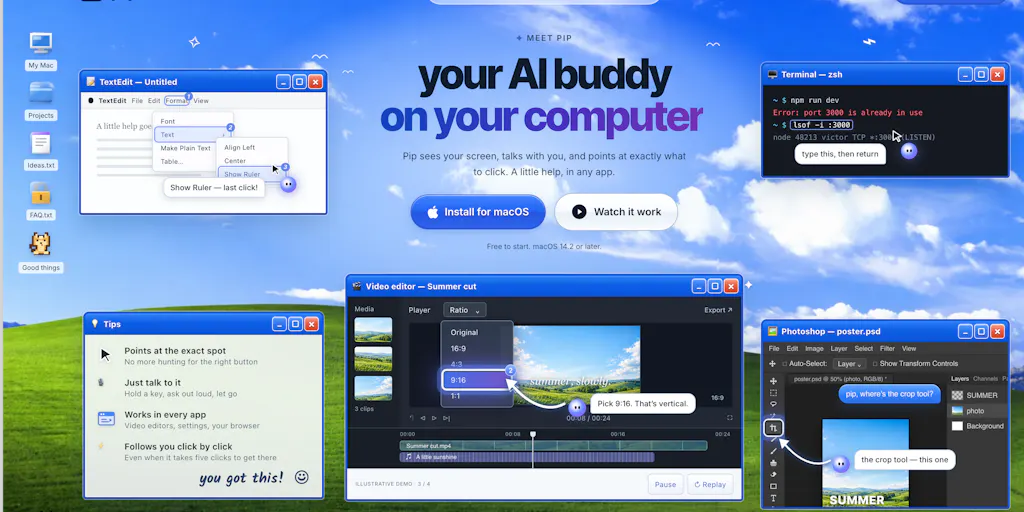
Pip is a desktop-resident AI assistant built by Victorr. The mechanic is deliberately physical: you hold a key, and while you hold it, Pip can see your screen, understand the context of whatever you’re looking at, and respond in place — explaining a field, pointing to where to click, fixing an error, or walking you through a multi-step task. The stated goal, in the maker’s own framing, is to make getting help on your computer feel less like chatting with a bot and more like having someone sitting next to you.
That’s the whole pitch. No agent framework, no MCP server registry, no “autonomous workforce” language. Just: hold key, get help, don’t leave the screen you’re on.
The provenance matters here. Pip was built on top of the open-source work behind HeyClicky, which the maker credits as the foundation he started from, before pushing on UX and feature depth. If you’ve been tracking the screen-aware assistant space, that lineage tells you most of what you need to know about the technical architecture — and it also tells you exactly which comparison a prospective buyer is going to make.
Why the “Hold a Key” Interaction Model Beats Another Chat Window
I want to dwell on this because it’s the part most operators will skim past, and it’s the part that actually matters for a cross-border team.
Every AI tool that has failed inside an e-commerce org has failed for the same reason: it added a destination. Another tab, another login, another place your VA has to remember to go. Adoption dies within two weeks because the marginal cost of opening the tool exceeds the marginal benefit of the answer, especially for the 40% of questions that turn out to be trivial.
A hold-to-activate overlay inverts that. The tool comes to the work instead of the work coming to the tool. For a category where your frontline users are often low-context, high-turnover, and working across three languages, that inversion is not a UX nicety — it’s the difference between a tool that gets used in week six and a tool that gets quietly cancelled.
How It Stacks Up Against What You’re Probably Already Paying For
Let me be concrete about the competitive set, because “AI assistant” is a meaningless label in 2025.
Against ChatGPT and Claude desktop apps. You already pay for one of these, probably both. The failure mode is context transfer: you have to describe your screen to a model that can’t see it. Pip’s bet is that screen visibility plus zero-friction invocation beats raw model quality. For e-commerce specifically — where the answer often depends on which marketplace, which report view, which column layout you’re staring at — that bet is directionally correct.
Against HeyClicky. The maker’s own answer to this question, asked directly by a commenter on launch day, was that Pip focuses on better UX and more useful features. That’s a soft answer, and I’d treat it as such. If you’re already running HeyClicky and it works, there is no compelling migration story in the launch copy.
Against browser-extension assistants. Tools like Kai for Chrome and the long tail of Chrome-side copilots live inside the browser. That’s fine if your entire operation is browser-based. It is not fine if your team lives in Helium 10, a desktop ERP, a 3PL portal, a freight forwarder’s web app, or a local spreadsheet. Desktop-level screen awareness is a genuinely wider net.
Why Amazon Sellers Should Care More Than Shopify Ones
This is the sidebar I’d underline twice.
A Shopify operator’s world is unusually consolidated. Product data, orders, analytics, and marketing all live in one admin, and the surrounding stack (Klaviyo, Meta Ads Manager, a handful of apps) is mostly browser-native. A screen-aware assistant is nice-to-have.
An Amazon seller’s world is the opposite. You’re toggling between Seller Central, a third-party repricer, a keyword tool, a returns dashboard, a reimbursement recovery tool, a freight tracking portal, and at least one spreadsheet that only one person understands. Every one of those has a different vocabulary for the same SKU. Every one of those has a help doc written for a different persona. This is the single highest-friction information environment in e-commerce, and it’s precisely where an overlay that can see your screen and answer in situ has the most to gain.
If you’re running TikTok Shop or Temu on top of that — different dashboards, different compliance rules, different return policies — the case gets stronger, not weaker.
What Cross-Border Operators Should Actually Borrow From This
I don’t know whether Pip wins. I do know the design principles underneath it are worth stealing regardless of which vendor you end up standardizing on.
One: kill the context-transfer step. Audit your team’s AI usage this week and count how many prompts begin with a paragraph of explanation about what the user was looking at. Every one of those paragraphs is recoverable time. Whether you solve it with a screen-aware tool, a well-built internal prompt library, or a shared Notion of pre-scoped prompts, the principle is the same.
Two: price the interaction, not the token. The most interesting exchange on the launch page was from Alexandra Protsenko, who asked whether a task that takes five clicks counts as one question or five against the monthly limit. The maker’s answer: one question. That’s the right answer, and it’s the right mental model for any tool you buy. Your VAs don’t think in API calls. They think in tasks. If your tooling meters in units your team doesn’t recognize, you will get shadow usage, workarounds, and eventually churn.
Three: assume the frontline user has no context. The reason a hold-a-key assistant works for a warehouse coordinator or a first-week VA is that it requires zero onboarding to invoke. Every internal tool you build should be judged against that bar. If it needs a training session, it needs to be simpler.
Where the Math Breaks
Here’s my honest read on the economics, and it’s less flattering than the launch narrative.
The value of a screen-aware assistant scales with the frequency of stuck moments and the cost of each one. For a solo operator doing 20 stuck-moments a day at two minutes each, you’re recovering maybe 40 minutes — real, but not transformative, and easily eaten by the subscription.
For a 30-person cross-border team, the math flips hard in the other direction, but only if you can actually deploy it. And that’s the catch: seat-based AI tooling at scale runs into procurement, IT policy on screen access, and — for anyone with EU or UK staff — a genuine data protection conversation about what a tool that “sees your screen” is doing with that data. The launch page doesn’t address any of this. Not disclosed.
Where My Judgment Says This Falls Short
Three things I’d want answered before I put Pip in front of a team.
The differentiation story is thin. “Better UX and more features than the open-source project we forked” is not a moat. It’s a head start. When asked directly how Pip differs from HeyClicky, the answer given was directional rather than specific — no named feature, no benchmark, no workflow that HeyClicky can’t do. That’s a launch-day answer, not a roadmap. Watch whether a concrete differentiator shows up in the next 90 days.
The team question is unresolved. Jim Hartung asked the question every operator should be asking about any tool they’re considering standardizing on: who’s behind this, is it just you, and is this a side project or full-time? That question went unanswered in the thread. For a $20/month personal tool, a solo side project is fine. For something you’re rolling out to a 40-person fulfillment and listing team, it is not. Solo-maintained tools die, and when they die mid-quarter you’re the one explaining the migration to your CFO.
Screen access is a compliance surface, not a feature. Any tool that can see your screen can see your Seller Central credentials, your supplier invoices, your customer PII, and your ad account spend. Before this touches a machine that logs into Amazon Seller Central or holds customer data, you need a written answer on data retention, on-device vs. cloud processing, and whether screen content is used for training. None of that is on the launch page. Not disclosed is not the same as no, but it’s also not a yes.
Pricing isn’t visible in the material I have. The monthly limit is referenced in the comments, which implies a metered tier exists, but no number appears. That makes it impossible to run the ROI math above with any precision. Ask for it before you pilot.
What I’d Watch / Test Next
This week, do three things.
First, run the audit. Have your team log every AI prompt for three days and mark which ones required describing what was on screen. That number is your addressable spend, and it will tell you instantly whether a screen-aware tool is worth a pilot or a distraction.
Second, pilot Pip narrowly — one power user, one genuinely messy workflow, ideally something that spans Seller Central and a third-party tool. Give it two weeks. Measure time-to-resolution on stuck moments before and after. Don’t measure “did they like it,” measure whether the context-transfer paragraph disappeared from their prompts.
Third, and most importantly, send the compliance questions before you send the credit card. Ask the vendor in writing: where does screen data go, is it retained, is it trained on, and what happens to it when we cancel? Any vendor that can’t answer that in a paragraph isn’t ready for a cross-border operation with EU staff or customer PII on screen.
The category is right. The timing is right. Whether this specific product is the one you standardize on is a question the launch page doesn’t answer — and that’s exactly the kind of gap an operator should notice.