Why a Screenshot Organizer Is Suddenly a Cross-Border Seller Problem
Let’s be honest: the average Amazon FBA operator doesn’t think they have a screenshot problem. They think they have a PPC bid problem, a supplier lead-time problem, or a cash-flow problem. But the moment you try to scale from one marketplace to three, from a single Shopify storefront to a TikTok Shop and an Etsy side-hustle, your entire operational memory fragments. Your competitor pricing snapshots live in one folder. Your supplier spec sheets are buried in another. The ad creative that converted at 3.2% is a random PNG buried under six months of Slack exports. You are not disorganized—you are running a business on a visual operating system that has no search function. That is the gap Caplio attacks, and it is why a humble Mac-only OCR tool deserves more than a polite nod from the cross-border community. It is not a glamorous tool. It is not AI-native in the way we’ve been trained to expect. But it solves a friction point that quietly bleeds hours out of every week for anyone who lives between Seller Central, a design tool, and a spreadsheet.
The Real Problem: Your Product Research Pipeline Is a Black Hole
Ask yourself where your product research actually lives. If you are honest, it is not in Helium 10 or Jungle Scout. It is in a chaotic collection of browser tabs, Pinterest boards, and a screenshots folder that has not been cleaned since you launched your first private-label product. When you are sourcing from Alibaba or 1688, you save reference images of packaging, labeling, and barcode placements. When you are spying on competitors, you capture their A+ content, their review velocity, and their pricing changes. When you are building a TikTok Shop strategy, you save the raw clips that went viral. All of this is visual data, and none of it is searchable by default.
Caplio’s maker, R Aghababa, frames the problem simply: he was taking screenshots and saving reference images constantly, but could rarely find them again when needed. The solution he built is a local-first visual library that runs on-device OCR to make the text inside your images searchable. For a cross-border operator, this is not just a convenience—it is the missing layer between raw visual intelligence and actionable decision-making.
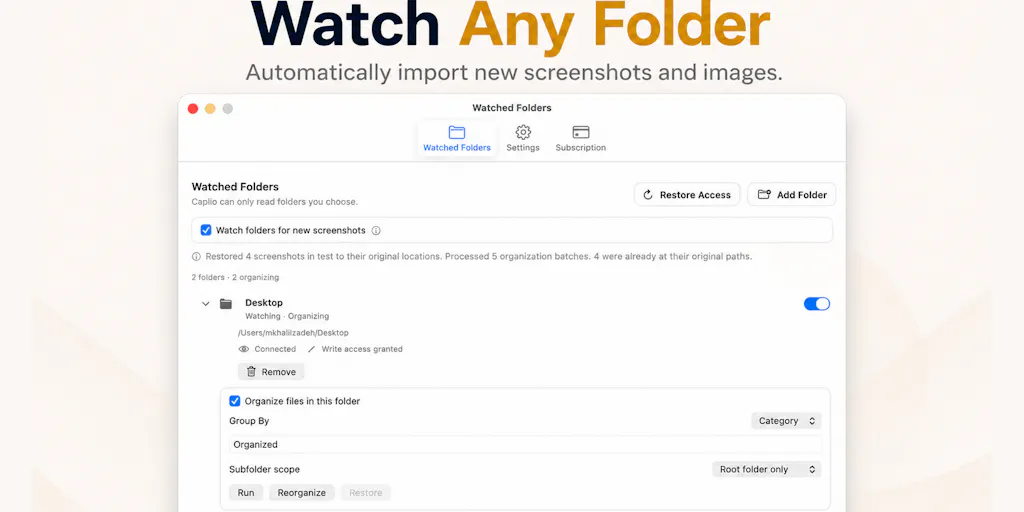
Think about the last time you tried to reconcile a supplier’s quoted MOQ against a competitor’s retail price. You had to open your email, scroll through WeChat history, and then dig through a folder of poorly named images. Caplio collapses that time. It points at the folders you already use, indexes the text inside the images, and gives you a visual timeline with filters by date or category. That means the moment you remember “that screenshot of the supplier’s updated spec sheet from last Tuesday,” you can actually find it. For sellers juggling multiple marketplaces, this is the difference between reacting to a competitor’s price drop in an hour versus a week.
Why Amazon Sellers Should Care More Than Shopify Ones
Shopify sellers live in a world of structured data. Their product catalogs, order histories, and customer segments are all queryable within the platform. Amazon sellers, by contrast, operate in a walled garden where the most valuable intelligence is often visual and external. Your competitors’ pricing strategies, their Buy Box wins, their review screenshot patterns—none of this is exportable via API. It is captured, if at all, through screenshots. Caplio’s value proposition is therefore sharper for the Amazon operator who is constantly monitoring Amazon Seller Central alongside external tools. The ability to search across a year of saved visual data—by text, by date, by category—turns a passive archive into an active competitive intelligence repository.
What Actually Differentiates Caplio from the Incumbent Mess
Let’s be clear about the existing landscape. On macOS, you have the built-in Screenshot app, which saves files with names like “Screenshot 2025-01-15 at 14.32.05.png.” You have CleanShot X, which is excellent for capture and annotation but weak on retrospective search. You have Eagle, which is a designer’s dream for organizing visual assets but has a learning curve and a library-based approach that doesn’t naturally align with your existing folder structure. And then you have the cloud-based tools like Notion or Miro, which require you to manually upload and tag everything—a discipline that breaks down after the first week.
Caplio’s differentiation is not in capture—it does not reinvent the screenshot shortcut. Its differentiation is in the retrieval layer. By indexing the text inside your images locally, it makes the content of your screenshots searchable without requiring you to rename files or build a taxonomy. That is a meaningful departure from the “folder discipline” model. You do not have to change your behavior to benefit from the tool. You point it at your existing folders, let it do its OCR work, and then search when you need something.
There is also the drag-and-drop functionality, which lets you pull an image directly from Caplio into another Mac app. For a cross-border seller who is constantly moving visual assets between a sourcing spreadsheet, a design tool like Canva, and a listing template, this kills a surprising amount of friction. You are not exporting, saving, and re-uploading. You are dragging the exact asset you need into the exact place you need it.
Where the Math Breaks: The Limitations of Local-Only OCR
I want to be enthusiastic, but I also want to be honest about the ceiling. Caplio’s privacy-first approach—OCR and indexing happen locally on your Mac, with images and extracted text not uploaded for processing—is a genuine selling point for anyone handling supplier contracts or unreleased product designs. But it also creates a ceiling. On-device OCR is getting better, but it still struggles with non-Latin scripts, handwritten annotations, and low-resolution captures. A cross-border seller dealing with Chinese-language supplier documents or Japanese competitor listings will likely find the search experience patchy.
One commenter on the launch page, Lisa, asked directly whether the on-device OCR handles non-English text. That is not a niche question for our audience—it is the central question. If Caplio cannot reliably index Chinese, Japanese, or Korean text, its utility for cross-border operators drops by half. The maker did not disclose a definitive answer in the launch copy, which suggests this is either a work in progress or a known limitation. I would not bet my sourcing workflow on it until I have tested it against a folder of WeChat screenshots.
What Cross-Border Sellers Can Borrow from Caplio’s Approach
Even if you never download Caplio, there is a lesson here about operational hygiene. The tool is built on a simple insight: your visual memory is only as good as your ability to retrieve it. For a cross-border operation, that insight extends beyond screenshots. It applies to your supplier communications, your ad creative libraries, and your competitor tracking.
Here is the practical borrowing: start building a visual intelligence folder structure that mirrors your operational workflow. Create folders for “Competitor Pricing,” “Ad Creative Winners,” “Supplier Specs,” and “Listing Images.” Then, find a tool—whether it is Caplio, Google Photos, or even a well-tagged Dropbox folder—that can index the text inside those images. The goal is not to organize everything perfectly from day one. The goal is to make your past visual data searchable so that future decisions are not made in a vacuum.
The timeline and category filtering that Caplio offers is also worth replicating in your own workflow. The ability to see “what did my competitor’s pricing look like over the last 90 days” is not just a screenshot retrieval task—it is a market intelligence task. If you are not already doing a weekly visual audit of your top ten competitors, you should start. Save the screenshots, date them, and review them monthly. Caplio just makes that habit less painful to maintain.
The Privacy Angle Is a Double-Edged Sword
I appreciate the privacy-first stance. For a seller dealing with proprietary product designs or unannounced launch plans, knowing that your images stay local is a real advantage. But I would caution against over-indexing on this feature as a primary buying decision. The threat model for most cross-border sellers is not a sophisticated adversary stealing your screenshots from the cloud. It is your own disorganization. A tool that syncs your visual library across devices might be more useful for a seller who works on both a desktop and a laptop, even if it means sacrificing some local-only purity.
Caplio’s maker is clear that the product is still at the beginning, and he is actively working on improvements. That is honest positioning, and it should temper your expectations. This is not a mature, battle-tested platform. It is a focused utility that solves one problem well. For the right user, that is enough.
Where My Judgment Says It Falls Short
Let me be direct about the gaps. First, the Mac-only limitation. If your operation runs on a mix of Windows and Mac—which is common when you are coordinating with overseas suppliers or VA teams—Caplio is only useful on one node of your workflow. That limits its utility as a team tool. Second, the absence of any cloud sync means your visual library is tethered to one machine. If your Mac dies, your competitive intelligence archive dies with it. For a business that depends on historical reference data, that is a risk I would not accept lightly.
Third, the duplicate detection gap. A commenter named Gal Dayan flagged this precisely: he retakes the same screenshot multiple times to get the crop right, and they all end up in the library looking identical. That is a real friction point for anyone who is actively capturing visual data. Without a merge or delete suggestion for near-identical images, your library will eventually become as cluttered as the folder it was meant to fix. The maker did not indicate this is on the roadmap, so I would treat it as a known limitation.
Finally, the pricing. The launch page does not disclose a price, which usually means one of two things: it is either free during the beta period, or the maker has not yet decided on a monetization model. For a cross-border seller evaluating tools, an undisclosed price is a yellow flag. It makes it harder to justify the time investment in testing and adoption. I would wait for clarity on pricing before building a critical workflow around it.
What I’d Watch / Test Next
If you are intrigued by the concept but not ready to commit, here is what I would do this week. First, download Caplio and point it at your existing screenshots folder. Do not reorganize anything. Let it index what is there and run a few searches for text you know is buried in your images. If it finds them, you have validated the core value proposition. If it does not, you have saved yourself a week of adoption time.
Second, test the OCR against non-English text. Take a screenshot of a Chinese-language supplier chat or a Japanese competitor listing and see if Caplio can index it. This is the make-or-break feature for cross-border operators. If it works, the tool becomes a genuine asset for your sourcing and competitive intelligence workflow. If it does not, wait for a future update.
Third, integrate it into your weekly review ritual. Every Friday, spend ten minutes capturing the pricing and ad creative of your top three competitors. Store those screenshots in a dedicated folder that Caplio indexes. After a month, you will have a searchable visual timeline of your competitive landscape. That alone is worth more than most paid tools in your current stack.
Finally, keep an eye on the Product Hunt launch page for updates on duplicate detection and non-English OCR support. The maker is actively engaging with feedback, which is a good sign for a tool at this stage. The cross-border community has a habit of ignoring tools that are not flashy. Caplio is not flashy. But it might just be the quiet utility that saves you from the next hour-long hunt through your own screenshots.