The Integration Tax Is Killing Your Cross-Border Margins — Albato’s AI Copilot Might Finally Chop It Down
Cross-border e-commerce is a beautiful mess. You’re managing inventory across Shopify, Amazon Seller Central, TikTok Shop, and maybe a warehouse in Poland or a returns depot in Shenzhen. Every platform has its own API quirks, its own CSV export format, its own rate limits. The result? Operators spend hours — sometimes days — manually moving data between systems. The classic response is either hire a developer or pay Zapier’s enterprise tax. Both options hurt when margins are already thin.
Albato’s latest release lands squarely in that pain point. The platform has been quietly building a reputation as a no-code automation alternative that combines affordability with a genuinely usable interface. But the new features — a natural-language Copilot, autonomous AI Agents, a flowchart-style Canvas editor, and shareable automations — aren’t just incremental. They directly attack the biggest friction I see in cross-border teams: the gap between knowing what needs to happen and actually wiring it up. If you can describe a workflow in plain English and have it built, tested, and shared in minutes, the barrier to automation drops from “we need a specialist” to “anyone on the ops team can do it.” That’s the shift this product is betting on, and it’s worth a serious look.
The Real Problem: Every Channel Speaks a Different API
For a seller operating on three or four marketplaces, the integration layer is not a “nice to have” — it’s the difference between a business that scales and one that burns out. Every new channel adds a new set of data formats, authentication protocols, and error states. Amazon’s SP-API changes every few months. TikTok Shop’s integration is still maturing. Temu doesn’t even offer a public API for most sellers. And your 3PL provider likely expects flat files or EDI.
The existing tools have trade-offs. Zapier is reliable and has a huge app library, but its pricing scales linearly with tasks, which kills high-volume sellers. Make (formerly Integromat) is more flexible for complex flows but has a steeper learning curve, especially for non-technical ops staff. n8n offers self-hosted control but demands server management and some technical chops. What Albato does differently is hold onto the no-code simplicity of Zapier while offering pricing that review after review calls “affordable,” and now it’s layering on AI to reduce build time further. The launch announcement notes that Albato has reached over 1,000 connected apps — which covers most e-commerce essentials: Shopify, WooCommerce, Amazon, Google Sheets, Slack, email platforms. That’s a library that can handle the core of a cross-border stack without needing a custom integration.
What’s New and Why a Seller Should Care
The headline features in this release are not just UI polish. They fundamentally change how quickly you can go from noticing a broken process to having it fixed.
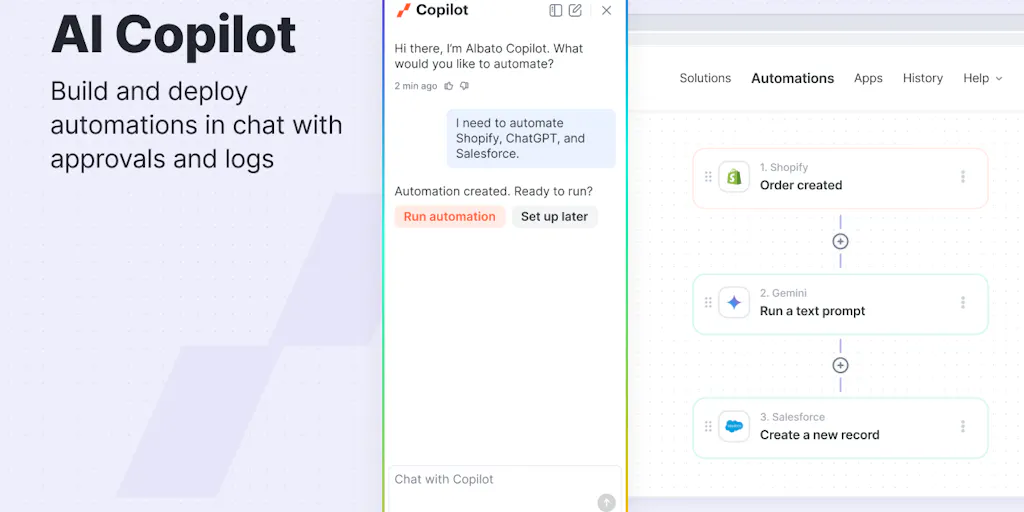
Albato Copilot is the standout. Instead of dragging and dropping trigger and action cards, you describe the automation in natural language. Need to create a flow where a new order in Shopify sends the shipping address to a 3PL’s webhook and also posts a Slack notification to the fulfillment team? You type that. Copilot interprets it and builds the workflow steps for you. For a team that isn’t fluent in “if this then that” logic, this is a game-changer. One commenter described a “Slack to Sheets” test that worked with branching logic without fuss. That’s the kind of real-world scenario — logging customer service interactions from Slack to a spreadsheet — that eats up minutes every day in an ops team.
AI Agents go a step further. Instead of a fixed trigger-and-action path, an agent can take a higher-level instruction like “when a return reason is ‘damaged in transit,’ initiate a replacement order and flag the carrier” and decide the steps. The maker explains the line: Copilot helps build workflows, agents help execute them autonomously with reasoning. For a seller handling dozens of return cases daily, that frees up time from manual triage. The agent can also have guardrails set by the user to prevent out-of-bounds actions — a critical feature when you’re automating financial or inventory decisions.
Canvas Mode turns the traditional vertical list of steps into a flowchart-style editor. Anyone who has debugged a five-step Zapier integration knows the pain of losing track of branches. Canvas gives you a visual map of the automation, with drag-and-drop functionality promised. Combined with the new Test Step feature — which lets you test each step individually with real data — you can validate a fulfillment workflow before it touches a live order. One commenter pointed out that debugging a single mis-mapped field across an entire workflow is a major time sink. Test Step addresses that directly.
Finally, Connection by Link and Automation Sharing are built for the agency and multi-store operator. If you manage brand accounts or run a cross-border aggregation play, you can generate a secure link for a client to connect their platform without sharing API keys. Then you can share the entire automation with a link — no need to rebuild for each store. That saves hours per client onboarding.
Why Amazon Sellers Should Care More Than Shopify Ones
Shopify’s app ecosystem is relatively open. Most automation tools integrate with it easily. Amazon, on the other hand, has a notoriously complex API landscape. MWS is being deprecated, SP-API requires OAuth, and FBA inventory sync needs to handle multiple fulfillment centers, reserved quantities, and inbound shipments. Albato’s ability to create custom integrations (called “Custom App Integrator” in reviews) means you’re not stuck with pre-built connectors. If your Amazon workflow needs to pull from a custom endpoint — say, a first-party data feed from your supply chain system — you can build that connector without code. For sellers who rely on Amazon as their primary channel, that flexibility is more valuable than a hundred Shopify template workflows.
What the Reviews Tell Us (and What They Don’t)
The aggregated review sentiment on Product Hunt is overwhelmingly positive. Users consistently highlight the user-friendly interface, affordable pricing, and responsive customer support. Multiple reviewers call it a “Zapier alternative” — one specifically mentions that after trying Albato they upgraded their plan on AppSumo because the value clicked. Another reviewer, Jason Laird, writes that Albato “struck the best balance of power, ease of use, and pricing” over Zapier, Make, and n8n.
But I also see recurring friction points. Learning curve appears in 12 mentions — not huge, but notable. The review summary notes that documentation can be “uneven,” and some users find the operation counting confusing. For a high-volume seller processing thousands of orders per month, understanding exactly how Albato counts operations is critical. The maker did clarify in comments that error handling includes retries and configurable continuation, but transparent reporting on what counts as an “operation” could be clearer. If you hit a pricing wall because each step in a complex workflow consumes multiple operations, you might find yourself priced out faster than expected.
Where the Math Breaks
Albato positions itself as affordable, and the reviews echo that. But “affordable” is relative. Most no-code platforms charge based on tasks executed. If your automation has 10 steps (including branches and error handlers) and fires 1,000 times a month, that’s 10,000 operations. At Zapier’s mid-tier, that could cost $50–$100. Albato’s pricing isn’t disclosed in the source material, but given the AppSumo mentions and the “affordable pricing” tag, it likely comes in under that. Still, I’d stress-test this yourself before committing. Build a realistic workflow that mirrors your actual volume — order created → check stock in 3PL → route to Amazon vs. Shopify accordingly — and run it through Albato’s test mode for a week. Then check the usage counter. That’s the only way to know if the math works for you.
Where My Judgment Says It Falls Short
I’m bullish on the direction, but I see three gaps that cross-border operators need to validate before they bake Albato into their stack.
First, integration depth vs. breadth. 1,000 apps is impressive, but the quality of each integration varies. Does the Amazon connector support SP-API’s latest feed endpoints? Does the TikTok Shop connector handle refunds and cancellations? The source doesn’t specify which apps are “deep” vs. “basic.” If a connector only supports basic read operations, you still end up with manual workarounds. I’d demand to see the actual actions and triggers for your critical apps before buying.
Second, AI reliability under load. The maker acknowledges that Copilot is trained on Albato’s knowledge base and real-world use cases, which improves determinism over a general-purpose model. But one commenter asked about the split between deterministic and random behavior. The answer — “more predictable” — is not “guaranteed correct.” For automations that involve inventory adjustments or financial data, even a 1% error rate can cause costly mistakes. The agent guardrails help, but until I’ve seen a high-volume workflow run for a month without glitches, I’d treat AI Agents as a co-pilot, not a pilot.
Third, documentation and community. The reviews flag “documentation needs improvement” as a repeated theme. In cross-border e-commerce, you often face edge cases that aren’t covered by templates or tutorials. If you hit a snag with an Aliexpress integration or a custom webhook for a Chinese warehouse, you need either stellar docs or responsive support. Albato’s support gets high marks — 47 mentions for responsiveness — but docs are a long-term investment. As the platform grows, uneven documentation can become a bottleneck for ops teams who don’t want to open a ticket for every question.
What I’d Watch / Test Next
This week, if you’re a cross-border operator drowning in manual data transfers, I’d do three things:
Test the Copilot with a real pain point. Pick the most annoying recurring task — maybe logging daily TikTok Shop order data into a Google Sheet for your accountant. Open Albato’s Copilot and describe it: “When a new order comes in on TikTok Shop, add a row to my Google Sheet with the order ID, customer email, and total.” See how many steps it generates, whether it correctly identifies the trigger and actions, and how long it takes to get a working flow. Time yourself against building the same thing in Zapier or Make. That’s your baseline.
Try the Connection by Link feature with a client store. If you manage accounts for brands, generate a link for one client to connect their Shopify. Build a simple automation (e.g., sync new orders to a central database) and share it back. Measure the time from start to live. If it takes under 10 minutes, you’ve found a way to standardize onboarding across your portfolio.
Stress-test an AI Agent for a low-risk scenario. Set up an agent to handle customer messages that contain keywords like “cancel” or “refund” — but limit its power to reading and classifying only, not taking action. Let it categorize incoming tickets in a Slack channel or spreadsheet. Run 100 real cases against it and check the accuracy of its classifications. If it’s above 90%, you can consider giving it guarded write access (e.g., updating an order status to “pending cancellation” but requiring human approval to proceed).
Albato isn’t a silver bullet for every integration headache. But it’s the first tool in a while that makes me think the no-code AI automation era for e-commerce is actually arriving, not just being hyped. The gap between describing a workflow and having it run is shrinking. For a cross-border operator, time saved on integration is time spent on what actually moves the needle: sourcing better products, negotiating logistics rates, and delighting customers. That’s a trade I’ll take.