Why a MacBook Notch App Matters to People Who Sell on Amazon
Let me be direct: if you run a cross-border e-commerce operation and you’re not at least curious about AI coding agents, you’re already behind. Not because you need to write code — you don’t — but because the same orchestration problem that plagues a developer running multiple Codex agents is the exact problem you face running multiple virtual assistants, PPC managers, and listing optimization tools. You have no idea which one is actually working, which one is stuck, and which one is silently burning your budget. So when I saw Treebar on Product Hunt, a utility that shoves live visibility of your AI agents into your MacBook’s notch, I didn’t see a developer toy. I saw a metaphor for every operational blind spot we tolerate in this industry. We run our businesses on dashboards that tell us what happened yesterday, while the actual work — the listing changes, the ad bid adjustments, the supplier emails — happens in scattered windows we can’t see. Treebar is a reminder that the next competitive advantage isn’t a better tool; it’s better visibility into the tools you already have.
The Problem Treebar Actually Solves: Agent Visibility, Not Agent Control
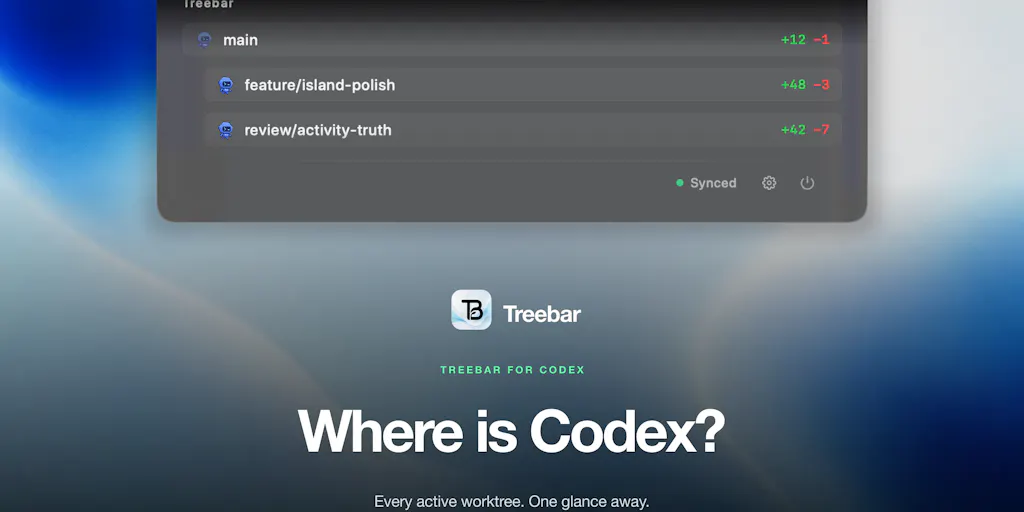
The maker, Cory Parry, built Treebar because he kept losing track of where Codex was actually working. If you’re not deep in the AI coding world, Codex is OpenAI’s agentic coding tool — it can spin up multiple worktrees, explore codebases, write files, and run subagents in parallel. Once you have several of these running, you face a coordination nightmare. Parry’s solution was to put the status right in the MacBook notch: active worktrees, live diffs, whether Codex is exploring or writing, and how many subagents are working — all without jumping between windows.
Now, step back and think about what this actually solves. It’s not a new coding paradigm. It’s not a better AI model. It’s a visibility layer. Treebar answers one question: what is my automation actually doing right now?
For a cross-border seller, that question is painfully familiar. You have Helium 10 running keyword sweeps, Klaviyo sending flows, Shopify processing orders, and maybe a VA in the Philippines updating listings. If you’re honest, you don’t know what half of those systems did in the last hour. You find out when something breaks — a price error, a duplicate SKU, a campaign that spent $300 with zero conversions. Treebar’s core insight is that the cost of automation isn’t the tool; it’s the blindness that comes with it. The same logic applies to your operation. You don’t need more tools. You need a way to see what your existing tools are doing without logging into six different dashboards.
What Treebar does differently from, say, a standard terminal or a CI/CD dashboard is that it compresses the signal into an always-visible, low-attention surface. The notch is a terrible place for detailed data, which is exactly why it works. It forces the tool to show only the essentials: is it working, is it stuck, is it done? That’s a design philosophy worth stealing. Most e-commerce dashboards try to show you everything and end up showing you nothing. A good operations dashboard should fit in a notch — a handful of statuses that tell you where the bottlenecks are, not a spreadsheet of every click.
Why Amazon Sellers Should Care More Than Shopify Ones
If you’re a Shopify DTC operator, you’re used to having clean APIs and a dashboard for everything. You can see a visitor’s entire journey in real time. Amazon sellers live in a different world. Amazon Seller Central is a black box. You get reports hours or days late. You can’t see what Amazon’s algorithm is doing to your listing. You can’t see whether your PPC bids are being throttled or boosted. You’re flying blind, and you’ve built a whole workflow around that blindness — third-party tools that scrape data, spreadsheets that reconcile orders, and a lot of gut feeling.
Treebar’s approach is a direct challenge to that mindset. It says: you can know what your automation is doing, in real time, without building a custom dashboard. That’s a radical idea for Amazon sellers. Imagine a tool that sat in your menu bar and told you when your repricing tool changed a price, when your review request tool sent an email, or when your inventory forecast crossed a reorder threshold. You wouldn’t need to open Seller Central every hour. You’d just glance at your menu bar. Treebar is built for Codex, but the pattern — real-time, low-friction visibility into automated work — is exactly what Amazon sellers are starved for. Shopify sellers have too many dashboards. Amazon sellers have almost none. The notch is the right place for the signal, because the alternative is a black box.
How Treebar Differs from the Incumbents: The Attention Economy of Dev Tools
There are existing tools for monitoring AI agents. You’ve got terminal multiplexers like tmux, CI/CD dashboards from GitHub Actions, and observability platforms like Datadog. All of them solve a version of this problem, but none of them solve it the way Treebar does.
The difference is attention. A terminal multiplexer shows you everything, but you have to look at it. A CI/CD dashboard shows you build status, but it’s buried in a browser tab. Datadog shows you metrics, but it’s designed for production systems, not for a developer’s local workflow. Treebar sits in the notch because it’s not asking for your attention — it’s just there. When something changes, you notice it in your peripheral vision. That’s a fundamentally different interaction model. It’s the difference between checking your email and having a notification badge on your phone. The badge is passive. The email is active. Treebar is a badge for your AI agents.
For cross-border sellers, this is a lesson in tool design. We’re drowning in dashboards. Google Analytics has hundreds of metrics. Facebook Ads Manager has a dozen campaign types. TikTok Shop has its own analytics. Every one of these tools demands active attention. What we need is more passive visibility — tools that sit at the edge of our awareness and only raise their voice when something actually needs a human. Treebar gets this. Most e-commerce SaaS vendors don’t. They sell you more data, not better attention.
Where the Math Breaks: The Cost of Context Switching
Let’s do the math on why this matters. A typical cross-border seller manages, say, five marketplaces: Amazon, eBay, Etsy, Walmart, and maybe a Shopify store. Each platform has its own dashboard, its own reporting, its own quirks. To get a full picture of your day, you’d log into five systems, cross-reference three spreadsheets, and check your email for supplier updates. That’s easily an hour of context switching. Multiply that by 250 working days and you’ve lost 250 hours a year just to seeing what’s going on.
Treebar’s insight is that this is the real cost of automation. It’s not the tool subscription. It’s not the time to set it up. It’s the constant switching between windows to figure out what the tool is doing. Parry noticed this with Codex — he had agents running across multiple worktrees and couldn’t tell what was changing or how many agents were actually working. So he built a tool that eliminates the switching. The notch is always there. The status is always visible. No context switching required.
This is the exact math that applies to your operation. If you could cut your daily monitoring time from 60 minutes to 10, that’s 200 hours a year back. That’s a part-time hire. That’s a new product launch. That’s a vacation. The tool you need isn’t necessarily a better dashboard — it’s a better attention model. Treebar is a small, opinionated example of what that looks like.
What Cross-Border Sellers Can Borrow from Treebar (Without Using Codex)
You don’t need to be a developer to steal Treebar’s best ideas. Here’s what I’d take from this launch and apply to your operation this week.
First, the concept of a live diff. Treebar shows you what Codex is changing in real time. For you, that means knowing what your virtual assistants are changing in your listings, your ad copy, your pricing. Do you have a system that shows you when a VA edits a product title or changes a bid? If not, you’re flying blind. You don’t need a notch — you need a Slack channel or a Google Sheet that logs every change your team makes. The tool doesn’t matter. The visibility does.
Second, the idea of subagent awareness. Treebar shows how many subagents are working. That’s a fancy way of saying: how many parallel tasks are actually running? For a seller, that’s your order fulfillment queue, your customer service inbox, your PPC campaigns. Do you know, at a glance, how many tasks are in flight right now? Most sellers don’t. They find out when something falls through the cracks. A simple Kanban board or a daily standup with your team could give you that visibility.
Third, the commitment to open sourcing the core. Parry says he’s planning to open source the core soon. That’s a signal. He understands that the value isn’t in the code — it’s in the community that adapts it. For your business, that’s a reminder to stop paying for black-box tools when you can build your own visibility layer with a simple script or a Zapier integration. The tools you use should be bendable to your setup, not the other way around.
The “Stuck Agent” Problem: A Lesson in Bottleneck Detection
One of the comments on the Treebar launch page nailed the real pain point. Asad M. pointed out that the thing he wants to know isn’t where each agent is — it’s which one is stuck. An agent that’s been thinking for twenty minutes and one that’s been thinking for twenty seconds look identical in every tool he’s used. The stuck one is the only one that needs human intervention.
That’s a profound observation for e-commerce. Your operation has stuck agents everywhere. A PPC campaign that’s been running for a week with zero conversions. A supplier who hasn’t replied to your last three emails. A listing that’s been suppressed for a month. These are your stuck agents. They look fine from the outside — they’re just sitting there. But they’re burning money or blocking revenue. The tools you use — SellerBoard, ManageByStats, even a basic spreadsheet — don’t tell you which tasks are stuck. They tell you which tasks exist. Treebar’s comment section is a masterclass in the difference. The tool that wins isn’t the one with the most features; it’s the one that tells you what’s broken.
Where Treebar Falls Short: My Honest Judgment
Let me be clear: Treebar is a niche tool for a niche audience. If you don’t use Codex and worktrees, this is not for you. And even if you do, there are real limitations.
First, it’s Mac-only. The notch is a hardware feature. If you’re on Windows or Linux, you’re out of luck. For a cross-border team that’s likely split across time zones and operating systems, that’s a non-starter for team-wide adoption. This is a solo developer tool, not a team platform.
Second, it’s early. The maker says he built it for himself and uses it every day, but the open-source core isn’t out yet. There’s no mention of pricing, no mention of a roadmap beyond open-sourcing. For a business operator, that’s a red flag. You don’t build your workflow around a tool that might change direction or disappear. The Product Hunt comments are full of feature requests — stuck agent detection, merge conflict warnings — which suggests the current version is still basic.
Third, and this is the bigger issue: Treebar solves a visibility problem, not a control problem. It shows you what’s happening, but it doesn’t let you intervene. If an agent is stuck, you still have to open the terminal and fix it yourself. That’s fine for a developer, but it’s a missed opportunity. The next evolution of this tool should be actionable — not just showing you the problem, but letting you pause, prioritize, or redirect an agent from the notch itself. Until then, it’s a notification tool, not a management tool.
For cross-border sellers, the lesson is to be skeptical of tools that promise visibility without control. A dashboard that shows you a problem but doesn’t let you fix it from the same screen is just another layer of friction. The tools that win are the ones that collapse the distance between seeing and doing.
What I’d Watch / Test Next
Here’s what I’d do this week, based on this launch, whether or not you ever touch Codex.
First, audit your own “stuck agents.” List every automated or delegated task in your operation — PPC campaigns, listing updates, supplier follow-ups, customer service flows. For each one, ask: can I tell at a glance whether it’s working, stuck, or done? If the answer is no, that’s your Treebar moment. Build a simple visibility layer — a shared spreadsheet, a Slack channel, a daily automation report — that surfaces the stuck ones without you having to ask.
Second, if you do use Codex or any AI coding agent, try Treebar for a week. It’s free to start, and the maker is actively looking for feedback. The comment section is already full of good ideas — Asad M. wants stuck-agent detection, Miki Makhlevitch is worried about too many parallel agents. If you have opinions, share them. This is exactly the kind of tool that gets better with community input.
Third, watch the open-source release. Parry says he’s planning to open source the core. When that happens, the real value emerges — not as a notch app, but as a pattern for agent visibility that other tools will copy. If you’re building any internal tooling for your e-commerce operation, steal the idea: a low-attention, always-visible status surface for your automation. You don’t need a notch. You need a philosophy.
Finally, the meta-lesson: the next big win in e-commerce isn’t a new marketplace or a new ad format. It’s operational visibility. The sellers who win are the ones who know what their automation is doing, which agents are stuck, and where the money is leaking — in real time, without context switching. Treebar is a tiny example of that future. Don’t buy it for the notch. Buy the idea.