Why a Markdown Collaboration Tool Matters More to Cross-Border Sellers Than to Coders
If you run an Amazon FBA operation, a DTC brand, or a marketplace business, you’ve already hit the wall that this tool is trying to demolish: the gap between strategy (which lives in docs) and execution (which lives in systems). Your product listings, ad copy, SOPs, and supplier communications are all written content — and increasingly, they’re written by AI agents, not humans. The bottleneck isn’t generating the words; it’s getting the right words into the right tools without losing context, feedback, or version history in the transfer. That’s why the launch of Skilldocs on Product Hunt deserves more than a glance from operators who think they’re “not a docs company.” The bigger lesson is about how teams will collaborate with AI agents on the operational knowledge that runs their business. If you’re still pasting markdown into Notion, emailing revisions, and then manually feeding changes into your AI tools, you’re leaving margin on the table.
The Real Problem: AI Agents Can’t Read Your Team’s Feedback
The maker of Skilldocs, Rajiv Ayyangar, frames the problem in developer terms: collaborating on .md files is painful because teams end up pasting them into Notion or screensharing local files, and there’s no clean path to get feedback back into coding agents. But strip away the developer jargon and you’re looking at the exact workflow problem that cross-border sellers face daily. Your product listings are markdown documents, your Amazon SEO briefs are markdown documents, your supplier negotiation scripts are markdown documents. And the AI tools you’re using — whether that’s a listing optimizer, an ad copy generator, or a custom GPT trained on your brand voice — need those documents as input.
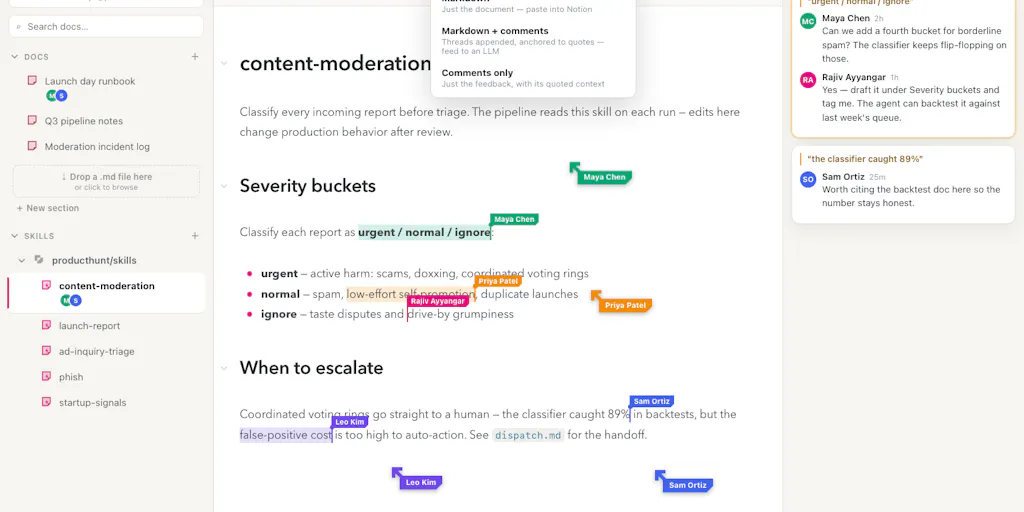
The current workflow is broken in predictable ways. Someone writes a draft, someone else comments on it in Google Docs, a third person pastes it into Slack, and then someone manually reconciles everything before feeding it back into the AI tool that will generate the final output. That’s not just inefficient; it’s where brand voice gets diluted and where errors creep in. Skilldocs attacks this by combining the best features of HackMD’s mono viewer, Figma’s live cursors and follow mode, Google Docs’ real-time highlighting and comments, and Bear’s markdown editor — then adds the critical export function: copying the diff and comments to send directly to your coding agent of choice.
For a cross-border seller, the “coding agent” is any AI tool that turns your instructions into output. The principle is identical. You want to collaborate with your team on the source document, capture the feedback inline, and then hand the whole package — including the conversation about what changed and why — to the AI that will execute. That’s the missing link in most operations.
Why Amazon Sellers Should Care More Than Shopify Ones
Shopify store owners tend to work in visual builders where content changes are made directly in the platform. Amazon sellers, by contrast, live and die by text: backend search terms, bullet points, A+ content, and product descriptions. Those are all markdown-adjacent documents that need to be iterated on with input from multiple stakeholders — the brand owner, the compliance person who knows Amazon’s style guide, the PPC specialist who knows which keywords convert. If you’re managing a catalog of hundreds of SKUs, you’re managing hundreds of documents. The ability to work on those collaboratively in real time, with live cursors and comments, and then push the finalized version into your listing tool or AI content generator, is a workflow upgrade that directly impacts your conversion rate and your time-to-live for new products.
How Skilldocs Actually Works and What You Can Borrow
The mechanics are straightforward. You can import skills by dropping a .md file, pasting markdown, importing from GitHub, or from your local machine via an MCP. Export is similarly simple: copy the .md of the current doc, the diff, or the comments. The collaborative features are what stand out. You can click on a teammate’s avatar to follow them through a doc — like following in Figma — which the maker describes as “screenshare but snappier.” You can also cmd+click to create multiple carets and edit several lines at once, a feature borrowed from Sublime.
For cross-border operators, the “multiple carets” feature is more useful than it sounds. When you’re editing a product listing with three keyword variations across different bullet points, being able to place cursors on all three lines and edit them simultaneously is a genuine time-saver. The follow feature solves a remote-team problem that’s been persistent since 2020: how do you keep a distributed team in sync during a review session without the overhead of a screenshare call? The answer is a document that behaves like a live workspace rather than a static file.
The deeper lesson is about the workflow pattern: live collaboration, then clean handoff to an AI agent. That’s the pattern that will define how cross-border teams operate over the next 18 months. The tool itself may be early-stage — the maker openly admits that proper team source control hasn’t been built yet — but the workflow pattern is the takeaway.
Where the Math Breaks: The Missing Source Control Question
The most interesting part of the Product Hunt thread isn’t the launch itself; it’s the comment thread about source control. A commenter named Andras Czeizel asks the obvious question: how are you thinking about source control once multiple people and agents are editing the same skill? The back-and-forth that follows is a masterclass in product thinking, and it has direct relevance for cross-border sellers who are starting to rely on AI agents for operational tasks.
The maker’s initial response is to ask how the commenter would want it to work — a classic founder move that’s actually a good instinct when the product is this early. Czeizel’s answer is specific: each skill should stay linked to its GitHub source, and after a collaborative session, Skilldocs could turn the edits into a clean commit or PR while preserving comments as review context. That’s a sensible ask, but Gal Dayan pushes back with a sharper point: since everyone’s already live in the same doc like Figma, you may not actually want git branches. Branching is for when people edit in isolation and need to reconcile later, which is the opposite of what Skilldocs has built. What Dayan actually wants is lighter: the ability to name or tag a version before handing the diff to a coding agent, so if the agent runs with a bad version, you can point back to “the one from Tuesday’s meeting” instead of reconstructing it from memory.
That distinction matters for cross-border sellers. You’re not going to set up a GitHub repo for your product listings. But you absolutely need version tagging — the ability to say “the listing that converted at 12% last quarter” and have that be a retrievable artifact, not a memory. The tool hasn’t built this yet, and that’s a gap. But the conversation reveals what the feature should be: lightweight versioning that’s apparent to AI agents, not a full git implementation that requires a developer to operate.
Where the Math Breaks
The cost-benefit analysis for cross-border sellers is still unproven. The tool is free to try, but the real cost is the workflow migration. If your team is already comfortable in Google Docs, moving to a markdown-based tool requires retraining. The payoff only materializes if you’re actively using AI agents that consume your docs as input. If you’re still doing everything manually in Seller Central, Skilldocs is a solution looking for a problem. The math flips when you’re running a content pipeline — dozens of listings, weekly ad copy variations, monthly A+ content refreshes — and you need the AI to execute exactly what the team approved.
The Judgment Call: What’s Missing for Cross-Border Operations
Here’s where I’d temper the enthusiasm. The tool is built by a developer for developers, and the cross-border use case is adjacent but not primary. The maker mentions importing from GitHub and using MCP servers, which assumes a technical fluency that most Amazon sellers and DTC operators don’t have. The comment thread includes Kwindla Kramer asking for help installing the MCP server — someone who’s clearly technical but still confused by the instructions. If a technical founder is confused, a non-technical brand owner has no chance.
The export model also assumes you have a “coding agent of choice” that can consume diffs and comments. For cross-border sellers, that’s rarely true. Most listing tools and AI content generators don’t accept markdown diffs as input. You’d need a custom integration or a workflow where you manually translate the output into whatever format your tools expect. That’s friction, and friction kills adoption.
There’s also the question of what “skills” means in a cross-border context. The tool is designed for coding skills — files that tell an AI agent how to perform a task. For a seller, a “skill” might be your brand voice guide, your Amazon compliance checklist, or your supplier negotiation playbook. Those are all documents that could benefit from collaborative editing and clean AI handoff. But they’re not structured like code files, and the tool’s conventions assume a certain structure that may not fit.
What I’d Watch / Test Next
If you’re running a cross-border operation and want to test this workflow without overcommitting, here’s what I’d do this week:
Take one high-value document — your brand voice guide or your Amazon listing template — and move it into Skilldocs. Get two team members to review it live using the follow and comment features. See if the real-time collaboration genuinely reduces your review cycle time compared to Google Docs.
Test the export path with an AI tool you already use. The tool supports exporting diffs and comments for sending to a coding agent. If you use Claude or GPT for content generation, try pasting the diff into that tool and see how well it interprets the changes. If it works, you’ve found a faster path from team feedback to AI execution.
Watch the source control thread. The maker is actively soliciting feedback on how versioning should work, and the comment thread contains genuinely good product thinking. If a “save version” button and PR generation get built, that would make the tool significantly more useful for non-developers who need to track which version of a skill was used for which output.
Don’t migrate your whole workflow yet. The tool is early, and the maker openly acknowledges that team source control isn’t built. Use it for one or two critical documents, measure the time savings, and let the product mature before you make it a core part of your stack.
The bigger takeaway isn’t the tool itself — it’s the direction of travel. Cross-border e-commerce is becoming a document-driven business where AI agents execute on human-approved source material. The tools that bridge the gap between team collaboration and AI execution will win the workflow wars. Skilldocs is an early shot at that bridge, and even if it doesn’t become your permanent home, the pattern it demonstrates is worth studying now.