Why a Browser Scratchpad Is Quietly Relevant to a Seven-Figure Amazon Operation
Let me start with something that sounds like a non-sequitur: the most expensive real estate in your e-commerce operation isn’t your Amazon PPC dashboard, your Shopify storefront, or your TikTok Shop analytics. It’s the moment between thinking and capturing. When you’re juggling supplier quotes from Alibaba, a new Helium 10 keyword export, a customer service email about a damaged shipment, and a Slack message from your VA about a listing violation — the tools that fail you aren’t the ones that do too little. They’re the ones that make you navigate to do something. You open Notion, you create a new page, you find the right database, you type — and by then, the thought is gone. That’s the friction tax. And it’s why a tiny browser extension called Tab Notes — a product with zero reviews, one maker, and a launch date of October 26th, 2022 — is more relevant to how you run your cross-border operation than most of the $100/month SaaS tools you’re already paying for. Not because it’s a platform, but because it solves a behavioral problem that every operator has: the capture moment. This essay isn’t a product review. It’s a meditation on what Tab Notes reveals about the way we work — and what you should steal from it, even if you never install it.
The Problem: Your Note-Taking Stack Is a Tax on Your Attention
Every cross-border seller I know has the same graveyard of abandoned note-taking apps. There was the Evernote phase in 2016. Then Notion became the team wiki — and promptly became a place where documents go to die. Then Google Keep for quick thoughts, which syncs to nothing useful. Then WhatsApp “Message Yourself” for voice memos that you never transcribe. The problem isn’t that these tools lack features. It’s that they demand a context switch — a decision about where something belongs before you’ve even decided what it is.
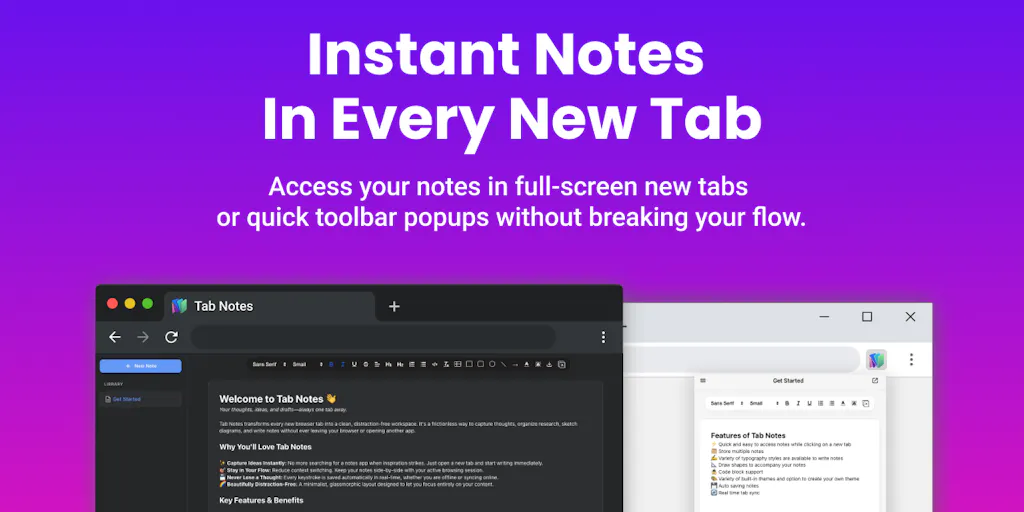
Tab Notes attacks this from a different angle. The maker, VINEETH TR, describes it as a “fast, local-first scratchpad right where I spend most of my working day — inside my browser tabs.” That’s not a feature list; that’s a philosophy. Instead of forcing you to go to your notes, the notes come to the place you already are. The new-tab page is the one piece of browser real estate you see dozens of times a day, and it’s almost always wasted on a search bar and a logo. Tab Notes takes over that page and turns it into a capture surface. You open a new tab, and there’s your scratchpad — not behind a login, not in a separate window, but right there.
For an operator managing three marketplaces, a supplier in Shenzhen, and a 3PL in California, this matters more than you’d think. The cost of a lost thought isn’t the thought itself — it’s the retrieval cost. You’ll spend 20 minutes later trying to remember which supplier quoted you $2.10/unit for the silicone mold, or which ad set had a 4.2x ROAS last Tuesday. The capture moment is cheap; the recall moment is expensive. Tab Notes is built to minimize the former so you never have to pay the latter.
Why the “Local-First” Pitch Matters More Than You Think
The privacy-first storage angle — using offline browser storage without logging in, or syncing to your personal Google Drive — isn’t just a privacy flex. For a cross-border operator, it’s a compliance feature. If you’re jotting down supplier payment terms, Amazon account health notes, or your cost breakdown for a new product, do you really want that living on a third-party server that could be subpoenaed, hacked, or — more likely — simply shut down when the startup runs out of runway? Local-first means your competitive intelligence stays yours. The Google Drive sync option is a nice middle ground: you get cross-device sync without building a dependency on a note-taking startup’s infrastructure. That’s a lesson every DTC operator should internalize: your tooling stack should have an exit strategy.
How It Differs From the Incumbents — and What You Should Steal
Let me compare Tab Notes to the tools you’re probably already using. Notion is a database, a wiki, a project manager, and a hundred other things. It’s powerful, but it’s heavy — and for a quick thought, it’s overkill. Evernote is a legacy product that’s been trying to be “AI-powered” for years, but its core capture flow is still clunky. Google Keep is fast, but it’s tied to the Google ecosystem and doesn’t do rich formatting well. Obsidian is beloved by power users, but it requires a local folder structure and a markdown workflow that most operators won’t bother to learn.
Tab Notes’ differentiator is the placement. It’s not a new app; it’s a new surface. The new-tab takeover is a bold move — it’s the browser equivalent of putting your scratchpad on your desk where you can’t miss it, rather than in a drawer across the room. The features — Markdown support, headings, lists, tables, and syntax-highlighted code blocks — are table stakes for any modern note app. The integrated canvas for drawing diagrams and flowcharts is a nice touch for visual thinkers, but it’s not the reason you’d install this.
What you should steal from Tab Notes, regardless of whether you install it, is the zero-friction capture philosophy. Here’s how to apply it to your operation today:
- Put your “running supplier notes” on your new-tab page. Not in a spreadsheet. Not in an email draft. Right where you’ll see them every time you open a browser.
- Use a tool that doesn’t require a login. If you have to authenticate, you’ve already lost the thought.
- Export everything to a portable format. Tab Notes offers .txt or .md export — meaning zero lock-in. Your notes should never be hostage to a platform’s fate.
Where the Math Breaks: The New-Tab Real Estate War
Here’s my honest judgment call, and it’s the same critique Gal Dayan raises in the comments: the new-tab page is contested territory. You probably already have a dashboard extension, a speed-dial start page, or a password manager that wants to own that space. The question is whether Tab Notes handles the conflict gracefully — or whether it’s “whichever extension loaded last wins,” forcing you to manually disable the other one. The maker hasn’t disclosed the answer, and that ambiguity is a real adoption barrier.
For a cross-border seller, this matters because your browser is already a mess. You’ve got the Amazon Seller Central tabs, the TikTok Shop analytics, the Alibaba chat windows, the freight forwarder’s tracking portal. The last thing you need is an extension that fights with your other tools for control. The concept is right, but the execution needs to be conflict-free. If Tab Notes can detect a new-tab conflict and warn you — rather than silently failing — that’s a different story. If it can’t, you’ll uninstall it within a week out of frustration.
Why Amazon Sellers Should Care More Than Shopify Ones
Here’s a subtle distinction. A Shopify DTC operator lives in a dashboard — they’re in Shopify admin, in Klaviyo, in their ad manager. The browser is a means to an end. But an Amazon FBA seller lives in tabs. You’re constantly switching between Seller Central, Helium 10, Jungle Scout, your repricing tool, and the Amazon forums. Your entire workflow is tab-based. That means the new-tab page is where you spend your cognitive time, not just your browser time. A scratchpad that lives there isn’t a convenience — it’s a workflow upgrade. For Amazon sellers, the capture moment is the difference between remembering a keyword idea for a listing and losing it to the void. Shopify operators can afford to be more deliberate; Amazon operators need speed.
What Cross-Border Sellers Can Borrow From Tab Notes (Even If You Never Install It)
The broader lesson here isn’t about browser extensions. It’s about tooling philosophy. Every SaaS product you pay for should be evaluated on the same criteria Tab Notes nails:
- Does it reduce friction at the point of action? If a tool makes you navigate to use it, it’s adding friction, not removing it. Your Klaviyo flows are great, but if you have to click through three menus to see a campaign’s performance, you’re paying for a tool that slows you down.
- Does it have an exit strategy? Tab Notes exports to .txt and .md. Does your Shopify store export your customer data cleanly? Does your Amazon Seller Central account let you download your historical PPC data without a third-party tool? If not, you’re locked in — and that’s a risk.
- Does it respect your privacy by default? Local-first storage isn’t just about security; it’s about control. When you’re running a cross-border operation, your margins, your suppliers, and your ad strategies are your competitive advantage. Why would you hand that data to a tool that could monetize it or lose it?
The popup and standalone modes are another idea worth stealing. The ability to pin a tool to your toolbar for quick access over any website — without taking over your new-tab page — is a modular approach to tooling. Instead of a monolithic dashboard, you get a lightweight utility that’s there when you need it and invisible when you don’t. That’s how your entire tooling stack should work: present but not intrusive, powerful but not demanding.
Where I’d Push Back: The Limits of a Scratchpad
Let me be clear about what Tab Notes is not. It’s not a project management tool. It’s not a database. It’s not a replacement for your SOPs or your team wiki. If you try to run your entire operation from a new-tab scratchpad, you’ll fail — you’ll outgrow it in a week. The tool is designed for capture, not organization. And that’s fine. The problem is that most operators confuse the two. They want a tool that does everything, so they end up with a tool that does nothing well.
The other limitation is the lack of collaboration. The maker hasn’t disclosed any team features — no shared notes, no real-time editing, no comment threads. For a solo operator, that’s fine. For a team of five managing different marketplaces, it’s a non-starter. You need a shared source of truth, not a personal scratchpad. So the practical takeaway is: use Tab Notes (or something like it) for your capture, and then move the important stuff into a proper system like Notion or Airtable. The scratchpad is the input; the system is the storage. Don’t confuse the two.
Where the Math Breaks: The Sync Question
The Google Drive sync option is a double-edged sword. On one hand, it gives you cross-device continuity without building your own backend. On the other, it means your notes are now sitting in a Google account — which, if you’re running a business, is probably tied to your personal email, your ad accounts, and your supplier communications. That’s a security consideration. If your Google account gets compromised, your notes — including potentially sensitive supplier pricing or ad strategy — are exposed. The local-first default is safer. But the sync feature is a convenience that most operators will want. The question is whether you trust the implementation. The maker hasn’t disclosed the encryption details, so I’d default to caution: use local-first for sensitive notes, and use the sync only for non-critical scratch.
What I’d Watch / Test Next
Here’s what I’d do this week, whether or not you install Tab Notes:
Audit your capture moments. For the next three days, every time you have a thought you need to remember — a supplier price, a listing idea, a customer complaint pattern — note where you actually wrote it down. If it was in an email to yourself, a WhatsApp chat, or a sticky note, you’re paying the friction tax. Find one tool that puts capture where you already are.
Install Tab Notes (or a clone) and test the new-tab takeover. See how it behaves with your existing extensions. If it conflicts with your dashboard, that’s a data point — not a dealbreaker. The question is whether the capture speed is worth the conflict. For me, it would be, but I’d also keep a fallback.
Set up a “capture → triage” workflow. Use the scratchpad for raw thoughts, and schedule a 15-minute block at the end of each day to move the important notes into your real system. The scratchpad is the net; the system is the boat. Don’t let the net hold everything.
Re-evaluate your entire tooling stack through the friction lens. For every tool you pay for, ask: “Does this make me faster at the moment of action, or does it make me navigate?” If it’s the latter, you’re paying to slow down. Cut it.
Tab Notes is a small product with a big idea: the best tool is the one you don’t have to think about using. That’s a lesson every cross-border operator should apply — not just to note-taking, but to every piece of software in your stack. The tools that win are the ones that disappear into your workflow. The tools that lose are the ones that demand your attention. Your margins depend on which ones you keep.


