The résumé builder nobody asked for — and why it’s quietly a template for how cross-border operators should think about their own tooling
Cross-border sellers spend their days inside tools that fight them: Seller Central dashboards that re-render mid-click, Shopify apps that bill monthly for a feature you use twice, AI copywriters that hallucinate product claims you then have to defend in a listing appeal. So when a six-year-old open-source project ships a major version built around a simple philosophy — you own the output, the AI is optional, and what you see is literally what you download — it’s worth ten minutes of an operator’s attention, even though the product itself has nothing to do with commerce. Reactive Resume v6 is a résumé builder. It is also a case study in the architecture choices that separate tools you rent from tools you own, and that distinction is about to matter a lot more to anyone running a DTC brand or an Amazon FBA account than most sellers realize.
What the product actually is, and what problem it solves
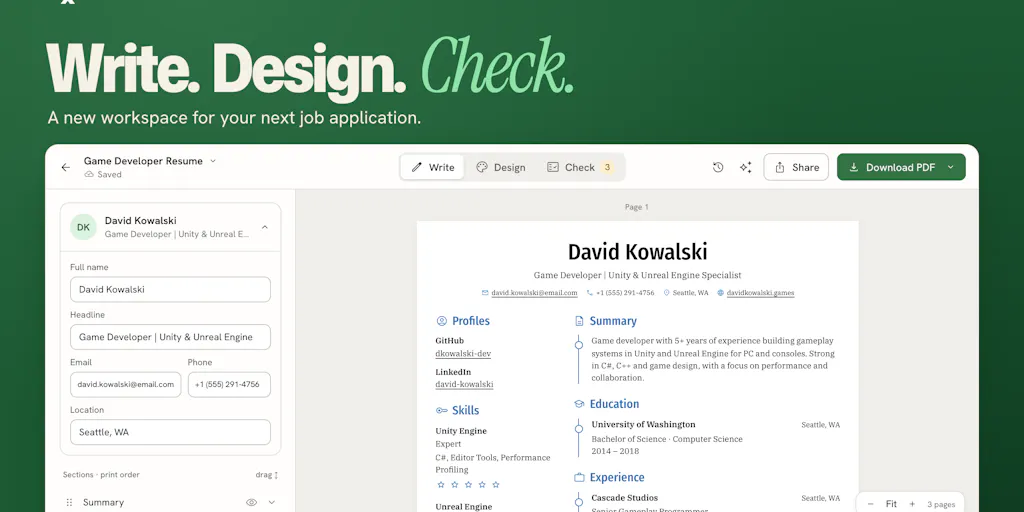
Reactive Resume is a free, open-source résumé builder made by Amruth Pillai, who has been shipping versions of it since 2020 — v1 launched March 26, 2020, v3 in March 2022, v4 in November 2023, v5 in January 2026, and now v6. That’s a six-year cadence, which in SaaS years is roughly a geological era. The v6 rebuild reorganizes the workspace around three phases of preparing an application: Write → Design → Check, keeping the résumé visible throughout. Review issues point to the specific lines they belong to. AI edits are shown side by side — original text, suggested replacement, explanation — with accept/reject per change. Résumés and cover letters now live together under Documents, LinkedIn data import works without AI, and there’s a redesigned application tracker.
The interesting engineering claim is this: the preview is the PDF. The editor renders an actual PDF via pdf.js in the browser, and the download uses the same engine, so what you see is what you send. Pillai confirmed this in the launch thread, telling a commenter that “the resume you’re looking at in the editor is actually a PDF… so when you click download WYSIWYG.” Self-hosting, meanwhile, is described as a single image — deployable on a Raspberry Pi, with self-hosting docs that Pillai suggests you can hand to an agent to configure for you.
Why this matters more to an Amazon seller than to a Shopify one
Here’s the operator’s angle. A Shopify DTC brand owner can swap storefront tools almost frictionlessly — rip out an app, install a competitor, migrate a theme. An Amazon FBA seller cannot. Your listing copy, A+ content, brand story, and support macros live inside systems you don’t control, and every AI feature bolted onto those systems is a compliance surface. Amazon’s own Seller Central has been layering generative AI into listing creation for a while, and the failure mode is always the same: plausible-sounding claims that violate category rules or, worse, trigger a suppression. A tool that shows you the diff before it commits — original text, proposed text, rationale, accept or reject — is the correct interaction model for anyone whose copy is subject to marketplace review. That’s the pattern worth stealing, not the résumé templates.
How it differs from the incumbents
The comparison set Pillai’s own reviewers reached for is telling. One reviewer on the launch page benchmarked it directly against Zety, citing “open source and advanced customizable features like adjusting line height, line spacing, fonts, and so much more.” That’s the classic open-source wedge: the paid incumbent gives you a polished default and gates the fine-grained controls; the open-source alternative gives you the controls and lets you decide whether the default is good enough.
The more instructive contrast is architectural. Zety is a subscription web app — your document lives on their servers, in their format, behind their paywall at export time. Reactive Resume is self-hostable, free, and exports through a browser-side PDF engine. If you want the résumé in your own infrastructure, you run one container and you’re done. That’s the same fork in the road cross-border operators face constantly: Klaviyo versus a self-hosted ESP, Helium 10 versus a homegrown keyword pipeline, a paid Shopify app versus a private app you maintain yourself. The trade is always the same — you swap a monthly invoice for maintenance burden, and the question is whether your team can carry that burden.
Where Reactive Resume genuinely differentiates is the AI posture. Most 2026 SaaS ships AI as the default path and the manual path as the fallback. Here it’s inverted: AI is optional, you connect your own provider, and that provider bills you directly. Pillai is explicit that “AI is optional and uses a provider you connect yourself; that provider may charge for usage.” For an operator burned by per-seat AI add-ons that quietly became mandatory, bring-your-own-key is a meaningful line item.
Where the math breaks
Free and open source isn’t free. Self-hosting means someone owns uptime, backups, and upgrades. For a solo seller, that’s an evening a quarter. For a ten-person brand with an ops lead who already maintains a Shopify private app and a returns portal, it’s marginal. For a team with no technical owner, “point an agent at the docs” is a cute line that will eventually produce a broken deployment nobody can debug. The honest framing: this tool’s cost advantage evaporates the moment you don’t have a person who enjoys this stuff.
What cross-border sellers should actually borrow from it
Three patterns, in descending order of how fast you can apply them.
First, the reviewable AI diff. Whatever AI writing tool you’re using for listings, ads, or support macros, insist on a side-by-side view with per-suggestion accept/reject. If your current tool overwrites in place, you are one hallucination away from a listing suppression you’ll spend a week appealing. This is the single most transferable idea on the page.
Second, WYSIWYG as a contract. The claim that preview and export share one engine is a product promise most tools quietly break. Think about how often you’ve exported a CSV from a reporting tool and found the columns don’t match the dashboard, or pulled a shipping label whose formatting differs from the on-screen proof. When you evaluate your next tool — a TikTok Shop analytics add-on, a Temu order manager — ask the vendor directly: does the export use the same rendering path as the preview? If the answer is vague, that’s your answer.
Third, bring-your-own-provider for AI. Connecting your own model provider means the vendor can’t silently raise your AI costs, can’t train on your data by default, and can’t hold your workflow hostage when they pivot. For sellers moving real margin through SHEIN, Etsy, or eBay, the data-governance angle alone justifies the extra setup friction.
A sidebar on the application tracker
The redesigned tracker — interviews, next steps, follow-ups — is a small feature with an outsized lesson for anyone managing supplier relationships or marketplace account health. One commenter asked whether it could send reminders before interviews or follow-ups, noting “I forget to follow up all the time.” Pillai didn’t answer that in the thread. But the underlying need is identical to what an FBA seller faces with supplier lead times, IP complaint deadlines, and reimbursement claim windows: a tracker that surfaces the next action is worth more than a dashboard that shows you history. If you’re still running supplier follow-ups out of a spreadsheet with no reminder layer, that’s a this-week fix, and you don’t need a new tool to do it.
Where my judgment says it falls short
The launch thread surfaced two real problems. One reviewer reported that “the web app sometimes fails to generate a PDF,” attributing it to launch-day traffic, and noted that cloning the repo and exporting locally “worked flawlessly.” That’s a self-hosting plug disguised as a bug report, but it’s also a genuine reliability caveat: browser-side PDF generation at scale is not a solved problem, and if you’re depending on it for time-sensitive output, you want the local fallback tested before you need it.
A second reviewer, from an earlier version, flagged that “PDF exports are long joined pages (should be separate page)” and asked for more templates. Pillai responded that this was fixed — you can now export as multiple A4/Letter pages or a single page — and that more templates have been added. Fair enough, but the pattern is worth noting: open-source projects accumulate feature requests faster than they accumulate design polish, and the template library is where that shows up first.
My own skepticism is about the AI provider model. Bring-your-own-key is principled, but it pushes configuration burden onto the user, and for a résumé builder — a tool people touch twice a decade — that’s a lot of setup for a task you don’t do often. The same critique applies to the self-hosting pitch. The people who benefit most from owning their data are often the least equipped to run the infrastructure. That’s not a flaw unique to this project; it’s the permanent tension in open-source tooling, and it’s why the hosted version still exists.
What I’d watch / test next
If you run a cross-border operation, here’s your week. One: audit your current AI writing stack for overwrite-in-place behavior. If any tool edits your listing or ad copy without showing a diff, replace it or wrap it — that’s a compliance risk, not a convenience feature. Two: pick one vendor you pay monthly for and ask whether self-hosting or bring-your-own-key is on their roadmap. The answer tells you how much leverage you’ll have at renewal. Three: stand up a single self-hosted tool — this one, or anything else you’ve been meaning to try — on a spare VPS or a Raspberry Pi, and time how long it takes from zero to working. That number is your real cost of ownership, and it’s the number that should drive every build-versus-buy call you make this quarter. Watch whether the PDF reliability complaints get resolved in the next release; if they do, the WYSIWYG promise holds and the pattern is worth copying. If they don’t, the lesson is narrower: good architecture, unfinished execution.