Why Video Infrastructure Is Suddenly a Cross-Border Seller Problem
Let me start with a confession: for most of my career covering e-commerce tooling, I’ve treated video encoding as a boring utility — the plumbing behind the product demos, the UGC compilations, and the TikTok ads that actually move units. You don’t think about the codec until a 4K lifestyle clip takes 40 seconds to load on a customer’s mid-range Android in Jakarta, and then it’s all you can think about. Cross-border sellers have a unique pain that domestic brands rarely feel: we’re shipping the same creative assets across continents, through variable bandwidth, onto devices ranging from $99 burner phones to the latest iPhone Pro. The video that looks buttery on a New York fiber connection turns into a stuttering slideshow in São Paulo. So when I saw Qencode launch an MCP server that lets an AI agent like Claude transcode, upscale, or repackage video just by asking in natural language, I didn’t see a developer toy. I saw a potential answer to the most under-discussed operational bottleneck in global DTC: the gap between the creative you make and the video experience your customer actually gets. This essay isn’t a review of a cool API. It’s a field manual for how a cross-border operator should think about video infrastructure, what this MCP approach gets right, and where I’d pump the brakes before you let Claude anywhere near your master product files.
The Real Problem: Your Creative Team and Your Delivery Network Speak Different Languages
Here’s the scenario every Amazon FBA seller with a video ad budget knows intimately. Your media buyer in Austin approves a 30-second spot. Your post-production house in Manila exports a masterpiece in ProRes 422. You upload it to Amazon Seller Central, and the platform’s transcoder churns out a version that looks like it was compressed through a straw. Meanwhile, your Shopify store on a custom theme uses a video background that loads above the fold — and on mobile data in the Philippines, it’s a 15-second blank space before the hero shot appears. You’ve paid for a $5,000 creative asset and then served it in a format that actively hurts conversion.
The problem isn’t creativity. It’s the last mile of video logistics. Every marketplace and every storefront has its own spec sheet: Amazon wants H.264 in MP4 with specific bitrates, TikTok Shop prefers vertical MP4s under a certain size, Etsy listings choke on files over a certain resolution, and your email marketing platform (yes, Klaviyo is the canonical one) will strip out or mangle video embeds if the file isn’t optimized for inline playback. The result is that a brand with a single great asset often has to manually re-encode it six different ways, and then re-do it again when the asset gets a minor tweak. It’s manual, it’s error-prone, and it burns hours that should go into scaling winning ads.
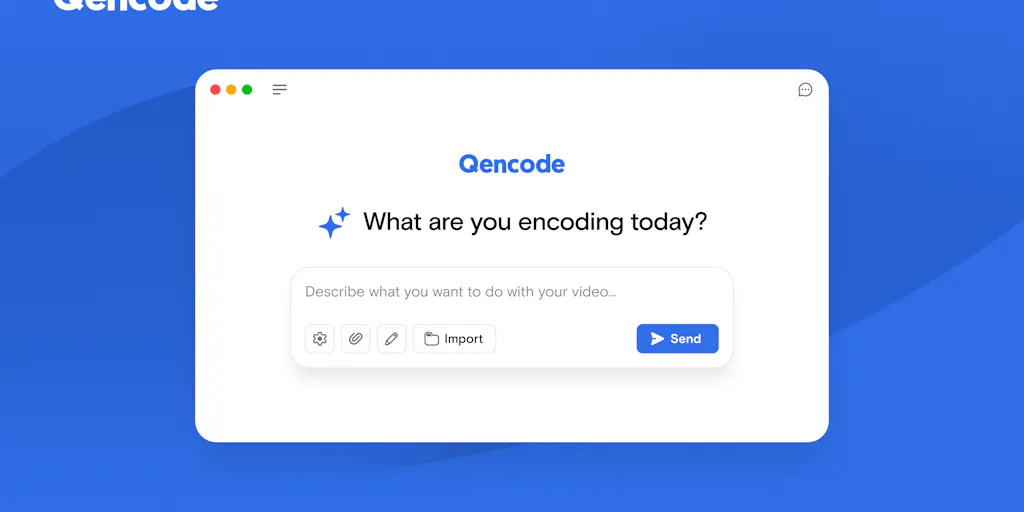
What Qencode is proposing with its MCP server is a way to turn that manual chore into a conversational command. The launch post frames it simply: you can ask an AI agent like Claude to “upscale this video to 4K” or “convert this video to HLS,” and the agent handles the workflow through Qencode’s API. For a solo operator or a lean team, that’s the difference between opening a terminal, reading a docs page, and debugging a failed job versus typing a sentence into a chat window. The Product Hunt comments even show the founder, Karina Avendaño, highlighting that you can chain changes together as the workflow evolves — not just a one-shot conversion but an iterative dialogue with your video pipeline.
That’s the thesis that matters for us. Cross-border e-commerce isn’t just about selling across borders; it’s about managing assets across a fragmented ecosystem of platforms, each with its own video religion. If Qencode MCP can collapse the time between “I need a vertical version for TikTok Shop” and “here is the file, uploaded and ready,” it stops being a developer convenience and becomes a competitive edge for anyone running ads at scale.
How Qencode MCP Differs From the Incumbent Chaos
To understand why this matters, you have to look at the current tooling landscape. The default for most sellers is a patchwork: you use Adobe Media Encoder on a local machine for the heavy lifting, or you rely on the built-in transcoders inside your platform — Amazon Seller Central has one, Shopify compresses your uploaded videos automatically, and YouTube has its own pipeline. The problem is that these are batch-oriented, not workflow-oriented. You upload a file, the platform does its thing, and you hope the output matches the quality you intended. There’s no conversational layer, no ability to say “actually, give me a lower bitrate version for the carousel ad and a 4K version for the product page” in the same session.
The other incumbent category is the dedicated encoding API — think Mux or Cloudflare Stream. These are excellent products with robust APIs, and honestly, they’re what I’d recommend if you have a full-time engineer. But they require you to think in terms of API calls, webhooks, and playback IDs. They don’t understand “I need this for Instagram Reels” unless you’ve written a script to translate that intent into the right parameters. Qencode’s bet is that the AI agent becomes that translation layer. Instead of you learning the API schema, the agent learns it for you. It’s the difference between driving a manual transmission and having a chauffeur who knows the route.
The launch page also references Qencode’s previous launches — VR Mode for turning VR video into shareable standard video, AI Upscaling for bringing legacy video into the 4K era, and Video Intelligence for AI-powered analysis. That trajectory tells me they’re not just a dumb pipe. They’re building a suite of AI-adjacent video tools, and the MCP server is the connective tissue. For a cross-border seller, the AI upscaling feature is particularly interesting — it means you can take a grainy, phone-shot UGC video from a customer in Germany, upscale it to 4K, and repurpose it as a polished testimonial for your US storefront without re-shooting anything.
Why Amazon Sellers Should Care More Than Shopify Ones
Let me be specific about where this matters most. Shopify merchants have a relatively forgiving video environment — the platform’s CDN handles most formats, and you can usually get away with uploading a single high-quality MP4. Amazon is a different beast. Seller Central has strict video requirements for product listings, and the platform’s transcoding can be opaque. You’ll often hear sellers complain that their video looks fine in preview but grainy on mobile. The MCP approach lets you preemptively encode for Amazon’s specs — and, more importantly, lets you iterate quickly. If you’re A/B testing a video thumbnail or a different opening shot, you don’t want to wait for a human to re-encode. You want to tell Claude to “make a version under 50MB with the first 3 seconds as a hook,” and have it done before your coffee cools. That speed-to-variant is a real advantage in the Amazon ad auction, where creative fatigue sets in fast.
Where the Math Breaks: The Cost of Conversational Convenience
Now let me be the skeptic in the room. The “just ask Claude” paradigm is seductive, but it hides a cost structure that operators need to understand. Every time you ask the AI agent to transcode a video, you’re paying for the compute — both the LLM inference and the actual encoding job on Qencode’s side. The Product Hunt page doesn’t disclose pricing, so I’ll assume it’s usage-based like most API services. For a small seller running a handful of videos a month, this is negligible. But if you’re a DTC brand with a catalog of 500 SKUs, each needing video variants for Amazon, TikTok Shop, and your own site, the costs compound. You’re also adding a layer of abstraction that can fail. What happens when Claude misinterprets “make it pop” as “increase saturation to 200%”? The AI agent is only as good as the prompt, and video is a medium where ambiguity is the default. A human encoder knows that “make it pop” means “boost contrast slightly and add a vignette.” An AI agent might take it literally and ruin your brand’s visual identity.
The other gap is quality control. Video encoding isn’t just about file size — it’s about perceptual quality, especially when you’re upscaling. Qencode’s AI upscaling is impressive on paper, but I’d want to see side-by-side comparisons with the original on a high-res monitor before I trust it with my hero product shots. The AI Upscaling launch page is light on technical details, which makes me cautious. For cross-border sellers, the risk isn’t just a bad-looking video — it’s a bad-looking video that gets served to thousands of customers and damages the perceived quality of your brand. You can’t A/B test your way out of a first impression that’s soft and mushy.
What Cross-Border Sellers Can Borrow From This (Even If You Never Touch the API)
Here’s the part I want you to take with you, regardless of whether you ever sign up for Qencode. The MCP server is a signal about how all e-commerce operations are going to evolve over the next 18 months. The pattern — natural language command, AI agent interprets, API executes, result returns — is coming for every repetitive task in your business. If you’re a seller who’s still manually resizing images in Photoshop or manually formatting CSV files for Temu and SHEIN uploads, you’re already behind. The Qencode MCP is a specific example of a general trend: the operator’s job is shifting from “doing the task” to “specifying the outcome and reviewing the result.”
For video specifically, here’s what I’d test this week. First, take your best-performing ad creative — the one that’s driving ROAS on Meta or TikTok — and run it through a test with Qencode MCP. Ask it to produce three variants: a vertical 9:16 version for TikTok Shop, a square 1:1 version for Amazon’s main image video slot, and a low-bitrate version for email marketing. Then measure the load times and visual quality on a real device, not just your desktop. Second, if you have legacy video content — old product demos, trade show footage, customer testimonials from two years ago — run a small batch through the AI Upscaling feature and see if any of it becomes usable for current campaigns. You might be sitting on a goldmine of content you thought was too low-res to deploy.
The third and most important takeaway is workflow design. Don’t wait for Qencode to be perfect. Start mapping out which of your video tasks are repetitive and rule-based. Those are the ones you should automate first. The MCP approach works best when the task is well-defined — “convert this to HLS” is a clear instruction. “Make it go viral” is not. So build your own internal playbook of video commands that you’d trust an AI agent to execute. If you can write down the specification, you can automate it.
The Integration Play: Where Qencode Fits in Your Stack
Let me sketch a practical integration for a mid-sized DTC operation. You’re running Shopify as your storefront, Amazon Seller Central as your marketplace, and TikTok Shop as your discovery channel. Your creative team produces master files in a shared Dropbox or Google Drive folder. In a Qencode MCP world, you’d have a Slack bot or a scheduled job that watches that folder, and every time a new master file drops, it automatically generates the platform-specific variants and uploads them to the right places. You review the outputs in a dashboard, approve, and move on. That’s the promise. It’s not science fiction — the pieces exist, and Qencode is assembling them.
But here’s my honest judgment: the MCP server is a developer-facing feature, and most cross-border sellers aren’t developers. The real value will come when this gets wrapped into a no-code tool — something like Zapier or Make — where a non-technical brand manager can set up the workflow with a visual editor. Until then, the sellers who benefit most are the ones who have a part-time developer or a technical co-founder who can wire this up in an afternoon. If you’re a solo operator, this is a tool to watch, not a tool to adopt today.
Where I’d Push Back: The Blind Spots Qencode Isn’t Addressing
Let me be direct about the gaps. First, the Product Hunt page is thin on specifics about error handling. What happens when a transcode job fails? Does the AI agent retry automatically, or does it just report an error and leave you hanging? In a cross-border context, where you might be working across time zones and your video editor is asleep, a failed job can stall an entire campaign launch. I’d want to see a robust retry mechanism and clear error messages before I rely on this for time-sensitive work.
Second, there’s the question of content moderation and brand safety. If you’re using AI to analyze and process video, you need to trust that the system won’t accidentally alter a frame in a way that violates a platform’s policy — for example, Amazon’s rules against medical claims or TikTok’s restrictions on certain content. An AI agent that’s focused on encoding might not have the contextual awareness to flag that a video makes a claim that could get your listing suspended. That’s still a human job.
Third, and this is the big one for cross-border sellers: regional compliance. Video encoding has a data residency dimension. If you’re serving customers in the EU, your video files may need to be processed and stored within EU boundaries to comply with GDPR. Qencode’s infrastructure — which I assume is US-centric based on the company’s profile — may not offer the regional endpoints you need. For sellers in regulated categories like health or finance, this could be a dealbreaker. It’s not a reason to avoid the tool, but it’s a reason to ask hard questions before you commit.
What I’d Watch / Test Next
Here’s my actionable shortlist for the next seven days. First, sign up for Qencode and run a single, low-stakes test: take a 30-second product demo you already have, and use the MCP to generate a 4K version and an HLS stream. Compare the output quality to your original. This costs you an hour and gives you a concrete feel for the tool’s strengths and weaknesses. Second, audit your current video workflow and count how many hours you spend on format conversion and re-encoding each month. If it’s more than two hours, it’s worth automating. Third, talk to your developer or agency about whether they can build a simple integration — even a proof of concept — that connects your asset folder to Qencode’s API. You don’t need a full rollout; you need to see if the conversational layer actually saves time in practice. Fourth, keep an eye on Qencode’s Video Intelligence feature, because that’s the one that could genuinely disrupt how you do creative testing — imagine an AI that watches your ad and tells you which frames are driving attention. That’s the future, and Qencode is positioning itself to be the infrastructure behind it.
Finally, don’t get seduced by the novelty. The tool is a means to an end — faster, better video across every marketplace you sell on. The end goal is still the same as it’s always been: get the right product in front of the right customer with creative that doesn’t get in the way. If Qencode MCP helps you do that with less friction, use it. If it adds complexity without adding speed, drop it. The best operators are the ones who treat every new tool as a hypothesis to test, not a solution to worship. Video is the most persuasive medium in e-commerce, and the sellers who master its logistics will win the next decade. Qencode is betting on that, and I think it’s a bet worth watching.