The Agentic Back Office Is Coming for Your Margins — Whether You’re Ready or Not
Every cross-border seller I know is running the same playbook: hire more virtual assistants, pile on more SaaS subscriptions, and pray that the person handling Amazon Seller Central refunds doesn’t accidentally delete the wrong listing. We’ve built operations that depend on human judgment at the worst possible moments — during a Q4 rush, during a Chinese New Year factory shutdown, during a 2 a.m. inventory sync failure. The promise of AI agents has always been that they’d take over these tedious, high-stakes workflows. But the reality has been messier: agents that can’t access the tools they need, or worse, agents with too much access, burning through credentials and making irreversible changes. That’s why the launch of Plow Latch caught my attention. It’s not another chatbot wrapper or a flashy content generator. It’s a permission layer for AI agents — a way to let Claude or Codex drive your browser and CLI on a Mac while an adversarial LLM gatekeeps sensitive data. For anyone running a lean e-commerce operation across multiple marketplaces, this isn’t a novelty. It’s a preview of how your back office will run in eighteen months. And the implications for how you handle credentials, vendor portals, and marketplace accounts are more urgent than you think.
The Problem: Agents Are Either Useless or Dangerous
Let me paint the picture that every operator in this industry recognizes. You’ve got an AI assistant that can draft listing copy, analyze ad spend, or summarize competitor reviews. But the moment you ask it to actually do something — adjust a bid in Seller Central, file a claim, update inventory levels — it hits a wall. The agent can’t access the tools. It doesn’t have the browser session. It can’t authenticate. So you’re back to copy-pasting data between windows, which defeats the entire purpose of automation.
The alternative is worse. You give the agent full access to your Mac, your browser, your saved passwords. And then you hold your breath every time it clicks. One wrong move — a misclicked “delete listing” button, a misfiled trademark claim, a payment confirmation sent to the wrong vendor — and you’re not just losing time. You’re losing money, possibly a lot of it. This is the core dilemma that Plow Latch addresses head-on. The product, built by Plow, sits between your AI agent and your actual machine. It lets the agent drive a browser and CLI on your Mac, but it controls what the agent can see and touch. Credentials stay locked in a vault. The agent can use an account for approved tasks, but it can’t extract the password. And an adversarial LLM monitors the agent’s actions, flagging anything that looks like it’s going off-script.
This is the missing piece that most e-commerce operators haven’t even articulated yet. We’ve been so focused on making agents smarter that we forgot to make them safer. And in a world where your entire business runs on a handful of marketplace credentials, safety isn’t optional. It’s the difference between automation that scales your operations and automation that destroys them.
Why Amazon sellers should care more than Shopify ones
If you’re a Shopify seller, your risk profile is different. Your store is your own. You control the platform, the plugins, the access levels. A rogue agent might mess up a discount code or delete a theme, but the blast radius is contained. Amazon sellers live in a different universe. Your Seller Central account is a lifeline. One policy violation, one misconfigured listing, one accidental price change that triggers a buy box suppression — and you’re fighting for weeks to recover. The stakes are existential.
That’s why Latch’s credential vault matters more for Amazon operators. When you’re juggling multiple accounts — maybe one for your US store, one for EU, one for a brand that’s been suspended and reinstated twice — the last thing you need is an AI agent that has blanket access to all of them. The ability to scope an agent’s access to specific tasks, specific time windows, specific accounts, is not a luxury. It’s a risk management feature. And the fact that Latch can run 100% locally means your data — including your Seller Central credentials — never leaves your machine.
How Latch Works: A Permission Layer, Not a Replacement
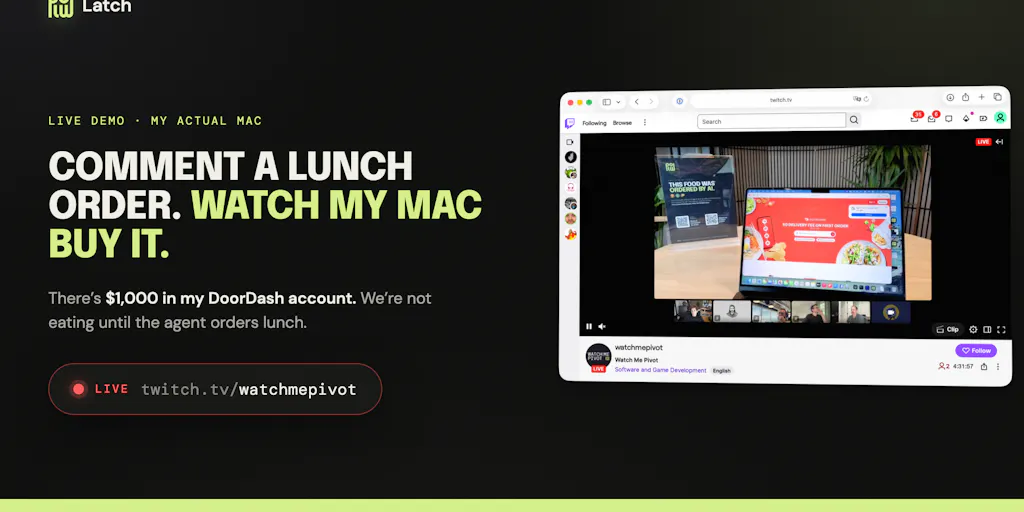
The Product Hunt launch was a spectacle, and I mean that in the best way. The founder, Sam Odio, literally opened up his Mac to the internet. Anyone who commented could ask the agent to do something — order food, organize a calendar, pay a bill — and watch it happen live on Twitch. The comments section is a goldmine of real-world testing. People asked for Chipotle bowls, customized salads, and even tried to extract the DoorDash password. The agent handled all of it, and crucially, it refused the password request. “Nice try — but the password stays locked in the vault, even from me.”
That’s the demo that matters. It’s easy to show an agent ordering food. It’s much harder to show an agent resisting a prompt injection attack from a human who’s actively trying to get it to reveal credentials. And that’s exactly what Latch is designed to do. The adversarial LLM gatekeeper sits between the agent and your data. It evaluates each action the agent wants to take — deleting a file, confirming a payment, accessing a credential — and decides whether that action is within the scope of what was approved. It’s not a static rule set. It’s an LLM that understands context, which means it can catch edge cases that a simple allowlist would miss.
The product works with the AI you already use — Claude.ai and Codex are explicitly mentioned — which is a smart positioning move. It’s not trying to be another agent. It’s trying to be the safety rail under whatever agent you’re already running. For cross-border sellers, this is a meaningful distinction. You don’t need to rip out your existing AI tooling stack. You need to make it safer and more useful.
Where the math breaks
Let me be honest about the limitations. Latch currently requires macOS. There’s no phone support yet, which the makers acknowledged in the comments. For a cross-border operator who lives on a Windows machine or manages everything from an Android phone, that’s a dealbreaker today. The team says they’re focused on Mac first, and I get the reasoning — it’s a much simpler sandboxing environment. But the reality is that most e-commerce back offices are mixed-OS environments. You’ve got a Windows machine for Seller Central, a Mac for design work, and a Chromebook for travel. Until Latch spans all of those, it’s a tool for a specific segment of your team, not the whole operation.
There’s also the question of cost. The Product Hunt page doesn’t disclose pricing, which is fine for a launch, but it means we don’t know whether this is a $10/month tool or a $100/month tool. For a solo seller with thin margins, that’s a meaningful variable. And the delivery fees in the demo — a $10.61 coffee that ended up costing $28.14 after fees — are a reminder that agents can execute tasks, but they can’t optimize for cost unless you explicitly tell them to. That’s a workflow design issue, not a tool issue, but it’s worth keeping in mind.
What Cross-Border Sellers Can Steal From This Right Now
Even if you’re not ready to hand your Mac over to an AI agent, Latch’s architecture offers a blueprint for how you should be thinking about AI tooling in your operation. The first lesson is credential isolation. Stop giving any tool — AI or human — blanket access to your marketplace accounts. If you’re using a virtual assistant to manage your Seller Central account, they should have a sub-account with limited permissions, not your main login. If you’re using an AI tool to draft listings, it should not have access to your payment methods. This is basic hygiene, and Latch’s vault model is a reminder that it’s non-negotiable.
The second lesson is the adversarial gatekeeper concept. When you’re evaluating AI tools for your business, don’t just ask what they can do. Ask what they refuse to do. A tool that can access your data but has no guardrails is a liability. Look for tools that have explicit safety layers, whether that’s a human review step, a sandboxed environment, or an AI monitor that flags anomalous actions. The cost of a security breach in cross-border e-commerce isn’t just the immediate loss. It’s the account suspension, the reputational damage, the weeks of back-and-forth with marketplace support.
The third lesson is about local data processing. Latch can run 100% locally, which means your data stays on your machine. For operators dealing with sensitive supplier contracts, unreleased product designs, or proprietary pricing strategies, this is a huge advantage. Cloud-based tools are convenient, but they’re also a target. If you’re handling data that you wouldn’t want on a public server, look for tools that offer a local mode. It’s a feature that’s worth paying for.
Where My Judgment Says It Falls Short
I want to be clear: I think Latch is a genuinely interesting product with a real use case. But it’s not a silver bullet for e-commerce operations, and I’d caution against treating it as one. The first issue is scope. Latch is designed for personal Macs, not for server fleets or shared workstations. If you’re running a team of five VAs across three time zones, each with their own machine and their own set of credentials, Latch doesn’t solve that problem. It solves the problem of a single operator who wants to delegate their own machine to an AI agent. That’s a much narrower use case than the “agentic back office” narrative suggests.
The second issue is the trust model. Latch’s adversarial LLM is a clever idea, but it’s still an LLM. It can be tricked, it can be confused, and it can make mistakes. The demo showed it handling obvious social engineering attempts — the password request was a nice touch — but real-world attacks are more subtle. An attacker might not ask for the password directly. They might ask for a “screenshot of the account settings page” or a “CSV export of recent transactions,” which would effectively leak the same information. The gatekeeper is only as good as its training data and its ability to recognize malicious intent in context. That’s a high bar, and I’d want to see more adversarial testing before I trust it with my supplier payment credentials.
The third issue is integration depth. Latch works with Claude and Codex, which are great for general-purpose tasks. But e-commerce operators use specialized tools — Helium 10 for keyword research, Klaviyo for email marketing, Jungle Scout for product research. These tools have their own authentication flows, their own APIs, their own quirks. Latch’s browser-driving approach can technically handle any web-based tool, but it’s not optimized for any of them. That means you’ll spend time configuring workflows, teaching the agent how to navigate each portal, and debugging when the agent gets confused. That’s a time investment that might not pay off for a small operation.
The “cool demo” trap
There’s a risk that Latch becomes a victim of its own success. The live demo was brilliant marketing — watching an agent order food in real-time is genuinely impressive. But it also sets an expectation that agents are ready to handle real-world complexity. They’re not. The demo worked because the tasks were simple: order a specific item from a specific restaurant, schedule a delivery, confirm a total. Real e-commerce operations involve multi-step workflows with conditional logic, exception handling, and human judgment. An agent that can order a Chipotle bowl is not an agent that can reconcile your monthly Amazon settlement report or negotiate a freight rate with a Chinese logistics provider.
This isn’t a knock on Latch specifically. It’s a reality check on the entire agentic AI category. The demos are always impressive. The production deployments are always harder. If you’re a cross-border seller, don’t let the demo fool you into thinking you can fire your VA and let Claude run your business. You can’t. What you can do is start experimenting with agents for narrow, well-defined tasks, and use tools like Latch to make those experiments safe. That’s a sensible first step, not a full transformation.
What I’d Watch / Test Next
If you’re intrigued by the agentic back office but not ready to go all-in, here’s what I’d do this week:
First, audit your credential exposure. Make a list of every marketplace account, payment processor, and logistics portal you use. Note which ones are shared across your team, which ones have admin-level access, and which ones are protected by two-factor authentication. If you find any account that’s being used by multiple people with the same login, fix that immediately. Set up sub-accounts, enforce MFA, and rotate passwords. This is the foundation that any agentic tool will build on.
Second, pick one narrow workflow to test with an agent. Don’t try to automate your entire back office. Choose something simple and repeatable — like generating a daily sales report from your Shopify admin and emailing it to your team. Use a tool like Claude or Codex, and if you’re on a Mac, give Latch a try. The download link is live, and there’s a video walkthrough that shows how to hook up an existing agent. The goal isn’t to replace your VA. It’s to learn how agents think, where they fail, and what guardrails you need.
Third, watch the Twitch stream for a few hours. It’s not just entertainment. It’s a real-time window into how an agent handles unexpected requests, how the gatekeeper responds to edge cases, and what happens when things go wrong. You’ll learn more from watching that stream than from reading a hundred blog posts about agentic AI.
Finally, set a budget and a timeline. Agentic AI is going to be a part of e-commerce operations within the next two years. The question is whether you’ll be an early adopter who’s learned the ropes or a late follower who’s scrambling to catch up. You don’t need to make a huge investment today. But you should be experimenting, learning, and building the muscle memory. The operators who do that will have a significant advantage when the tools mature — and they will mature. The only question is whether you’ll be ready.