Why a Motion-Design Tool Matters More Than Another SaaS Dashboard
Every cross-border seller I know has the same bottleneck hiding in plain sight: not the product, not the ad creative, not even the logistics — it’s the explainer video. You need a 60-second video for a TikTok Shop listing, a different cut for an Amazon A+ page, another aspect ratio for a Shopify product page, and yet another for a Facebook retargeting campaign. The agencies quote you $2,000–$5,000 per video and a two-week turnaround, which is useless when you’re launching a product next Tuesday. The DIY tools churn out generic templates that look like every other dropshipping ad from 2019. So when I see a tool pitched as “motion design for product teams,” my ears perk up — not because I care about animation aesthetics, but because the gap between product ready and video ready is where most cross-border launches quietly die. If OpenMotion can compress that gap, it’s not a nice-to-have; it’s a unit economics play.
The Actual Problem: Video Production Is a Supply-Chain Problem
Let’s reframe what OpenMotion is actually solving. The maker, Usman Farooq, frames it as making “professional motion design more accessible to product teams.” That’s the polite way to say it. The impolite way — the way that matters to you as an operator — is that video production is a broken supply chain with a 10-day lead time and no visibility into the pipeline.
When you’re selling on Amazon, your listing video is a ranked conversion factor. When you’re selling on TikTok Shop, your first three seconds determine whether the algorithm pushes your product to 10,000 people or 100. When you’re running Meta ads, your creative fatigue curve means you need fresh video variants every 7–14 days. The traditional agency model — brief, call, storyboard, revisions, export, reformat — cannot keep up with that cadence. It’s not a talent problem; it’s a throughput problem.
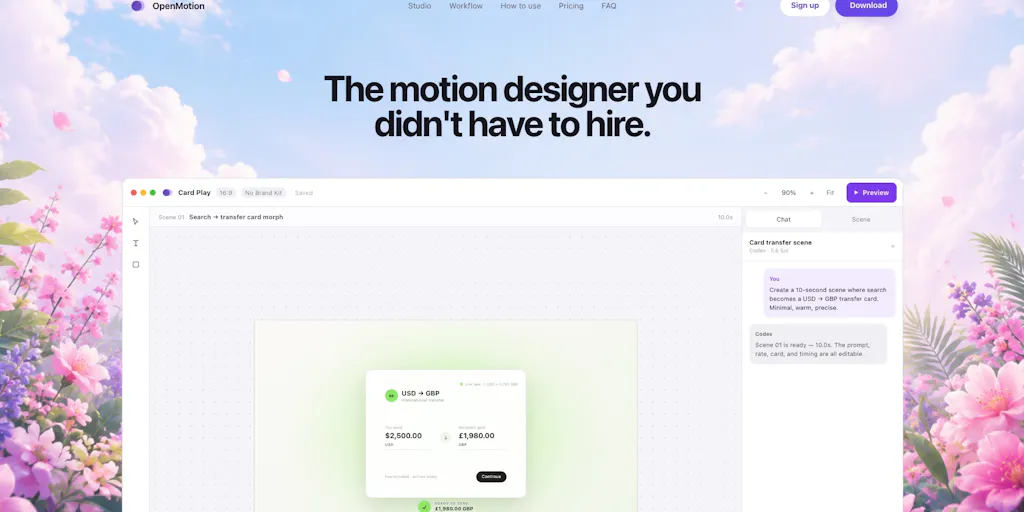
OpenMotion claims to attack that throughput problem directly. It turns “prompts, product screenshots, logos, and brand assets into editable motion videos.” That’s a meaningful distinction from the one-click video generators like Pictory or InVideo, which give you a finished-looking video that you can’t actually edit beyond swapping text and stock clips. OpenMotion’s pitch is that you get the raw material — scenes, layers, timing, easing, colors, camera, sound — as editable components. For a seller, that means you can take one base video and produce the square crop for Amazon, the vertical 9:16 for TikTok, and the 16:9 for YouTube without paying a freelancer to rebuild the timeline.
The native macOS positioning is also worth noting. It runs locally, which means your product assets — your proprietary packaging shots, your unlisted product mockups — aren’t being uploaded to some cloud server where they might train a competitor’s model. For anyone selling private-label goods, that’s a real security consideration. And the integration with Codex and Claude Code is interesting because it suggests the tool is built for a workflow where AI writes the structure and you refine the output, rather than a black-box “generate video” button.
Why Amazon Sellers Should Care More Than Shopify Ones
Here’s my contrarian take: this tool is potentially more valuable for Amazon FBA sellers than for Shopify DTC brands, even though Shopify sellers are the ones who usually care about “brand storytelling.”
On Shopify, your product page video is a nice-to-have. You have a clean layout, multiple images, and a description section. A video helps, but the conversion lift is incremental. On Amazon Seller Central, the video is often the only differentiator between your listing and three identical-looking competitors selling the same sourced product. The A+ content module supports video, and the main image carousel supports video, but most sellers under-utilize it because the production cost is prohibitive for a product that might only do $3,000/month in revenue.
If OpenMotion works as advertised — you feed it your product screenshots and a prompt, it generates a structured, editable video — then the math changes for a $29.99 kitchen gadget. Instead of paying $500 for a single video, you pay $0 in marginal cost and spend an hour refining scenes and timing. Even if the output is 70% as good as the professional version, the ROI is better because you can A/B test five different video hooks for the price of one agency video. That’s a real competitive advantage in a marketplace where most listings look identical.
How It Differs From the Incumbents (and Where It Doesn’t)
The landscape of “AI video for marketers” is crowded, so let me position OpenMotion against the tools you’re probably already using or have evaluated.
First, there’s the template-based generation layer: Canva has video templates, Renderforest has been doing this for a decade, and Animaker offers similar drag-and-drop animation. These are fine for a quick social post, but they’re not motion design. You can’t control easing curves, camera movement, or layer timing with granularity. The output looks like a template because it is one.
Second, there’s the AI-generation layer: Runway, Pika, and Sora generate video from text prompts, but they generate footage, not motion graphics. You get a clip of a product floating in space, but you can’t open it in an editor and refine the animation curve on the logo entrance. OpenMotion’s differentiation is that it generates editable motion graphics — the kind of thing you’d normally build in After Effects, but without the steep learning curve.
Third, there’s the agency/outsourcing layer: Fiverr and Upwork where you hire a freelancer. That’s still the best option if you need a truly custom, brand-defining video. But the lead time and iteration cost are painful. OpenMotion is positioned to handle the “good enough, fast, and iterable” tier that sits between template garbage and agency quality.
Where OpenMotion falls short, based on the launch description, is in the scale of what it can produce. The examples mentioned are “product explainers, SaaS explainers, feature announcements, product launches, and SaaS launch videos.” Notice what’s missing: lifestyle footage, UGC-style videos, and influencer content. For cross-border sellers, the highest-converting TikTok Shop content right now is raw, unpolished UGC — someone holding the product, showing it in use, talking to the camera. No amount of motion design can replace that. OpenMotion is for the polished side of your content mix — the listing video, the brand page, the launch announcement — not the raw social proof side.
Where the Math Breaks
Let’s do the unit economics. A decent freelancer on Upwork charges $30–$50/hour and takes 6–10 hours to produce a 60-second animated explainer. That’s $180–$500 per video. An agency charges $1,000–$3,000. OpenMotion’s pricing is not disclosed on the Product Hunt page, which is a red flag in the sense that I can’t tell you whether it’s a $20/month subscription or a $200/month subscription. But even at the higher end, the tool pays for itself if you produce more than one video per month.
The math breaks, however, when you factor in learning time. The maker explicitly says it’s “not a one-click video generator” — you have control over scenes, layers, timing, easing, colors, camera, and sound. That means there’s a learning curve. If you’re a solo seller who’s never touched After Effects, you’re not going to master easing curves in an afternoon. The tool is pitched at “product teams,” which suggests it expects someone with at least a basic understanding of motion design principles. For a cross-border seller without a dedicated creative person, the time investment might be better spent on a freelancer for the first few videos, then using OpenMotion to produce variants and updates.
What Cross-Border Sellers Can Borrow From This Approach
Even if you never download OpenMotion, the way it’s built offers three lessons for your own operations.
Lesson one: Your creative assets are a library, not individual files. OpenMotion’s approach of ingesting “product screenshots, logos, and brand assets” and turning them into editable videos implies a structured asset pipeline. Most sellers have a chaotic folder of product photos, some shot on a phone, some from the supplier, some from a photoshoot — all in different resolutions and lighting. If you can’t feed a tool a consistent set of brand assets, you can’t get consistent output. The operational takeaway: standardize your product asset library. Shoot everything on a consistent background, export logos in multiple formats, and organize by product SKU. That discipline will pay off regardless of which video tool you use.
Lesson two: AI generation is a starting point, not a finish line. The maker’s emphasis on editability — “You can refine scenes, layers, timing, easing, colors, camera, and sound before exporting” — is the correct philosophy. The first draft from any AI tool is rarely the final draft. It’s a scaffold. The sellers who win are the ones who treat AI output as a rough cut to be refined, not as a finished product to be published. If you’re using Jasper or Copy.ai for listing copy, you already know this. The same discipline applies to video.
Lesson three: Native is better than cloud for sensitive assets. The fact that OpenMotion runs locally on macOS, rather than as a web app, is a differentiator that matters for sellers who are paranoid about their product designs being scraped. When you’re selling on Temu or SHEIN, your product photos are already being copied by competitors daily. But your unreleased product shots, your brand guidelines, your proprietary packaging — those should not be floating through a third-party server. A local tool gives you control over your IP. It’s a small point, but in a market where a product photo can be stolen and reposted within hours, every layer of protection matters.
Where My Judgment Says It Falls Short
I want to be clear that I’m evaluating this from a cross-border seller’s perspective, not a motion designer’s. For a professional animator, OpenMotion is probably too limiting — you’d want the full power of After Effects or Motion with plugins. For a seller, the limitations are different.
First, the macOS-only constraint is a real problem for teams. Most cross-border sellers I know run a mix of Windows and Mac. If your virtual assistant is on Windows, they can’t use this tool. That immediately limits it to solo operators or teams with Mac-only workflows. It’s a strange choice for a tool pitched at “product teams,” which are usually heterogeneous in their hardware.
Second, the integration with Codex and Claude Code is a double-edged sword. It suggests a workflow where you’re writing prompts or scripts in a code-like environment. For a technical founder, that’s powerful. For a seller who just wants to type “show my product from three angles with a smooth zoom,” it’s an extra layer of friction. The tool is not yet at the “describe what you want in plain English and get a video” stage; it’s still at the “write a structured prompt, review the output, and iterate” stage.
Third, the output quality ceiling is unknown. The Product Hunt page doesn’t show sample videos in the text scrape, so I can’t judge whether the output looks professional or looks like a PowerPoint animation. Motion design is a craft — the difference between a good easing curve and a bad one is subtle but immediately visible to a viewer. If OpenMotion’s output is “good enough for a feature announcement” but not “good enough for a product launch,” then its utility for high-stakes campaigns is limited.
Finally, there’s the question of audio. The page mentions sound as an editable component, but it doesn’t specify whether OpenMotion generates music, voiceover, or sound effects. For a product explainer, the voiceover is often the most important element — a bad AI voice can tank an otherwise good video. If OpenMotion doesn’t integrate with a high-quality TTS tool like ElevenLabs or Murf, you’re still going to need a separate audio workflow.
What I’d Watch / Test Next
If I were running a cross-border operation, here’s what I’d do this week, without waiting for the tool to mature.
First, I’d download OpenMotion and run one product through it — your best-selling product, the one with clean, high-resolution photos and a clear value proposition. Don’t try to make it perfect. Just see what the first draft looks like. Time how long it takes from “I have a prompt” to “I have a video I’d consider posting.” That’s the real metric — not the quality of the output, but the speed to acceptable.
Second, I’d compare that output against your current baseline. If you’re using Canva templates, is the OpenMotion output noticeably better? If you’re using a freelancer, is it 50% as good at 10% of the cost? If yes, then the tool has a place in your stack for iterative videos — the ones you need to test hooks and messaging, not the ones you need to make a splash.
Third, I’d test the asset pipeline discipline I mentioned earlier. Spend two hours organizing your product assets into a clean folder structure — logos, product shots, lifestyle shots, brand colors, fonts. Then feed those into OpenMotion. If the tool can consistently produce on-brand videos from a well-organized asset library, then it’s worth integrating into your monthly content calendar.
Fourth, I’d watch the roadmap. The maker is asking for feedback on what to improve next. That’s your opportunity to shape the tool. If you need Windows support, say so. If you need direct export to TikTok Shop or Amazon video specs, say so. Product Hunt launches are early signals — the tools that win are the ones that listen to their early users.
Finally, I’d keep the freelancer relationship warm. OpenMotion is not a replacement for a skilled motion designer, and it’s not a replacement for raw UGC content. It’s a tool for the middle tier — the “we need a video by Friday and it needs to not embarrass us” tier. That’s a real need, and if OpenMotion fills it, it’s worth the subscription. But the moment you need a video that makes people feel something — a brand film, a launch moment, a story — you’ll still want a human. The smart operator uses tools like this to free up budget and time for the work that actually needs a human.