Why This Markdown Editor for Books Actually Matters to Cross-Border Sellers
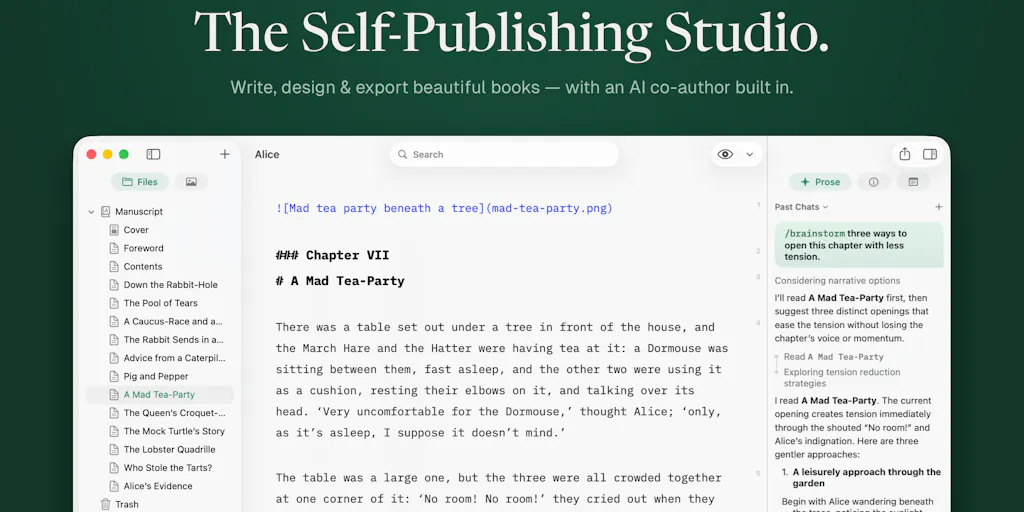
Every week I see another SaaS that promises to “automate your product descriptions” or “write Amazon listing copy in one click.” Most of them produce generic text that reads like a badly translated press release—and that’s before you factor in the AI plagiarism risks and the fact that every seller using the same tool gets the same voice. What we actually need is something that helps us write better, not just write faster. The problem isn’t speed; it’s that the output is hollow. When I read the launch of Pinery 2.0, a macOS-native Markdown editor for books with an AI co-author called Prose, I didn’t see a tool for novelists. I saw a framework for how we should be treating AI-assisted copy in e-commerce: diff-based control, file ownership, and model choice. These are exactly the principles that are missing from the tools we currently use to write A+ content, product descriptions, and brand stories. If you’re a cross-border seller who still treats AI copy as a one-shot “generate and paste” pipeline, you’re leaving money on the table—and you’re probably building a brand voice that sounds like everyone else’s. Let me show you why a book-authoring app deserves your attention.
What Problem This Actually Solves (and Why It’s Our Problem Too)
Pinery’s Prose isn’t another chatbot. It’s a co-author that works inside your manuscript, with three design decisions that are directly applicable to the kind of long-form content sellers produce: product launch pages, brand origin stories, detailed comparison guides, and email sequences that don’t feel templated.
You see exactly what changed. Prose edits appear as labeled diffs—grammar, word choice, formatting—that you accept or reject individually. No copy-paste, no guessing. For sellers, this is huge. The biggest complaint I hear about AI-generated product copy is that it “sounds off” but you can’t pinpoint why. With a diff system, you can see exactly which phrases the AI changed, and you can reject the ones that shift your tone. Think of it as version control for your brand voice. Every listing variation you test becomes a tracked edit instead of a lost history.
Your files stay yours. This is the privacy decision that should be an industry standard. Pinery stores everything as plain Markdown on your Mac or iCloud. If you cancel, your book (or your entire content library) opens anywhere. Contrast that with most e-commerce content tools that lock you into a proprietary database or a browser-only editor. I’ve seen sellers lose months of SEO-optimized copy when a SaaS startup shuts down. Pinery’s “your files stay yours” approach should be a checklist item when you evaluate any content tool.
Not locked to one model. You can leave Prose on Auto or choose per task from Anthropic, OpenAI, and Google. This matters because not all AI models are equal for e-commerce writing. Claude (Anthropic) tends to produce more nuanced, tone-aware text—good for brand storytelling. GPT-4o is faster for bulk description generation. Gemini might be cheaper for high-volume line edits. Pinery gives you the choice, and that flexibility is exactly what we need when margins are thin and we’re optimizing for both quality and cost.
I’ll go deeper on each of these, but first: yes, this is a book-writing app, not a Shopify app. But the philosophy of how it handles AI—transparent diffs, user-owned files, multi-model orchestration—is more advanced than anything I’ve seen in the Shopify or Amazon Seller Central ecosystem. The specific features like “/beta-reader,” “/line-edit,” and “/developmental-edit” are presets for the kinds of revision passes that sellers should be doing on their most important content—not just one-shot generation.
How It Differs from Existing Options (and Why the Incumbents Should Be Nervous)
Let’s map Pinery’s approach against the tools most sellers actually use for copy.
ChatGPT / Claude / Gemini in a browser tab. This is the default. You paste your brief, get a block of text, and then you either copy-paste it into your CMS or spend 20 minutes rewriting it to sound like you. The core failure is that you lose the context of your own writing. Pinery’s Prose “doesn’t start from a blank prompt—it works from the pages you’ve already written.” That means the AI continuation comes back in your pacing and vocabulary, not the generic over-polished register. For a seller writing a brand story that spans five product pages, that continuity is gold.
Helium 10 / Jungle Scout listing generators. These tools are built for Amazon keyword stuffing and bullet points. They’re great for data-driven listing optimization, but they produce copy that reads like a spreadsheet. Pinery’s skill system—/beta-reader, /line-edit, /drafting-partner—is a much better model for content that sells, because it treats editing as a multi-pass process. A line edit pass can catch awkward phrasing; a developmental edit can improve structure; a beta reader can flag missing context. Sellers who are writing long A+ Content modules or launch emails should be doing the same kind of iterative review.
Notion AI / Copy.ai / Jasper. These are more comparable because they offer some editing and brand voice settings. But they all keep your content in their cloud, and they treat every generation as a fresh start. Notion AI has no diff system for accepting/rejecting changes; it just overrides your text. Copy.ai’s “brand voice” is a one-time prompt, not a live learning from your existing writing. Pinery’s approach—where the AI learns from the pages you’ve already written and shows diffs for every change—is actually closer to how professional editors work. And the fact that you can create your own custom skills (“/create-skill”) means you can teach it your specific tone for, say, “tech product description” vs. “lifestyle brand story.”
Where the math breaks: the diff decay problem. A commenter on the Product Hunt launch, Clemente Lopez, raised a sharp point: the labeled diff is the feature you defend hardest, but it decays over time as you trust the AI. Early on you read every change; later you accept because it’s been right so far. Pinery’s maker acknowledges this and says the app doesn’t currently learn from rejections across a manuscript. For sellers, this is a real risk. You may approve a tone shift you don’t notice because you’re skimming the diffs. The solution, as Lopez suggests, is to track acceptance rates per category (grammar vs. formatting vs. word choice) and adjust suggestions accordingly. Until Pinery adds that, you need to stay vigilant—or build that discipline into your own review process.
Why Amazon Sellers Should Care More Than Shopify Ones
Amazon’s A+ Content and brand story modules are essentially long-form documents with strict formatting. The difference between a decent A+ page and a great one is often the *flow*—how the narrative moves from problem to solution. Pinery’s Kindle e-ink preview is a direct analogy: you should be previewing your A+ modules on a device that simulates the reading experience. More importantly, Amazon’s algorithm rewards “detailed product descriptions” that read naturally. Using a tool that lets you iterate with tracked diffs and model choice means you can A/B test tone variations without losing the original.
Shopify stores, on the other hand, have more design freedom, but the copy is often isolated per page. Pinery’s manuscript-based approach is overkill for a three-paragraph product description. Where it shines is for the brand’s core narrative: the “About Us” page, the launch email sequence, the downloadable brand guide. Shopify sellers running DTC brands should borrow the “developmental edit” skill to refine their value proposition across multiple touchpoints.
The Mac-only limitation is a dealbreaker for teams. Pinery is a native macOS app. Cross-border teams often run Windows, and remote teams use web-based tools. The maker says it stores files as plain Markdown on iCloud, which is fine for a solo author but impossible for a team of three content writers collaborating on a brand story. This is where a tool like Notion or Google Docs with AI integration still wins for multi-user workflows. Pinery would need a web client or at least a shared folder sync that works on Windows/Chrome to be viable for more than a solo seller.
What Cross-Border Sellers Can Actually Borrow from Pinery
Even if you never download the app, the product’s design decisions offer three actionable principles for your content workflow.
1. Implement a diff-based review process for all AI-assisted copy. Instead of accepting every AI suggestion, use a version control mindset. In practice, this means: when you use any AI tool, copy the output into your editor and use a compare tool (like GitHub Desktop, or even the “compare documents” feature in Word) against your original. Accept changes one by one. Pinery does this natively, but you can replicate it with any tool if you have the discipline. This is especially critical for SEO content, where a single tone shift can hurt your brand voice consistency.
2. Treat AI as a co-author, not a generator. The Pinery model is built on the idea that the AI works from your existing pages. Most sellers give AI a blank prompt and get generic text. Instead, always feed the AI your best example of the type of copy you want—a previous product description you liked, an email that converted. Then ask for a continuation or an edit. The more context you provide, the more your voice sticks. You can do this in ChatGPT by pasting your example and saying, “Rewrite the following paragraph in this style.” But Pinery’s manuscript-level context is superior because it captures pacing and vocabulary across multiple sections.
3. Choose your model per task. Not all AI models are equally cheap or good for your specific use. For quick line edits (grammar, readability), use a fast model like Gemini 1.5 Flash. For a brand story where tone is everything, use Claude 3.5 Sonnet. For bulk description generation for 200 SKUs, use OpenAI’s GPT-4o mini for speed and cost. Pinery lets you pick per task. You can do the same by routing your API calls through a middleware like OpenRouter or just manually switching models. The key is to not default to the same model for everything.
Where My Judgment Says It Falls Short
Pinery is not built for e-commerce sellers, and trying to force it will waste time. Here’s where I’d caution you:
No templates for product copy. The built-in skills (beta-reader, line-edit, etc.) assume you’re writing a book. For a seller, you’d need to create custom skills for “product description,” “email sequence,” “A+ content module.” The /create-skill feature exists, but it requires teaching the AI with examples from your own copy. That’s a one-time setup cost that may take a couple of hours. If you have a large catalog, that investment might pay off. If you only manage 20 products, stick with a simpler tool.
No SEO or keyword integration. Amazon sellers live and die by keyword placement. Pinery has no built-in keyword density checker, search volume lookups, or competitor analysis. You’d have to manually export text and run it through a tool like SellerSprite or DataDive. That’s an extra step, and for bulk work, it’s a dealbreaker.
No collaboration or approval workflows. As mentioned, Mac-only and file-based sharing means you can’t have a content manager approve a draft and a writer edit it simultaneously. For a team of three, you’re better off with Google Docs with the Klaviyo integration or a dedicated content platform like Contentful.
Pricing not disclosed on the page. The source doesn’t mention subscription cost. If it’s $10/month, it’s a no-brainer for serious content creators. If it’s $50/month, it competes with full CMS tools. You’d have to check Pinery’s pricing page (I’m linking the root domain since no specific URL was given). Without that, I can’t recommend a financial commitment.
What I’d Watch / Test Next
If you’re a cross-border seller who values brand voice over template-driven copy, here’s your next three steps:
Download the Pinery trial (if available) and run your brand’s “About Us” story through it. Use the /developmental-edit skill to request a structural critique of your narrative. See if the AI’s suggestions maintain your tone. Reject any change that sounds overly formal. Compare the result to what you’d get from pasting the same text into ChatGPT.
Create a custom skill for your product description format. Take your best-performing Amazon listing and paste it as an example. Write a brief instruction for your typical product (e.g., “Write a 200-word description for a reusable silicone food storage bag. Tone: friendly, eco-conscious, action-oriented.”). Save it as a skill. Then test it on 10 SKUs. Monitor the diff acceptance rate—if you find yourself rejecting more than 30% of the word-choice changes, your skill needs refinement.
Set up a manual diff review process for all AI-generated copy. Even if you don’t use Pinery, replicate its core feature: after every AI generation, paste the output into a tool that shows changes line-by-line. Accept or reject each one. This habit will save you from the “sounds off” problem and build consistency across your catalog.
Pinery 2.0 isn’t the perfect tool for sellers—yet. But the principles it embodies (transparent diffs, user-owned data, multi-model orchestration) are exactly what’s missing from every e-commerce content tool I’ve tested. The next time you evaluate a “write product descriptions with AI” SaaS, ask: does it show me exactly what changed? Can my files survive if the company folds? Can I choose the model per task? If the answer is no to any of those, walk away. And keep an eye on Pinery’s changelog to see if they ever add team features. If they do, I’ll be the first in line to test it on my clients’ A+ content.


