The Attention Tax Is Coming for Your Ops Team — and Orbit Is a Preview of How It Gets Priced
Cross-border e-commerce is an industry that runs on borrowed attention. The same feeds we buy inventory against — TikTok Shop discovery, Meta ad libraries, Amazon review velocity, Temu’s daily flash pages — are the same feeds that quietly eat the cognitive bandwidth of the people running the business. For a DTC operator, a brand owner, or a marketplace account manager, the real bottleneck in 2025 isn’t ad spend or fulfillment; it’s the number of hours per week a human can spend inside an app without losing the thread. So when a product shows up on Product Hunt that tries to put a literal price on opening a locked app, I pay attention — not because I want a screen-time nanny, but because it’s a clean, working model of the “friction-as-a-service” pattern that’s about to hit seller tooling too. Orbit, built by Alara Akcasiz and Orhan İştenhiçkorkmaz, is the most interesting small product I’ve seen this month for exactly that reason.
What Orbit Actually Solves (and Why It’s Not “Screen Time With Extra Steps”)
Let me be blunt about what most app blockers get wrong, because this is the frame that matters for operators. Apple’s built-in Screen Time and Google’s Digital Wellbeing are permission systems, not commitment systems. You set a limit, you tap “ignore limit,” and the limit is gone. Third-party tools like Opal and Freedom do the same thing with prettier UI — and as one commenter on the launch thread put it, “once I learned how to interrupt its sessions, the restrictions lost their meaning.”
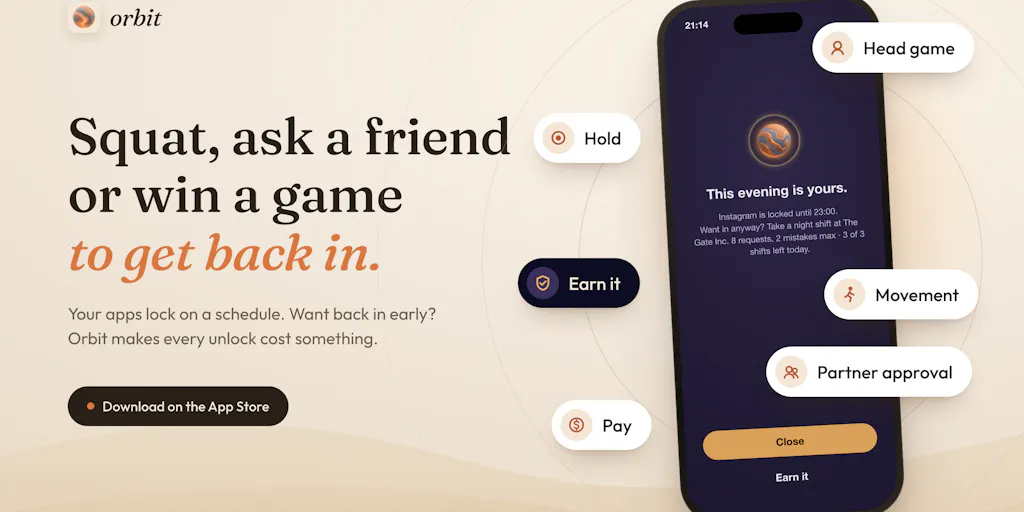
Orbit’s insight is narrower and more useful: the problem isn’t access, it’s that re-entry is free. So it charges you. Every unlock has a cost — a breathing hold on the orb, squats in front of the camera, a head-movement mini-game, a request to an accountability partner, or actual money ($0.99, then $1.99, up to $9.99 that week, or redirected to a nonprofit). There’s also a delightfully weird mini-game called The Gate Inc., where you play a night-shift judge approving eight residents’ requests to go online; make two mistakes or fewer and you earn your break, capped at three shifts a day so the game itself doesn’t become the new feed.
The numbers the maker cites are the ones I’d actually use in a pitch deck: her own Screen Time went from 10h 19m a day to 6h 14m in a month, with social time halved. She also cites a 2025 randomized trial in PNAS Nexus showing that blocking mobile internet for two weeks improved attention and well-being, with over 90% of participants improving on at least one measure, and a WHO/HBSC finding that 1 in 9 teens across 44 countries now show signs of social media addiction, up from 1 in 14 in 2018. I’d treat the headline stat as marketing and the mechanism as the real story: pre-commitment with a visible cost beats willpower every time, and there’s a 12-week study cited in the thread where putting money on the line cut social media use by 39%, with the habit change persisting after the money stopped.
Why Amazon sellers should care more than Shopify ones
Here’s the operator-specific angle. A Shopify DTC operator spends most of their day in owned surfaces — Klaviyo flows, ad dashboards, the storefront — where the feed is adjacent to the work. An Amazon seller or TikTok Shop operator lives inside the feed. TikTok Shop discovery, Amazon’s “Customers also viewed” rabbit hole, Temu’s daily deals page — these are the office. The Orbit thread has a genuinely useful exchange about exactly this: a commenter who runs Instagram for two brands asks whether the “What for?” prompt can save a “work” reason so work sessions don’t eat into the limit. The maker’s honest answer is “not yet” — the fixed options are “Reply to someone” (2 minutes, one app) and “Check one thing” (1 minute) — but the workaround is that Orbit runs on schedules, not daily limits, so you can lock Instagram only outside work blocks and leave work hours open. The other maker adds the line I’d underline for any seller: “Orbit doesn’t use a time allowance that work sessions eat into. During a blocking schedule, you still need to complete your chosen challenge, regardless of why you’re opening the app.” That’s a design choice, and it tells you who this is for.
How It Differs From the Incumbents — and Where the Comparison Gets Awkward
The honest competitive set isn’t Opal or Freedom; it’s the entire “digital minimalism” category, and Orbit’s differentiator is that it treats the moment of opening as the product surface. Most blockers optimize for the lock; Orbit optimizes for the bouncer. The “What for?” prompt is the cleverest part of the design — it converts an automatic thumb-tap into a two-second decision, and the maker’s explanation of why they can’t do better is the most technically honest thing in the thread: Apple’s Screen Time framework never lets an app like Orbit see what you do inside another app, so automatic detection of “drift from real tasks to doomscrolling” isn’t possible on iPhone, and they’re glad about it because nothing reads your screen or messages.
That constraint is also the product’s ceiling. Compare it to what a seller actually wants: a tool that knows the difference between “answering a customer DM in Meta Business Suite” and “watching a competitor’s unboxing video for the fourth time.” Orbit can’t do that, and no iOS app can. On Android the story is different — Digital Wellbeing and third-party tools have more surface area — but Orbit’s launch is clearly iOS-first and the maker’s answers are framed around iPhone limits.
Where the math breaks
I want to flag two places where I think the product’s own numbers work against it. First, the pay-to-unlock ladder ($0.99 → $1.99 → up to $9.99/week) is a commitment device, not a pricing model — and the maker is explicit that it resets every Monday “so it motivates instead of punishing.” That’s the right call for habit formation, but it means the revenue ceiling is the subscription, not the penalties, and the launch discounts (20% off annual with PHA20, 20% off lifetime with PHL20) suggest they know it. Second, the accountability-partner feature is the one I’d stress-test hardest: the partner “never sees which apps you use, only the minutes and your reason,” which is privacy-respecting but also means the partner is approving a request without context. For a seller with a VA or a co-founder, that’s a feature; for a solo operator, it’s a friction point that will get bypassed in week two.
What Cross-Border Sellers Can Borrow From This
Strip away the wellness framing and Orbit is a case study in three patterns that every operator should be stealing for their own stack.
1. Friction as a feature, not a bug. The reason ad platforms and marketplaces are so effective is that they’ve removed every step between impulse and purchase. Orbit does the inverse for the operator’s own attention. The seller-side translation: put friction between your team and the low-value actions in Seller Central — bulk repricing, ad-bid tinkering, refreshing the Business Reports tab — and remove friction from the high-value ones. A weekly “what did we actually change” review beats a daily dashboard refresh every time.
2. Pre-commitment beats willpower in ops too. The 39% reduction from putting money on the line is the same mechanism behind commitment contracts in inventory planning: if you pre-commit to a reorder point and a max ad spend, you don’t have to make the decision in the moment when you’re emotional about a bad sales day. The Orbit thread’s best line — “infinite feeds remove the natural stopping cues, which is why your thumb keeps going on autopilot. It’s not a willpower problem” — applies verbatim to a seller refreshing Helium 10 rankings at 11pm.
3. Group lock as a team ritual. The “Together” feature locks a whole group’s phones at once for dinner, a study night, or a trip. The maker’s answer on how it works is more nuanced than the pitch: everyone keeps their own apps and their own schedules, the host sets the shared duration and the one challenge anyone can do for a 3-minute pause, and nobody sees anyone else’s app list — at the end you just see “4 of 4, to the end” plus who took a pause. For a cross-border team spread across time zones, that’s a template for a weekly ops standup with phones down: same duration, same challenge, no surveillance, just a shared commitment. I’d run it before a Q4 planning session, not after.
Where My Judgment Says It Falls Short
I like Orbit, and I’m not going to pretend otherwise — the design is tight and the maker’s answers in the thread are unusually candid. But three things would keep me from recommending it as anything more than a personal tool for a seller right now.
The work/personal boundary is unresolved. The Instagram-for-two-brands exchange is the tell. Orbit’s answer is “use schedules, not limits” — lock Instagram outside work hours, leave work hours open — but that assumes your work hours are predictable, which for a cross-border operator running TikTok Shop live sessions across US and EU time zones, they are not. A saved “work” reason is “a really good idea” per the maker, and they’re “taking it to the team,” but it’s not shipped. Until it is, the product is best for the personal phone, not the ops phone.
The Gate mini-game is a cute risk. Three shifts a day is a smart cap, but the maker’s own framing — “so the game can’t become the new feed” — acknowledges the failure mode. Any gamified unlock system eventually gets gamed, and the commenter who asked “how do you help that pause become a habit of actually considering why you’re opening an app, before tapping through it becomes the habit instead” asked the right question. The maker’s answer (pre-commitment, not in-the-moment detection) is defensible, but it’s a bet that the pause is the habit, not the game.
The iOS constraint is the product’s ceiling. No screen-reading, no drift detection, no context. That’s the right privacy call and the wrong product call for anyone who wants a smart assistant rather than a bouncer. If you’re an operator who wants “block TikTok Shop between 9pm and 7am,” Orbit is great. If you want “block the feed but let me check my own store’s analytics,” it can’t tell the difference — and won’t be able to on iPhone for the foreseeable future.
What I’d Watch / Test Next
This week, three concrete moves. One: install Orbit on your personal phone, not your ops phone, and run a single schedule — lock the two apps you open most outside work hours — for seven days. Log your Screen Time before and after. The maker’s own 10h 19m → 6h 14m is a single-user anecdote; you want your own baseline. Two: if you run a team, steal the “Together” mechanic for one ritual — a Friday ops review with phones locked for 45 minutes, same challenge for everyone, no app visibility — and see whether the meeting gets shorter and the decisions get better. Three: pressure-test the work/personal gap yourself by asking the maker (they’re active in the thread) whether a saved “work” reason is on the roadmap and when; if it ships, this becomes a legitimate ops tool, and if it doesn’t, treat it as a personal habit app with a great launch story. And if you’re building seller tooling, steal the bouncer pattern: the next generation of Klaviyo and Gorgias automations won’t just send messages — they’ll ask “what for?” before they let you fire one.